

Introduction to Operating Systems
Hello, Habr! I would like to present to your attention a series of translation articles of some interesting literature in my opinion — OSTEP. This material dives deeply into the workings of Unix-like operating systems, specifically — working with processes, various schedulers, memory, and other similar components that make up a modern OS. You can view the original materials here . Please note that the translation is done non-professionally (rather freely), but I hope I preserved the overall meaning.
Laboratory work on this subject can be found here:
Other parts:
You can also check out my channel on =)
Scheduling: Multi-Level Feedback Queue
In this lecture, we will discuss the issues of developing one of the most well-known approaches to
scheduling, which is called Multi-Level Feedback Queue (MLFQ). The MLFQ scheduler was first described in 1962 by Fernando J. Corbató in a system called
Compatible Time-Sharing System (CTSS). This work (including later work on
Multics) was subsequently presented for the Turing Award. The scheduler was
later improved and took on a form that can be found in
some modern systems.
The MLFQ algorithm attempts to solve two fundamental overlapping problems.
Firstly, it tries to optimize turnaround time, which as we discussed in the previous lecture, is optimized by running the shortest
jobs at the front of the queue. However, the OS does not know how long each process will take, which is
necessary knowledge for SJF and STCF algorithms. Secondly, MLFQ tries to
make the system responsive for users (for example, those who are sitting and
staring at the screen waiting for a task to complete) and thus minimize the
response time. Unfortunately, algorithms like RR reduce response time, but have a very
poor impact on the turnaround time metric. Hence our problem: How to design a
scheduler that meets our requirements while knowing nothing about the
nature of the process, in general? How can the scheduler learn the characteristics of the
tasks it is running and thus make better scheduling decisions?
The essence of the problem: How to schedule tasks without perfect knowledge?
How to develop a scheduler that minimizes response time
for interactive tasks while also minimizing turnaround time without prior
knowledge of task execution time?
Note: learning from past events
The MLFQ queue is a great example of a system that learns from
past events to predict the future. Such approaches are often
found in OS (and many other fields in computer science, including branches of
predictions in hardware and caching algorithms). Such approaches
work well when tasks have behavioral phases and are thus predictable.
However, one must be cautious with such techniques, as predictions can easily
turn out to be incorrect and lead the system to make worse decisions than
it would have without any knowledge at all.
MLFQ: Basic Rules
Let's look at the basic rules of the MLFQ algorithm. While there are several
implementations of this algorithm, the fundamental approaches are similar.
In the implementation we will examine, MLFQ will have several
separate queues, each with a different priority. At any given time,
a task ready for execution is in one of the queues. MLFQ uses priorities
to determine which task to execute, meaning the task with the higher
priority (the task from the queue with the highest priority) will be executed first.
Certainly, there can be more than one task in a specific queue, so
they will have the same priority. In this case, the RR mechanism will be used
for scheduling execution among these tasks.
Thus, we arrive at two fundamental rules for MLFQ:
Rule 1: If Priority(A) > Priority(B), task A will be executed (B will not)
- Rule 2: If Priority(A) = Priority(B), A and B are executed using RR
- Based on the aforementioned, the key elements for MLFQ scheduling
are priorities. Instead of assigning a fixed priority to each
task, MLFQ adjusts its priority based on observed behavior.
For instance, if a task constantly yields CPU work waiting for keyboard input,
MLFQ will maintain the process's priority at a high level, because that is how
an interactive process should function. Conversely, if a task constantly and
intensively utilizes the CPU for a long period, MLFQ will lower its
priority. Thus, MLFQ will learn the behavior of processes during their operation
and use this behavior.
Let's illustrate how the queues might look at a certain moment
in time, resulting in something like this:
In this scheme, processes A and B are in the highest priority queue. Process
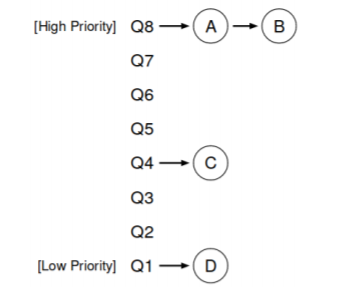
C is somewhere in the middle, while process D is at the end of the queue. According to the descriptions above,
the MLFQ scheduler will execute tasks only from the highest priority.
In the descriptions of the MLFQ algorithm, the scheduler will execute tasks only with the highest priority.
the priority according to RR, while tasks C and D will not be prioritized.
Naturally, a static snapshot will not provide a complete picture of how MLFQ operates.
It is important to understand how the picture changes over time.
Attempt 1: How to change priority
At this point, it is necessary to decide how MLFQ will adjust the priority level
of tasks (and thus their position in the queue) throughout their lifecycle. To
do this, it is essential to keep in mind the workflow: a certain number of
interactive tasks with short execution times (and thus frequent CPU releases)
and several long tasks that utilize the CPU for their entire working time, where
the response time for such tasks is not critical. Thus, a first attempt can be made to
implement the MLFQ algorithm with the following rules:
- Rule3: When a task enters the system, it is placed in the highest priority queue.
- priority.
- Rule4a: If a task fully uses its allocated time slice, its priority is lowered.
- Rule4b: If a task releases the CPU before its time slice expires, it
- retains its previous priority.
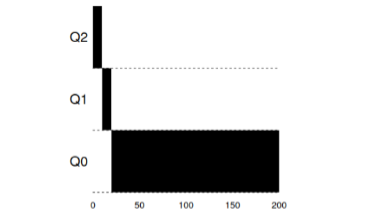
- Example 1: A single long-running task
As seen in this example, when the task arrives, it is assigned the highest
priority. After a time slice of 10ms, the process is deprioritized by the
scheduler. After the next time slice, the task is finally deprioritized to
the lowest priority in the system, where it remains.
Example 2: A short task arrives
Now let's look at an example of how MLFQ tries to get close to SJF. In this
example, there are two tasks: A, which is a long-running task constantly
occupying the CPU, and B, which is a short interactive task. Let's assume that
A has already been running for some time by the time task B arrives.
The results of this scenario are shown in the graph. Task A, like any task that
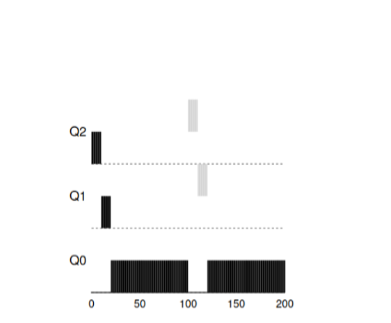
utilizes the CPU, is at the bottom. Task B will arrive at time T=100 and will be
placed in the highest priority queue. Since its execution time is short, it
will finish before reaching the last queue.
From this example, the main goal of the algorithm can be understood: since the algorithm does not
know whether a task is long or short, it initially assumes that the task
Knowing whether a task is long or short, it first assumes that the task is short.
short and gives it the highest priority. If it is indeed a short task, then
it will complete quickly, otherwise if it is a long task, it will proceed slowly
in priority downwards and will soon prove that it is indeed a long task that does not
require a response.
Example 3: What about input-output?
Now let's look at an example with input-output. As stated in rule 4b,
if a process releases the processor without fully utilizing its processor time,
it stays at its previous priority level. The intentions of this rule are quite simple
— if an interactive task performs many input-output operations, for example, waiting
for user key presses or mouse actions, such a task will release the processor
earlier than the allocated window. We wouldn’t want to lower such a task's priority,
and thus it will remain at the same level.
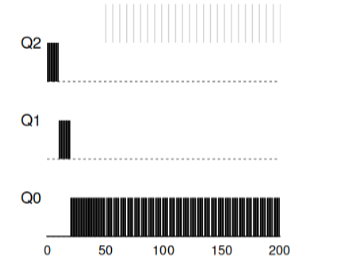
This example shows how the algorithm will work with such processes — interactive task B, which only needs the CPU for 1ms before performing
an input-output process and long task A, which utilizes the CPU all its time.
MLFQ keeps process B at the highest priority as it continuously
releases the CPU. If B is an interactive task, then in this case the algorithm achieves
its goal of running interactive tasks quickly.
Issues with the current MLFQ algorithm
In the previous examples, we built a basic version of MLFQ. And it seems that it
does its job well and fairly, distributing processor time honestly between
long tasks and allowing short tasks or tasks that intensively use
input-output to execute quickly. Unfortunately, this approach has several
serious problems.
Firstly, starvation problem: if there are many interactive
tasks in the system, they will consume all the processor time and thus no long
task will get the opportunity to execute (they starve).
Secondly, clever users could write their programs to
fool the scheduler. The trick lies in doing something to make
the scheduler allocate more processor time to the process. The algorithm that
described above is quite vulnerable to such attacks: before the time window almost
expires, it is necessary to perform an input/output operation (to some file, no matter which)
and thus free up the CPU. Such behavior will allow it to stay in the same
queue and again receive a larger percentage of CPU time. If done
correctly (for example, executing 99% of the time within the window before freeing the CPU),
such a task can simply monopolize the processor.
Finally, a program can change its behavior over time. Those tasks that
used the CPU may become interactive. In our example, such
tasks will not receive proper attention from the scheduler, as other
(initial) interactive tasks would.
Question to the audience: what attacks on the scheduler could be carried out in the modern world?
Attempt 2: Priority Elevation
Let's try to change the rules and see if we can avoid starvation issues.
What could we do to ensure that CPU-bound tasks get their time (even if not for long)?
As a simple solution to the problem, one could periodically
raise the priority of all such tasks in the system. There are many ways
to achieve this; let’s try to implement something simple as an example: moving
all tasks to the highest priority at once, hence the new rule:
Rule5
- : After a certain period S, move all tasks in the system to the highest queue.Our new rule solves two problems at once. Firstly, processes
are guaranteed not to starve: tasks in the highest queue will share
the CPU time according to the RR algorithm, and thus all processes will receive
CPU time. Secondly, if a process that previously only used the
CPU becomes interactive, it will remain in the queue with higher
priority after it has once received an elevation to the highest.
Let's consider an example. In this scenario, let's consider one process using
Consider an example. In this scenario, let's examine a single process utilizing
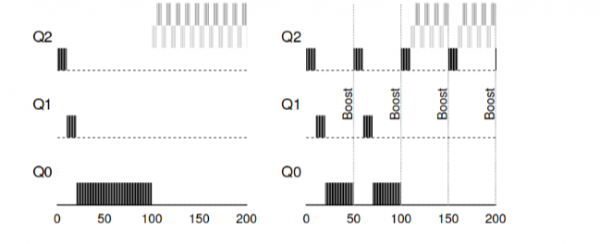
The CPU and two interactive, short processes. The left image shows the behavior without priority boosting, and thus a long task begins to starve after two interactive tasks arrive in the system. The right image shows that every 50 ms a priority boost occurs, ensuring that all processes receive CPU time and are executed periodically. Here, 50 ms is used for illustration; the actual number is somewhat larger.
It is evident that adding the periodic boost time S leads to
the inevitable question: what value should be set? One of the esteemed
system engineers, John Ousterhout, referred to such values in systems as voo-doo
constants, as they somewhat required black magic for correct
configuration. And unfortunately, S has that scent. If set too
high, long tasks will start to starve. Conversely, if set too low,
interactive tasks won't receive adequate CPU time.
Attempt 3: Better Accounting
Now we have another problem to solve: how to prevent
our scheduler from being deceived? The culprits are the
rules 4a and 4b, which allow a job to maintain priority by freeing the CPU
before its allocated time expires. How to deal with this?
In this case, the solution can be considered as better accounting of CPU time at each
MLFQ level. Instead of forgetting the time the program used
the CPU in the allocated time frame, it should be accounted for and stored. Once
a process has used its allocated time, it should be demoted to the next
priority level. Now it doesn't matter how the process utilizes its time — whether
constantly computing on the CPU or through multiple calls. Thus,
rule 4 should be rewritten as follows:
- Rule 4: After a task has consumed its allocated time in the current queue (regardless of how many times it has freed the CPU), the priority of that task is lowered (it moves down the queue).
Let's look at an example:
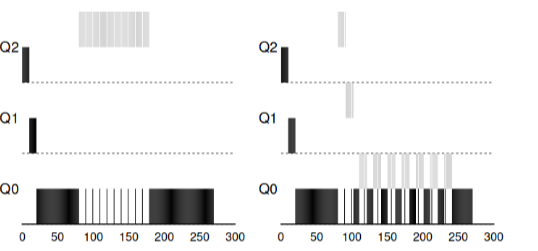 »
»
The image shows what happens if you try to deceive the scheduler, as
if there were with the previous rules 4a, 4b, the result would be on the left. With the new
rule — the result is on the right. Before protection, any process could invoke I/O until completion and
thus dominate the CPU, after enabling protection, regardless of I/O behavior, it will still be moved down the queues and therefore cannot unfairly
seize CPU resources.
Enhancing MLFQ and other issues
With the improvements mentioned above, new problems arise: one of the main
questions is how to parameterize such a scheduler? That is, how many should there be
queues? What should be the size of the working window of the program within the queue? How
often should the program's priority be raised to avoid starvation and
consider changes in the program's behavior? There are no simple
answers to these questions, and only experiments with loads and subsequent configuration
of the scheduler can lead to some satisfactory balance.
For example, most implementations of MLFQ allow assigning different
time slices to different queues. High-priority queues are usually
assigned short slices. These queues consist of interactive tasks,
switching between which is quite sensitive and should take 10 milliseconds or less.
In contrast, low-priority queues consist of long tasks that use
CPU. In this case, long time slices are very suitable (100 ms).
In this example, there are 2 tasks that have run in the high-priority queue for 20
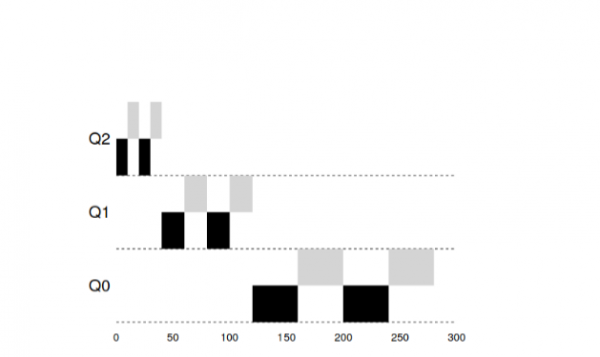
ms, split into windows of 10 ms each. 40 ms in the medium queue (window of 20 ms) and in the low-priority
queue, the time window became 40 ms, where tasks completed their work.
The implementation of MLFQ in the Solaris OS — a class of schedulers that are time-sharing.
The scheduler provides a set of tables that precisely define how the
process priority should change over its lifetime, what the size of the
allocated window should be, and how often task priorities need to be raised. The system
administrator can interact with this table and force the scheduler to behave
differently. By default, this table contains 60 queues with gradually increasing
window sizes from 20 ms (high priority) to several hundred ms (low priority), and
a window size ranging from 20ms (high priority) to several hundred ms (lowest priority), and
also with a boost for all tasks every second.
Other MLFQ schedulers do not use a table or any specific
rules that are described in this lecture; instead, they calculate priorities using
mathematical formulas. For example, the scheduler in FreeBSD uses a formula to
calculate the current task priority based on how much CPU the process
has used. Additionally, CPU usage decays over time, and thus
the priority increase occurs somewhat differently than described above. These are the
so-called decay algorithms. Starting from version 7.1, FreeBSD uses the ULE scheduler.
Finally, many schedulers have other features. For instance, some
schedulers reserve the highest levels for operating system tasks, and thus
no user process can achieve the highest priority in
the system. Some systems allow giving hints to help
the scheduler set priorities correctly. For example, using a command nice
you can increase or decrease the task's priority and thus raise or
lower the program's chances of CPU time.
MLFQ: Summary
We have outlined an approach to scheduling called MLFQ. Its name
reflects its working principle—it has multiple queues and uses feedback
to determine the task's priority.
The final appearance of the rules will be as follows:
- Rule1: If Priority(A) > Priority(B), task A will be run (B will not be)
- Rule2: If Priority(A) = Priority(B), A and B run using RR
- Rule3: When a task enters the system, it is placed in the highest priority queue.
- Rule 4: After a task has consumed its allocated time in the current queue (regardless of how many times it has freed the CPU), the priority of that task is lowered (it moves down the queue).
- : After a certain period S, move all tasks in the system to the highest queue.Our new rule solves two problems at once. Firstly, processes
MLFQ is interesting for the following reason—instead of requiring knowledge about
the nature of the task in advance, the algorithm learns the past behavior of the task and assigns
priorities accordingly. Thus, it aims to sit on two chairs at once—achieve performance for small tasks (SJF, STCF) while fairly scheduling long,
CPU-intensive jobs. Therefore, many systems, including BSD and its derivatives,
Solaris, Windows, and Mac use some form of the MLFQ algorithm
as a fundamental basis.
Additional materials:
- (computing)
Source: habr.com

 Russian
 Italian
 German
 Polish
 Estonian
 Albanian
 Bulgarian
 Croatian
 Czech
Czech Danish
 Dutch
Dutch English
 French
 Hungarian
 Latvian
 Portuguese
 Romanian
 Slovak
 Slovenian
 Spanish
 Swedish