

Microservice architecture, like everything in this world, has its pros and cons. Some processes become simpler with it, while others become more complex. In favor of speed and better scalability, sacrifices have to be made. One of these sacrifices is the complexity of analytics. In a monolith, all operational analytics can be reduced to SQL queries to an analytical replica, but in a multi-service architecture, each service has its own database, and it seems that one query will not suffice (or maybe it will?). For those interested in how we solved the problem of operational analytics in our company and how we learned to live with this solution — welcome.

My name is Pavel Sivash, and at DomClick, I work in the team responsible for maintaining the analytical data warehouse. Our activities can be loosely categorized as data engineering, but in reality, the range of tasks is much broader. There are standard data engineering tasks like ETL/ELT, support and adaptation of tools for data analysis, and development of our own tools. In particular, for operational reporting, we decided to 'pretend' that we have a monolith and to provide analysts with a single database containing all the necessary data.
In fact, we considered various options. We could have built a full-fledged storage system — we even tried, but to be honest, we never managed to align the frequent changes in logic with the rather slow process of building storage and making changes to it (if anyone succeeded, please share in the comments how). We could have told the analysts: "Guys, learn Python and work with analytical replicas," but that would be an added requirement for staffing, and it seemed like something to avoid if possible. We decided to try using the FDW (Foreign Data Wrapper) technology: essentially, it’s a standard dblink present in SQL standards, but with a much more user-friendly interface. Based on it, we developed a solution that ultimately became established, and that’s where we settled. The details of it are a topic for a separate article, or maybe more than one, since there’s so much to discuss: from schema synchronization to access management and anonymization of personal data. Also, it’s important to clarify that this solution is not a replacement for real analytical databases and data warehouses; it only addresses a specific task.
At a high level, it looks like this:
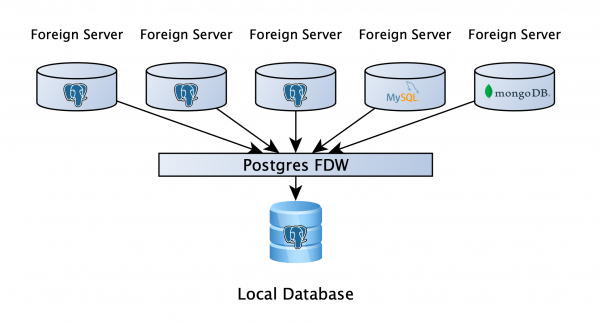
There is a PostgreSQL database where users can store their working data, and most importantly — analytical replicas of all services are connected to this database via FDW. This allows you to write queries across multiple databases, regardless of whether they are PostgreSQL, MySQL, MongoDB, or something else (a file, an API; if there isn’t a suitable wrapper, you can write your own). Well, that’s it, great! Shall we disperse?
If everything ended that quickly and simply, there probably wouldn't be an article.
It's important to clearly understand how PostgreSQL processes queries to remote servers. This seems logical, yet often goes unnoticed: PostgreSQL breaks a query into parts that run independently on remote servers, collects the data, and then performs the final computations itself, meaning the speed of executing a query will heavily depend on how it is written. It's also worth noting that when data comes from a remote server, it no longer has indexes or anything that assists the planner; therefore, we can only assist and inform it ourselves. And this is what I want to discuss in more detail.
Simple query and the plan with it
To illustrate how PostgreSQL executes a query on a table with 6 million rows remotely, server, let's look at a simple plan.
explain analyze verbose
SELECT count(1)
FROM fdw_schema.table;

Aggregate  (cost=418383.23..418383.24 rows=1 width=8) (actual time=3857.198..3857.198 rows=1 loops=1)
  Output: count(1)
  ->  Foreign Scan on fdw_schema."table"  (cost=100.00..402376.14 rows=6402838 width=0) (actual time=4.874..3256.511 rows=6406868 loops=1)
        Output: "table".id, "table".is_active, "table".meta, "table".created_dt
        Remote SQL: SELECT NULL FROM fdw_schema.table
Planning time: 0.986 ms
Execution time: 3857.436 ms
Using the VERBOSE instruction allows us to see the query that will be sent to the remote server and the results we will obtain for further processing (line RemoteSQL).
Let's go a bit further and add some filters to our query: one by boolean field, one by occurrence timestamp in the interval, and one by jsonb.
explain analyze verbose
SELECT count(1)
FROM fdw_schema.table
WHERE is_active is True
AND created_dt BETWEEN CURRENT_DATE - INTERVAL '7 month'
AND CURRENT_DATE - INTERVAL '6 month'
AND meta->>'source' = 'test';

Aggregate  (cost=577487.69..577487.70 rows=1 width=8) (actual time=27473.818..25473.819 rows=1 loops=1)
  Output: count(1)
  ->  Foreign Scan on fdw_schema."table"  (cost=100.00..577469.21 rows=7390 width=0) (actual time=31.369..25372.466 rows=1360025 loops=1)
        Output: "table".id, "table".is_active, "table".meta, "table".created_dt
        Filter: (("table".is_active IS TRUE) AND (("table".meta ->> 'source'::text) = 'test'::text) AND ("table".created_dt >= (('now'::cstring)::date - '7 mons'::interval)) AND ("table".created_dt <= ((('now'::cstring)::date)::timestamp with time zone - '6 mons'::interval)))
        Rows Removed by Filter: 5046843
        Remote SQL: SELECT created_dt, is_active, meta FROM fdw_schema.table
Planning time: 0.665 ms
Execution time: 27474.118 ms
This is the moment to pay attention to when writing queries. The filters were not sent to the remote server, which means PostgreSQL pulls all 6 million rows to then filter them locally (line Filter) and perform aggregation. The key to success is to write the query so that the filters are passed to the remote machine, allowing us to retrieve and aggregate only the necessary rows.
That’s some booleanshit
With boolean fields, it's straightforward. In the original query, the problem arose due to the operator is. If we replace it with =, we will get the following result:
explain analyze verbose
SELECT count(1)
FROM fdw_schema.table
WHERE is_active = True
AND created_dt BETWEEN CURRENT_DATE - INTERVAL '7 month'
AND CURRENT_DATE - INTERVAL '6 month'
AND meta->>'source' = 'test';

Aggregate  (cost=508010.14..508010.15 rows=1 width=8) (actual time=19064.314..19064.314 rows=1 loops=1)
  Output: count(1)
  ->  Foreign Scan on fdw_schema."table"  (cost=100.00..507988.44 rows=8679 width=0) (actual time=33.035..18951.278 rows=1360025 loops=1)
        Output: "table".id, "table".is_active, "table".meta, "table".created_dt
        Filter: ((("table".meta ->> 'source'::text) = 'test'::text) AND ("table".created_dt >= (('now'::cstring)::date - '7 mons'::interval)) AND ("table".created_dt <= ((('now'::cstring)::date)::timestamp with time zone - '6 mons'::interval)))
        Rows Removed by Filter: 3567989
        Remote SQL: SELECT created_dt, meta FROM fdw_schema.table WHERE (is_active)
Planning time: 0.834 ms
Execution time: 19064.534 ms
As you can see, the filter was sent to the remote server, and the execution time decreased from 27 to 19 seconds.
It's worth noting that the operator is differs from the operator = in that it can handle Null values. This means that is not True in the filter will leave False and Null values, while != True will leave only False values. Therefore, when replacing the operator is not it is necessary to provide two conditions in the filter using the OR operator, for example, WHERE (col != True) OR (col is null).
We've sorted out boolean values, now let's move on. Meanwhile, let's revert the filter for boolean values to its original state to independently examine the effect of other changes.
timestamptz? hz
In general, it often requires experimentation to correctly write a query involving remote servers, and only then to seek an explanation for why it behaves that way. There is very little information available online about this. In our experiments, we found that filtering by a fixed date sends it successfully to the remote server, but when we want to set the date dynamically, such as using now() or CURRENT_DATE, that does not happen. In our example, we added such a filter to ensure that the created_at column contains data exactly one month in the past (BETWEEN CURRENT_DATE - INTERVAL '7 month' AND CURRENT_DATE - INTERVAL '6 month'). What actions did we take in this case?
explain analyze verbose
SELECT count(1)
FROM fdw_schema.table
WHERE is_active is True
AND created_dt >= (SELECT CURRENT_DATE::timestamptz - INTERVAL '7 month')
AND created_dt >'source' = 'test';

Aggregate  (cost=306875.17..306875.18 rows=1 width=8) (actual time=4789.114..4789.115 rows=1 loops=1)
  Output: count(1)
  InitPlan 1 (returns $0)
    ->  Result  (cost=0.00..0.02 rows=1 width=8) (actual time=0.007..0.008 rows=1 loops=1)
          Output: ((('now'::cstring)::date)::timestamp with time zone - '7 mons'::interval)
  InitPlan 2 (returns $1)
    ->  Result  (cost=0.00..0.02 rows=1 width=8) (actual time=0.002..0.002 rows=1 loops=1)
          Output: ((('now'::cstring)::date)::timestamp with time zone - '6 mons'::interval)
  ->  Foreign Scan on fdw_schema."table"  (cost=100.02..306874.86 rows=105 width=0) (actual time=23.475..4681.419 rows=1360025 loops=1)
        Output: "table".id, "table".is_active, "table".meta, "table".created_dt
        Filter: (("table".is_active IS TRUE) AND (("table".meta ->> 'source'::text) = 'test'::text))
        Rows Removed by Filter: 76934
        Remote SQL: SELECT is_active, meta FROM fdw_schema.table WHERE ((created_dt >= $1::timestamp with time zone)) AND ((created_dt < $2::timestamp with time zone))
Planning time: 0.703 ms
Execution time: 4789.379 ms
We suggested the planner to pre-compute the date in the subquery and pass the ready variable into the filter. This hint gave us a fantastic result — the query became almost six times faster!
Once again, it's crucial to be careful here: the data type in the subquery must match the type of the field we are filtering by. Otherwise, the planner will decide that the types are different and will need to fetch all the data first, then filter it locally.
Let’s revert the date filter to its original value.
Freddy vs. Jsonb
In general, boolean fields and dates have already significantly sped up our query. However, there was still one more data type left. Honestly, the battle for filtering it is still not over, though we have had successes here too. So here’s how we managed to pass the filter for jsonb the field to the remote server.
explain analyze verbose
SELECT count(1)
FROM fdw_schema.table
WHERE is_active is True
AND created_dt BETWEEN CURRENT_DATE - INTERVAL '7 month'
AND CURRENT_DATE - INTERVAL '6 month'
AND meta @> '{"source":"test"}'::jsonb;

Aggregate  (cost=245463.60..245463.61 rows=1 width=8) (actual time=6727.589..6727.590 rows=1 loops=1)
  Output: count(1)
  ->  Foreign Scan on fdw_schema."table"  (cost=1100.00..245459.90 rows=1478 width=0) (actual time=16.213..6634.794 rows=1360025 loops=1)
        Output: "table".id, "table".is_active, "table".meta, "table".created_dt
        Filter: (("table".is_active IS TRUE) AND ("table".created_dt >= (('now'::cstring)::date - '7 mons'::interval)) AND ("table".created_dt  '{"source": "test"}'::jsonb))
Planning time: 0.747 ms
Execution time: 6727.815 ms
Instead of filtering operators, it's necessary to use the existence operator. jsonb in another. 7 seconds instead of the original 29. So far, this is the only successful option for transferring filters across jsonb to the remote server, but one limitation must be considered: we are using version 9.6 of the database, however, by the end of April we plan to complete the final tests and move to version 12. Once we upgrade, we will report on how it affected performance, as there are quite a few changes we are hopeful about: json_path, new CTE behavior, push down (existing since version 10). We are eager to try this out soon.
Finish him
We checked how each change affects query speed individually. Now, let's see what happens when all three filters are correctly applied.
explain analyze verbose
SELECT count(1)
FROM fdw_schema.table
WHERE is_active = True
AND created_dt >= (SELECT CURRENT_DATE::timestamptz - INTERVAL '7 month')
AND created_dt  '{"source":"test"}'::jsonb;

Aggregate  (cost=322041.51..322041.52 rows=1 width=8) (actual time=2278.867..2278.867 rows=1 loops=1)
  Output: count(1)
  InitPlan 1 (returns $0)
    ->  Result  (cost=0.00..0.02 rows=1 width=8) (actual time=0.010..0.010 rows=1 loops=1)
          Output: ((('now'::cstring)::date)::timestamp with time zone - '7 mons'::interval)
  InitPlan 2 (returns $1)
    ->  Result  (cost=0.00..0.02 rows=1 width=8) (actual time=0.003..0.003 rows=1 loops=1)
          Output: ((('now'::cstring)::date)::timestamp with time zone - '6 mons'::interval)
  ->  Foreign Scan on fdw_schema."table"  (cost=100.02..322041.41 rows=25 width=0) (actual time=8.597..2153.809 rows=1360025 loops=1)
        Output: "table".id, "table".is_active, "table".meta, "table".created_dt
        Remote SQL: SELECT NULL FROM fdw_schema.table WHERE (is_active) AND ((created_dt >= $1::timestamp with time zone)) AND ((created_dt  '{"source": "test"}'::jsonb))
Planning time: 0.820 ms
Execution time: 2279.087 ms
Yes, the query looks more complex, it's a necessary trade-off, but the execution speed is 2 seconds, which is more than 10 times faster! And we're talking about a simple query on a relatively small dataset. For real queries, we achieved performance gains of up to several hundred times.
In conclusion: if you are using PostgreSQL with FDW, always check that all filters are passed to the remote server, and happiness will be yours... At least until you reach joins between tables from different servers. But that's already a story for another article.
Thank you for your attention! I would love to hear your questions, comments, as well as stories about your experiences in the comments.
Source: habr.com
