

In our blog, we have already , discussed how to create your own Minecraft server. However, five years have passed since then, and much has changed. We are sharing with you the current methods for creating and optimizing the server part of this popular game.
In its nine-year history (if we count from the release date), Minecraft has gained an incredible number of fans and haters among both casual players and geeks. The simple concept of a block world has transformed from mere entertainment into a universal environment for communication and the creation of various objects from the real world.
In addition to building, the game offers the ability to create , allowing for the implementation of full algorithms within Minecraft. YouTube is full of impressive videos where people, having put in tremendous effort and time, have created a copy of various electronic devices or constructed a detailed replica of and architectural structures. Everything is limited only by the gamer's imagination and the possibilities of the gaming universe.

But let's not dwell on what players create and look instead at the server side of the application, highlighting the issues (sometimes quite complex) that may arise during operation under load. Let's clarify right away that we will only be discussing the Java Edition.
Types of servers
The simplest option is the server built into the game client. You create a world, press a button, and the server becomes available on the local network. Such an option cannot handle any serious load, so we won’t even consider it.
Vanilla
Mojang Studios distributes the server part of the game as a Java application for free . This allows you to create your own and personal world, making it accessible for connection from anywhere on the planet. For those doing this for the first time, there is an excellent , available in the relevant gaming Wiki.
This approach has one serious drawback, namely the lack of built-in support for plugins that expand server functionality, allowing not only automation of many processes but also optimization of performance. Moreover, the official server has a relatively high memory consumption per connected player.
Bukkit
An application created by enthusiasts based on the Vanilla version significantly expanded the game's capabilities by supporting plugins and mods (modifications). It allowed not only the addition of new blocks to the gameplay but also various manipulations that were inaccessible to vanilla software. Interestingly, this application required significantly less memory.
Installing Bukkit is not particularly difficult; the corresponding instructions are available on the resource . However, this is pointless since the Bukkit team disbanded in 2014, with the project's developers becoming employees of Mojang Studios, and abandoned. Thus, Bukkit is effectively dead, and it makes sense to pay attention to the next two projects.
SpigotMC
To make life easier for plugin developers, an API was needed to interact with the game world. This task was addressed by the creators of , based on the Bukkit core and reworked for better reliability and performance. Nevertheless, the project was blocked under the Digital Millennium Copyright Act (), and the source code cannot be downloaded from there.
Currently, SpigotMC is actively developed and used. It supports all plugins created for Bukkit; however, it is not backward compatible. To bypass the DMCA Takedown notice, an elegant solution called BuildTools was devised. This tool eliminates the necessity of distributing a compiled application and allows users to compile Spigot, CraftBukkit, and Bukkit from the source code. All of this renders the DMCA ban ineffective.
PaperMC
It seems everything is great, and Spigot has become a fantastic option. But some enthusiasts found it insufficient, and they created their own 'steroid-enhanced' fork of Spigot. Its key advantage claims to be that 'It’s stupid fast.' The developed allows for prompt resolution of arising issues, while the extended API enables the creation of interesting plugins. Starting PaperMC can be done with a simple command as shown in .
Compatibility with PaperMC is excellent, so plugins written for SpigotMC will run smoothly on PaperMC as well, although without official support. Backward compatibility with SpigotMC is also present. Now that we have outlined various options for server creation, let's move on to the performance issues that may arise.
Problems and Solutions
The main thing to understand is that everything related to processing the game world will be handled by a single core of the physical server. So, if you have a wonderful server with a dozen CPU cores, only one will be utilized. All the others will effectively be idle. This is the architecture of the application, and there’s nothing you can do about it. Therefore, when choosing a server, you should focus on clock speed rather than the number of cores. The higher it is, the better the performance will be.
Regarding the amount of RAM, here are some factors to consider:
- the planned number of players;
- the planned number of worlds on the server;
- the size of each world.
It should be noted that Java applications always require a buffer for RAM. If you expect memory consumption of 8 gigabytes, you should actually have 12. Those figures are conditional, but the essence remains unchanged.
To run the server portion, we recommend using the flags mentioned in the article This 'black magic' allows the server to properly configure the garbage collector and optimizes the use of RAM. It's not advisable to allocate more memory than the server actually consumes during peak player influx.
Block Map Generation
“Do you really think the Moon exists only when you look at it?” (Albert Einstein)
A brand new server. Once a player successfully connects for the first time, the game character appears at the central spawn point. This is the only location where the game world is pre-generated by the server. At this moment, the client checks the settings, and a key parameter is the render distance. It is measured in chunks (a map area of 16×16 with a height of 256 blocks). The number of chunks specified will be requested from the server.
The server stores a global map of the world, and if there are no generated blocks at the spawn point of the game character, the server dynamically generates and saves them. Not only does this require significant computational resources, but it also continuously increases the size of the world map. One of the oldest anarchic servers, (2builders2tools), has a map size that has already exceeded 8 TB, and the world border is at the 30 million block mark. This server is linked to thousands of stories and deserves a separate article in a series of articles.
Generating the world around one player is not a problem. Generating the world around a hundred players will cause minor server lag for a brief period, after which the load will decrease. Generating the world to the render distance around a thousand players is capable of 'crashing' the server and disconnecting all clients due to timeout.
In the server software, there is a value known as TPS (Ticks per Server — ticks per second). Normally, 1 tick equals 50 ms. (1 second in real-time equals 20 ticks in the game world). If the processing of one tick increases to 60 seconds, the server application will close, disconnecting all players.
The solution is to limit the world with specific coordinates and perform pre-generation of blocks. This eliminates the need for dynamic generation during gameplay, and the server can simply read the existing map. Both issues can be solved with a single plugin. .
The easiest way to set the world border as a circle relative to the spawn point (though it can be any shape) is with one command:
/wb set <радиус в блоках> spawnIf a game character attempts to cross the boundary, they will be pushed back several blocks. If this is done multiple times within a limited time, the offender will be forcibly teleported to the spawn point. The world pre-generation is even easier with the command:
/wb fillSince this action can potentially affect players on the server, remember to confirm its execution:
/wb confirmIn total, it took about 2 hours on an Intel® Xeon® Gold 6240 processor to generate a world with a radius of 5000 blocks (~40 billion blocks). Therefore, if you want to start pre-generating a larger map, keep in mind that this process will take a considerable amount of time and the server TPS will be significantly reduced. Also, remember that even a radius of 5000 blocks will require about 2 GB of storage space.
Although the latest version of the plugin was developed for Minecraft version 1.14, it has been experimentally shown to work perfectly on subsequent versions as well. A complete list of commands with explanations is available .
Problematic Blocks
There are many types of blocks in Minecraft. However, we would like to draw the readers' attention to a block known as TNT. As the name suggests, this block is an explosive material (editor's note — this is a game item from a virtual world and has nothing to do with real explosives). Its feature is such that upon activation, gravity starts to act on it. This forces the server to calculate all coordinates if that block starts falling at that moment.
If there are multiple TNT blocks, detonating one block triggers the detonation and gravity activation of neighboring blocks, scattering them in all directions. This beautiful mechanic on the server side appears as numerous operations to calculate the trajectory of each block, as well as interactions with neighboring blocks. The task is extremely resource-intensive, which anyone can easily verify. Generate and blow up a cube of TNT blocks at least 30x30x30 in size. And if you thought you had a powerful gaming computer, you were very mistaken. 😉
/fill ~ ~ ~ ~30 ~30 ~30 minecraft:tnt 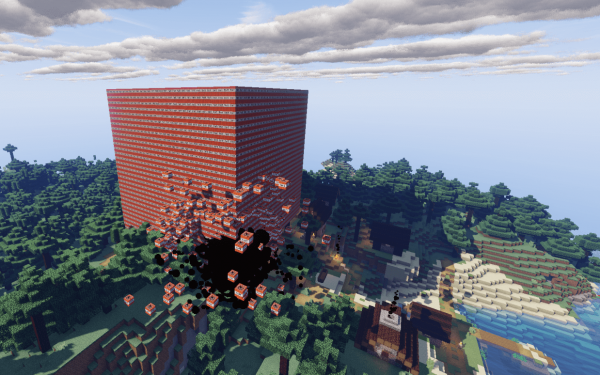
A similar "experiment" on a server with Intel® Xeon® Gold 6240 led to a significant drop in TPS and 80% CPU load during the entire detonation of blocks. Thus, if any player manages to replicate this, the performance issue will affect all players on the server.
An even harsher option — End Crystals. If TNT does explode sequentially, then End Crystals detonate all at once, which theoretically could completely stop the server application.
This scenario can only be avoided by completely banning the use of these blocks in the game world. For example, with the help of the plugin . Note that this plugin alone does not work without another plugin, . So, install WorldEdit first, and then WorldGuard.
Conclusion
Proper management of a game server is not an easy task. Difficulties and performance drops will lurk at every turn, especially when not taking into account the game mechanics themselves. It's impossible to foresee everything, as players can sometimes be very inventive in trying to make the server do things it wasn't designed for. Only a reasonable balance between risks and the limits set will allow the server to operate continually without reducing its performance to critical levels.
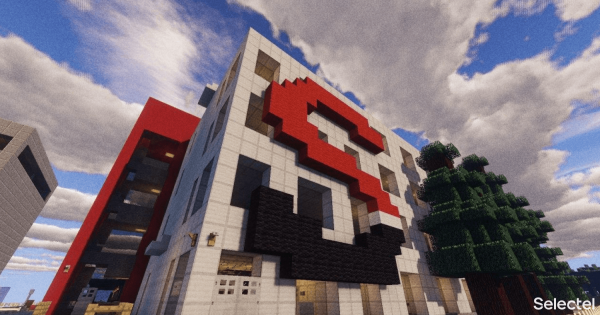
During quarantine, some of our employees missed their favorite offices and decided to recreate them inside Minecraft. You also have a chance to visit us without risking your health and wasting time on the road.
For this, we invite everyone to our server minecraft.selectel.ru (client version 1.15.2), where the data centers Flower-1 and Flower-2 have been recreated. Don't forget to agree to download additional resources, as they are necessary for the correct display of some locations.
You'll find quests, promo codes, "easter eggs," and pleasant communication waiting for you.
Source: habr.com

 Russian
 Italian
 German
 Polish
 Estonian
 Albanian
 Bulgarian
 Croatian
 Czech
Czech Danish
 Dutch
Dutch English
 French
 Hungarian
 Latvian
 Norwegian
 Portuguese
 Romanian
 Slovak
 Slovenian
 Spanish
 Swedish