

This article will discuss how to transfer mail between different servers using the IMAPSync utility through a simple user interface.
On the destination server, you need to have an account with the required login and password. Before using Imapsync, it is essential to install it (https://imapsync.lamiral.info/#install).
Due to the organization's prohibition on using employee mailbox passwords in the script, the migration process is handed over to the user. For this, a web user interface has been developed, consisting of a form module (gis.html) and a module for running the imapsync script (gis.php). Filling out servers IMAP can be automated by analyzing the contents of the mailbox name field. The use of Fetchmail as a Roundcube plugin is not considered, as I did not find a detailed cohesive analysis of this issue.
The web interface consists of fields with information about the mailboxes, an area for outputting the operation's execution, and control buttons (gis.html).
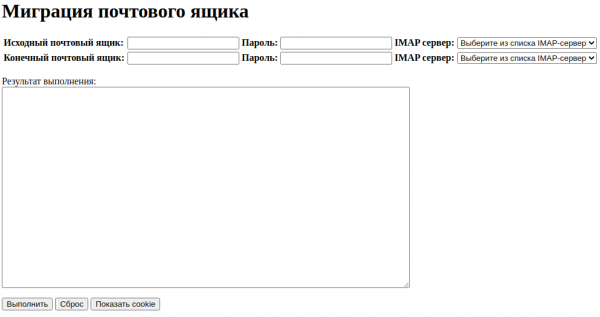
<html>
<head>
    <meta http-equiv="Content-Type" content="text/html;charset=utf-8">
    <script>
          //запуск скрипта sh из командной строки linux
     function isexe() {
      var ta = document.getElementById('output');
      document.getElementById('output').value += 'Start import, please wait...n';
      var source = new EventSource('gis.php');
      source.addEventListener('message', function(e) {
       if (e.data !== '') {
        ta.value += e.data + 'n';
       }
      }, false);
      source.addEventListener('error', function(e) {
       source.close();
      }, false);
     }//isexe

    //кнопка Выполнить
    function Complete() {
      document.cookie = "mail1="+document.maildata.mail1.value;
      document.cookie = "pass1="+document.maildata.pass1.value;
      document.cookie = "mail2="+document.maildata.mail2.value;
      document.cookie = "pass2="+document.maildata.pass2.value;
      document.cookie = "msrv1="+document.maildata.msrv1.value;
      document.cookie = "msrv2="+document.maildata.msrv2.value;
      //alert(document.cookie); // показываем все куки
      isexe();
      document.cookie = "mail1="+document.maildata.mail1.value+"; max-age=0";
      document.cookie = "pass1="+document.maildata.pass1.value+"; max-age=0";
      document.cookie = "mail2="+document.maildata.mail2.value+"; max-age=0";
      document.cookie = "pass2="+document.maildata.pass2.value+"; max-age=0";
      document.cookie = "msrv1="+document.maildata.msrv1.value+"; max-age=0";
      document.cookie = "msrv2="+document.maildata.msrv2.value+"; max-age=0";
    }//Complete

    function ShowCookie() {
     alert(document.cookie); // показываем все куки
    }
    </script>
</head>

<body>
<h1>Mailbox Migration</h1>
<form name="maildata" action="">
   <table>
        <tr><td><b>Source Mailbox:<b></td>
            <td><input name="mail1" size="20" value=""
        <tr><td><b>Password:<b>
            <td><input type="password" name="pass1" size="20" value=""
        <tr><td><b>IMAP Server:<b></td>
            <td><input name="msrv1" size="20" value=""<td>
        <tr><td><b>Destination Mailbox:<b></td>
            <td><input name="mail2" size="20" value=""
        <tr><td><b>Password:<b>
            <td><input type="password" name="pass2" size="20" value=""
        <tr><td><b>IMAP Server:<b></td>
            <td><input name="msrv2" size="20" value=""<td>
    </table>
    <p>The output shows:<br/><textarea id="output" style="width: 50%; height: 25em;"></textarea></p>
   <input type="button" value="Execute" onclick="Complete();">
    <input type="reset" value="Reset">
    <input type="button" value="Show Cookie" onclick="ShowCookie();">
<input type="hidden" name="trp-form-language" value="en"/></form>
</body>
</html>
Module to run the imapsync script (gis.php).
<?php
 ob_end_flush();
 ini_set("output_buffering", "0");
 ob_implicit_flush(true);
 header('Content-Type: text/event-stream');
 header('Cache-Control: no-cache');

 //вывод в область сообщений
function echoEvent($datatext) {
  echo "data: ".implode("ndata: ", explode("n", $datatext))."nn";
 }//echoEvent

 echoEvent("Start!");
 //формируем строку запуска скрипта imapsync с параметрами
 $strexe = "/bin/bash /home/user/imapsync/startimapsync.sh "
           .htmlspecialchars($_COOKIE["mail1"]).' '
           .htmlspecialchars($_COOKIE["pass1"])." "
           .htmlspecialchars($_COOKIE["mail2"])." "
           .htmlspecialchars($_COOKIE["pass2"])." "
           .htmlspecialchars($_COOKIE["msrv1"])." "
           .htmlspecialchars($_COOKIE["msrv2"]);
 echoEvent($strexe);
//запускаем sh скрипт из командной строки linux
 $proc = popen($strexe,'r');
//могут быть ограничения php, поэтому достаточно вывести результат окончания миграции
 while (!feof($proc)) {
  echoEvent(fread($proc, 4096));
 }
  echoEvent("Finish!");
?>
The mailbox migration script (startimapsync.sh) accepts command line parameters: logins and passwords, IMAP servers of the source and destination mailboxes, respectively.
#!/bin/bash
#переход в каталог откуда был запущен данный скрипт
cd `dirname $0`
#запуск imapsync с нужными параметрами
 /home/user/imapsync/./imapsync
#сервер начального почтового ящика, логин, пароль
  --host1 $5:993    --user1 $1 --password1 $2
#сервер конечного почтового ящика, логин, пароль
  --host2 $6:993    --user2 $3 --password2 $4
#использование  шифрования при подключении к server
  --ssl1  --ssl2
#folder mapping
  --automap
#synchronize the incoming folder first
  --folderfirst INBOX
#folder mapping
  --regextrans2 "s/&BB4EQgQ,BEAEMAQyBDsENQQ9BD0ESwQ1-/Sent/"
  --regextrans2 "s/&BBoEPgRABDcEOAQ9BDA-/Trash/"
  --regextrans2 "s/&BCEEPwQwBDw-/Junk/"
  --regextrans2 "s/&BCcENQRABD0EPgQyBDgEOgQ4-/Drafts/"
#correctly accept unread emails in Inbox
  --regexflag 's/\Unseen//g'
#Comparing received and sent emails by Message-ID
  --useheader Message-Id
Source: habr.com
