


Today, I want to introduce Habr readers to a Python utility for working with table dependencies in the PostgreSQL DBMS.
The utility's API is simple and consists of three methods:
- archive_table — recursive archiving/deletion of rows with specified Primary Keys
- get_table_references — searching for dependencies for a table (it will show the tables referenced by the specified one and those that reference it)
- get_rows_references — searching for rows in other tables that reference specified rows in the required table
Background
My name is Oleg Borzov, I am a developer on the CRM team for mortgage lending managers at Domklik.
The main database of our CRM system is one of the largest by volume in the company. It is also one of the oldest: it was created at the very launch of the project, when the trees were big, Domklik was a startup, and instead of a microservice on a trendy Python asynchronous framework, there was a huge monolith on PHP.
The transition from PHP to Python was very long and required simultaneous support for both systems, which affected the database design.
As a result, we have a database with a large number of heavily interrelated tables that are enormous in size, with many indexes for different types of queries. All of this negatively impacts the database performance: due to large tables and numerous links between them, the complexity of queries is constantly increasing, which is particularly critical for the most heavily loaded tables.
To reduce the load on the database, we decided to write a script that would daily transfer old records from the largest and most loaded tables to archives (for example, from task downward API support (simultaneously with this in task_archive).
This task is complicated by the large number of relationships between tables: it is not enough to simply move rows from task downward API support (simultaneously with this in task_archive first, it is necessary to recursively do the same for all referencing task tables.
I will demonstrate this using the example of :
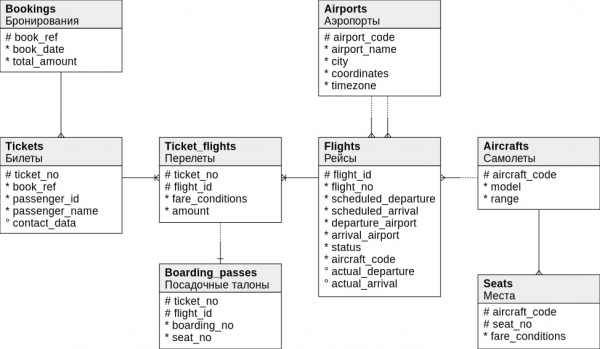
Suppose we need to delete records from the table Flights. Just doing this will not be allowed by Postgres: we need to first delete records from all referencing tables recursively, down to the tables that no one references.
In our example, it is referenced by Flights Ticket_flights , and it is referenced byBoarding_passes Therefore, we need to delete in this order:.
We obtain the primary key values (Primary Keys, PK) of the rows in
- Retrieving the primary key values (Primary Keys, PK) of the rows in
, and it is referenced by, which refer to deleted rows inFlights. - Obtaining PK rows
Therefore, we need to delete in this order:, which refer to, and it is referenced by. - Deleting rows by PK from item 2 in the table
Therefore, we need to delete in this order:. - Deleting rows by PK from item 1 in
, and it is referenced by. - Deleting rows from
Flights.
As a result, we created a utility called PgGraph, which we decided to make open source.
How to use
The utility supports two modes of use:
- Calling from the command line (
pggraph …). - Using in Python code (class
PgGraphApi).
Installation and setup
First, you need to install the utility from the Pypi repository:
pip3 install pggraphThen create a config.ini file on the local machine with the database and archiving script configuration:
[db]
host = localhost
port = 5432
user = postgres
password = postgres
dbname = postgres
schema = public ; Optional parameter, default value specified

[archive]  ; This section is optional, default values are listed below
is_debug = false
chunk_size = 1000
max_depth = 20
to_archive = true
archive_suffix = 'archive'
Running from the console
Parameters
$ pggraph -h
usage: pggraph action [-h] --table TABLE [--ids IDS] [--config_path CONFIG_PATH]
positional arguments:
  action        required action: archive_table, get_table_references, get_rows_references

optional arguments:
  -h, --help                    show this help message and exit
  --table TABLE                 table name
  --ids IDS                     primary key ids, separated by comma, e.g. 1,2,3
  --config_path CONFIG_PATH     path to config.ini
  --log_path LOG_PATH           path to log dir
  --log_level LOG_LEVEL         log level (debug, info, error)
Positional arguments:
action— required action:archive_table,get_table_referencesorget_rows_references.
Named arguments:
--config_path— path to the config file;--table— table to perform the action on;--ids— list of ids separated by commas, for example,1,2,3(optional parameter);--log_path— path to the log directory (optional parameter, defaults to home directory);--log_level— logging level (optional parameter, defaults to INFO).
Command examples
Archiving a table
The main function of the utility is data archiving, i.e., moving rows from the main table to the archive table (for example, from the table books downward API support (simultaneously with this in books_archive).
Deletion without archiving is also supported: for this, you need to set the parameter to_archive = false).
Required parameters — config_path, table and ids.
After executing, records with ids Mangle Prerouting table will be recursively deleted from all referencing tables.
$ pggraph archive_table --config_path config.hw.local.ini --table flights --ids 1,2,3
2020-06-20 19:27:44 INFO: flights - START
2020-06-20 19:27:44 INFO: flights - start archive_recursive 3 rows (depth=0)
2020-06-20 19:27:44 INFO:       START ARCHIVE REFERRING TABLES
2020-06-20 19:27:44 INFO:       ticket_flights - start archive_recursive 3 rows (depth=1)
2020-06-20 19:27:44 INFO:               START ARCHIVE REFERRING TABLES
2020-06-20 19:27:44 INFO:               boarding_passes - start archive_recursive 3 rows (depth=2)
2020-06-20 19:27:44 INFO:                       START ARCHIVE REFERRING TABLES
2020-06-20 19:27:44 INFO:                       END ARCHIVE REFERRING TABLES
2020-06-20 19:27:44 INFO:               boarding_passes - archive_by_ids 3 rows by ticket_no, flight_id
2020-06-20 19:27:44 INFO:               boarding_passes - start archive_recursive 3 rows (depth=2)
2020-06-20 19:27:44 INFO:                       START ARCHIVE REFERRING TABLES
2020-06-20 19:27:44 INFO:                       END ARCHIVE REFERRING TABLES
2020-06-20 19:27:44 INFO:               boarding_passes - archive_by_ids 3 rows by ticket_no, flight_id
2020-06-20 19:27:44 INFO:               boarding_passes - start archive_recursive 3 rows (depth=2)
2020-06-20 19:27:44 INFO:                       START ARCHIVE REFERRING TABLES
2020-06-20 19:27:44 INFO:                       END ARCHIVE REFERRING TABLES
2020-06-20 19:27:44 INFO:               boarding_passes - archive_by_ids 3 rows by ticket_no, flight_id
2020-06-20 19:27:44 INFO:               boarding_passes - start archive_recursive 3 rows (depth=2)
2020-06-20 19:27:44 INFO:                       START ARCHIVE REFERRING TABLES
2020-06-20 19:27:44 INFO:                       END ARCHIVE REFERRING TABLES
2020-06-20 19:27:44 INFO:               boarding_passes - archive_by_ids 3 rows by ticket_no, flight_id
2020-06-20 19:27:44 INFO:               END ARCHIVE REFERRING TABLES
2020-06-20 19:27:44 INFO:       ticket_flights - archive_by_ids 3 rows by ticket_no, flight_id
2020-06-20 19:27:44 INFO:       END ARCHIVE REFERRING TABLES
2020-06-20 19:27:44 INFO: flights - archive_by_ids 3 rows by id
2020-06-20 19:27:44 INFO: flights - END
Searching for dependencies for the specified table
Function to find dependencies of the specified table table. Required parameters — config_path and table.
After running, a dictionary will be displayed on the screen, where:
in_refs— a dictionary of referring tables to this one, where the key is the table name, and the value is the list of Foreign Key objects (pk_main— primary key in the main table,pk_ref— primary key in the referring table,fk_ref— the name of the column that is a foreign key to the source table);out_refs— a dictionary of tables that this one refers to.
$ pggraph get_table_references --config_path config.hw.local.ini --table flights
{'in_refs': {'ticket_flights': [ForeignKey(pk_main='flight_id', pk_ref='ticket_no, flight_id', fk_ref='flight_id')]},
 'out_refs': {'aircrafts': [ForeignKey(pk_main='aircraft_code', pk_ref='flight_id', fk_ref='aircraft_code')],
              'airports': [ForeignKey(pk_main='airport_code', pk_ref='flight_id', fk_ref='arrival_airport'),
                           ForeignKey(pk_main='airport_code', pk_ref='flight_id', fk_ref='departure_airport')]}}
Searching for links to rows with specified Primary Keys
Function to find rows in other tables that refer through Foreign Keys to rows of the table ids tables table. Required parameters — config_path, table and ids.
After launching, a dictionary with the following structure will be displayed on the screen:
{
	pk_id_1: {
		reffering_table_name_1: {
			foreign_key_1: [
				{row_pk_1: value, row_pk_2: value},
				...
			],
			...
		},
		...
	},
	pk_id_2: {...},
	...
}
Example call:
$ pggraph get_rows_references --config_path config.hw.local.ini --table flights --ids 1,2,3
{1: {'ticket_flights': {'flight_id': [{'flight_id': 1,
                                       'ticket_no': '0005432816945'},
                                      {'flight_id': 1,
                                       'ticket_no': '0005432816941'}]}},
 2: {'ticket_flights': {'flight_id': [{'flight_id': 2,
                                       'ticket_no': '0005433101832'},
                                      {'flight_id': 2,
                                       'ticket_no': '0005433101864'},
                                      {'flight_id': 2,
                                       'ticket_no': '0005432919715'}]}},
 3: {'ticket_flights': {'flight_id': [{'flight_id': 3,
                                       'ticket_no': '0005432817560'},
                                      {'flight_id': 3,
                                       'ticket_no': '0005432817568'},
                                      {'flight_id': 3,
                                       'ticket_no': '0005432817559'}]}}}
Usage in code
In addition to running in the console, the library can also be used in Python code. Below are examples of calls in the interactive iPython environment.
Archiving a table
>>> from pg_graph.main import setup_logging
>>> setup_logging(log_level='DEBUG')
>>> from pg_graph.api import PgGraphApi
>>> api = PgGraphApi('config.hw.local.ini')
>>> api.archive_table('flights', [4, 5])
2020-06-20 23:12:08 INFO: flights - START
2020-06-20 23:12:08 INFO: flights - start archive_recursive 2 rows (depth=0)
2020-06-20 23:12:08 INFO: 	START ARCHIVE REFERRING TABLES
2020-06-20 23:12:08 DEBUG: 	ticket_flights - ForeignKey(pk_main='flight_id', pk_ref='flight_id, ticket_no', fk_ref='flight_id')
2020-06-20 23:12:08 DEBUG: 	SQL('SELECT flight_id, ticket_no FROM bookings.ticket_flights WHERE (flight_id) IN (%s, %s)')
2020-06-20 23:12:08 INFO: 	ticket_flights - start archive_recursive 30 rows (depth=1)
2020-06-20 23:12:08 INFO: 		START ARCHIVE REFERRING TABLES
2020-06-20 23:12:08 DEBUG: 		boarding_passes - ForeignKey(pk_main='flight_id, ticket_no', pk_ref='flight_id, ticket_no', fk_ref='flight_id, ticket_no')
2020-06-20 23:12:08 INFO: 		boarding_passes - archive_by_fk 30 rows by ForeignKey(pk_main='flight_id, ticket_no', pk_ref='flight_id, ticket_no', fk_ref='flight_id, ticket_no')
2020-06-20 23:12:08 DEBUG: 		SQL('CREATE TABLE IF NOT EXISTS bookings.boarding_passes_archive (LIKE bookings.boarding_passes)')
2020-06-20 23:12:08 DEBUG: 		DELETE FROM boarding_passes by FK flight_id, ticket_no - 30 rows
2020-06-20 23:12:08 INFO: 		END ARCHIVE REFERRING TABLES
2020-06-20 23:12:08 INFO: 	ticket_flights - archive_by_ids 30 rows by flight_id, ticket_no
2020-06-20 23:12:08 DEBUG: 	SQL('CREATE TABLE IF NOT EXISTS bookings.ticket_flights_archive (LIKE bookings.ticket_flights)')
2020-06-20 23:12:08 DEBUG: 	DELETE FROM ticket_flights by flight_id, ticket_no - 30 rows
2020-06-20 23:12:08 DEBUG: 	INSERT INTO ticket_flights_archive - 30 rows
2020-06-20 23:12:08 INFO: 	ticket_flights - start archive_recursive 30 rows (depth=1)
2020-06-20 23:12:08 INFO: 		START ARCHIVE REFERRING TABLES
2020-06-20 23:12:08 DEBUG: 		boarding_passes - ForeignKey(pk_main='flight_id, ticket_no', pk_ref='flight_id, ticket_no', fk_ref='flight_id, ticket_no')
2020-06-20 23:12:08 INFO: 		boarding_passes - archive_by_fk 30 rows by ForeignKey(pk_main='flight_id, ticket_no', pk_ref='flight_id, ticket_no', fk_ref='flight_id, ticket_no')
2020-06-20 23:12:08 DEBUG: 		SQL('CREATE TABLE IF NOT EXISTS bookings.boarding_passes_archive (LIKE bookings.boarding_passes)')
2020-06-20 23:12:08 DEBUG: 		DELETE FROM boarding_passes by FK flight_id, ticket_no - 30 rows
2020-06-20 23:12:08 INFO: 		END ARCHIVE REFERRING TABLES
2020-06-20 23:12:08 INFO: 	ticket_flights - archive_by_ids 30 rows by flight_id, ticket_no
2020-06-20 23:12:08 DEBUG: 	SQL('CREATE TABLE IF NOT EXISTS bookings.ticket_flights_archive (LIKE bookings.ticket_flights)')
2020-06-20 23:12:08 DEBUG: 	DELETE FROM ticket_flights by flight_id, ticket_no - 30 rows
2020-06-20 23:12:08 DEBUG: 	INSERT INTO ticket_flights_archive - 30 rows
2020-06-20 23:12:08 INFO: 	ticket_flights - start archive_recursive 30 rows (depth=1)
2020-06-20 23:12:08 INFO: 		START ARCHIVE REFERRING TABLES
2020-06-20 23:12:08 DEBUG: 		boarding_passes - ForeignKey(pk_main='flight_id, ticket_no', pk_ref='flight_id, ticket_no', fk_ref='flight_id, ticket_no')
2020-06-20 23:12:08 INFO: 		boarding_passes - archive_by_fk 30 rows by ForeignKey(pk_main='flight_id, ticket_no', pk_ref='flight_id, ticket_no', fk_ref='flight_id, ticket_no')
2020-06-20 23:12:08 DEBUG: 		SQL('CREATE TABLE IF NOT EXISTS bookings.boarding_passes_archive (LIKE bookings.boarding_passes)')
2020-06-20 23:12:08 DEBUG: 		DELETE FROM boarding_passes by FK flight_id, ticket_no - 30 rows
2020-06-20 23:12:08 INFO: 		END ARCHIVE REFERRING TABLES
2020-06-20 23:12:08 INFO: 	ticket_flights - archive_by_ids 30 rows by flight_id, ticket_no
2020-06-20 23:12:08 DEBUG: 	SQL('CREATE TABLE IF NOT EXISTS bookings.ticket_flights_archive (LIKE bookings.ticket_flights)')
2020-06-20 23:12:08 DEBUG: 	DELETE FROM ticket_flights by flight_id, ticket_no - 30 rows
2020-06-20 23:12:08 DEBUG: 	INSERT INTO ticket_flights_archive - 30 rows
2020-06-20 23:12:08 INFO: 	ticket_flights - start archive_recursive 3 rows (depth=1)
2020-06-20 23:12:08 INFO: 		START ARCHIVE REFERRING TABLES
2020-06-20 23:12:08 DEBUG: 		boarding_passes - ForeignKey(pk_main='flight_id, ticket_no', pk_ref='flight_id, ticket_no', fk_ref='flight_id, ticket_no')
2020-06-20 23:12:08 INFO: 		boarding_passes - archive_by_fk 3 rows by ForeignKey(pk_main='flight_id, ticket_no', pk_ref='flight_id, ticket_no', fk_ref='flight_id, ticket_no')
2020-06-20 23:12:08 DEBUG: 		SQL('CREATE TABLE IF NOT EXISTS bookings.boarding_passes_archive (LIKE bookings.boarding_passes)')
2020-06-20 23:12:08 DEBUG: 		DELETE FROM boarding_passes by FK flight_id, ticket_no - 3 rows
2020-06-20 23:12:08 INFO: 		END ARCHIVE REFERRING TABLES
2020-06-20 23:12:08 INFO: 	ticket_flights - archive_by_ids 3 rows by flight_id, ticket_no
2020-06-20 23:12:08 DEBUG: 	SQL('CREATE TABLE IF NOT EXISTS bookings.ticket_flights_archive (LIKE bookings.ticket_flights)')
2020-06-20 23:12:08 DEBUG: 	DELETE FROM ticket_flights by flight_id, ticket_no - 3 rows
2020-06-20 23:12:08 DEBUG: 	INSERT INTO ticket_flights_archive - 3 rows
2020-06-20 23:12:08 INFO: 	END ARCHIVE REFERRING TABLES
2020-06-20 23:12:08 INFO: flights - archive_by_ids 2 rows by flight_id
2020-06-20 23:12:09 DEBUG: SQL('CREATE TABLE IF NOT EXISTS bookings.flights_archive (LIKE bookings.flights)')
2020-06-20 23:12:09 DEBUG: DELETE FROM flights by flight_id - 2 rows
2020-06-20 23:12:09 DEBUG: INSERT INTO flights_archive - 2 rows
2020-06-20 23:12:09 INFO: flights - END
Searching for dependencies for the specified table
>>> from pg_graph.api import PgGraphApi
>>> from pprint import pprint
>>> api = PgGraphApi('config.hw.local.ini')
>>> res = api.get_table_references('flights')
>>> pprint(res)
{'in_refs': {'ticket_flights': [ForeignKey(pk_main='flight_id', pk_ref='flight_id, ticket_no', fk_ref='flight_id')]},
 'out_refs': {'aircrafts': [ForeignKey(pk_main='aircraft_code', pk_ref='flight_id', fk_ref='aircraft_code')],
              'airports': [ForeignKey(pk_main='airport_code', pk_ref='flight_id', fk_ref='arrival_airport'),
                           ForeignKey(pk_main='airport_code', pk_ref='flight_id', fk_ref='departure_airport')]}}
Searching for links to rows with specified Primary Keys
>>> from pg_graph.api import PgGraphApi
>>> from pprint import pprint
>>> api = PgGraphApi('config.hw.local.ini')
>>> rows = api.get_rows_references('flights', [1,2,3])
>>> pprint(rows)
{1: {'ticket_flights': {'flight_id': [{'flight_id': 1,
                                       'ticket_no': '0005432816945'},
                                      {'flight_id': 1,
                                       'ticket_no': '0005432816941'}]}},
 2: {'ticket_flights': {'flight_id': [{'flight_id': 2,
                                       'ticket_no': '0005433101832'},
                                      {'flight_id': 2,
                                       'ticket_no': '0005433101864'},
                                      {'flight_id': 2,
                                       'ticket_no': '0005432919715'}]}},
 3: {'ticket_flights': {'flight_id': [{'flight_id': 3,
                                       'ticket_no': '0005432817560'},
                                      {'flight_id': 3,
                                       'ticket_no': '0005432817568'},
                                      {'flight_id': 3,
                                       'ticket_no': '0005432817559'}]}}}
The source code of the library is available at under the MIT license, as well as in the repository .
I welcome comments, commits, and suggestions.
I will try to answer questions here and in the repository as I can.
Source: habr.com
