

As I delved into the work of 1C products in a Linux environment, I discovered one drawback — the lack of a convenient cross-platform graphical tool for managing a cluster of 1C servers. It was decided to address this flaw by creating a GUI for the rac console utility. The programming language chosen for development was Tcl/Tk, which, in my opinion, is the most suitable for this task. I would like to present some interesting aspects of the solution in this material.
For this project, you will need the distributions of Tcl/Tk and 1C. Since I decided to maximize the capabilities of the base distribution of Tcl/Tk without using third-party packages, version 8.6.7 is required, which includes ttk — a package with additional graphical elements, of which we mainly need ttk::TreeView, which allows displaying data both in a tree structure and in a table (list) format. Also, in the new version, the handling of exceptions has been redesigned (the try command, which is used in the project when launching external commands).
The project consists of several files (although nothing prevents making it all in one):
rac_gui.cfg — default configuration
rac_gui.tcl — main launch script
In the lib directory, there are files automatically loaded at startup:
function.tcl — file with procedures
gui.tcl — main graphical interface
images.tcl — library of images in base64
The rac_gui.tcl file actually launches the interpreter, initializes variables, loads modules, configurations, and so on. The content of the file with comments:
rac_gui.tcl
#!/bin/sh
exec wish "$0" -- "$@"

# Устанавливаем текущий каталог
set dir(root) [pwd]
# Устанавливаем рабочий каталог, если его нет то создаём
set dir(work) [file join $env(HOME) .rac_gui]
if {[file exists $dir(work)] == 0 } {
    file mkdir $dir(work)
}
# каталог с модулями
set dir(lib) "[file join $dir(root) lib]"

# загружаем пользовательский конфиг, если он отсутствует, то копируем дефолтный
if {[file exists [file join $dir(work) rac_gui.cfg]] ==0} {
    file copy [file join [pwd] rac_gui.cfg] [file join $dir(work) rac_gui.cfg]
}
source [file join $dir(work) rac_gui.cfg]
# Код проверки наличия rac и правильности указания пути в конфиге
# если программа не найдена то будет выведен диалог для указания корректного пути
# и этот путь будет записан в пользовательский конфиг
if {[file exists $rac_cmd] == 0} {
    set rac_cmd [tk_getOpenFile -initialdir $env(HOME) -parent . -title "Укажите путь до rac" -initialfile rac]
    file copy [file join $dir(work) rac_gui.cfg] [file join $dir(work) rac_gui.cfg.bak]
    set orig_file [open [file join $dir(work) rac_gui.cfg.bak] "r"]
    set file [open [file join $dir(work) rac_gui.cfg] "w"]
    while {[gets $orig_file line] >=0 } {
        if {[string match "set rac_cmd*" $line]} {
            puts $file "set rac_cmd $rac_cmd"
        } else {
            puts $file $line
        }
    }
    close $file
    close $orig_file
    #return "$host:$port"
    file delete [file join $dir(work) 1c_srv.cfg.bak]
} else {
    puts "Found $rac_cmd"
}

set cluster_user ""
set cluster_pwd ""
set agent_user ""
set agent_pwd ""
## LOAD FILE ##
# Загружаем модули кроме gui.tcl так как его надо загрузить последним
foreach modFile [lsort [glob -nocomplain [file join $dir(lib) *.tcl]]] {
    if {[file tail $modFile] ne "gui.tcl"} {
        source $modFile
        puts "Loaded module $modFile"
    }
}
source [file join $dir(lib) gui.tcl]
source [file join $dir(work) rac_gui.cfg]

# Читаем файл со списком серверов 1С
# и добавляем в дерево
if [file exists [file join $dir(work) 1c_srv.cfg]] {
    set f [open [file join $dir(work) 1c_srv.cfg] "RDONLY"]
    while {[gets $f line] >=0} {
        .frm_tree.tree insert {} end -id "server::$line" -text "$line" -values "$line"
    }
}
After loading everything required and checking for the availability of the rac utility, a graphical window will be launched. The program's interface consists of three elements:
Toolbar, tree, and list
I made the content of the 'tree' as similar as possible to the default Windows snap-in from 1C.
The main code forming this window is located in the file
lib/gui.tcl
# установка размера и положения основного окна
# можно установить в переменную topLevelGeometry в конфиг программы
if {[info exists topLevelGeometry]} {
    wm geometry . $topLevelGeometry
} else {
    wm geometry . 1024x768
}
# Заголовок окна
wm title . "1C Rac GUI"
wm iconname . "1C Rac Gui"
# иконка окна (берется из файла lib/imges.tcl)
wm iconphoto . tcl
wm protocol . WM_DELETE_WINDOW Quit
wm overrideredirect . 0
wm positionfrom . user

ttk::style theme use clam

# Панель инсрументов
set frm_tool [frame .frm_tool]
pack $frm_tool -side left -fill y
ttk::panedwindow .panel -orient horizontal -style TPanedwindow
pack .panel -expand true -fill both
pack propagate .panel false

ttk::button $frm_tool.btn_add  -command Add  -image add_grey_32
ttk::button $frm_tool.btn_del  -command Del -image del_grey_32
ttk::button $frm_tool.btn_edit  -command Edit -image edit_grey_32
ttk::button $frm_tool.btn_quit -command Quit -image quit_grey_32

pack $frm_tool.btn_add $frm_tool.btn_del $frm_tool.btn_edit -side top -padx 5 -pady 5
pack $frm_tool.btn_quit  -side bottom -padx 5 -pady 5

# Дерево с полосами прокрутки
set frm_tree [frame .frm_tree]

ttk::scrollbar $frm_tree.hsb1 -orient horizontal -command [list $frm_tree.tree xview]
ttk::scrollbar $frm_tree.vsb1 -orient vertical -command [list $frm_tree.tree yview]
set tree [ttk::treeview $frm_tree.tree -show tree
-xscrollcommand [list $frm_tree.hsb1 set] -yscrollcommand [list $frm_tree.vsb1 set]]

grid $tree -row 0 -column 0 -sticky nsew
grid $frm_tree.vsb1 -row 0 -column 1 -sticky nsew
grid $frm_tree.hsb1 -row 1 -column 0 -sticky nsew
grid columnconfigure $frm_tree 0 -weight 1
grid rowconfigure $frm_tree 0 -weight 1

# назначение обработчика нажатия кнопкой мыши
bind $frm_tree.tree <ButtonRelease> "TreePress $frm_tree.tree"

# Список для данных (таблица)
set frm_work [frame .frm_work]
ttk::scrollbar $frm_work.hsb -orient horizontal -command [list $frm_work.tree_work xview]
ttk::scrollbar $frm_work.vsb -orient vertical -command [list $frm_work.tree_work yview]
set tree_work [
    ttk::treeview $frm_work.tree_work
    -show headings  -columns "par val" -displaycolumns "par val"
    -xscrollcommand [list $frm_work.hsb set]
    -yscrollcommand [list $frm_work.vsb set]
]
# Установка цветов для чередования в таблице
$tree_work tag configure dark -background $color(dark_table_bg)
$tree_work tag configure light -background $color(light_table_bg)

# Размещение элементов на форме
grid $tree_work -row 0 -column 0 -sticky nsew
grid $frm_work.vsb -row 0 -column 1 -sticky nsew
grid $frm_work.hsb -row 1 -column 0 -sticky nsew
grid columnconfigure $frm_work 0 -weight 1
grid rowconfigure $frm_work 0 -weight 1
pack $frm_tree $frm_work -side left -expand true -fill both

#.panel add $frm_tool -weight 1
.panel add $frm_tree -weight 1
.panel add $frm_work -weight 1
The workflow with the program is as follows:
1. First, you need to add the main cluster server (i.e., the cluster management server (in Linux, management is started with the command ‘/opt/1C/v8.3/x86_64/ras cluster --daemon’)).
To do this, click the ‘+’ button and in the window that opens, enter the server address and port:
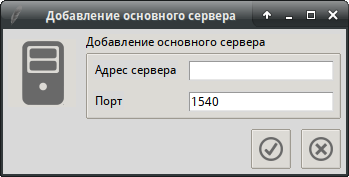
Later, our server will appear in the tree, and by clicking on it, a list of clusters will open, or an error message will be displayed.
2. By clicking on the cluster name, a list of functions available for it will open.
3.…
And so on, that is, to add a new cluster, select any available one from the list and click the ‘+’ button in the toolbar, and a dialog for adding a new one will be displayed:
The buttons in the toolbar perform functions depending on the context, i.e., the procedure executed will be based on which tree or list element is selected.
Let's consider the example of the add button (‘+’):
Code for the button creation:
ttk::button $frm_tool.btn_add -command Add -image add_grey_32Here we see that when the button is pressed, the ‘Add’ procedure will be executed; its code:
proc Add {} {
    global active_cluster host
    # Determine the ID of the selected element
    set id  [.frm_tree.tree selection]
    # Determine the value of this element
    set values [.frm_tree.tree item [.frm_tree.tree selection] -values]
    set key [lindex [split $id "::"] 0]
    # depending on what is selected, the appropriate procedure will be launched
    if {$key eq "" || $key eq "server"} {
        set host [ Add::server ]
        return
    }
    Add::$key .frm_tree.tree $host $values
}
And here lies one of the advantages of tuck — as a procedure name, you can pass a variable value:
Add::$key .frm_tree.tree $host $valuesThat is, for example, if we click on the main server and press ‘+’, the Add::server procedure will be launched; if we click on a cluster — Add::cluster, and so on (about where the necessary ‘keys’ come from, I will write a bit later), the mentioned procedures render graphical elements corresponding to the context.
As you may have noticed, the forms are similar in style — this is not surprising, as they are output by a single procedure, specifically the main framework of the form (window, buttons, image, label), the name of the procedure AddTopLevel
proc AddToplevel {lbl img {win_name .add}} {
    set cmd "destroy $win_name"
    if [winfo exists $win_name] {destroy $win_name}
    toplevel $win_name
    wm title $win_name $lbl
    wm iconphoto $win_name tcl
    # label with icon
    ttk::label $win_name.lbl -image $img
    # frame with input fields
    set frm [ttk::labelframe $win_name.frm -text $lbl -labelanchor nw]

    grid columnconfigure $frm 0 -weight 1
    grid rowconfigure $frm 0 -weight 1
    # frame and buttons
    set frm_btn [frame $win_name.frm_btn -border 0]
    ttk::button $frm_btn.btn_ok -image ok_grey_24 -command { }
    ttk::button $frm_btn.btn_cancel -command $cmd -image quit_grey_24
    grid $win_name.lbl -row 0 -column 0 -sticky nw -padx 5 -pady 10
    grid $frm -row 0 -column 1 -sticky nw -padx 5 -pady 5
    grid $frm_btn -row 1 -column 1 -sticky se -padx 5 -pady 5
    pack  $frm_btn.btn_cancel  -side right
    pack  $frm_btn.btn_ok  -side right -padx 10
    return $frm
}
Call parameters: title, image name for the icon from the library (lib/images.tcl), and an optional window name parameter (default .add). Thus, using the examples above for adding a main server and a cluster, the calls would be accordingly:
AddToplevel "Adding Main Server" server_grey_64or
AddToplevel "Adding Cluster" cluster_grey_64Continuing with these examples, I will show the procedures that display the add dialogs for the server or cluster.
Add::server
proc Add::server {} {
    global default
    # display the main form
    set frm [AddToplevel "Adding Main Server" server_grey_64]
    # add labels and input fields to this form
    label $frm.lbl_host -text "Server Address"
    entry  $frm.ent_host
    label $frm.lbl_port -text "Port"
    entry $frm.ent_port
    $frm.ent_port  insert end $default(port)
    grid $frm.lbl_host -row 0 -column 0 -sticky nw -padx 5 -pady 5
    grid $frm.ent_host -row 0 -column 1 -sticky nsew -padx 5 -pady 5
    grid $frm.lbl_port -row 1 -column 0 -sticky nw -padx 5 -pady 5
    grid $frm.ent_port -row 1 -column 1 -sticky nsew -padx 5 -pady 5
    grid columnconfigure $frm 0 -weight 1
    grid rowconfigure $frm 0 -weight 1
    #set frm_btn [frame .add.frm_btn -border 0]
    # redefining the button click handler
    .add.frm_btn.btn_ok configure -command {
        set host [SaveMainServer [.add.frm.ent_host get] [.add.frm.ent.port get]]
        .frm_tree.tree insert {} end -id "server::$host" -text "$host" -values "$host"
        destroy .add
        return $host
    }
    return $frm
}
Add::cluster
proc Add::cluster {tree host values} {
    global default lifetime_limit expiration_timeout session_fault_tolerance_level
    global max_memory_size max_memory_time_limit errors_count_threshold security_level
    global load_balancing_mode kill_problem_processes
    agent_user agent_pwd cluster_user cluster_pwd auth_agent
    if {$agent_user ne "" && $agent_pwd ne ""} {
        set auth_agent "--agent-user=$agent_user --agent-pwd=$agent_pwd"
    } else {
        set auth_agent ""
    }
    # setting global variables ()
    set lifetime_limit $default(lifetime_limit)
    set expiration_timeout $default(expiration_timeout)
    set session_fault_tolerance_level $default(session_fault_tolerance_level)
    set max_memory_size $default(max_memory_size)
    set max_memory_time_limit $default(max_memory_time_limit)
    set errors_count_threshold $default(errors_count_threshold)
    set security_level [lindex $default(security_level) 0]
    set load_balancing_mode [lindex $default(load_balancing_mode) 0]

    set frm [AddToplevel "Adding Cluster" cluster_grey_64]

    label $frm.lbl_host -text "Main Server Address"
    entry  $frm.ent_host
    label $frm.lbl_port -text "Port"
    entry $frm.ent_port
    $frm.ent_port  insert end $default(port)
    label $frm.lbl_name -text "Cluster Name"
    entry  $frm.ent_name
    label $frm.lbl_secure_connect -text "Secure Connection"
    ttk::combobox $frm.cb_security_level -textvariable security_level -values $default(security_level)
    label $frm.lbl_expiration_timeout -text "Stop inactive processes after:"
    entry  $frm.ent_expiration_timeout -textvariable expiration_timeout
    label $frm.lbl_session_fault_tolerance_level -text "Fault Tolerance Level"
    entry  $frm.ent_session_fault_tolerance_level -textvariable session_fault_tolerance_level
    label $frm.lbl_load_balancing_mode -text "Load Balancing Mode"
    ttk::combobox $frm.cb_load_balancing_mode -textvariable load_balancing_mode
    -values $default(load_balancing_mode)
    label $frm.lbl_errors_count_threshold -text "Allowed Error Count Deviation, %"
    entry  $frm.ent_errors_count_threshold -textvariable errors_count_threshold
    label $frm.lbl_processes -text "Working Processes:"
    label $frm.lbl_lifetime_limit -text "Restart Period, sec."
    entry  $frm.ent_lifetime_limit -textvariable lifetime_limit
    label $frm.lbl_max_memory_size -text "Maximum Memory Size, KB"
    entry  $frm.ent_max_memory_size -textvariable max_memory_size
    label $frm.lbl_max_memory_time_limit -text "Memory Limit Exceed Interval, sec."
    entry  $frm.ent_max_memory_time_limit -textvariable max_memory_time_limit
    label $frm.lbl_kill_problem_processes -justify left -anchor nw -text "Force Kill Problem Processes"
    checkbutton $frm.check_kill_problem_processes -variable kill_problem_processes -onvalue yes -offvalue no

    grid $frm.lbl_host -row 0 -column 0 -sticky nw -padx 5 -pady 5
    grid $frm.ent_host -row 0 -column 1 -sticky nsew -padx 5 -pady 5
    grid $frm.lbl_port -row 1 -column 0 -sticky nw -padx 5 -pady 5
    grid $frm.ent_port -row 1 -column 1 -sticky nsew -padx 5 -pady 5
    grid $frm.lbl_name -row 2 -column 0 -sticky nw -padx 5 -pady 5
    grid $frm.ent_name -row 2 -column 1 -sticky nsew -padx 5 -pady 5
    grid $frm.lbl_secure_connect -row 3 -column 0 -sticky nw -padx 5 -pady 5
    grid $frm.cb_security_level -row 3 -column 1 -sticky nsew -padx 5 -pady 5
    grid $frm.lbl_expiration_timeout -row 4 -column 0 -sticky nw -padx 5 -pady 5
    grid $frm.ent_expiration_timeout -row 4 -column 1 -sticky nsew -padx 5 -pady 5
    grid $frm.lbl_session_fault_tolerance_level -row 5 -column 0 -sticky nw -padx 5 -pady 5
    grid $frm.ent_session_fault_tolerance_level -row 5 -column 1 -sticky nsew -padx 5 -pady 5
    grid $frm.lbl_load_balancing_mode -row 6 -column 0 -sticky nw -padx 5 -pady 5
    grid $frm.cb_load_balancing_mode -row 6 -column 1 -sticky nsew -padx 5 -pady 5
    grid $frm.lbl_errors_count_threshold -row 7 -column 0 -sticky nw -padx 5 -pady 5
    grid $frm.ent_errors_count_threshold -row 7 -column 1 -sticky nsew -padx 5 -pady 5
    grid $frm.lbl_processes -row 8 -column 0 -sticky nw -padx 5 -pady 5
    grid $frm.lbl_lifetime_limit -row 9 -column 0 -sticky nw -padx 5 -pady 5
    grid $frm.ent_lifetime_limit -row 9 -column 1 -sticky nsew -padx 5 -pady 5
    grid $frm.lbl_max_memory_size -row 10 -column 0 -sticky nw -padx 5 -pady 5
    grid $frm.ent_max_memory_size -row 10 -column 1 -sticky nsew -padx 5 -pady 5
    grid $frm.lbl_max_memory_time_limit -row 11 -column 0 -sticky nw -padx 5 -pady 5
    grid $frm.ent_max_memory_time_limit -row 11 -column 1 -sticky nsew -padx 5 -pady 5
    grid $frm.lbl_kill_problem_processes -row 12 -column 0 -sticky nw -padx 5 -pady 5
    grid $frm.check_kill_problem_processes -row 12 -column 1 -sticky nw -padx 5 -pady 5
    # redefining handler
    .add.frm_btn.btn_ok configure -command {
        RunCommand "" "cluster insert
        --host=[.add.frm.ent_host get]
        --port=[.add.frm.ent_port get]
        --name=[.add.frm.ent_name get]
        --expiration-timeout=$expiration_timeout
        --lifetime-limit=$lifetime_limit
        --max-memory-size=$max_memory_size
        --max-memory-time-limit=$max_memory_time_limit
        --security-level=$security_level
        --session-fault-tolerance-level=$session_fault_tolerance_level
        --load-balancing-mode=$load_balancing_mode
        --errors-count-threshold=$errors_count_threshold
        --kill-problem-processes=$kill_problem_processes
        $auth_agent $host"
        Run::server $tree $host ""
        destroy .add
    }
    return $frm
}
When comparing the code of these procedures, the difference is clear to the naked eye. I will draw attention to the handler for the 'Ok' button. In Tk, the properties of graphical elements can be overridden at runtime using an option. configureFor example, the initial command to output the button:
ttk::button $frm_btn.btn_ok -image ok_grey_24 -command { }However, in our forms, the command depends on the required functionality:
  .add.frm_btn.btn_ok configure -command {
        RunCommand "" "cluster insert
        --host=[.add.frm.ent_host get]
        --port=[.add.frm.ent_port get]
        --name=[.add.frm.ent_name get]
        --expiration-timeout=$expiration_timeout
        --lifetime-limit=$lifetime_limit
        --max-memory-size=$max_memory_size
        --max-memory-time-limit=$max_memory_time_limit
        --security-level=$security_level
        --session-fault-tolerance-level=$session_fault_tolerance_level
        --load-balancing-mode=$load_balancing_mode
        --errors-count-threshold=$errors_count_threshold
        --kill-problem-processes=$kill_problem_processes
        $auth_agent $host"
        Run::server $tree $host ""
        destroy .add
    }
In the example above, the 'Ok' button is configured to run the cluster addition procedure.
Here it is worth digressing to the work with graphical elements in Tk — for various data input elements (entry, combobox, checkbutton, etc.), a parameter called textvariable has been introduced:
entry $frm.ent_lifetime_limit -textvariable lifetime_limitThis variable is defined in the global namespace and holds the currently entered value. That is, to get the entered text from the field, you just need to read the value of the corresponding variable (provided it is defined when the element is created).
The second method of obtaining the entered text (for entry type elements) is to use the get command:
.add.frm.ent_name getBoth these methods can be seen in the above code.
Pressing this button, in this case, launches the RunCommand procedure with the constructed command string for adding a cluster in rac terms:
/opt/1C/v8.3/x86_64/rac cluster insert --host=localhost --port=1540 --name=dsdsds --expiration-timeout=0 --lifetime-limit=0 --max-memory-size=0 --max-memory-time-limit=0 --security-level=0 --session-fault-tolerance-level=0 --load-balancing-mode=performance --errors-count-threshold=0 --kill-problem-processes=no localhost:1545And here we come to the main command that controls the execution of rac with the parameters we need, also parsing the command output into lists and returning it if necessary:
RunCommand
proc RunCommand {root par} {
    global dir rac_cmd cluster work_list_row_count agent_user agent_pwd cluster_user cluster_pwd
    puts "$rac_cmd $par"
    set work_list_row_count 0
    # open channel in non-blocking mode
    # $rac - command with full path
    # $par - generated launch keys and options
    set pipe [open "|$rac_cmd $par" "r"]
    try {
        set lst ""
        set l ""
        # append command output to the list of lists
        while {[gets $pipe line] >= 0} {
            #puts $line
            if {$line eq ""} {
                lappend l $lst
                set lst ""
            } else {
                lappend lst [string trim $line]
            }
        }
        close $pipe
        return $l
    } on error {result options} {
        # Launch error handler
        ErrorParcing $result $options
        return ""
    }
}
After entering the main server data, it will be added to the tree; the following code in the above procedure Add:server is responsible for this:
.frm_tree.tree insert {} end -id "server::$host" -text "$host" -values "$host"Now, by clicking on the server's name in the tree, we will get a list of clusters managed by that server, and by clicking on a cluster, we will get a list of cluster elements (servers, information bases, etc.). This is implemented in the procedure TreePress (file lib/function.tcl):
proc TreePress {tree} {
   global host server active_cluster infobase
   # determine the selected item
    set id  [$tree selection]
   # set the necessary global variables
    SetGlobalVarFromTreeItems $tree $id
   # Determine the key and value, i.e., the type of the selected item
    set values [$tree item $id -values]
    set key [lindex [split $id "::"] 0]
   # depending on what was selected, the corresponding procedure will be launched
   # in the Run namespace
    Run::$key $tree $host $values
}
Accordingly, for the main server, Run::server will be launched (for the cluster — Run::cluster, for the work server — Run::work_server, etc.). That is, the value of the variable $key is part of the tree item's name defined by the option -id.
Let's pay attention to the procedure
Run::server
proc Run::server {tree host values} {
    # Retrieve the list of clusters for the specified server
    set lst [RunCommand server::$host "cluster list $host"]
    if {$lst eq ""} {return}
    set l [lindex $lst 0]
    #puts $lst
    # Remove unnecessary items from the list
    .frm_work.tree_work delete  [ .frm_work.tree_work children {}]
    # Read the list
    foreach cluster_list $lst {
        # Populate the list with the retrieved values
        InsertItemsWorkList $cluster_list
        # Process the output (list) to add data to the tree
        foreach i $cluster_list {
            #puts $i
            set cluster_list [split $i ":"]
            if  {[string trim [lindex $cluster_list 0]] eq "cluster"} {
                set cluster_id [string trim [lindex $cluster_list 1]]
                lappend cluster($cluster_id) $cluster_id
            }
            if  {[string trim [lindex $cluster_list 0]] eq "name"} {
                lappend  cluster($cluster_id) [string trim [lindex $cluster_list 1]]
            }
        }
    }
    # Add clusters to the tree
    foreach x [array names cluster] {
        set id [lindex $cluster($x) 0]
        if { [$tree exists "cluster::$id"] == 0 } {
            $tree insert "server::$host" end -id "cluster::$id" -text "[lindex $cluster($x) 1]" -values "$id"
            # Add items to the cluster
            InsertClusterItems $tree $id
        }
    }
    if { [$tree exists "agent_admins::$id"] == 0 } {
        $tree insert "server::$host" end -id "agent_admins::$id" -text "Administrators" -values "$id"
        #InsertClusterItems $tree $id
    }
}
This procedure processes what has been received from the server via the RunCommand command and adds various items to the tree—clusters, different root elements (databases, working servers, sessions, etc.). If you look closely, you can see a call to the InsertItemsWorkList procedure. It is used to add items to the graphical list, processing the output of the rac console utility, which was previously returned as a list in the $lst variable. This is a list of lists containing element pairs separated by colons.
For example, the list of cluster connections:
svk@svk ~]$ /opt/1C/v8.3/x86_64/rac connection list --cluster=783d2170-56c3-11e8-c586-fc75165efbb2 localhost:1545
connection     : dcf5991c-7d24-11e8-1690-fc75165efbb2
conn-id        : 0
host           : svk.home
process        : 79de2e16-56c3-11e8-c586-fc75165efbb2
infobase       : 00000000-0000-0000-0000-000000000000
application    : "JobScheduler"
connected-at   : 2018-07-01T14:49:51
session-number : 0
blocked-by-ls  : 0

connection     : b993293a-7d24-11e8-1690-fc75165efbb2
conn-id        : 0
host           : svk.home
process        : 79de2e16-56c3-11e8-c586-fc75165efbb2
infobase       : 00000000-0000-0000-0000-000000000000
application    : "JobScheduler"
connected-at   : 2018-07-01T14:48:52
session-number : 0
blocked-by-ls  : 0
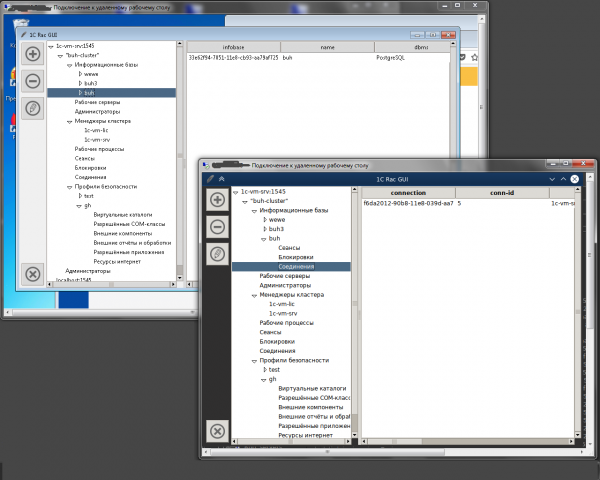
Graphically, it would look something like this:
The aforementioned procedure identifies the names of elements for the header and the data for filling the table:
InsertItemsWorkList
proc InsertItemsWorkList {lst} {
    global work_list_row_count
    # setting row color alternation
    if [expr $work_list_row_count % 2] {
        set tag dark
    } else {
        set tag light
    }
    # parsing lines into key - value pairs
    foreach i $lst {
        if [regexp -nocase -all -- {(D+)(s*?|)(:)(s*?|)(.*)} $i match param v2 v3 v4 value] {
            lappend column_list [string trim $param]
            lappend value_list [string trim $value]
        }
    }
     # populating the table
    .frm_work.tree_work configure -columns $column_list -displaycolumns $column_list
    .frm_work.tree_work insert {} end  -values $value_list -tags $tag
    .frm_work.tree_work column #0 -stretch
    # setting headers
    foreach j $column_list {
        .frm_work.tree_work heading $j -text $j
    }
    incr work_list_row_count
}
Here, instead of a simple command [split $str ""], which splits the string into elements separated by "" and returns a list, a regular expression is used because some elements also contain colons.
The InsertClusterItems procedure (one of several similar ones) simply adds a list of child elements with corresponding IDs to the required cluster element in the tree.
InsertClusterItems
proc InsertClusterItems {tree id} {
    set parent "cluster::$id"
    $tree insert $parent end -id "infobases::$id" -text "Information Bases" -values "$id"
    $tree insert $parent end -id "servers::$id" -text "Working Servers" -values "$id"
    $tree insert $parent end -id "admins::$id" -text "Administrators" -values "$id"
    $tree insert $parent end -id "managers::$id" -text "Cluster Managers" -values $id
    $tree insert $parent end -id "processes::$id" -text "Working Processes" -values "workprocess-all"
    $tree insert $parent end -id "sessions::$id" -text "Sessions" -values "sessions-all"
    $tree insert $parent end -id "locks::$id" -text "Locks" -values "blocks-all"
    $tree insert $parent end -id "connections::$id" -text "Connections" -values "connections-all"
    $tree insert $parent end -id "profiles::$id" -text "Security Profiles" -values $id
}
Two more implementation options for such a procedure can be considered, which will clearly demonstrate how to optimize and eliminate repetitive commands:
In this procedure, addition and verification are handled blatantly:
InsertBaseItems
proc InsertBaseItems {tree id} {
    set parent "infobase::$id"
    if { [$tree exists "sessions::$id"] == 0 } {
        $tree insert $parent end -id "sessions::$id" -text "Sessions" -values "$id"
    }
    if { [$tree exists "locks::$id"] == 0 } {
        $tree insert $parent end -id "locks::$id" -text "Locks" -values "$id"
    }
    if { [$tree exists "connections::$id"] == 0 } {
        $tree insert $parent end -id "connections::$id" -text "Connections" -values "$id"
    }
}
And here the approach is more correct:
InsertProfileItems
proc InsertProfileItems {tree id} {
    set parent "profile::$id"
    set lst {
        {dir "Virtual Directories"}
        {com "Allowed COM Classes"}
        {addin "External Components"}
        {module "External Reports and Processes"}
        {app "Allowed Applications"}
        {inet "Internet Resources"}
    }
    foreach i $lst {
        append item [lindex $i 0] "::$id"
        if { [$tree exists $item] == 0 } {
            $tree insert $parent end -id $item -text [lindex $i 1] -values "$id"
        }
        unset item
    }
}
The difference between them lies in the use of the loop, in which the repeating command (commands) is executed. Which approach to use is at the discretion of the developer.
We have covered adding items and retrieving data, now it's time to focus on editing. Since primarily the same parameters are used for both editing and adding (the information database is an exception), the dialog forms used are identical. The algorithm to call the procedures for adding looks like this:
Add::$key->AddToplevel
And for editing it looks like this:
Edit::$key->Add::$key->AddTopLevel
For example, let's take editing a cluster, i.e., by clicking on the name of the cluster in the tree, we press the edit button in the toolbar (the pencil icon) and the corresponding form will appear on the screen:
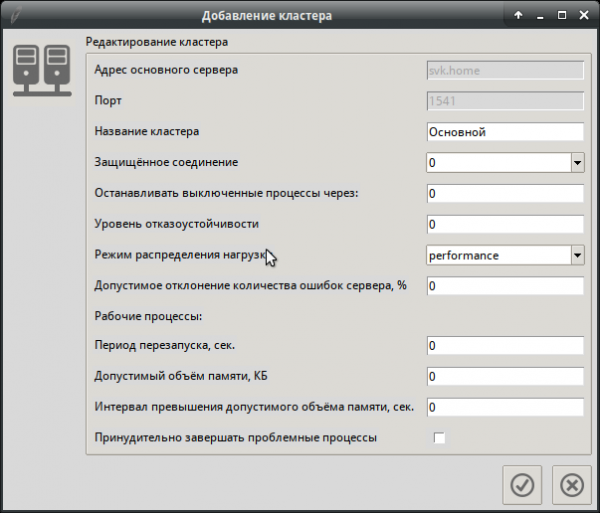
Edit::cluster
proc Edit::cluster {tree host values} {
    global default lifetime_limit expiration_timeout session_fault_tolerance_level
    global max_memory_size max_memory_time_limit errors_count_threshold security_level
    global load_balancing_mode kill_problem_processes active_cluster
    agent_user agent_pwd cluster_user cluster_pwd auth
    if {$cluster_user ne "" && $cluster_pwd ne ""} {
        set auth "--cluster-user=$cluster_user --cluster-pwd=$cluster_pwd"
    } else {
        set auth ""
    }
    # drawing form for the cluster
    set frm [Add::cluster $tree $host $values]
    # changing text on the label
    $frm configure -text "Editing Cluster"

    set active_cluster $values
    # getting data for the selected cluster
    set lst [RunCommand cluster::$values "cluster info --cluster=$active_cluster $host"]
    # filling in the fields
    FormFieldsDataInsert $frm $lst
    # disabling fields that are not allowed to be edited
    $frm.ent_host configure -state disable
    $frm.ent_port configure -state disable
    # reassigning the handler
    .add.frm_btn.btn_ok configure -command {
        RunCommand "" "cluster update
        --cluster=$active_cluster $auth
        --name=[.add.frm.ent_name get]
        --expiration-timeout=$expiration_timeout
        --lifetime-limit=$lifetime_limit
        --max-memory-size=$max_memory_size
        --max-memory-time-limit=$max_memory_time_limit
        --security-level=$security_level
        --session-fault-tolerance-level=$session_fault_tolerance_level
        --load-balancing-mode=$load_balancing_mode
        --errors-count-threshold=$errors_count_threshold
        --kill-problem-processes=$kill_problem_processes
        $auth $host"
        $tree delete "cluster::$active_cluster"
        Run::server $tree $host ""
        destroy .add
    }
}
From the comments in the code, everything is clear in principle, except that the button handler code is overridden and there is a procedure FormFieldsDataInsert, which fills in the fields with data and initializes the variables:
FormFieldsDataInsert
proc FormFieldsDataInsert {frm lst} {
    foreach i [lindex $lst 0] {
        # getting the list of parameters and values
        if [regexp -nocase -all -- {(D+)(s*?|)(:)(s*?|)(.*)} $i match param v2 v3 v4 value] {
            # changing characters
            regsub -all -- "-" [string trim $param] "_" entry_name
            # filling in the data
            if [winfo exists $frm.ent_$entry_name] {
                $frm.ent_$entry_name delete 0 end
                $frm.ent_$entry_name insert end [string trim $value """]
            }
            if [winfo exists $frm.cb_$entry_name] {
                global $entry_name
                set $entry_name [string trim $value """]
            }
            # changing values for checkboxes
            if [winfo exists $frm.check_$entry_name] {
                global $entry_name
                if {$value eq "0"} {
                    set $entry_name no
                } elseif {$value eq "1"} {
                    set $entry_name yes
                } else {
                    set $entry_name $value
                }
            }
        }
    }
}
In this procedure, another advantage of TCL has emerged — variable names can take on the values of other variables. That is, to automate form filling and variable initialization, the field names and variable names correspond to the keys of the rac utility's command line and the names of the command output parameters, with some exceptions — dashes are replaced with underscores. For example, scheduled-jobs-deny corresponds to the field ent_scheduled_jobs_deny and the variable scheduled_jobs_deny.
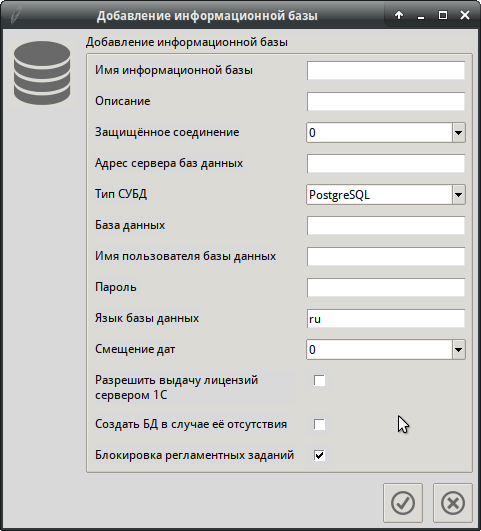
The forms for adding and editing may differ in the composition of fields; for example, working with the information base:
Adding IB
Editing IB
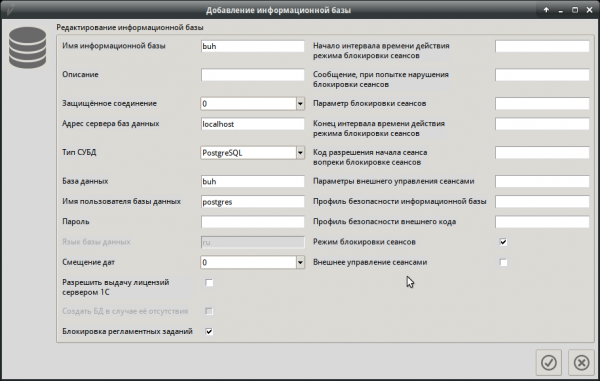
In the editing procedure Edit::infobase, the required fields are added to the form; the code is extensive, so I won't include it here.
Procedures for adding, editing, and deleting have been implemented analogously for other elements.
Since the utility's operation implies an unlimited number of servers, clusters, information bases, etc., several global variables have been introduced to determine which cluster each server or IB belongs to, with values set at each click on tree elements. That is, the procedure recursively traverses all parent elements and sets the variables:
SetGlobalVarFromTreeItems
proc SetGlobalVarFromTreeItems {tree id} {
    global host server active_cluster infobase
    set parent [$tree parent $id]
    set values [$tree item $id -values]
    set key [lindex [split $id "::"] 0]
    switch -- $key {
        server {set host $values}
        work_server {set server $values}
        cluster {set active_cluster $values}
        infobase {set infobase $values}
    }
    if {$parent eq ""} {
        return
    } else {
        SetGlobalVarFromTreeItems $tree $parent
    }
}
The 1C cluster allows operation both with and without authorization. There are two types of administrators — the cluster agent administrator and the cluster administrator. Accordingly, for proper operation, four more global variables have been introduced to store the administrator's login and password. That is, if an administrator account exists in the cluster, a dialog will pop up to enter the login and password, and the data will be saved in memory to be included in each command for the respective cluster.
This is handled by the error processing procedure
ErrorParcing
proc ErrorParcing {err opt} {
    global cluster_user cluster_pwd agent_user agent_pwd
        switch -regexp -- $err {
        "Cluster administrator is not authenticated" {
            AuthorisationDialog "Cluster Administrator"
            .auth_win.frm_btn.btn_ok configure -command {
                set cluster_user [.auth_win.frm.ent_name get]
                set cluster_pwd [.auth_win.frm.ent_pwd get]
                destroy .auth_win
            }
            #RunCommand $root $par
        }
        "Central server administrator is not authenticated" {
            AuthorisationDialog "Cluster Agent Administrator"
            .auth_win.frm_btn.btn_ok configure -command {
                set agent_user [.auth_win.frm.ent_name get]
                set agent_pwd [.auth_win.frm.ent_pwd get]
                destroy .auth_win
            }
        }
        "Cluster administrator is not authenticated" {
            AuthorisationDialog "Cluster Administrator"
            .auth_win.frm_btn.btn_ok configure -command {
                set cluster_user [.auth_win.frm.ent_name get]
                set cluster_pwd [.auth_win.frm.ent_pwd get]
                destroy .auth_win
            }
            #RunCommand $root $par
        }
        "Central server administrator is not authenticated" {
            AuthorisationDialog "Cluster Agent Administrator"
            .auth_win.frm_btn.btn_ok configure -command {
                set agent_user [.auth_win.frm.ent_name get]
                set agent_pwd [.auth_win.frm.ent_pwd get]
                destroy .auth_win
            }
        }
        (.+) {
            tk_messageBox -type ok -icon error -message "$err"
        }
    }
}
That is, depending on what the command returns, the reaction will be accordingly.
Currently, the functionality is about 95% complete, with the remaining work on security profiles to be implemented and testing to be done =). That's all for now. I apologize for the truncated narrative.
The code, as usual, is available. .
Update: I have completed the work on security profiles. The functionality is now 100% implemented.
Update 2: English and Russian localization added, functionality tested on Windows 7.
Source: habr.com
