

Hello everyone.
This spring, I came across a project where the guys learned to run a Dota 2 server of the 2014 version and, consequently, play on it. I'm a big fan of this game and couldn't pass up the unique opportunity to relive my childhood.
I dove in very deeply, and it turned out that I wrote a Discord bot that takes care of almost all the functionality that is not supported in the old version of the game, namely match-making.
Before all the updates, the lobby was created manually. We gathered 10 reactions on a message and set up the server manually or hosted a local lobby.
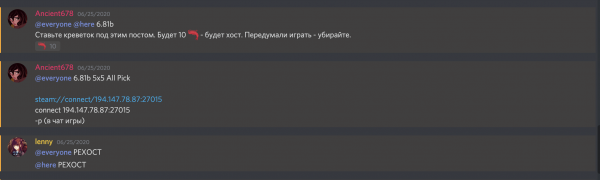
My programmer nature couldn't handle that amount of manual work, so in one night I threw together the simplest version of a bot that automatically started the server when 10 people gathered.
I decided to write it in Node.js because I don't really like Python, and I feel more comfortable in this environment.
This is my first experience writing a bot for Discord, but it turned out to be quite simple. The official npm module discord.js provides a convenient interface for working with messages, collecting reactions, etc.
Disclaimer: all code examples are 'up-to-date', meaning they have gone through several iterations of rewrites at night.
The core of match-making is a 'queue' where players wanting to play are placed and removed when they no longer wish to play or have found a game.
This is what a 'player' entity looks like. Initially, it was just the user's ID in Discord, but plans for a launcher/game finder from the site are in the works, but more on that later.
export enum Realm {
  DISCORD,
  EXTERNAL,
}

export default class QueuePlayer {
  constructor(public readonly realm: Realm, public readonly id: string) {}

  public is(qp: QueuePlayer): boolean {
    return this.realm === qp.realm && this.id === qp.id;
  }

  static Discord(id: string) {
    return new QueuePlayer(Realm.DISCORD, id);
  }

  static External(id: string) {
    return new QueuePlayer(Realm.EXTERNAL, id);
  }
}
And here is the queue interface. Instead of 'players', an abstraction in the form of a 'group' is used. For a single player, the group consists of just themselves, and for players in a group, it consists of all the players in the group.
export default interface IQueue extends EventEmitter {
  inQueue: QueuePlayer[]
  put(uid: Party): boolean;
  remove(uid: Party): boolean;
  removeAll(ids: Party[]): void;

  mode: MatchmakingMode
  roomSize: number;
  clear(): void
}
I decided to use events to exchange context. It fit the cases — for the event "game found for 10 people," we can send the necessary message to the players via private messages and execute the main business logic — starting a task to check readiness, preparing the lobby for launch, and so on.
For IOC I use InversifyJS. I have a pleasant experience working with this library. Fast and simple!
We have several queues on our server — 1v1 modes have been added, along with regular/ranked and a couple of custom games. Therefore, there's a singleton RoomService that stands between the user and the game search.
constructor(
    @inject(GameServers) private gameServers: GameServers,
    @inject(MatchStatsService) private stats: MatchStatsService,
    @inject(PartyService) private partyService: PartyService
  ) {
    super();
    this.initQueue(MatchmakingMode.RANKED);
    this.initQueue(MatchmakingMode.UNRANKED);
    this.initQueue(MatchmakingMode.SOLOMID);
    this.initQueue(MatchmakingMode.DIRETIDE);
    this.initQueue(MatchmakingMode.GREEVILING);
    this.partyService.addListener(
      "party-update",
      (event: PartyUpdatedEvent) => {
        this.queues.forEach((q) => {
          if (has(q.queue, (t) => t.is(event.party))) {
            // if queue has this party, we re-add party
            this.leaveQueue(event.qp, q.mode)
            this.enterQueue(event.qp, q.mode)
          }
        });
      }
    );

    this.partyService.addListener(
      "party-removed",
      (event: PartyUpdatedEvent) => {
        this.queues.forEach((q) => {
          if (has(q.queue, (t) => t.is(event.party))) {
            // if queue has this party, we remove it
            q.remove(event.party)
          }
        });
      }
    );
  }
(Code snippet to represent how the processes look roughly)
Here I initialize a queue for each of the implemented game modes, and I also listen for changes in "groups" to adjust the queues and avoid some conflicts.
So, I'm clever; I pasted in pieces of code that don’t really relate to the topic, and now let’s move on directly to matchmaking.
Let's consider a case:
1) A user wants to play.
2) To start searching, they use Gateway=Discord, meaning they react to a message:

3) This gateway goes to RoomService and says, "A user from Discord wants to join the queue, mode: unranked game."
4) RoomService accepts the gateway's request and puts the user (or rather, the user's group) in the appropriate queue.
5) The queue checks at each update whether there are enough players for a game. If so, we emit an event:
private onRoomFound(players: Party[]) {
    this.emit("room-found", {
      players,
    });
  }
6) RoomService, obviously, eagerly awaits each queue in anticipation of this event. We receive a list of players, form a virtual 'room' from them, and of course, emit the event:
queue.addListener("room-found", (event: RoomFoundEvent) => {
      console.log(
        `Room found mode: [${mode}]. Time to get free room for these guys`
      );
      const room = this.getFreeRoom(mode);
      room.fill(event.players);

      this.onRoomFormed(room);
    });
7) Now we've reached the 'highest' instance — the class Bot. In general, it handles communication between gateways (how funny it looks in Russian, I can't help) and the matchmaking business logic. The bot listens for the event and instructs DiscordGateway to send all users a readiness check.
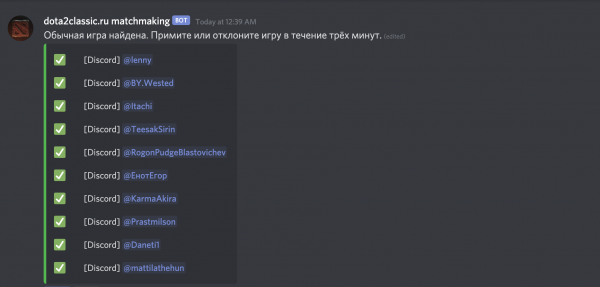
8) If someone declines or does not accept the game within 3 minutes, then we do NOT return them to the queue. All others are returned to the queue, and we wait for another 10 people to gather. If all players accept the game, then the interesting part begins.
Dedicated server configuration
Our games are hosted on a VDS with Windows Server 2012. From this, we can draw several conclusions:
- There is no Docker on it, which struck me right in the heart.
- We save on rent.
The task is: to run a process on the VDS from a VPS on Linux. I wrote a simple server in Flask. Yes, I don't like Python, but what can I do — it's faster and easier to write this server in it.
It performs 3 functions:
- Starting the server with configuration — choosing the map, the number of players to start the game, and a set of plugins. I won't be writing about plugins now — that's a separate story with liters of coffee at night mixed with tears and pulled hair.
- Stopping/restarting the server in case of unsuccessful connections that we can only handle manually.
Here it's simple; code examples are even unwarranted. The script is 100 lines long.
So, when 10 people gather together and accept the game, the server is launched, and everyone is eager to play, a link to connect to the game is sent to personal messages.
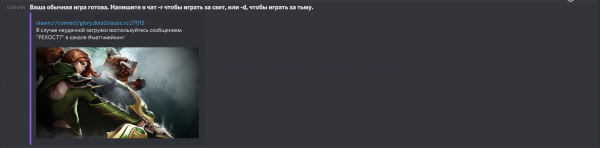
By clicking the link, the player connects to the game server, and then everything is automatic. After about 25 minutes, the virtual 'room' with players is cleared.
I apologize in advance for the disjointedness of the article; I haven't written here in a long time, and there is too much code to highlight the important parts. Just a mess.
If I see interest in the topic, there will be a second part — it will include my struggles with plugins for srcds (Source dedicated server), and probably a rating system and a mini-dotabuff, a website for game statistics.
A few links:
Source: habr.com
