

Hello, Habr!
In this article, we will begin discussing how the is structured and what technologies are used in its development.
Why do we think this is interesting? Firstly, because the '1C:Enterprise 8' platform is a large application (over 10 million lines of code) written in C++ (client, server, etc.), JavaScript (web client), and, recently, also Large projects are interesting due to their scale as issues that go unnoticed in smaller codebases become prominent. Secondly, '1C:Enterprise' is a replicable, boxed product, and there are very few articles about such developments on Habr. Furthermore, it's always intriguing to learn how other teams and companies operate.
So, let's get started. In this article, we will review some of the technologies used in the platform, outlining the landscape without delving deeply into implementation. For many mechanisms, a detailed discussion could fill an entire separate article, or for some, even a whole book!
First, we should clarify some basics—what is the '1C:Enterprise' platform and what components does it consist of? The answer isn't straightforward, as the term 'Platform' (for brevity, we will refer to it in this way) encompasses the business application development tool, runtime environment, and administration tools. We can conditionally highlight the following components:
- server cluster
- a 'thin' client capable of connecting to the server via HTTP and its own binary protocol
- a client for working in a two-tier architecture with a database located on a hard drive or network folder
- web client
- application server administration tools
- development environment (known as Configurator)
- execution environment for iOS, Android, and Windows Phone (1C mobile platform)
All these parts, except for the web client, are written in C++. In addition, there is a recently announced , written in Java.
Native applications
Native applications are developed using C++03. On Windows, Microsoft Visual C++ 12 (Windows XP compatible profile) is used as the compiler, while gcc 4.8 is used for Linux and Android, and clang 5.0 for iOS. A unified standard library is used across all OSs and compilers — STLPort. This solution reduces the likelihood of implementation-specific STL errors. We are currently planning to transition to the STL implementation provided with CLang, as STLPort has ceased to be developed and is incompatible with the C++11 support mode enabled in gcc.
The server codebase is shared 99%, while the client codebase is about 95% shared. Moreover, even the mobile platform uses the same C++ code as the 'main' platform, although the degree of unification is slightly lower.
Like most C++ users, we do not claim to utilize 100% of the language and its libraries. For example, we rarely use Boost, and regarding language features, we have little use for dynamic type casting. However, we actively employ:
- STL (in particular, strings, containers, and algorithms)
- multiple inheritance, including multiple implementation inheritance
- templates
- exceptions
- smart pointers (custom implementation)
By using multiple interface inheritance (completely abstract classes), a component model becomes possible, which will be discussed below.
Components
To ensure modularity, all functionality is divided into components, which are dynamic libraries (*.dll for Windows, *.so for Linux). There are over one hundred and fifty components in total; we will provide descriptions of some of them:
backend
Contains the platform's metadata 'engine'
accnt
Objects that application developers use to build accounting (charts of accounts and accounting registers)
bsl
Engine for executing the embedded language
nuke
Custom memory allocator implementation
dbeng8
File database engine. A simple file-server database machine based on ISAM, including a basic SQL processor
wbase
Contains basic classes and functions for implementing the Windows user interface — window classes, access to GDI, etc.
Splitting into multiple components is beneficial from several perspectives:
- Separation promotes better design, particularly better code isolation
- The component set allows for flexible assembly of different delivery options:
- For example, the installation of a thin client will include wbase but will not include backend.
- On the server, wbase, on the contrary, will not be present.
- Both options will, of course, include nuke and bsl.
All the components needed for this launch option are loaded when the program starts. This is necessary, in particular, for registering SCOM classes, which will be discussed below.
SCOM
For lower-level decomposition, the SCOM system is used, which is ideologically similar to the ATL library. For those who have not worked with ATL, let's briefly list its main capabilities and features.
For the specially formatted SCOM class:
- Provides factory methods that allow creating a class from another component knowing only its name (without revealing the implementation).
- Provides a smart pointer infrastructure with reference counting. There is no need to manually monitor the lifetime of the SCOM class.
- Allows you to check if an object implements a specific interface and automatically casts the object pointer to the interface pointer.
- Create a service object that is always available through the get_service method, etc.
For example, you can describe in the component json.dll a class for reading JSON (for instance, JSONStreamReader).
Classes and instances can be created from other components registered in the SCOM machine:
SCOM_CLASS_ENTRY(JSONStreamReader)
This macro will describe a special static class registrar whose constructor will be called when the component is loaded into memory.
After this, you can create its instance in another component:
IJSONStreamReaderPtr jsonReader = create_instance(SCOM_CLSIDOF(JSONStreamReader));
To support services, SCOM offers an additional, quite complex infrastructure. Central to this is the concept of a SCOM process, which serves as a container for running services (i.e., acts as a Service Locator) and also contains bindings to localized resources. The SCOM process binds to the OS thread. As a result, services can be obtained within the application like this:
SCOM_Process* process = core::current_process();
if (process)
	return get_service(process);
Furthermore, by switching logical (SCOM) processes tied to the stream, it is possible to achieve almost independent application environments from the perspective of information space, all operating within a single thread. This is how our thin client is designed, which works with a file database — within a single OS process, there are two SCOM processes: one connected to the client, and the other — to the server. This approach enables the unification of code writing that will operate both on a local file database and in a 'true' client-server setup. The price for such uniformity is the overhead, but practice shows that it is worth it.
The business logic and interface part of 1C:Enterprise are implemented based on the SCOM component model.
User Interface
By the way, regarding interfaces. We do not use standard Windows controls; our controls are implemented directly on the Windows API. For the Linux version, a layer has been created that operates through the wxWidgets library.
The control library is independent of other parts of '1C:Enterprise' and is also used in several other internal utilities.
Over the years of development of 1C:Enterprise, the appearance of the controls has changed, but a significant change in principles occurred only once, in 2009, with the release of version 8.2 and the introduction of 'managed forms'. In addition to changing the appearance, the fundamental principle of form layout changed — abandoning pixel-perfect positioning of elements in favor of flow layout. Moreover, in the new model, controls work not directly with domain objects but with special DTO ().
These changes allowed for the creation of a web client for '1C:Enterprise', replicating the C++ logic of the controls in JavaScript. We strive to maintain functional equivalence between thin and web clients. When this is not possible, for example, due to limitations of the available JavaScript API (such as the very limited file handling capabilities), we often implement the required functionality using browser extensions written in C++. Currently, we support Internet Explorer and Microsoft Edge (Windows), Google Chrome (Windows), Firefox (Windows and Linux), and Safari (MacOS).
In addition, the technology of managed forms is used to create the interface of mobile applications on the 1C platform. On mobile devices, the rendering of controls is implemented using the 'native' technologies of the operating system, but the same code is used for the logic of form layout and interface response as in the 'large' platform '1C:Enterprise'.
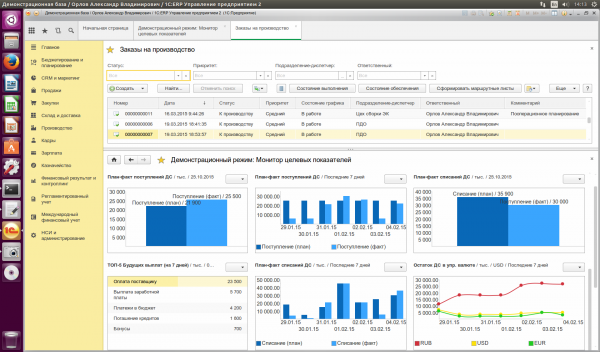
1C Interface on Linux OS
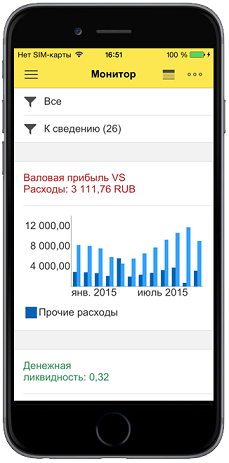
1C Interface on Mobile Device
1C Interface on Other Platforms 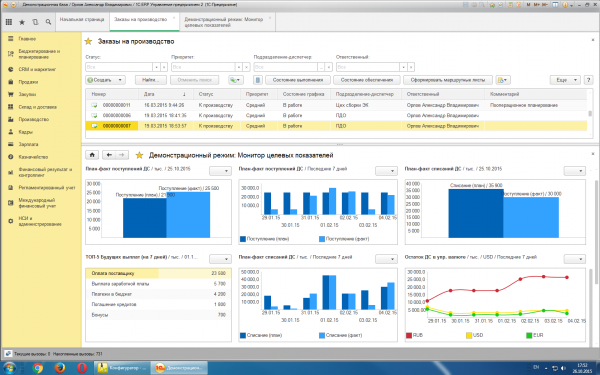
1C Interface on Windows OS
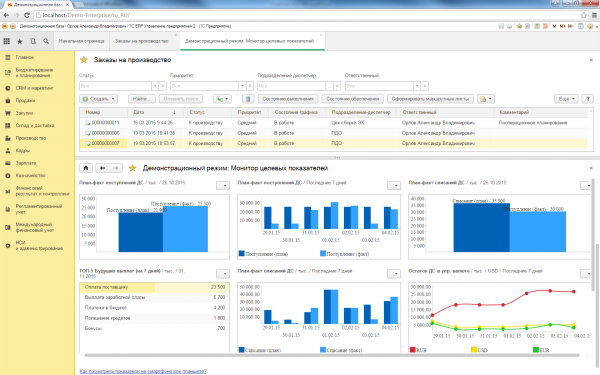
1C Interface — Web Client
Open source
Although we do not use standard libraries for C++ developers under Windows (MFC, controls from WinAPI), we do not write all components ourselves. The library has already been mentioned , and we also use:
- for working with HTTP and FTP.
- for cryptography and establishing TLS connections.
- for parsing XML.
- for working with mail protocols (POP3, SMTP, IMAP).
- for parsing email messages.
- for storing user activity logs.
- for internationalization.
The list can go on.
In addition, we use heavily modified versions of and when developing unit tests.
The libraries required adaptation for compatibility with the SCOM model of component organization.
The prevalence of 1C makes the platform an excellent stress test for the libraries used in it. The diversity of users and scenarios quickly detects bugs even in the most rarely used parts of the code. We fix them on our side and try to give back to the authors of the libraries. The experience of interaction varies significantly.
Developers and Some respond quickly to pull requests, but the patch, for example, in we still did not manage to return.
Conclusion
In this article, we touched on several key aspects of the development of the '1C:Enterprise' platform. In the limited scope of the article, we only addressed some interesting aspects, in our opinion.
A general description of various platform mechanisms can be viewed .
What topics would you be interested in for future articles?
How is the 1C mobile platform implemented?
Description of the internal structure of the web client?
Or perhaps you are interested in the process of feature selection for new releases, development, and testing?
Leave your comments!
Source: habr.com
