

You may have already tried our new application . We are currently working hard on a release that will include, among other things, support for video calls! If you haven't seen the new 3CX client yet, join the !
However, we have noticed a fairly common issue — unstable operation of PUSH notifications for calls and messages. A typical negative review on Google Play: if the app is not currently active — calls are not received.

We take such feedback very seriously. Overall, the Google Firebase infrastructure used by Google for notifications works very reliably. Therefore, it's worth breaking down the PUSH issue into several levels — points where it may arise:
- Rare issues with the Google Firebase service. You can check the service status .
- Clear errors in our application — please leave feedback on Google Play.
- Problems with phone settings — you may have made certain settings or installed applications that are optimizers, interfering with PUSH operation.
- Features of this Android build on this specific phone model. Unlike Apple, Android device manufacturers customize the system, adding various 'enhancements' that by default or always block PUSH operation.
In this article, we will provide recommendations related to improving the reliability of PUSH specifically in the last two points.
Issues with connecting to Firebase servers
Often, there is a situation where the PBX is successfully connected to the Firebase infrastructure, but PUSH does not arrive on the device. In this case, check whether the issue only affects the 3CX application or other applications as well.
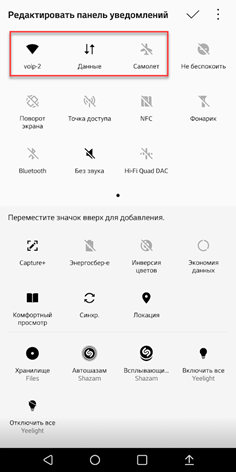
If PUSH is not arriving in other applications either, try toggling 'airplane mode', restarting Wi-Fi and 'mobile data', or even rebooting the phone. This clears the Android network stack and may resolve the issue. If only the 3CX application is affected, try uninstalling and reinstalling it.
Power-saving utilities from the phone manufacturer
Although Android has built-in power-saving features, smartphone manufacturers add their own 'enhancements.' While some of these can extend device battery life, they may also affect the performance of background applications. We recommend finding and disabling any third-party power-saving tools.
However, caution is advised here. Often, vendors create their own power-saving measures to prevent excessive heating of the phone. Sometimes they try to bypass hardware limitations this way, but if the phone catches fire, it won’t matter anymore. Therefore, after disabling the 'enhanced' power-saving features, test your device under load. And, of course, use quality chargers and branded USB cables.
Restrictions on Background Data Transfer
Background data transfer is used by many Android services and applications. A typical example is the automatic update of installed apps. If the user has restrictions on the volume of data transferred, the Android Background Data Restriction service simply blocks the background data exchange of applications, including PUSH notifications.
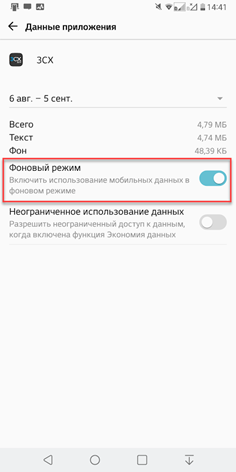
Be sure to exclude the 3CX client from such restrictions. Go to Settings > Apps & notifications > App info > 3CX > Data usage and enable Background data.
Data Saver Feature
The Data Saver feature is not used when connected to Wi-Fi, but it limits data transfer when using 3G/4G mobile networks. If you plan to use the 3CX client, you should disable this feature in Settings > Network & internet > Mobile network > top right menu > Data Saver.
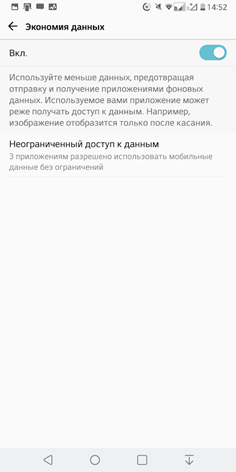
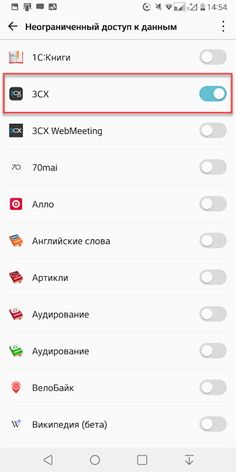
If you need to save data, tap Unlimited data access and enable it for 3CX (see previous screenshot).
Android Doze Mode
Starting with version Android 6.0 (API level 23) Marshmallow, Google implemented , which activates when the device is not in use for a while — it remains stationary with the display off and no connected charger. During this time, app activity is paused, data transmission is minimized, and the CPU enters power-saving mode. In Doze Mode, network requests are not executed, except for high-priority PUSH notifications. The requirements for Doze Mode are constantly tightening — in new Android versions, synchronization operations, various notifications, Wi-Fi scanning, and GPS functionality may be blocked...
Although 3CX sends high-priority PUSH notifications, the specific Android build may ignore them. This happens like this: you pick up the phone from the table, the screen lights up — and a notification about an incoming call arrives (delayed due to the power-saving Doze Mode). You answer — but it's silent; the call was already missed long ago. The issue is exacerbated by the fact that some devices take too long to exit Doze Mode or handle it incorrectly.
To check if Doze Mode is causing the problem, connect the phone to the charger, place it on the table, and wait a few seconds until it starts charging. Make a call to it — if both the PUSH notification and the call come through, then the issue lies with Doze Mode. As mentioned, Doze Mode does not activate when connected to a charger. However, if you simply move the standalone phone or turn on its screen — a complete exit from Doze is not guaranteed.
So, if the problem is with Doze, try removing the 3CX app from the battery optimization mode in Settings > Apps & notifications > App info > 3CX > Battery > Battery optimization exceptions.
Try our recommendations. If they don't help either, install on another phone and check its stability. This will help determine whether the issue is with the specific device or the network where you're using it. We also recommend installing all available Android updates.
If nothing helped, please describe the problem in detail, indicating the exact phone model and Android version on our .
And the final recommendation, which may seem obvious. The higher the class of the phone and the more well-known the manufacturer, the greater the chances of it working smoothly right "out of the box". Whenever possible, use devices from Google, Samsung, LG, OnePlus, Huawei, and all devices running . This article uses screenshots from the LG V30+ phone with Android 8.0.
Source: habr.com
