


Hello everyone. As part of my job, I have to look for email services for domains, meaning I need a good and reliable corporate email, specifically an external one. Previously, I was looking for video call services with corporate capabilities, and now it’s time to focus on email.
I can say that there seem to be many services available, but while working with most of them, various problems arise. Some have minimal support, making it necessary to handle issues on your own; others lack features, and still others have bugs that occasionally pop up. As a result, I decided to settle on two options — Corporate Email from Mail.ru and Yandex.Mail for Business.
Yandex.Mail for Business
This is a separate service from the company, which is now part of the Yandex.Connect platform. It includes tools for managing projects within a company and is primarily intended for corporate users. Or for freelancers working in a team.
First, a bit about Yandex.Connect. It includes tools such as:
- “Mail” — this is corporate email for your domain.
- “Disk” — shared file storage.
- “Calendar” — here you can create events and manage tasks.
- “Wiki” — a company knowledge base, with general access for employees.
- “Tracker” — task and project management with the ability to assign tasks, designate performers, and so on.
- “Forms” — creating surveys, collecting feedback.
- “Chats” — a corporate internal messenger that works both in a browser and as a desktop or mobile app.
The business email was integrated into Connect, meaning the corporate email for the domain. The standard Yandex.Mail remains an independent and completely free service for its users.
After the transition, each domain from PDD (mail for domain) became a separate organization within Connect. If there are other organizations, they can also be added. To do this, you need to log into Connect with the main account, select the appropriate list, and add a new organization. After that, you need to confirm access to domain. In fact, this procedure is nearly identical to what was in the Mail for Domain.
Working with mailboxes
Things are a bit different here than before (if, of course, you remember how it was "before"). To use the mail, you need to go to the "Admin Panel" from the main page of the service. After that, the user lands in the "Organizational Structure" subsection.
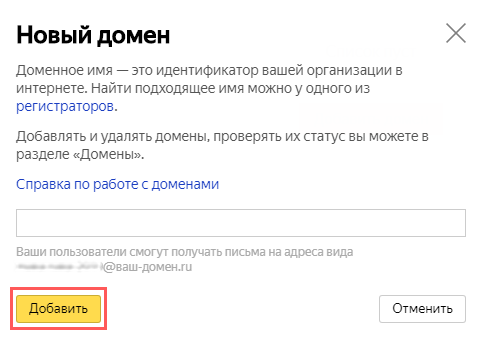
Here is where the main work with new mailboxes is done — they can be created, edited, and deleted. Each employee is usually assigned a separate language/account. You can add employees through the "Add" button. There’s also an option to create departments with their own mail and employees.
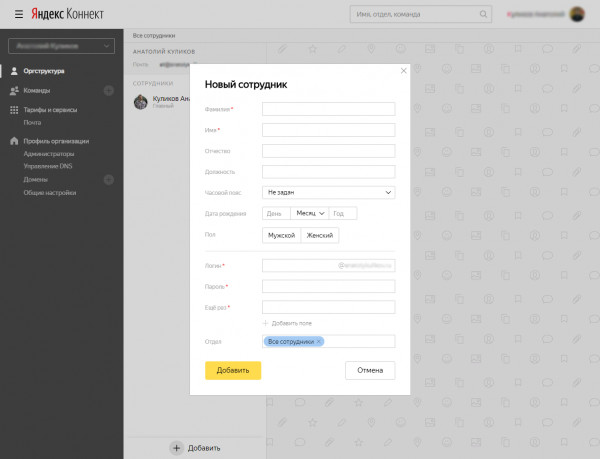
The administrator can add and edit employee information from the admin panel. Previously, this operation was more convoluted, as you had to create a mailbox in "Mail for Domain," log in, add user data, and then repeat everything again — if, of course, there was more than one user.

Each mailbox had to be treated as a separate account, including all associated tasks. For example, to change users’ avatars (like in a corporate style), you had to log in one by one and change their avatars sequentially, which took a lot of time. In "Connect," it’s simpler — the administrator doesn’t need to log in under each user (imagine if there are dozens or even hundreds of them). He manages each employee's account from his own account.
Corporate mail capabilities from "Yandex"
There are both paid and free plans. The free one is limited to a thousand users and 10 GB of file storage. In the free version, each user has their own "Disk," also free, while in the paid version, file storage is shared, starting from 1 TB. The more advanced the plan, the more file space it offers.
A company — a user of the service can get more than 1000 mailboxes, but each request is considered separately. To increase its limit, user activity must be high and stable. There is no need to pay for this, as it seems the company monetizes the service through advertising displayed to mail users.
Personal impressions
Overall, everything is good, but I would say that Yandex's corporate email is more suitable for small companies that need no more than 10-15 addresses. Larger companies can use Yandex's corporate email, but it will be a bit more complex.
The advertising in corporate inboxes leaves a rather poor impression. It’s clear that nothing is free; moreover, Yandex already offers ad-free email, but this is still a test project.
Mail.ru Domain Email
Mail.ru introduced its email as a cloud service for companies 7 years ago. This is a product that has stood the test of time and users. Its operation is roughly the same as that of regular Mail.ru email, but it offers more features. This year, Mail.ru Domain Email evolved into a new product for large businesses and the public sector. It is no longer a cloud solution but a boxed product that is installed on the client company's servers, and it in the Register of Domestic Software. This factor can be extremely important for domestic organizations, especially governmental ones.
As in the previous case, Mail.ru Domain Email is part of a multiservice platform that includes services for corporate communications. This includes file storage, a messenger, a calendar, etc. However, Mail.ru email has another feature — group calls — completely free and without time limits.
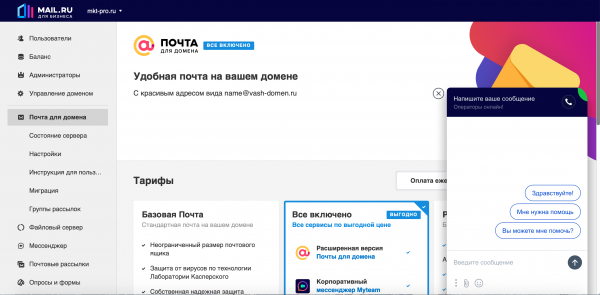
Mail.ru Domain Email includes the email service itself, as well as a calendar and an address book. For managing the email functions of the company, there is an administrative panel that allows for configuration and modification of each user's capabilities on the domain.
Among other features, the email supports SMTP and IMAP protocols with popular email clients like Outlook, Gmail, Thunderbird, The Bat, and Mail on Mac.
Features of Mail.ru Corporate Email
In addition to the usual email handling, the service offers features such as managing newsletters, contact groups, and the ability to grant shared access to individual user folders. Directly from the email, one can schedule a video meeting and send invitations to participants. They only need the link — no app download is required.
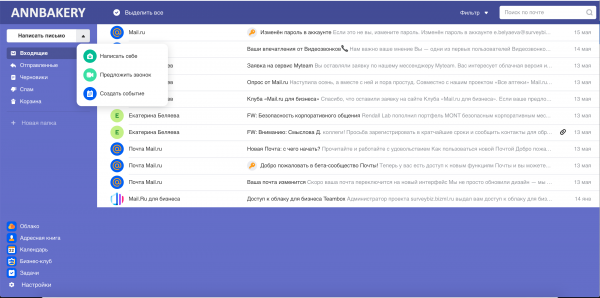
The company can send files of any size by email — even the free version of Mail.ru's domain email has no limits on the size of mailboxes and attached files. If a file exceeds 25 MB, it will be uploaded to the cloud and sent as a link in the email.
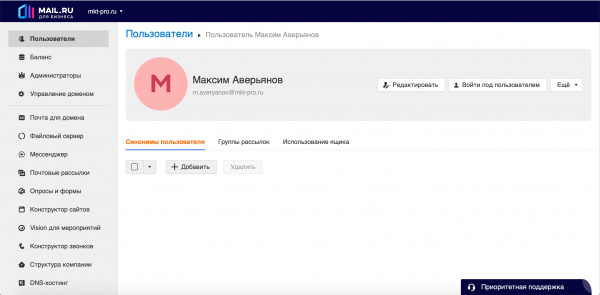
The administrative panel allows you to manage access rights, log in as any user, and restore emails deleted by any user. User actions and different device connections are logged. For convenience, synchronization with Active Directory has been added for working with user data.
Mail.ru's business email is connected to the Bug Bounty program HackerOne, under which Mail.ru pays between $10,000 and $35,000 to those who find vulnerabilities.
Additionally, there is Russian-speaking support that works quite efficiently. This is not available with most other email services, so for those who consider it important — keep that in mind. Support is divided into basic, where issues are resolved via email during working hours, and premium, which operates 24/7 by email and phone.
Personal impressions
Overall, the email service leaves a positive impression — there are many features, plus support, plus flexible management. It seems to be a slightly more 'mature' service than 'Yandex'. More functions, video calls, access systems, and all that. Of course, this opinion is subjective, so if I'm wrong — let's discuss it in the comments.
Well, that's all on this topic. Next time, I will try to describe a couple of foreign corporate email services.
Source: habr.com
