

Various aspects of DNS operation have already been addressed by the author in several published blog entries. In this context, the main focus has always been on enhancing the security of this key service for the entire Internet.

Until recently, despite the evident vulnerability of DNS traffic, which is still largely transmitted in plain text, the process of , despite the existence of various technologies such as DNSSEC/DANE, DNScrypt, DNS-over-TLS, and DNS-over-HTTPS, has stalled. While server solutions, several of which have been around for quite some time, are well-known and accessible, support for them in client software leaves much to be desired.
Fortunately, the situation is changing. In particular, the developers of the popular browser Firefox have announced plans to include support for (DoH) by default soon. This should help protect users' DNS traffic from the aforementioned threats, though it may potentially introduce new ones.
1. Issues with DNS-over-HTTPS
At first glance, the impending widespread adoption of DNS-over-HTTPS in Internet-enabled software seems to elicit only positive reactions. However, the devil, as they say, is in the details.
The first issue that limits the widespread application of DoH is its focus solely on web traffic. Indeed, the HTTP protocol and its current version, HTTP/2, on which DoH is based, form the basis of the WWW. But the Internet is not just the web. There are many popular services such as email, various messengers, file transfer systems, multimedia streaming, and more that do not use HTTP. Thus, despite many perceiving DoH as a panacea, it proves inapplicable without additional (and unnecessary) efforts for anything beyond browser technologies. By the way, DNS-over-TLS appears to be a much more worthy candidate for this role, encapsulating standard DNS traffic into the secure standard TLS protocol.
The second issue, which is potentially much more significant than the first, is the actual abandonment of the inherent DNS decentralization in favor of using a single DoH server specified in browser settings. In particular, Mozilla recommends using the service from Cloudflare. Similar services have also been launched by other notable figures in the Internet space, including Google. This means that the implementation of DNS-over-HTTPS as it is currently proposed only increases the dependency of end users on the largest services. It is no secret that the information that DNS query analysis can provide is capable of collecting even more data about users, as well as improving its accuracy and relevance.
In this regard, the author has been and remains an advocate for the widespread adoption of not DNS-over-HTTPS, but DNS-over-TLS in conjunction with DNSSEC/DANE as a universal, secure means that does not contribute to further centralization of the Internet to ensure the security of DNS traffic. Unfortunately, rapid adoption of broad support for alternatives to DoH in client software is unlikely for understandable reasons, leaving it to enthusiasts of secure technologies.
However, now that we have DoH, why not use it while avoiding potential corporate surveillance via their servers by switching to our own DNS-over-HTTPS server?
2. DNS-over-HTTPS Protocol
If we look at the standard describing the DNS-over-HTTPS protocol, we can see that it essentially represents a web API that encapsulates a standard DNS packet in the HTTP/2 protocol. This is implemented through special HTTP headers and by converting the binary format of the transmitted DNS data (see and subsequent documents) into a form that allows them to be transmitted and received, as well as to work with the necessary metadata.
By standard, only HTTP/2 and secure TLS connections are supported.
DNS queries can be sent using standard GET and POST methods. In the first case, the request is transformed into a base64URL-encoded string, while in the second, it is sent through the body of the POST request in binary form. During both the request and response, a special MIME type is used for the DNS data application/dns-message.
root@eprove:~ # curl -H 'accept: application/dns-message' 'https://my.domaint/dns-query?dns=q80BAAABAAAAAAAAB2V4YW1wbGUDY29tAAABAAE' -v
*   Trying 2001:100:200:300::400:443...
* TCP_NODELAY set
* Connected to eprove.net (2001:100:200:300::400) port 443 (#0)
* ALPN, offering h2
* ALPN, offering http/1.1
* successfully set certificate verify locations:
*   CAfile: /usr/local/share/certs/ca-root-nss.crt
  CApath: none
* TLSv1.3 (OUT), TLS handshake, Client hello (1):
* TLSv1.3 (IN), TLS handshake, Server hello (2):
* TLSv1.3 (IN), TLS handshake, Encrypted Extensions (8):
* TLSv1.3 (IN), TLS handshake, Certificate (11):
* TLSv1.3 (IN), TLS handshake, CERT verify (15):
* TLSv1.3 (IN), TLS handshake, Finished (20):
* TLSv1.3 (OUT), TLS change cipher, Change cipher spec (1):
* TLSv1.3 (OUT), TLS handshake, Finished (20):
* SSL connection using TLSv1.3 / TLS_AES_256_GCM_SHA384
* ALPN, server accepted to use h2
* Server certificate:
*  subject: CN=my.domain
*  start date: Jul 22 00:07:13 2019 GMT
*  expire date: Oct 20 00:07:13 2019 GMT
*  subjectAltName: host "my.domain" matched cert's "my.domain"
*  issuer: C=US; O=Let's Encrypt; CN=Let's Encrypt Authority X3
*  SSL certificate verify ok.
* Using HTTP2, server supports multi-use
* Connection state changed (HTTP/2 confirmed)
* Copying HTTP/2 data in stream buffer to connection buffer after upgrade: len=0
* Using Stream ID: 1 (easy handle 0x801441000)
> GET /dns-query?dns=q80BAAABAAAAAAAAB2V4YW1wbGUDY29tAAABAAE HTTP/2
> Host: eprove.net
> User-Agent: curl/7.65.3
> accept: application/dns-message
>
* TLSv1.3 (IN), TLS handshake, Newsession Ticket (4):
* Connection state changed (MAX_CONCURRENT_STREAMS == 100)!
< HTTP/2 200
< server: h2o/2.3.0-beta2
< content-type: application/dns-message
< cache-control: max-age=86274
< date: Thu, 12 Sep 2019 13:07:25 GMT
< strict-transport-security: max-age=15768000; includeSubDomains; preload
< content-length: 45
<
Warning: Binary output can mess up your terminal. Use "--output -" to tell
Warning: curl to output it to your terminal anyway, or consider "--output
Warning: " to save to a file.
* Failed writing body (0 != 45)
* stopped the pause stream!
* Connection #0 to host eprove.net left intact
Also note the header cache-control: in the response from the web server. The parameter max-age contains the TTL value for the returned DNS record (or the minimum value if a set of them is returned).
Based on the above, the operation of the DoH server consists of several stages.
- Receive the HTTP request. If it's a GET, then decode the packet from base64URL encoding.
- Send this packet to the DNS server.
- Receive a response from the DNS server
- Find the minimum TTL value in the received records.
- Return the response to the client via HTTP.
3. Your own DNS-over-HTTPS server
The simplest, fastest, and most efficient way to run your own DNS-over-HTTPS server is to use an HTTP/2 web server , which the author has briefly mentioned before (see "«).
The choice is supported by the fact that all the code for the DoH server can be fully implemented using the integrated interpreter in H2O, In addition to the standard libraries, a library (mrbgem) Socket is required for data exchange with the DNS server, which, fortunately, is already included in the current development version of H2O 2.3.0-beta2. in FreeBSD ports. However, it's not difficult to add it to any previous version by cloning the repository. to the directory /deps before compilation.
root@beta:~ # uname -v
FreeBSD 12.0-RELEASE-p10 GENERIC
root@beta:~ # cd /usr/ports/www/h2o
root@beta:/usr/ports/www/h2o # make extract
===>  License MIT BSD2CLAUSE accepted by the user
===>   h2o-2.2.6 depends on file: /usr/local/sbin/pkg - found
===> Fetching all distfiles required by h2o-2.2.6 for building
===>  Extracting for h2o-2.2.6.
=> SHA256 Checksum OK for h2o-h2o-v2.2.6_GH0.tar.gz.
===>   h2o-2.2.6 depends on file: /usr/local/bin/ruby26 - found
root@beta:/usr/ports/www/h2o # cd work/h2o-2.2.6/deps/
root@beta:/usr/ports/www/h2o/work/h2o-2.2.6/deps # git clone https://github.com/iij/mruby-socket.git
Cloning into 'mruby-socket'…
remote: Enumerating objects: 385, done.
remote: Total 385 (delta 0), reused 0 (delta 0), pack-reused 385
Counting objects: 100% (385/385), 98.02 KiB | 647.00 KiB/s, done.
Detecting changes: 100% (208/208), done.
root@beta:/usr/ports/www/h2o/work/h2o-2.2.6/deps # ll
total 181
drwxr-xr-x   9 root  wheel  18 12 Aug  16:09 brotli/
drwxr-xr-x   2 root  wheel   4 12 Aug  16:09 cloexec/
drwxr-xr-x   2 root  wheel   5 12 Aug  16:09 golombset/
drwxr-xr-x   4 root  wheel  35 12 Aug  16:09 klib/
drwxr-xr-x   2 root  wheel   5 12 Aug  16:09 libgkc/
drwxr-xr-x   4 root  wheel  26 12 Aug  16:09 libyrmcds/
drwxr-xr-x  13 root  wheel  32 12 Aug  16:09 mruby/
drwxr-xr-x   5 root  wheel  11 12 Aug  16:09 mruby-digest/
drwxr-xr-x   5 root  wheel  10 12 Aug  16:09 mruby-dir/
drwxr-xr-x   5 root  wheel  10 12 Aug  16:09 mruby-env/
drwxr-xr-x   4 root  wheel   9 12 Aug  16:09 mruby-errno/
drwxr-xr-x   5 root  wheel  14 12 Aug  16:09 mruby-file-stat/
drwxr-xr-x   5 root  wheel  10 12 Aug  16:09 mruby-iijson/
drwxr-xr-x   5 root  wheel  11 12 Aug  16:09 mruby-input-stream/
drwxr-xr-x   6 root  wheel  11 12 Aug  16:09 mruby-io/
drwxr-xr-x   5 root  wheel  10 12 Aug  16:09 mruby-onig-regexp/
drwxr-xr-x   4 root  wheel  10 12 Aug  16:09 mruby-pack/
drwxr-xr-x   5 root  wheel  10 12 Aug  16:09 mruby-require/
drwxr-xr-x   6 root  wheel  10 12 Sep 16:10 mruby-socket/
drwxr-xr-x   2 root  wheel   9 12 Aug  16:09 neverbleed/
drwxr-xr-x   2 root  wheel  13 12 Aug  16:09 picohttpparser/
drwxr-xr-x   2 root  wheel   4 12 Aug  16:09 picotest/
drwxr-xr-x   9 root  wheel  16 12 Aug  16:09 picotls/
drwxr-xr-x   4 root  wheel   8 12 Aug  16:09 ssl-conservatory/
drwxr-xr-x   8 root  wheel  18 12 Aug  16:09 yaml/
drwxr-xr-x   2 root  wheel   8 12 Aug  16:09 yoml/
root@beta:/usr/ports/www/h2o/work/h2o-2.2.6/deps # cd ../../../..
root@beta:/usr/ports/www/h2o # make install clean
...
The web server configuration is generally standard.
root@beta:/usr/ports/www/h2o #  cd /usr/local/etc/h2o/
root@beta:/usr/local/etc/h2o # cat h2o.conf
# this sample config gives you a feel for how h2o can be used
# and a high-security configuration for TLS and HTTP headers
# see https://h2o.examp1e.net/ for detailed documentation
# and h2o --help for command-line options and settings

# v.20180207 (c)2018 by Max Kostikov http://kostikov.co e-mail: max@kostikov.co

user: www
pid-file: /var/run/h2o.pid
access-log:
    path: /var/log/h2o/h2o-access.log
    format: "%h %v %l %u %t "%r" %s %b "%{Referer}i" "%{User-agent}i""
error-log: /var/log/h2o/h2o-error.log

expires: off
compress: on
file.dirlisting: off
file.send-compressed: on

file.index: [ 'index.html', 'index.php' ]

listen:
    port: 80
listen:
    port: 443
    ssl:
        cipher-suite: ECDHE-ECDSA-CHACHA20-POLY1305:ECDHE-RSA-CHACHA20-POLY1305:ECDHE-ECDSA-AES128-GCM-SHA256:ECDHE-RSA-AES128-GCM-SHA256:ECDHE-ECDSA-AES256-GCM-SHA384:ECDHE-RSA-AES256-GCM-SHA384:DHE-RSA-AES128-GCM-SHA256:DHE-RSA-AES256-GCM-SHA384:ECDHE-ECDSA-AES128-SHA256:ECDHE-RSA-AES128-SHA256:ECDHE-ECDSA-AES128-SHA:ECDHE-RSA-AES256-SHA384:ECDHE-RSA-AES128-SHA:ECDHE-ECDSA-AES256-SHA384:ECDHE-ECDSA-AES256-SHA:ECDHE-RSA-AES256-SHA:DHE-RSA-AES128-SHA256:DHE-RSA-AES128-SHA:DHE-RSA-AES256-SHA256:DHE-RSA-AES256-SHA:ECDHE-ECDSA-DES-CBC3-SHA:ECDHE-RSA-DES-CBC3-SHA:EDH-RSA-DES-CBC3-SHA:AES128-GCM-SHA256:AES256-GCM-SHA384:AES128-SHA256:AES256-SHA256:AES128-SHA:AES256-SHA:DES-CBC3-SHA:!DSS
        cipher-preference: server
        dh-file: /etc/ssl/dhparams.pem
        certificate-file: /usr/local/etc/letsencrypt/live/eprove.net/fullchain.pem
        key-file: /usr/local/etc/letsencrypt/live/my.domain/privkey.pem

hosts:
    "*.my.domain":
        paths: &go_tls
            "/":
                redirect:
                    status: 301
                    url: https://my.domain/
    "my.domain:80":
        paths: *go_tls
    "my.domain:443":
        header.add: "Strict-Transport-Security: max-age=15768000; includeSubDomains; preload"
        paths:
            "/dns-query":
               mruby.handler-file: /usr/local/etc/h2o/h2odoh.rb
The exception is only the URL handler /dns-query which is managed by our DNS-over-HTTPS server, written in mruby and called through the handler option mruby.handler-file.
root@beta: /usr/local/etc/h2o # cat h2odoh.rb
# H2O HTTP/2 web server as DNS-over-HTTP service
# v.20190908 (c)2018-2019 Max Kostikov https://kostikov.co e-mail: max@kostikov.co

proc {|env|
    if env['HTTP_ACCEPT'] == "application/dns-message"
        case env['REQUEST_METHOD']
            when "GET"
                req = env['QUERY_STRING'].gsub(/^dns=/'', '')
                # base64URL decode
                req = req.tr("-_", "+/")
                if !req.end_with?("=") && req.length % 4 != 0
                    req = req.ljust((req.length + 3) & ~3, "=")
                end
                req = req.unpack1("m")
            when "POST"
                req = env['rack.input'].read
            else
                req = ""
        end
        if req.empty?
            [400, { 'content-type' => 'text/plain' }, [ "Bad Request" ]]
        else
            # --- ask DNS server
            sock = UDPSocket.new
            sock.connect("localhost", 53)
            sock.send(req, 0)
            str = sock.recv(4096)
            sock.close
            # --- find lowest TTL in response
            nans = str[6, 2].unpack1('n') # number of answers
            if nans > 0 # no DNS failure
                shift = 12
                ttl = 0
                while nans > 0
                    # process domain name compression
                    if str[shift].unpack1("C")  curttl
                        ttl = curttl
                    end
                    nans -= 1
                 end
                 cc = 'max-age=' + ttl.to_s
            else
                 cc = 'no-cache'
            end
            [200, { 'content-type' => 'application/dns-message', 'content-length' => str.size, 'cache-control' => cc }, [ str ] ]
        end
    else
        [415, { 'content-type' => 'text/plain' }, [ "Unsupported Media Type" ]]
    end
}
Please note that the DNS packet handling is managed by the local caching server in this case. from the standard FreeBSD distribution. From a security standpoint, this is an optimal solution. However, nothing prevents you from replacing localhost it with the address of another DNS that you intend to use.
root@beta: /usr/local/etc/h2o # local-unbound version
usage:  local-unbound [options]
        start unbound daemon DNS resolver.
-h      this help
-c file config file to read instead of /var/unbound/unbound.conf
        file format is described in unbound.conf(5).
-d      do not fork into the background.
-p      do not create a pidfile.
-v      verbose (more times to increase verbosity)
Version 1.8.1
linked libs: mini-event internal (it uses select), OpenSSL 1.1.1a-freebsd  20 Nov 2018
linked modules: dns64 respip validator iterator
BSD licensed, see LICENSE in source package for details.
Report bugs to unbound-bugs@nlnetlabs.nl
root@eprove: /usr/local/etc/h2o # sockstat -46 | grep unbound
unbound  local-unbo 69749 3  udp6   ::1:53                *:*
unbound  local-unbo 69749 4  tcp6   ::1:53                *:*
unbound  local-unbo 69749 5  udp4   127.0.0.1:53          *:*
unbound  local-unbo 69749 6  tcp4   127.0.0.1:53          *:*
Now, restart H2O and see what results you get.
root@beta:/usr/local/etc/h2o # service h2o restart
Stopping h2o.
Waiting for PIDS: 69871.
Starting h2o.
start_server (pid:70532) starting now...
4. Testing
So, let's check the results by sending another test request and observing the network traffic using the utility tcpdump.
root@beta/usr/local/etc/h2o # curl -H 'accept: application/dns-message' 'https://my.domain/dns-query?dns=q80BAAABAAAAAAAAB2V4YW1wbGUDY29tAAABAAE'
Warning: Binary output can mess up your terminal. Use "--output -" to tell
Warning: curl to output it to your terminal anyway, or consider "--output
Warning: " to save to a file.
...
root@beta:~ # tcpdump -n -i lo0 udp port 53 -xx -XX -vv
tcpdump: listening on lo0, link-type NULL (BSD loopback), capture size 262144 bytes
16:32:40.420831 IP (tos 0x0, ttl 64, id 37575, offset 0, flags [none], proto UDP (17), length 57, bad cksum 0 (-e9ea)!)
    127.0.0.1.21070 > 127.0.0.1.53: [bad udp cksum 0xfe38 -> 0x33e3!] 43981+ A? example.com. (29)
        0x0000:  0200 0000 4500 0039 92c7 0000 4011 0000  ....E..9....@...
        0x0010:  7f00 0001 7f00 0001 524e 0035 0025 fe38  ........RN.5.%.8
        0x0020:  abcd 0100 0001 0000 0000 0000 0765 7861  .............exa
        0x0030:  6d70 6c65 0363 6f6d 0000 0100 01         mple.com.....
16:32:40.796507 IP (tos 0x0, ttl 64, id 37590, offset 0, flags [none], proto UDP (17), length 73, bad cksum 0 (-e9cb)!)
    127.0.0.1.53 > 127.0.0.1.21070: [bad udp cksum 0xfe48 -> 0x43fa!] 43981 q: A? example.com. 1/0/0 example.com. A 93.184.216.34 (45)
        0x0000:  0200 0000 4500 0049 92d6 0000 4011 0000  ....E..I....@...
        0x0010:  7f00 0001 7f00 0001 0035 524e 0035 fe48  .........5RN.5.H
        0x0020:  abcd 8180 0001 0001 0000 0000 0765 7861  .............exa
        0x0030:  6d70 6c65 0363 6f6d 0000 0100 01c0 0c00  mple.com........
        0x0040:  0100 0100 0151 8000 045d b8d8 22         .....Q...].."
^C
2 packets captured
23 packets received by filter
0 packets dropped by kernel
The output shows how the address resolution request example.com was received and successfully processed by the DNS server.
Now we need to activate our server in the Firefox browser. To do this, a few settings need to be changed on the configuration pages. about:config.
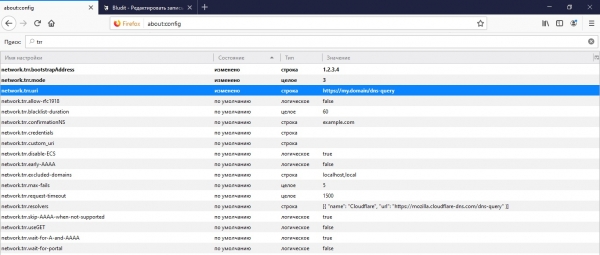
First, this is the address of our API that the browser will use to request DNS information at network.trr.uri. It is also recommended to specify the IP of the domain from this URL for secure resolution in IP using the browser itself without going to DNS in network.trr.bootstrapAddress. Finally, there is the actual parameter network.trr.mode enabling the use of DoH. Setting the value to '3' will force the browser to use DNS-over-HTTPS exclusively for name resolution, while a more reliable and secure '2' will prioritize DoH, leaving standard DNS queries as a fallback option.
5. PROFIT!
Did you find the article helpful? Then please don't hesitate to support us financially through the donation form (below).
Source: habr.com

 Russian
 Italian
 German
 Polish
 Estonian
 Albanian
 Bulgarian
 Croatian
 Czech
Czech Danish
 Dutch
Dutch English
 French
 Hungarian
 Latvian
 Portuguese
 Romanian
 Slovak
 Slovenian
 Spanish
 Swedish