

Thousands of sales managers across the country record in tens of thousands of contacts every day — instances of communication with potential or current clients. But first, this client needs to be found, and preferably very quickly. This is most often done by name.
So it’s no surprise that while revisiting the "heavy" queries on one of the most loaded databases — our own , I found in the "top" a request for "quick" name search for organization cards.
Moreover, further investigation revealed an interesting case that initially involved optimization, but subsequently declined in performance of the query due to iterative enhancements performed by several teams, each acting purely out of good intentions.
0: what did the user want
 [KDPV ]
What does a user typically mean when they refer to a "quick" name search? It almost never turns out to be a "honest" substring search like ... LIKE '%rose%' — as this includes not only 'Roselia' and 'Shop Rose', but also 'Grose' and even 'Grandpa Morose'.
However, the user generally expects that you will ensure the search begins with the start of a word in the title and will show more relevant results that start with what they input. And you will do this virtually instantly — with partial input.
1: limiting the task
Moreover, a person is unlikely to specifically type in 'rose shop', so that each word has to be searched with a prefix. No, it's much easier for the user to respond to a quick suggestion for the last word than to deliberately "under-type" the previous ones — just look at how any search engine handles this.
In general, correctly formulating requirements for the task is more than half the solution. Sometimes careful analysis of the use case .
What does an abstract developer do?
1.0: external search engine
Oh, search is complicated, I really don’t want to deal with that — let’s just hand it off to devops! Let them set up an external search system relative to the DB: Sphinx, ElasticSearch,…
A working, albeit labor-intensive option in terms of synchronization and responsiveness to changes. However, this is not the case for us, as the search is conducted for each client only within their account data. The data has quite a high variability—if the manager enters a card now, 'Rose Store', in 5-10 seconds they may remember that they forgot to include their email and want to find and correct it.
So let's search "directly in the database". Fortunately, PostgreSQL allows us to do this, and not just in one way—we will look into them.
1.1: "exact" substring
Let's focus on the word "substring". Indeed, there is an excellent ! Just remember to sort it correctly afterwards.
For simplicity, let's take this table:
CREATE TABLE firms(
  id
    serial
      PRIMARY KEY
, name
    text
);
We are loading 7.8 million records of real organizations and indexing:
CREATE EXTENSION pg_trgm;
CREATE INDEX ON firms USING gin(lower(name) gin_trgm_ops);
Let's search the first 10 records for substring search:
SELECT
  *
FROM
  firms
WHERE
  lower(name) ~ ('(^|s)' || 'rose')
ORDER BY
  lower(name) ~ ('^' || 'rose') DESC -- first "starting with"
, lower(name) -- rest in alphabetical order
LIMIT 10;
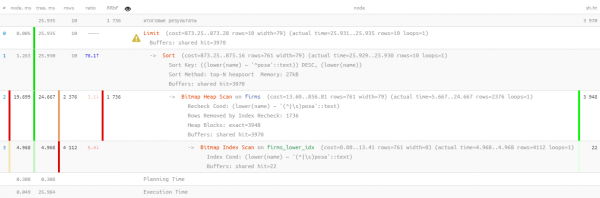
Well, that's something... 26ms, 31MB of read data and more than 1.7K filtered records—for 10 searched. The overhead is too great; can we optimize it somehow?
1.2: search by text? Isn't that FTS!
Indeed, PostgreSQL provides a very powerful (Full Text Search), including the ability for prefix search. It's a great option, and you don't even need to install extensions! Let's try:
CREATE INDEX ON firms USING gin(to_tsvector('simple'::regconfig, lower(name)));SELECT
*
FROM
firms
WHERE
to_tsvector('simple'::regconfig, lower(name)) @@ to_tsquery('simple', 'rose:*')
ORDER BY
lower(name) ~ ('^' || 'rose') DESC
, lower(name)
LIMIT 10; 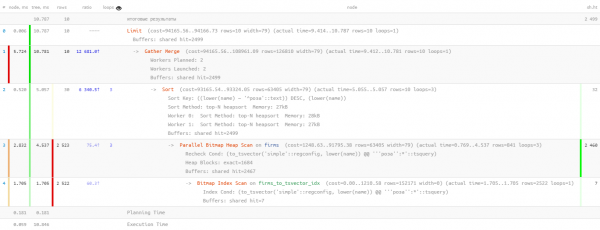
Here, the parallelization of query execution helped us a bit, reducing the time by half to 11ms. And we had to read 1.5 times less—only 20MB. And the less we read, the better, since the larger the volume we read, the higher the chances of getting a cache miss, and every extra page read from the disk is a potential "slowdown" for the query.
1.3: still LIKE?
The previous query is good, but if we run it a hundred thousand times a day, we will accumulate 2TB read data. At best, from memory, but if we're unlucky, from disk as well. So let's try to make it smaller.
Let's remember what the user wants to see first 'which start with ...'. Well, this is pure using text_pattern_ops! And only if we 'don't have enough' to make 10 found records, we will have to read them using FTS search:
CREATE INDEX ON firms(lower(name) text_pattern_ops);SELECT
*
FROM
firms
WHERE
lower(name) LIKE ('rose' || '%')
LIMIT 10; 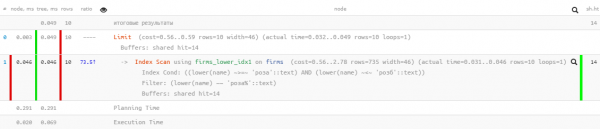
Excellent metrics — only 0.05ms and just over 100KB read! Only we forgot to sort by name, so that the user doesn't get lost in the results:
SELECT
  *
FROM
  firms
WHERE
  lower(name) LIKE ('rose' || '%')
ORDER BY
  lower(name)
LIMIT 10; 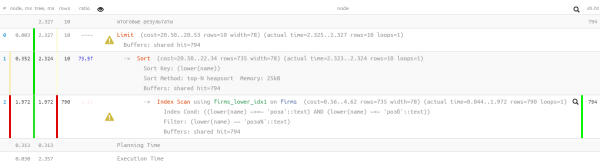
Oh, something is not looking so good now — it seems there's an index, but sorting is bypassing it... It’s certainly much more efficient than the previous version, but…
1.4: 'refine with a file'
But there is an index that allows both range searching and normal sorting — ordinary btree!
CREATE INDEX ON firms(lower(name));Only the query for it will have to be 'assembled manually':
SELECT
  *
FROM
  firms
WHERE
  lower(name) >= 'rose' AND
  lower(name) <= ('rose' || chr(65535)) -- for UTF8, for single-byte - chr(255)
ORDER BY
   lower(name)
LIMIT 10; 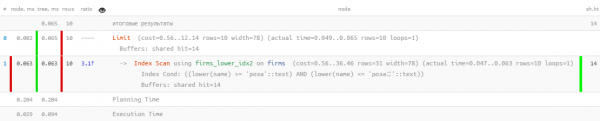
Great — both sorting works, and resource consumption remains 'microscopic', thousands of times more efficient than 'pure' FTS! We just have to combine it into a single query:
(
  SELECT
    *
  FROM
    firms
  WHERE
    lower(name) >= 'rose' AND
    lower(name) <= ('rose' || chr(65535)) -- for UTF8, for single-byte encodings - chr(255)
  ORDER BY
     lower(name)
  LIMIT 10
)
UNION ALL
(
  SELECT
    *
  FROM
    firms
  WHERE
    to_tsvector('simple'::regconfig, lower(name)) @@ to_tsquery('simple', 'rose:*') AND
    lower(name) NOT LIKE ('rose' || '%') -- 'starting with' we've already found above
  ORDER BY
    lower(name) ~ ('^' || 'rose') DESC -- using the same sorting to NOT go through the btree index
  , lower(name)
  LIMIT 10
)
LIMIT 10;
I note that the second subquery is executed only if the first returned fewer than expected last LIMIT number of rows. I've already written about such a method for optimizing queries .
Indeed, we now have both btree and gin on the table, but statistically it turned out that less than 10% of queries reach the execution of the second block. Thus, with such known typical constraints for the task, we managed to reduce the total server resource consumption by almost thousands of times!
1.5*: let's do without the file
Above LIKE We were hindered by using the wrong sort order. However, it can be 'set on the right path' by specifying the USING operator:
By default, it is assumed
ASC. Additionally, you can specify the name of a specific sorting operator in the statementUSING. The sorting operator must be a member of 'less than' or 'greater than' from a certain family of B-tree operators.ASCusually equivalent toUSING <andDESCusually equivalent toUSING >.
In our case, 'less than' is ~<~:
SELECT
  *
FROM
  firms
WHERE
  lower(name) LIKE ('rose' || '%')
ORDER BY
  lower(name) USING ~<~
LIMIT 10; 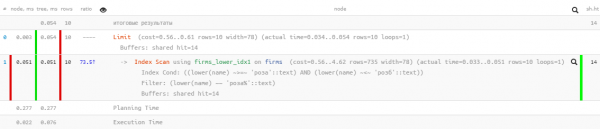
2: how requests 'ferment'
Now let's let our request 'stew' for six months to a year, and surprisingly find it 'in the top' with indicators of total daily memory 'boost' (buffers shared hit) in 5.5TB — which is even more than it was initially.
Of course not, our business has grown, and the load has increased, but not to that extent! Something is off here — let's investigate.
2.1: the birth of paging
At some point, another development team wanted to add the ability to jump from quick inline searches to a registry with the same, but expanded results. And what registry is complete without pagination? Let's add it!
( ... LIMIT  + 10)
UNION ALL
( ... LIMIT  + 10)
LIMIT 10 OFFSET ;
Now, without any strain for the developer, it was possible to show the registry of search results with 'pagination type' loading.
Of course, in reality, for each subsequent page of data, more and more is read (all from the previous time that we'll discard, plus the necessary 'tail') — which is definitely an anti-pattern. It would be more correct to launch the search on the next iteration from the saved key in the interface, but that's for another time.
2.2: a desire for exoticism
At some moment, the developer wanted to diversify the resulting selection of data from another table, for which the entire previous query was sent to a CTE:
WITH q AS (
  ...
  LIMIT  + 10
)
SELECT
  *
, (SELECT ...) sub_query -- some query to the related table
FROM
  q
LIMIT 10 OFFSET ;
And even so — not bad, since the nested query is calculated only for the 10 returned records, if it weren't for…
2.3: DISTINCT mindless and ruthless
Somewhere in the process of such evolution, from the second subquery the condition was lost NOT LIKE condition.It is clear that after this UNION ALL started returning some records twice — first found at the start of the string, and then again — at the beginning of the first word of that string. Ultimately, all records of the 2nd subquery could match with the records of the first.
What does the developer do instead of finding the cause?.. No question!
- let's double the size of the original samples
- we'll apply DISTINCT, to get only unique instances of each row
WITH q AS (
  ( ... LIMIT  + 10)
  UNION ALL
  ( ... LIMIT  + 10)
  LIMIT  + 10
)
SELECT DISTINCT
  *
, (SELECT ...) sub_query
FROM
  q
LIMIT 10 OFFSET ;
So it is clear that the result, in the end, is exactly the same, but the chance of "missing out" on the 2nd subquery CTE has significantly increased, and besides that, it obviously consumes more.
But that’s not the worst part. Since the developer requested to select DISTINCT not by specific fields, but across all fields records, the field sub_query — the result of the subquery — was automatically included. Now, to execute DISTINCT, the database had to perform not 10 subqueries, but all + 10 2.4: cooperation above all!!
That's how developers lived — without worrying, because in the registry it was clearly frustrating to "tighten it" to significant values of N due to the chronic slowdown in obtaining each subsequent "page" for the user.
Until developers from another department came to them, and wanted to use such a convenient method
for iterative searching — that is, we take a piece from some sample, filter it by additional conditions, draw the result, then the next piece (which in our case is achieved by increasing N), and so on until we fill the screen. In general, in the captured instance
N reached values of nearly 17K , and in just one day, no less than 4K such queries were executed "in a chain". The last of them were boldly scanning already by1GB of memory at each iteration SkillFactory is launching a new set for the complete course in Data Science…
Total

Source: habr.com
