

A considerable number of enterprise applications and virtualization systems have their own mechanisms for creating fault-tolerant solutions. In particular, Oracle RAC (Oracle Real Application Cluster) represents a cluster of two or more Oracle database servers working together to balance loads and ensure fault tolerance at the server/application level. To operate in this mode, a shared storage is required, which is typically provided by a storage system.
As we discussed in one of our , the storage system itself, despite having redundant components (including controllers), still has points of failure—primarily, in the form of a single set of data. Therefore, to build an Oracle solution with higher reliability requirements, the scheme of 'N servers – one storage system' needs to be made more complex.

First, of course, we need to determine what risks we are trying to protect against. In this article, we will not consider protection against threats like 'a meteorite landed'. Thus, building a geographically dispersed disaster recovery solution will remain the topic for one of our future articles. Here, we will focus on the so-called Cross-Rack disaster recovery solution, where protection is established at the level of server racks. These racks can be located in the same room or different ones, but usually within the same building.
These racks should contain all the necessary set of equipment and software that will allow the operation of Oracle databases independently of the status of the 'neighbor'. In other words, by using a Cross-Rack disaster recovery solution, we eliminate the risks during a failure:
- Oracle application servers
- Storage systems
- Switching systems
- Total failure of all equipment in the rack:
- Power failure
- Cooling system failure
- External factors (human, nature, etc.)
Redundancy of Oracle servers implies the very principle of Oracle RAC operation and is implemented through the application. Redundancy of switching equipment is also not a problem. However, redundancy of storage systems is more complex.
The simplest option is to replicate data from the primary storage system to a backup. Synchronous or asynchronous, depending on the capabilities of the storage system. In the case of asynchronous replication, the issue of ensuring data consistency with Oracle immediately arises. However, even if there's programmatic integration with the application, manual intervention by administrators will be required to switch the cluster to the backup storage in case of a failure in the primary storage system.
A more complex option is software and/or hardware 'virtualizers' of the storage system, which eliminate problems with consistency and manual intervention. But the complexity of deployment and subsequent administration, as well as the rather excessive cost of such solutions, discourages many.
For scenarios like Cross-Rack disaster recovery, the All Flash array solution AccelStor NeoSapphire™ is ideal. using Shared-Nothing architecture. This model is a two-node storage system that employs its own FlexiRemap® technology for working with flash drives. Thanks to NeoSapphire™ H710 is capable of delivering performance of up to 600K IOPS@4K random write and 1M+ IOPS@4K random read, which is unattainable when using traditional RAID-based storage systems.
But the main feature of the NeoSapphire™ H710 is that the two nodes are implemented as separate enclosures, each having its own copy of the data. The synchronization of the nodes is carried out through an external InfiniBand interface. This architecture allows the nodes to be spread across different locations up to 100m apart, thereby providing a Cross-Rack disaster recovery solution. Both nodes operate fully in synchronous mode. From the hosts' perspective, H710 appears as a regular dual-controller storage system. Therefore, no additional software or hardware options or particularly complex configurations need to be performed.
When comparing all the above Cross-Rack disaster recovery solutions, the option from AccelStor stands out significantly from the rest:
AccelStor NeoSapphire™ Shared Nothing Architecture
Software or hardware 'virtualizer' of the storage system
Replication-based solution
All exploit scenarios related to attack vectors on
Server failure
No Downtime
No Downtime
No Downtime
Switch failure
No Downtime
No Downtime
No Downtime
Storage system failure
No Downtime
No Downtime
Downtime
Entire rack failure
No Downtime
No Downtime
Downtime
Cost and complexity
Cost of the solution
Low*
High
High
Deployment complexity
Low
High
High
*AccelStor NeoSapphire™ is indeed an All Flash array, which by definition does not come cheap, especially with its double capacity. However, when comparing the total cost of a solution based on it with similar offerings from other vendors, the price can be considered low.
The topology for connecting application servers and nodes of the All Flash array will look as follows:
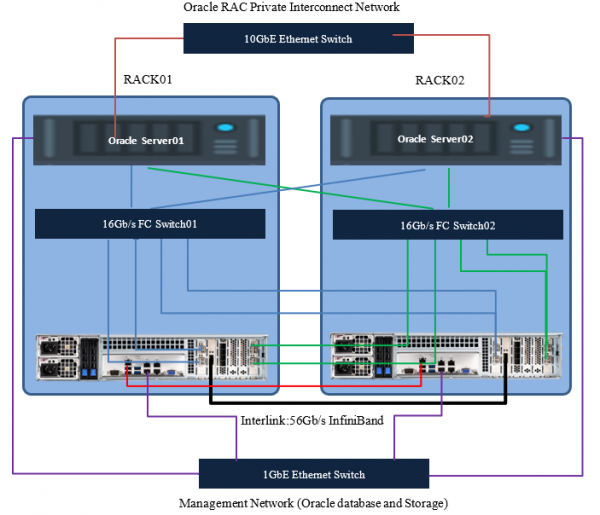
When planning the topology, it is highly recommended to duplicate the management and interconnect switches for the servers.
From here on, we will discuss connections via Fibre Channel. If using iSCSI, the same principles apply, with adjustments for the types of switches used and slightly different array settings.
Preparatory work on the array
Equipment and software used
Specifications of servers and switches
Components
Description
Oracle Database 11g servers
Two
Server operating system
Oracle Linux
Oracle database version
11g (RAC)
Processors per server
Two 16-core Intel® Xeon® CPU E5-2667 v2 @ 3.30GHz
Physical memory per server
128GB
FC network
16Gb/s FC with multipathing
FC HBA
Emulex Lpe-16002B
Dedicated public 1GbE ports for cluster management
Intel ethernet adapter RJ45
16Gb/s FC switch
Brocade 6505
Dedicated private 10GbE ports for data synchronization
Intel X520
Specification of AccelStor NeoSapphire™ All Flash array
Components
Description
Storage system
NeoSapphire™ high availability model: H710
Image version
4.0.1
Total number of drives
48
Drive size
1.92TB
Drive type
SSD
FC target ports
16 x 16Gb ports (8 per node)
Management ports
The 1GbE ethernet cable connecting to hosts via an ethernet switch
Heartbeat port
The 1GbE ethernet cable connecting between two storage nodes
Data synchronization port
56Gb/s InfiniBand cable
Before using the array, it must be initialized. By default, the management address of both nodes is the same (192.168.1.1). You need to connect to them one after the other and set new (different) management addresses and configure time synchronization, after which the Management ports can be connected to a single network. Then, the nodes are combined into an HA pair by assigning subnets for the Interlink connections.
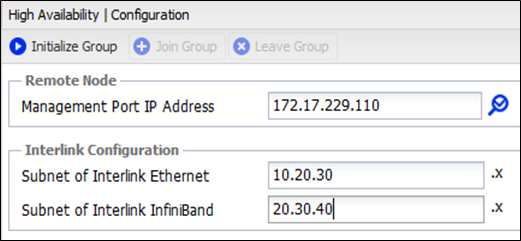
Once initialization is complete, the array can be managed from any node.
Next, we create the required volumes and publish them for the application servers.
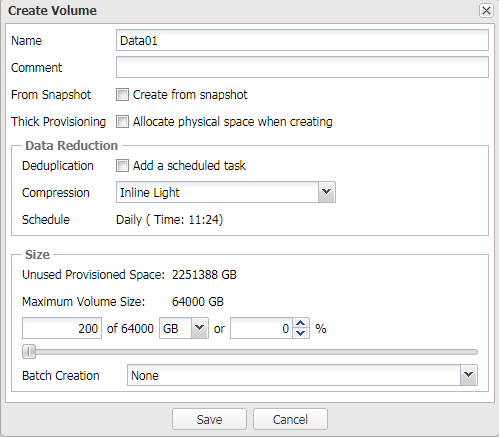
It is highly recommended to create several volumes for Oracle ASM, as this will increase the number of targets for the servers, ultimately improving overall performance (more on queues elsewhere) ).
Test configuration
Storage Volume Name
Volume Size
Data01
200GB
Data02
200GB
Data03
200GB
Data04
200GB
Data05
200GB
Data06
200GB
Data07
200GB
Data08
200GB
Data09
200GB
Data10
200GB
Grid01
1GB
Grid02
1GB
Grid03
1GB
Grid04
1GB
Grid05
1GB
Grid06
1GB
Redo01
100GB
Redo02
100GB
Redo03
100GB
Redo04
100GB
Redo05
100GB
Redo06
100GB
Redo07
100GB
Redo08
100GB
Redo09
100GB
Redo10
100GB
Some explanations regarding the operating modes of the array and the processes occurring during abnormal situations
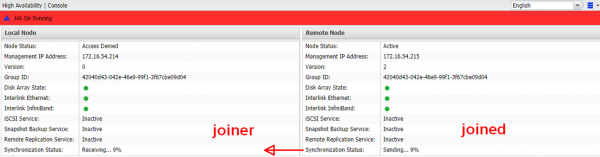
Each node's data set has a parameter called 'version number'. After the initial initialization, it is the same and equal to 1. If, for any reason, the version numbers are different, data synchronization occurs from the higher version to the lower one, after which the lower version's number is adjusted, meaning that the copies are identical. Reasons for differing versions may include:
- Scheduled reboot of one of the nodes
- Failure of one of the nodes due to a sudden shutdown (power failure, overheating, etc.).
- Loss of InfiniBand connection with the inability to synchronize
- Failure of one of the nodes due to data corruption. Here, the creation of a new HA group and complete data set synchronization will be required.
In any case, the node that remains online increases its version number by one so that after the connection is restored with the pair, it can synchronize its data set.
If there is a disconnection over the Ethernet link, Heartbeat temporarily switches to InfiniBand and returns back within 10 seconds upon its restoration.
Host configuration
To ensure fault tolerance and enhance performance, MPIO support for the array must be enabled. To do this, add the following lines to the file /etc/multipath.conf and then restart the multipath service
Hidden textdevices {
device {
vendor "AStor"
path_grouping_policy "group_by_prio"
path_selector "queue-length 0"
path_checker "tur"
features "0"
hardware_handler "0"
prio "const"
failback immediate
fast_io_fail_tmo 5
dev_loss_tmo 60
user_friendly_names yes
detect_prio yes
rr_min_io_rq 1
no_path_retry 0
}
}
Next, for ASM to work with MPIO through ASMLib, it is necessary to modify the file /etc/sysconfig/oracleasm and then execute /etc/init.d/oracleasm scandisks
Hidden text
# ORACLEASM_SCANORDER: Matching patterns to order disk scanning
ORACLEASM_SCANORDER="dm"
# ORACLEASM_SCANEXCLUDE: Matching patterns to exclude disks from scan
ORACLEASM_SCANEXCLUDE="sd"
Note
If you prefer not to use ASMLib, UDEV rules can be used, which are the basis for ASMLib.
Starting with version 12.1.0.2, the Oracle Database option is available for installation as part of the ASMFD software.
It is essential to ensure that the disks created for Oracle ASM are aligned with the block size that the array physically operates with (4K). Otherwise, performance issues may occur. Therefore, it is necessary to create volumes with the appropriate parameters:
parted /dev/mapper/device-name mklabel gpt mkpart primary 2048s 100% align-check optimal 1
Database distribution across created volumes for our test configuration
Storage Volume Name
Volume Size
Volume LUNs mapping
ASM Volume Device Detail
Allocation Unit Size
Data01
200GB
Map all storage volumes to storage system all data ports
Redundancy: Normal
Name: DGDATA
Purpose: Data files
4MB
Data02
200GB
Data03
200GB
Data04
200GB
Data05
200GB
Data06
200GB
Data07
200GB
Data08
200GB
Data09
200GB
Data10
200GB
Grid01
1GB
Redundancy: Normal
Name: DGGRID1
Purpose: Grid: CRS and Voting
4MB
Grid02
1GB
Grid03
1GB
Grid04
1GB
Redundancy: Normal
Name: DGGRID2
Purpose: Grid: CRS and Voting
4MB
Grid05
1GB
Grid06
1GB
Redo01
100GB
Redundancy: Normal
Name: DGREDO1
Purpose: Redo log of thread 1
4MB
Redo02
100GB
Redo03
100GB
Redo04
100GB
Redo05
100GB
Redo06
100GB
Redundancy: Normal
Name: DGREDO2
Purpose: Redo log of thread 2
4MB
Redo07
100GB
Redo08
100GB
Redo09
100GB
Redo10
100GB
Database settings
- Block size = 8K
- Swap space = 16GB
- Disable AMM (Automatic Memory Management)
- Disable Transparent Huge Pages
Other settings
# vi /etc/sysctl.conf
✓ fs.aio-max-nr = 1048576
✓ fs.file-max = 6815744
✓ kernel.shmmax 103079215104
✓ kernel.shmall 31457280
✓ kernel.shmmn 4096
✓ kernel.sem = 250 32000 100 128
✓ net.ipv4.ip_local_port_range = 9000 65500
✓ net.core.rmem_default = 262144
✓ net.core.rmem_max = 4194304
✓ net.core.wmem_default = 262144
✓ net.core.wmem_max = 1048586
✓ vm.swappiness=10
✓ vm.min_free_kbytes=524288 # don't set this if you're using Linux x86
✓ vm.vfs_cache_pressure=200
✓ vm.nr_hugepages = 57000
# vi /etc/security/limits.conf
✓ grid soft nproc 2047
✓ grid hard nproc 16384
✓ grid soft nofile 1024
✓ grid hard nofile 65536
✓ grid soft stack 10240
✓ grid hard stack 32768
✓ oracle soft nproc 2047
✓ oracle hard nproc 16384
✓ oracle soft nofile 1024
✓ oracle hard nofile 65536
✓ oracle soft stack 10240
✓ oracle hard stack 32768
✓ soft memlock 120795954
✓ hard memlock 120795954
sqlplus "/as sysdba"
alter system set processes=2000 scope=spfile;
alter system set open_cursors=2000 scope=spfile;
alter system set session_cached_cursors=300 scope=spfile;
alter system set db_files=8192 scope=spfile;
Failover test
HammerDB was used for demonstration purposes to simulate OLTP workload. HammerDB configuration:
Number of Warehouses
256
Total Transactions per User
1000000000000
Virtual Users
256
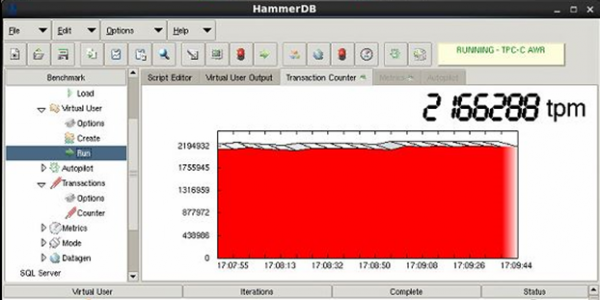
As a result, a figure of 2.1M TPM was obtained, which is far from the array's performance limit , but is the 'ceiling' for the current hardware configuration of the servers (primarily due to the processors) and their quantity. The goal of this test is still to demonstrate the resilience of the solution as a whole, rather than achieving performance maximums. So let's just take this figure as a reference.
Node failure test
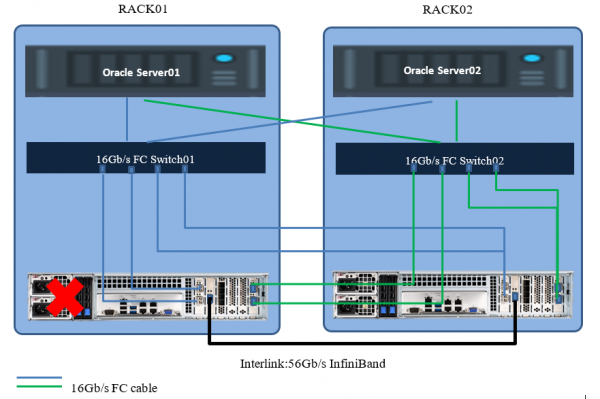
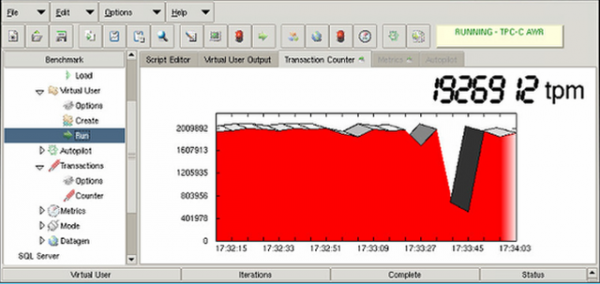
Hosts lost part of the paths to the storage, continuing to operate through the remaining ones with the second node. Performance dropped for several seconds due to path reconstruction and then returned to normal indicators. There was no service interruption.
Cabinet failure test with all equipment
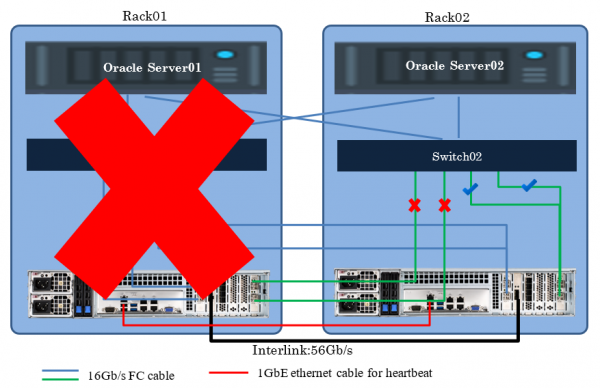
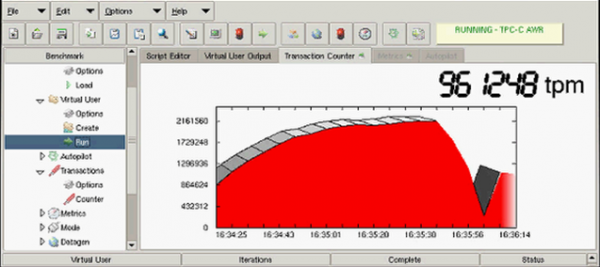
In this case, performance also dropped for several seconds due to path reconstruction and then returned to half of the initial indicator. The result was halved from the original due to the exclusion of one application server from operation. There was also no service interruption.
If there is a need for implementing a cost-effective Cross-Rack disaster recovery solution for Oracle with minimal deployment/administration effort, then the collaboration of Oracle RAC and architecture will be one of the best options. Instead of Oracle RAC, any other software that supports clustering, including the same DBMS or virtualization systems, could be used. The principle of building the solution will remain the same. The ultimate goal is to achieve zero values for RTO and RPO.
Source: habr.com
