

Last week, we introduced the release of 3CX v16 and the 3CX Live Chat & Talk widget, which can work with any website, not just those on CMS WordPress.
3CX v16 allows customers to quickly contact your company by offering powerful and efficient ticket handling technologies - a call center with call distribution based on operator qualification, a web service for monitoring service quality (SLA), and improved call recording management.
In addition to the contact center, the new 3CX has enhanced performance, new security technologies, improved administration tools, chat, video conferencing, and integration with Office 365. It is the first communication system in the industry to successfully run on Raspberry Pi.
3CX Live Chat & Talk widget
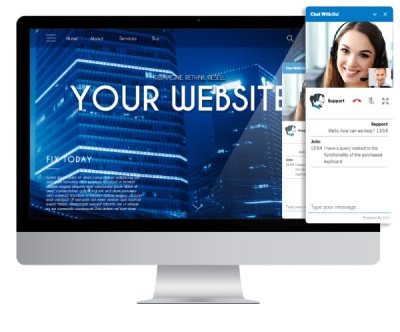
The new 3CX Live Chat & Talk widget allows website visitors to start a chat, make a call, or initiate a video call with your sales department in just one click. This is the easiest, most direct, and completely free way to communicate, which your employees can easily manage. The uniqueness of the 3CX approach is that the chat can be converted into a voice call at any moment — without a separate phone call, ensuring the client doesn't end up speaking to someone completely different. Your business gains new loyal customers, and employees don't need to learn a third-party 'website chat' that also requires a monthly payment.
The 3CX Live Chat & Talk widget is available as a WordPress plugin and as a set of scripts for any CMS. The widget can be styled to match your website's design or the expectations of your visitors. For example, you can set a custom welcome message, the names of managers answering questions, allow or disallow video calls, and so on.
Installing the widget is quite simple and consists of 3 steps:
- Set up the widget parameters in the 3CX management interface to configure the communication channel between the PBX and the website.
- the widget files and set the parameters and colors that correspond to your website's design.
- Copy the CSS into the HTML content of the website.
. For websites on CMS WordPress, it's easier to use .
Updated integrated call center
3CX v16 comes with a thoroughly revamped call center module, which is included in :
- Distributing incoming calls based on the operator's qualifications.
- Server-side REST API integration with most popular CRM systems, including , , , logging the call in the customer’s profile.
- REST API integration with databases .
- Monitoring the quality of service delivery (SLA) in a separate window of the Operator Panel.
- Updated reports on operator performance.
- Enhanced call recording management:
Corporate chat server and WebRTC softphone
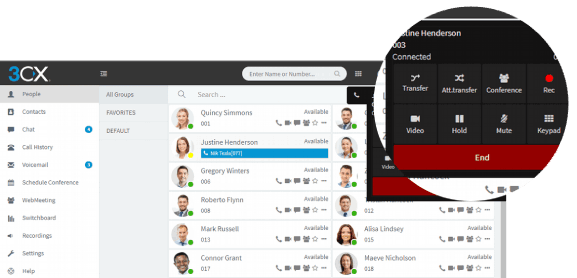
3CX v16 enables effective communication with modern business communication tools:
- The browser softphone based on WebRTC technology allows calling directly from Chrome and Firefox browsers. It can also manage your desktop IP phone or 3CX mobile softphone, enhancing their functionality.
- Full integration with , including contact and user status synchronization. The integration operates on the server side of the PBX. All Office 365 subscriptions are supported.
- Enhanced corporate chat — image, file, and emoji sharing has been added.
- Support for dialers from some CRMs, particularly Salesforce, allows calling directly from the CRM interface.
New video conferencing features in 3CX WebMeeting
The free web conferencing service WebMeeting in 3CX v16 also offers several new features that both users and administrators will appreciate:
- Voice call from a regular phone to a web conference.
- Improved video quality thanks to dynamic bandwidth adjustment.
- An international network of video conferencing servers on Amazon and Google infrastructure for high service stability.
- Screen sharing from your PC in the conference without installing additional plugins.
- Support for popular and affordable video conferencing kits from Logitech Conference Room.
Let’s remember that the main advantage of 3CX WebMeeting is conducting video conferences and webinars completely free and without having to learn a third-party online conferencing system.
New capabilities for PBX administrators.
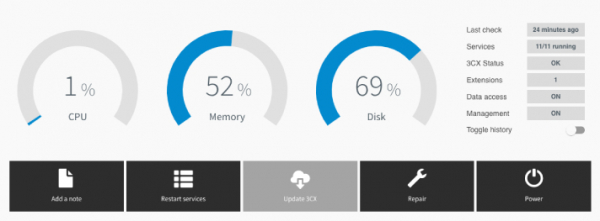
3CX v16 offers a range of exciting innovations for integrators and system administrators. All of them are aimed at reducing 'headaches,' i.e., lowering the effort involved in diagnostics and routine maintenance.
- – manage and monitor multiple 3CX PBX servers from a single administration portal.
- Synchronization of 3CX extensions and Office 365 users – manage PBX users from a unified point.
- Enhanced security:
- Installation of 3CX on for systems with up to 8 simultaneous calls.
- Significantly reduced CPU and memory requirements for installation on low-cost VPS servers.
- RTCP protocol statistics for monitoring VoIP quality.
- User cloning – creating a new 3CX extension based on an existing one.
3CX Pro trial license, free license for 8 simultaneous calls, and a price reduction of 40%
In the new 3CX v16 price list for the Standard edition by 40% and by up to 20% for the PRO and Enterprise editions! Annual licenses of intermediate sizes have also been added, allowing you to start with a small system and gradually expand it as the business grows.
The free version of 3CX has been expanded to 8 simultaneous calls and will remain free forever! Note that you will receive a fully functional version of 3CX Pro, which will operate for 40 days. It will then switch to 3CX Standard and remain free.
- The 3CX Standard edition for 8 simultaneous calls is free forever.
- Additional license sizes: 24, 48, 96, and 192 simultaneous calls.
- License extension – pay only the difference in cost, with no additional conditions.
- The 3CX Standard edition excludes Call Queues, call recording, call reports, inter-site trunks, and CRM / Office 365 integration.
Development plans for v16
In a video presentation, the head of 3CX discussed the upcoming development plans for the system. Some features will appear in v16 Update 1 within a month, while others will come closer to summer. Please note that plans may change, so just take note of them.
- Expanded integration capabilities with SQL databases.
- Improvement of corporate chat – archiving, translation, message interception.
- New .
- The new 3CX SBC that allows management of remote phones from the 3CX interface.
- Improved DNS handling for compatibility with SIP operators.
- Simplified setup for a fault-tolerant PBX cluster.
- REST API for making outbound calls via 3CX.
- Interactive, customizable call center dashboard.
Installation of 3CX v16
- In the cloud — and use the service to launch a free PBX in your Google cloud account
- On a local server:
See. in the new version. You can share your feedback about the system on !
Presentation in English.

Source: habr.com
