

Canary deployment is a highly effective method for testing new code on a subset of users. It significantly reduces the traffic load that may cause issues during deployment since it occurs only within a specific subgroup. This note is dedicated to how to organize such a deployment using Kubernetes and deployment automation. It is assumed that you have some knowledge of Helm and Kubernetes resources..
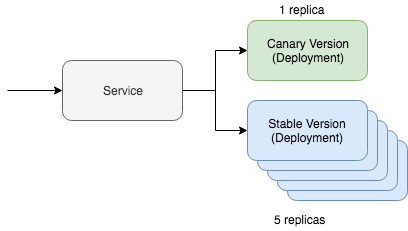
A simple canary deployment in Kubernetes consists of two key resources: the service itself and the deployment tool. The canary deployment operates through a single service that interacts with two different resources managing the updated traffic. One of these resources will run the 'canary' version, while the other will run the stable version. In this situation, we can regulate the number of canary versions to reduce the volume of traffic that needs to be managed. For example, if you prefer to use YAML, it would look like this in Kubernetes:
kind: Deployment
metadata:
  name: app-canary
  labels:
    app: app
spec:
  replicas: 1
  ...
    image: myapp:canary
---
kind: Deployment
metadata:
  name: app
  labels:
    app: app
spec:
  replicas: 5
  ...
    image: myapp:stable
---
kind: Service
selector:
  app: app # Selector will route traffic to both deployments.
An even simpler way to visualize this option is with kubectl, and in there is even a complete tutorial on this scenario. But the main question of this post is how we plan to automate this process using Helm.
Automating canary deployment
First of all, we will need a Helm chart map that already includes the resources discussed above. It should look something like this:
~\/charts\/app
├── Chart.yaml
├── README.md
├── templates
│   ├── NOTES.txt
│   ├── _helpers.tpl
│   ├── deployment.yaml
│   └── service.yaml
└── values.yaml
The core concept of Helm is managing multi-version releases. The stable version is our main stable branch of the project's code. But with Helm, we can deploy a canary release with our experimental code. The key is to maintain traffic exchange between the stable version and the canary release. We will manage all of this using a special selector:
selector:
  app.kubernetes.io\/name: myapp
Both our canary and stable deployment resources will mark this label on the modules. If everything is set up correctly, during the deployment of the canary version of our Helm chart, we will see that traffic will be directed to the freshly deployed modules. The stable version of this command will look like this:
helm upgrade
  --install myapp
  --namespace default
  --set app.name=myapp       # Goes into app.kubernetes.io/name
  --set app.version=v1       # Goes into app.kubernetes.io/version
  --set image.tag=stable
  --set replicaCount=5
Now let's check our canary release. To deploy the canary version, we need to keep two things in mind. The release name must be different so we don't overwrite the current stable version. The version and tag must also differ so we can deploy different code and identify differences by resource labels.
helm upgrade
  --install myapp-canary
  --namespace default
  --set app.name=myapp       # Goes into app.kubernetes.io/name
  --set app.version=v2       # Goes into app.kubernetes.io/version
  --set image.tag=canary
  --set replicaCount=1
That's it! If you ping the service, you can see that the canary update routes traffic only part of the time.
If you're looking for deployment automation tools that include the logic described, take a look at and on . The Helm charts used to implement the method described above are available on GitHub, . In general, this was a theoretical overview of how to implement canary version deployment automation in practice, with specific concepts and examples.
Source: habr.com
