

– Oh, no shelter can withstand a meteor strike. But like everyone else, you have a backup, so you need not worry.
Stanisław Lem, "The Star Diaries of Ijon Tichy"
Database backup refers to the process of saving a copy of data somewhere outside the main storage location.

The primary purpose of backing up is to restore data after loss. Consequently, it is often heard that with a replica of a database, data can always be restored, and backup is unnecessary. In reality, backup can solve at least three tasks that cannot be addressed with just a replica, and a replica cannot be initialized without a backup.
Firstly, a backup allows data recovery after a logical error. For example, an accountant deletes a group of entries or a database administrator destroys a tablespace. Both actions are completely legitimate from the database perspective, and the replication process will reproduce them in the replica database.
Secondly, modern DBMS are fairly reliable software systems, but occasionally, internal database structures can become corrupted, resulting in loss of access to data. What is particularly frustrating is that such a failure often occurs under high load or during the installation of some update. However, both high load and regular updates indicate that the database is far from being a test case and the data it holds is valuable.
Finally, the third task that requires a backup is cloning the database, for instance, for testing purposes.
Database backups are based on one of two principles:
- Data extraction followed by saving in any format;
- Snapshot of the database files and saving logs.
Let's take a closer look at these principles and the tools that implement them.
Data Export
Any DBMS suite comes with tools for data exporting and importing. Data can be saved either in a text format or in a binary format specific to a particular DBMS. The table below lists such tools:
Binary Format
Text Format
Oracle
DataPump Export/DataPump Import
Export/Import
SQL*Plus/SQL*Loader
PostgreSQL
pg_dump, pg_dumpall/pg_restore
pg_dump, pg_dumpall/psql
Microsoft SQL Server
bcp
bcp
DB2
unload/load
unload/load
MySQL
mysqldump, mysqlpump/mysql, mysqlimport
MongoDB
mongodump/mongorestore
mongoexport/mongoimport
Cassandra
nodetool snapshot/sstableloader
cqlsh
The text format is advantageous because it can be edited or even created by external programs, while the binary format is good because it allows for faster data export and import through resource savings on format conversion.
Despite the simplicity and obviousness of the idea of data export, this method is rarely used for backing up heavily loaded production databases. Here are the reasons why export is not suitable for full backup:
- the export process creates a significant load on the source system;
- export takes a lot of time – by the time the export is finished, it will already be outdated;
- making a consistent export of the entire database under high load is practically impossible, since the DBMS must maintain a snapshot of its state at the start of the export. The more transactions have been completed since the start of the export, the larger the snapshot size (obsolete data copies in PostgreSQL, undo space in Oracle, tempdb in Microsoft SQL Server, etc.);
- export preserves the logical structure of the data but does not maintain its physical structure – the parameters for physical storage of tables, indexes, etc.
Nonetheless, export has its advantages:
- high selectivity: it’s possible to export individual tables, specific fields, and even particular rows;
- the exported data can be loaded into a database of a different version, and if the export is done in text format, into another database altogether.
Thus, export is mainly used for tasks such as backing up small tables (for example, reference tables) or distributing datasets with the next release of an application.
The most common method of backing up databases is file copying.
Cold Backup of DB Files
The obvious idea is to stop the database and copy all its files. This type of backup is called a 'cold' backup. It is extremely reliable and simple, but it has two obvious drawbacks:
- You can only restore the state of the database that existed at the moment of shutdown from a 'cold' backup; transactions made after the database restart will not be included in the 'cold' backup.
- Not every database has a maintenance window during which it can be stopped.
If you are satisfied with 'cold' backups, you should remember that
- a 'cold' copy must sometimes also include logs. The methods for determining which logs should be included in the 'cold' copy are specific to each DBMS. For example, in Oracle, it is necessary to copy the so-called online redo, which means a fixed number of log files located in a specific directory, even when the database is correctly shut down. In PostgreSQL, you must save all logs starting from the log containing the last checkpoint, the information about which is stored in the control file.
- The database directory may contain quite large temporary tablespace files that do not necessarily need to be included in the backup. By the way, this remark is also true for 'hot' backups.
'Hot' file saving
Most modern database backups are performed by copying database files without stopping the database. Here, several issues arise:
- At the moment copying begins, the contents of the database may not match the contents of the files, as part of the information is in cache and has not yet been written to disk.
- During copying, the contents of the database may change. If mutable data structures are used, the contents of the files change, and when immutable structures are used, the set of files changes: new files appear, and old ones are deleted.
- Since writing data to the database and reading database files are not synchronized, the backup program may read an inconsistent page, with one half being from the old version of the page and the other half from the new version.
To ensure that the backup is consistent, each DBMS has a command that signals the beginning of the backup process. This command may syntactically differ:
- In Oracle, it is a separate command ALTER DATABASE/TABLESPACE BEGIN BACKUP;
- In PostgreSQL, it is the function pg_start_backup();
- In Microsoft SQL Server and DB2, the preparation for backup is implicitly performed during the execution of the BACKUP DATABASE command;
- In MySQL Enterprise, Cassandra, and MongoDB, the preparation is implicitly handled by external utilities – mysqlbackup, OpsCenter, and Ops Manager, respectively.
Despite syntactical differences, the backup preparation process looks the same.
Here's how backup preparation appears in DBMS with mutable disk structures, i.e., in all traditional disk-based relational systems:
- The moment the backup begins is recorded; the backup must contain database logs starting from this point.
- A checkpoint is executed, meaning all changes that occurred on data pages before the recorded moment are flushed to disk. This ensures that the logs up to the beginning of the backup will not be needed for recovery.
- A special logging mode is enabled: if a data page is modified for the first time after being loaded from disk, instead of logging the page's change, the database will log the entire page. During the preparatory procedure, all pages are flushed to disk, so when the first modification occurs, the block will always be logged in its entirety. However, if the page is flushed to disk again during the backup process, the next modification will also result in a complete copy of the page being logged. This guarantees that if the data file's page is somehow corrupted during the file copy, applying the log will restore its integrity.
- Changes to the headers of data files are locked, meaning that the part whose changes are not reflected in the logs is protected. This ensures that the header will be copied correctly, and later, the logs will be accurately applied to the data file.
After completing all the procedures mentioned above, you can copy data files using operating system tools – cp, rsync, and others. Enabling backup mode reduces database performance: first, the volume of logs increases, and second, if a failure occurs during backup mode, recovery will take longer because the data file headers are not updated. The faster the backup is completed, the better it is for the database; therefore, using tools like filesystem snapshot or BCV (broken consistency volume) in the disk array is appropriate here. Some DBMS (Oracle, PostgreSQL) allow the administrator to choose the copying method, while others (Microsoft SQL Server) provide an interface to integrate their own backup utilities with filesystem mechanisms or storage systems.
Once the backup is complete, you need to return the database to its normal state. In Oracle, this is done with the command ALTER DATABASE/TABLESPACE END BACKUP, in PostgreSQL – by calling the pg_stop_backup() function, and in other databases – through the internal procedures of the corresponding commands or external services.
Here is how the timeline of the backup process looks:

- Preparation for backup (begin backup) takes time, sometimes significant. Even if mirror volumes or snapshot-enabled filesystems are used, the backup process will not be instantaneous.
- Along with the data files, logs must be retained from the moment backup preparation begins until the database is returned to its normal state.
- You can recover from this backup at the moment the database is returned to its normal state. Recovery to an earlier point is not possible.
For databases using immutable data structures (memory snapshots, LSM trees), the situation is simpler. The preparation for backup consists of the following steps:
- Data from memory is flushed to disk.
- A list of files included in the backup is recorded. Until the backup process is complete, the database is prohibited from deleting these files, even if they become unnecessary.
Upon the completion of the backup signal, the database with immutable structures can once again delete unnecessary files.
Point-in-time recovery
A backup allows restoring the database state to the moment when the command to exit backup mode was completed. However, a failure requiring recovery can occur at any time. The task of restoring the database state to an arbitrary moment is called 'point-in-time recovery.'
To ensure this capability, it is necessary to retain database logs starting from the moment the backup ends, and during recovery, continue to apply logs to the restored copy. Once the database is restored from the backup to the end of the copying process, the state of the database (files and cached pages) is guaranteed to be correct, so special logging mode is not required. By applying logs up to the desired moment, it is possible to obtain the database state at any point in time.
If the backup restoration speed is limited only by the disk bandwidth, then the speed of applying logs is generally limited by CPU performance. If changes occur in the primary database concurrently, all changes during recovery are executed sequentially – in the order of reading from the log. Thus, the recovery time linearly depends on how far the recovery point is from the backup completion point. Due to this, full backups have to be performed fairly often – at least once a week for databases with low transaction loads and up to daily backups for heavily-loaded databases.
Incremental Backup
To speed up point-in-time recovery, it would be ideal to perform backups as frequently as possible without using excessive disk space and without overloading the database with backup tasks.
The solution is incremental backup, which entails only copying those data pages that have changed since the last backup.
Incremental backups make sense only for DBMSs using mutable data structures.
The increment can be based on either a full backup (cumulative copy) or any previous copy (differential copy).

Unfortunately, there is no unified terminology, and different vendors use different terms:
Differential
Cumulative
Oracle
Differential
Cumulative
PostgresPro
Incremental
—
Microsoft SQL Server
—
Differential
IBM DB2
Delta
Incremental
When incremental copies are available, the recovery process to a point looks like this:
- the last full backup made before the recovery point is restored;
- incremental copies are restored on top of the full copy;
- logs are applied from the backup start point to the recovery point.
Having a cumulative copy speeds up the recovery process. For instance, to restore the database state to a point between T3 and T4, two incremental copies need to be restored, while to restore to a point after T4, only one is needed.
It is clear that the size of one cumulative copy is less than the size of several differential copies, because some pages have changed multiple times, and each incremental copy contains its version of the page.
There are three ways to create an incremental copy:
- creating a full copy and calculating the difference from the previous full copy;
- parsing logs, creating a list of changed pages, and backing up the pages included in the list;
- querying the changed pages in the database.
The first method saves disk space but does not solve the problem of reducing the load on the database. Moreover, if we have a full backup, converting it into an incremental one is pointless since restoring a full copy is faster than restoring the previous full copy and increment. The task of saving disk space with this approach is better handled by dedicated components with built-in deduplication mechanisms. These can be special storage systems (EMC DataDomain, HPE StorageWorks VLS, the entire NetApp lineup) or software products (ZFS, Veritas NetBackup PureFile, Windows Server Data Deduplication).
The second and third methods differ in how they determine the list of modified pages. Log parsing is more resource-intensive, plus it requires knowledge of the log file structure. Asking the database itself which pages have changed is the easiest method, but for that, the DBMS core must have the functionality for block change tracking.
The functionality for incremental backups was first created in Oracle Recovery Manager (RMAN), which appeared in the Oracle 8i release. Oracle immediately implemented block change tracking, eliminating the need for log parsing.
PostgreSQL does not track changed blocks, so the pg_probackup utility, developed by the Russian company Postgres Professional, identifies modified pages by analyzing the logs. However, the company also provides the PostgresPro DBMS, which includes the ptrack extension that tracks page changes. When using pg_probackup with PostgresPro, the utility queries the database for changed pages, just like RMAN.
Microsoft SQL Server, like Oracle, tracks modified pages, but the BACKUP command only allows for full and cumulative backups.
DB2 has the capability to track modified pages, but it is disabled by default. Once enabled, DB2 allows for full, differential, and cumulative backups.
An important difference between the tools described in this section (except for pg_probackup) and file-based backup tools is that they request page images from the database rather than reading data from the disk independently. The drawback of this approach is a slight additional load on the database. However, this shortfall is more than offset by the fact that the read page is always correct, so there is no need to enable a special logging mode during backup.
Once again, note that having incremental backups does not negate the requirement for logs for recovery to any arbitrary point in time. Therefore, in enterprise databases, logs are continuously rewritten to external storage, while full and/or incremental backups are created on a scheduled basis.
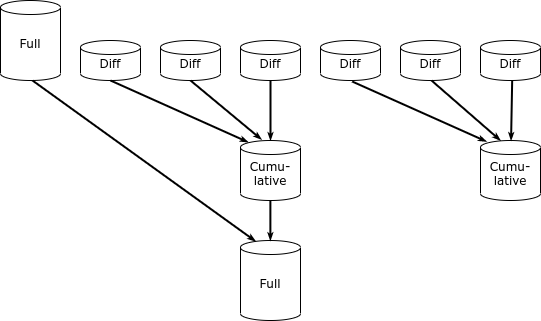
The best implementation of the incremental backup idea today is the Zero Data Loss Recovery Appliance, a software-hardware complex (in Oracle terminology – engineered system), which is a specialized solution by Oracle for backing up its own databases. The system consists of a cluster servers with a large volume of disks on which a modified version of the Recovery Manager software is installed. It can work with other Oracle software-hardware complexes (Database Appliance, Exadata, SPARC Supercluster) as well as with Oracle databases on traditional infrastructure. Unlike the 'regular' RMAN, the ZDLRA implements the concept of 'incremental forever'. The system creates a full copy of the database just once, and thereafter only makes incremental copies. Additional RMAN modules allow for the merging of copies to create new full copies from the incremental ones.
To the credit of Russian developers, it should be noted that pg_probackup can also merge incremental copies.
Unlike many similar questions, the question 'which backup method is better' has a clear answer – the best is the native utility for the used DBMS that provides the capability for incremental backup.
For a database administrator, much more important are the questions of choosing a backup strategy and integrating database backup tools into corporate infrastructure. But these issues are beyond the scope of this article.
Source: habr.com
