

Queue (queue) — a data structure on disk or in memory that stores references to messages and returns their copies consumers (to consumers). Queue is a with state (where the messages themselves can be cached). 1,000 queues can take up roughly 80Mb.
Binding (binding) — a rule that tells the broker which queue messages should go to.
Table of Contents
- RabbitMQ. Part 4. Understanding what messages and frames are
- RabbitMQ. Part 5. Performance of Message Publishing and Consumption
- RabbitMQ. Part 6. Overview of Federation and Shovel Modules
- RabbitMQ. Part 7. Detailed about Connection and Channel
- RabbitMQ. Part 8. RabbitMQ in .NET
- RabbitMQ. Part 9. Monitoring
Temporary queues
If a queue is created with a set parameter autoDelete, then such a queue gains the ability to automatically delete itself. Such queues are usually created when the first client connects and are deleted when all clients disconnect.
If a queue is created with a set parameter exclusive, then such a queue allows only one consumer to connect and is deleted if the channel closes. Until the channel closes, the client can disconnect/reconnect, but only within the same connection. If the parameter exclusive is set, then the parameter autoDelete has no effect.
Features:
- in case of a brief disconnection we will lose messages that have not yet reached the consumer
- we may encounter the phenomenon
binding churn. This phenomenon occurs when the number of create/delete operations for queues and bindings reaches very large values. In clustered mode, such a flow of operations will spread across all nodes and create a substantial load. This process can be optimized by controlling the number of subscriptions.
Durable queues
If a queue is created with a set parameter durable, then such a queue retain their state and recover after the server/broker restarts. This queue will exist until the command is invoked Queue.Delete.
Highly Available queues
HA queues require a clustered RabbitMQ environment. In clustered mode, all information about exchanges, queues, bindings, and consumers will be copied to all nodes.
When a message is published to an HA queue, it is stored on each node related to that HA queue. After the message is consumed on one of the nodes, all copies of that message will be deleted on the other nodes.
HA queues can span all nodes in a cluster or be limited to individual ones.
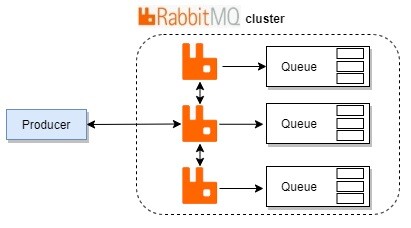
Features:
- Using HA queues leads to performance penalties. When placing a message into a HA queue or consuming a message from a HA queue, RabbitMQ must coordinate across all nodes (usually 2-3 nodes are sufficient).
Creating a queue
The creation of a queue occurs through a synchronous RPC request to the server. The request is made using the method Queue.Declare, called with the parameters:
- the name of the queue
- other parameters
Example of creating a queue using :
// ...
channel.QueueDeclare(
    queue: "my_queue",
    durable: false,
    exclusive: false,
    autoDelete: false,
    arguments: null
);
// ...queue— the name of the queue we want to create. The name must be unique and cannot coincide with a system queue name.durable— if true, the queue will save its state and be restored after the server/broker restarts.exclusive— if true, the queue will allow only one consumer to connect.autoDelete— if true, the queue gains the ability to automatically delete itselfarguments— optional arguments. Let's discuss in more detail below.
arguments
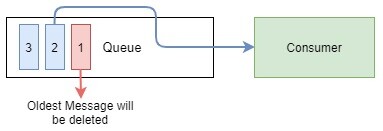
x-message-ttl(x-message-time-to-live) — allows you to set the expiration time for messages in milliseconds. If the queue is created with a set argument valuex-message-ttl, then such a queue will automatically discard messages that have expired.Setting the argument valuex-message-ttlspecifies the maximum age for all messages in this queue. Creating such a queue helps prevent receiving outdated information.This can be utilized in real-time systems. If a queue that has a dead-letter exchange is set with the argument valuex-message-ttl, then rejected messages in this queue will start having an expiration time..x-expires— sets the value in milliseconds after which the queue is deleted. A queue can only expire if it has no subscribers. If there are subscribers connected to the queue, it can only be automatically deleted when all subscribers callBasic.Cancelor disconnect. The lifespan of the queue can only end if there hasn't been a request to itBasic.Get. Otherwise, the current expiration setting is reset, and the queue will no longer be automatically deleted. Also there are no guarantees on how quickly the queue is deleted after its expiration.x-max-length— sets the maximum number of messages in the queue. If the number of messages in the queue exceeds the maximum, the oldest messages will start to be deleted
x-max-length-bytes— sets the maximum allowed total size of the payload of messages in the queue. If the established value is exceeded (a queue overflow occurs upon the next message publication), the oldest messages will begin to be deletedx-overflow— this argument is used to configure the behavior resulting from a queue overflow. Two values are available:drop-head(default value) andreject-publish. If you choosedrop-head, the oldest messages will be deleted. If you choosereject-publish, message reception will be suspendedx-dead-letter-exchange— specifies the exchange to which rejected messages that are not re-queued are sentx-dead-letter-routing-key— specifies an optional routing key for rejected messagesx-max-priority— allows sorting by priorities in the queue with a maximum priority value of 255 (RabbitMQ versions 3.5.0 and higher). The number specifies the maximum priority that the queue will support. If the argument is not set, the queue will not support message prioritiesx-queue-mode— allows you to switch the queue to lazy mode. In this mode, as many messages as possible will be stored on disk. The use of RAM will be minimal. If it is not set, the queue will store messages in memory to deliver messages as quickly as possiblex-queue-master-locator— if we have a cluster, you can specify the master queuex-ha-policy— used when creating HA queues and determines how a message will be distributed across nodes. If the value is set toall, the message will be stored on all nodes. If the value is set tonodes, the message will be stored on specific nodes of the clusterx-ha-nodes— specifies the nodes to which a certain queue will belongHA
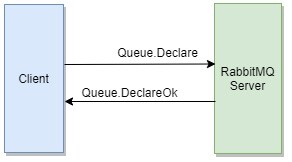
If queue creation is possible, the server will send an synchronous RPC response Queue.DeclareOk. If queue creation is not possible (the request was refused Queue.Declare), then the channel will be closed by the server using the command Channel.Close and the client will receive an exception , which will contain an error code and its description.
Re-invocation Queue.Declare with similar parameters will return useful information about this queue. For example, the total number of messages waiting in this queue and the total number of consumers subscribed to it.
Call Queue.Declare under the user credentials that do not have the required rights assigned will close the channel using the command Channel.Close and the client will receive an exception , which will contain an error code and its description.
After the queue remains idle for >= 10 seconds, it enters sleep mode, invoking GC in the queue, which leads to a significant reduction in memory required for this queue.
Creating a Queue through the graphical interface
Log into the admin panel RabbitMQ under the user guest (username: guest and password: guest). Note that the user guest can connect only from the local host. Now let's go to the Queues tab and click on Add a new queue. Fill in the properties:
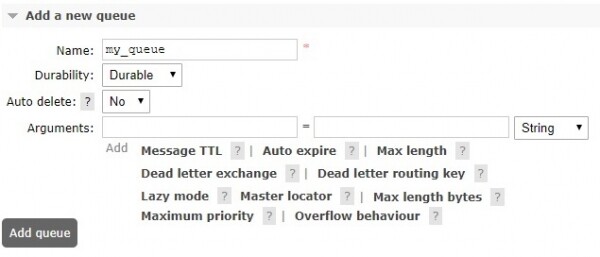
Once we enter all required information and click on Add queues, the queue will appear in the main list.

Clicking on the queue name will show its detailed information. Here you can configure the binding between the exchange and the queue, view the list consumers, publish/receive messages, delete the queue, and view statistics.
Creating a Binding
Creating a binding occurs using synchronous RPC request to the server. The request is made using the method Queue.Bind, called with the parameters:
- the name of the queue
- exchange point name
- other parameters
Example of creating a binding using :
//...
channel.QueueBind(
    queue: queueName,
    exchange: "my_exchange",
    routingKey: "my_key",
    arguments: null
);
//...queue— queue nameexchange— exchange nameroutingKey— routing keyarguments— optional arguments
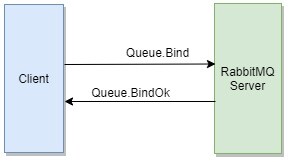
If creating a binding is possible, the server will send an synchronous RPC response Queue.BindOk.
Creating a Binding through the graphical interface
Log into the admin panel RabbitMQ under the user guest (username: guest and password: guest). Note that the user guest can connect only from the local host. Now let's go to the Queues and click on the queue my_queue. Fill in the fields of the section bindings:
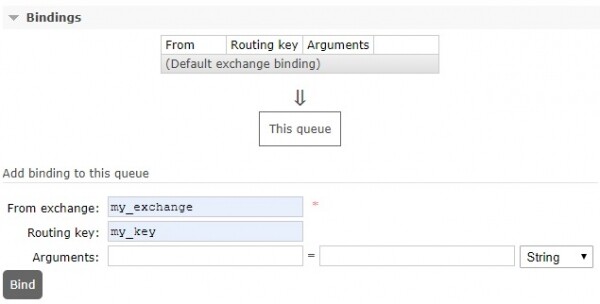
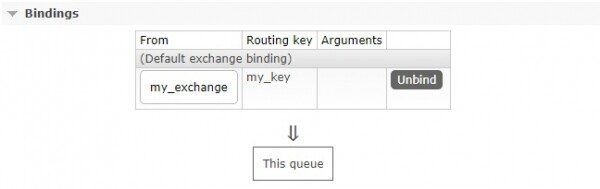
Once we enter all required information and click on Bind, the binding will appear in the main list:
Code
In this section, we will describe the queue and binding in C# code, as if we needed to develop a library. This may be useful for understanding.
public interface IQueue
    {
        string Name { get; }

        // <summary>
        //     If set to true, the queue will be persistent.
        //     It will be stored on disk and can
        //     survive a server/broker restart.
        //     If false, the queue is temporary and will be deleted,
        //     when the server/broker is restarted
        // </summary>
        bool IsDurable { get; }

        // <summary>
        //     If set to true,
        //     such a queue will allow connection
        //     only to one consumer
        // </summary>
        bool IsExclusive { get; }

        // <summary>
        //     Auto-delete.
        //     The queue will be deleted when all clients disconnect.
        // </summary>
        bool IsAutoDelete { get; }

        // <summary>
        //     Optional arguments
        // </summary>
        IDictionary<string, object> Arguments { get; }
    }
public class Queue : IQueue
{
public Queue(
string name,
bool isDurable = true,
bool isExclusive = false,
bool isAutoDelete = false,
IDictionary<string, object> arguments = null)
{
Name = name ??
throw new ArgumentNullException(name, $"{name} must not be null");
IsDurable = isDurable;
IsExclusive = isExclusive;
IsAutoDelete = isAutoDelete;
Arguments = arguments ?? new Dictionary<string, object>();
}
public string Name { get; }
public bool IsDurable { get; }
public bool IsExclusive { get; }
public bool IsAutoDelete { get; }
public IDictionary<string, object> Arguments { get; }
}public static class QueueMode
{
public const string Default = "default";
// <summary>
// Lazy mode. Lazy mode will make it store as many messages as possible on disk to minimize
// memory usage
// </summary>
public const string Lazy = "lazy";
}public interface IBinding
{
// <summary>
// The exchange that will be bound by the binding
// </summary>
IExchange Exchange { get; }
// <summary>
// Routing key
// </summary>
string RoutingKey { get; }
// <summary>
// Optional arguments
// </summary>
IDictionary<string, object> Arguments { get; }
}public class Binding : IBinding
{
public Binding(
IExchange exchange,
string routingKey,
IDictionary<string, object> arguments)
{
Exchange = exchange;
RoutingKey = routingKey;
Arguments = arguments;
}
public IExchange Exchange { get; }
public string RoutingKey { get; }
public IDictionary<string, object> Arguments { get; }
}Source: habr.com
