

If you use the blocked process report or gather deadlock graphs provided by SQL Server periodically, you will encounter things like this:
waitresource="PAGE: 6:3:70133"
waitresource="KEY: 6:72057594041991168 (ce52f92a058c)"
Sometimes, in that huge XML you are examining, there will be more information (deadlock graphs contain a list of resources that help identify the object and index names), but not always.
This text will help you decode them.
All the information here is available online in various places; it's just widely scattered! I want to bring everything together—from DBCC PAGE to hobt_id and undocumented %%physloc%% and %%lockres%% functions.
First, let's talk about waits on PAGE locks and then move on to KEY locks.
1) waitresource="PAGE: 6:3:70133" = Database_Id: FileId: PageNumber
If your query is waiting on a PAGE lock, SQL Server will provide you with the address of this page.
Breaking down "PAGE: 6:3:70133" we get:
- database_id = 6
- data_file_id = 3
- page_number = 70133
1.1) Decoding database_id
Let's find the database name using this query:
SELECT
    name
FROM sys.databases
WHERE database_id=6;
GO
This is the public DB on my SQL Server.
1.2) Looking for the data file name—if you're interested
We are going to use data_file_id in the next step to find the table name. You could proceed to the next step, but if you are curious about the file name, you can find it by executing a query in the context of the found DB, substituting data_file_id into this query:
USE WideWorldImporters;
GO
SELECT
    name,
    physical_name
FROM sys.database_files
WHERE file_id = 3;
GO
In the WideWorldImporters DB, this file is named WWI_UserData, and it has been restored to C:MSSQLDATAWideWorldImporters_UserData.ndf. (Oops, you caught me putting files on the system disk! No! That’s awkward).
1.3) Getting the object name from DBCC PAGE
Now we know that page #70133 in data file 3 belongs to the WideWorldImporters DB. We can inspect the contents of this page using the undocumented DBCC PAGE and trace flag 3604.
Note: I prefer to use DBCC PAGE on a backup-restored copy somewhere on another server because this is undocumented. In some cases, it (translator's note—unfortunately, the link goes nowhere, but judging by the URL, it's about filtered indexes.).
/* This trace flag makes DBCC PAGE output go to our Messages tab
instead of the SQL Server Error Log file */
DBCC TRACEON (3604);
GO
/* DBCC PAGE (DatabaseName, FileNumber, PageNumber, DumpStyle)*/
DBCC PAGE ('WideWorldImporters',3,70133,2);
GO
By promoting to the results, you can find the object_id and index_id.
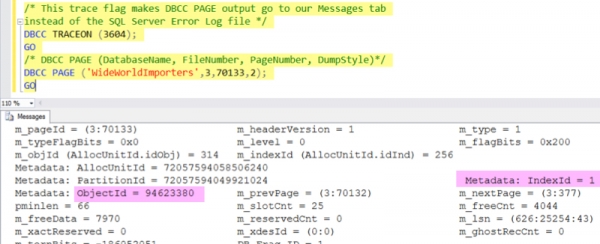
Almost done! Now, you can find the table and index names using the query:
USE WideWorldImporters;
GO
SELECT
    sc.name as schema_name,
    so.name as object_name,
    si.name as index_name
FROM sys.objects as so
JOIN sys.indexes as si on
    so.object_id = si.object_id
JOIN sys.schemas AS sc on
    so.schema_id = sc.schema_id
WHERE
    so.object_id = 94623380
    and si.index_id = 1;
GO
And here we can see that the wait on the block was on the index PK_Sales_OrderLines of the Sales.OrderLines table.
Note: In SQL Server 2014 and later, the object name can also be found using the undocumented DMO sys.dm_db_database_page_allocations. However, you'll need to query each page in the DB, which doesn't look very cool for large databases, so I used DBCC PAGE.
1.4) Can we see the data on the page that was blocked?
Well, yes. But... are you sure you really need this?
It's slow even on small tables. But it seems kind of cool, so since you've read this far... let's talk about %%physloc%%!
%%physloc%% is an undocumented piece of magic that returns a physical identifier for each record. You can use .
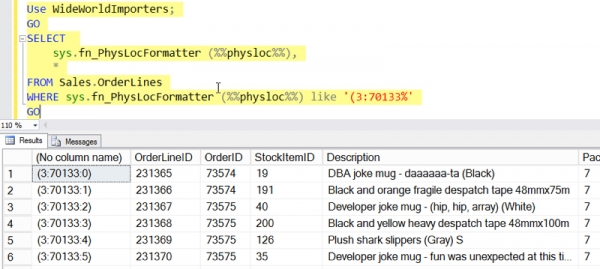
Now that we know we wanted to lock the page in Sales.OrderLines, we can look at all the data in this table stored in data file #3 on page #70133 using the following query:
Use WideWorldImporters;
GO
SELECT
    sys.fn_PhysLocFormatter (%%physloc%%),
    *
FROM Sales.OrderLines (NOLOCK)
WHERE sys.fn_PhysLocFormatter (%%physloc%%) like '(3:70133%'
GO
As I said — it's slow even on tiny tables. I added NOLOCK to the query because we still have no guarantees that the data we want to look at is the same as it was at the moment when the block was detected — so we can comfortably do dirty reads.
But hooray, the query returns the very 25 rows for which our request was fighting.
Enough about PAGE locks. What if we're waiting for a KEY lock?
2) waitresource="KEY: 6:72057594041991168 (ce52f92a058c)" = Database_Id, HOBT_Id (the magical hash that can be decoded using %%lockres%%, if you really want to)
If your query is trying to lock a record in the index and ends up being blocked itself, you get a completely different type of address.
Breaking down "6:72057594041991168 (ce52f92a058c)" we get:
- database_id = 6
- hobt_id = 72057594041991168
- magical hash = (ce52f92a058c)
2.1) Decoding database_id
This works exactly the same as in the example above! We find the database name using the query:
SELECT
    name
FROM sys.databases
WHERE database_id=6;
GO
In my case, it's the same one .
2.2) Decoding hobt_id
In the context of the found database, we need to query sys.partitions with a pair of joins to help identify the table and index names...
USE WideWorldImporters;
GO
SELECT
    sc.name as schema_name,
    so.name as object_name,
    si.name as index_name
FROM sys.partitions AS p
JOIN sys.objects as so on
    p.object_id=so.object_id
JOIN sys.indexes as si on
    p.index_id=si.index_id and
    p.object_id=si.object_id
JOIN sys.schemas AS sc on
    so.schema_id=sc.schema_id
WHERE hobt_id = 72057594041991168;
GO
It tells me that the query was waiting on the lock Application.Countries, using the index PK_Application_Countries.
2.3) Now for a bit of magic %%lockres%% — if you want to find out which record was blocked
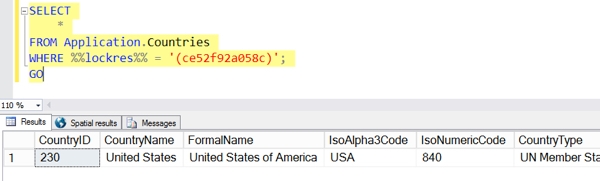
If I really want to know which row needed the lock, I can find it with a query on the table itself. We can use the undocumented function %%lockres%% to find the record that matches the magic hash.
Keep in mind that this query will scan the entire table, and on large tables, this can be quite inconvenient:
SELECT
    *
FROM Application.Countries (NOLOCK)
WHERE %%lockres%% = '(ce52f92a058c)';
GO
I added NOLOCK () because locks can become an issue. We just want to see what's there now, not what was there when the transaction started — I don't think data consistency is important to us.
Voila, the record we were fighting for!
Acknowledgments and further reading
I don’t remember who first described many of these things, but here are two posts about some of the least documented tricks that you might find interesting:
- Paul Randal's post about (as we did our data in the first example)
- A question on StackOverflow about (as we found the data in the second example). One of the answers leads to a post .
Source: habr.com
