


“I inherited this mess,
starting with the shameless Zello; LinkedIn
and ending with ‘everyone else’ on the Telegram platform
in my world.And then, stammering,
the official quickly and loudly added:
but I will establish order (here in IT)"
(…).
Durov rightly believes that authoritarian states should fear his cipherpunk, while Roskomnadzor and golden shields with their DPI filters don’t really concern him
(Political technology)
My technical policy is simpler, I can elaborate on my thoughts regarding careless blocking in RuNet, but I believe that progressive citizens of Modern Russia and users of Habr have felt the incompetence of the current authorities firsthand, so I will limit myself to a single phrase: our technical policy is 'Digital Resistance.' 'Providing family and friends with a stable communication channel.'
Deploying MTProto proxy Telegram
- Technical complexity level - 'not complicated', if, for example, you follow this cheat sheet.
- Reliability level - 'above average': the Docker image works stably, it doesn’t need to be restarted every day, as the developers stated in their official Telegram documentation, but some vulnerabilities are certainly present in the container.
- Resistance/anxiety level - 10 ISIS members are weaving their conspiracy 'relatives are using it', there hasn’t been a single ban from Roskomnadzor since spring.
- Trust level - 'public baby distrust', the problem lies with the clients (some friends are suspicious of my MtprotoProxy).
- Testosterone level - 'remains unchanged'.
- Financial costs - '0₽'.
- Financial reward - 'does not depend on citizen Durov'. Incentive - the possibility of advertising imposition.
We will raise our TelegramProxy on 'free/personal' resources from Amazon-ec2: t2.micro. I used this the machine.
Okay, we’ve deployed our free server, let's move on to the official website dockerhub and download the docker container.
No need to look for any image, file, or magic button - 'there are none', all the magic happens in CLI:
$ docker pull telegrammessenger/proxy #image downloaded.But before 'this', install docker for CLI:
sudo apt-get install docker.io dockerNext, the official MtprotoProxyTelegram documentation suggests doing something like the following:
$ sudo su && docker run -d -p443:443 --name=mtproto-proxy --restart=always -v proxy-config:/data telegrammessenger/proxy:latest #starting our container "mtproto-proxy".
After this command, a HEX string will appear in the terminal output, but we are not interested in that.
We write in the CLI:
$ docker logs mtproto-proxyAnd we get the required data:
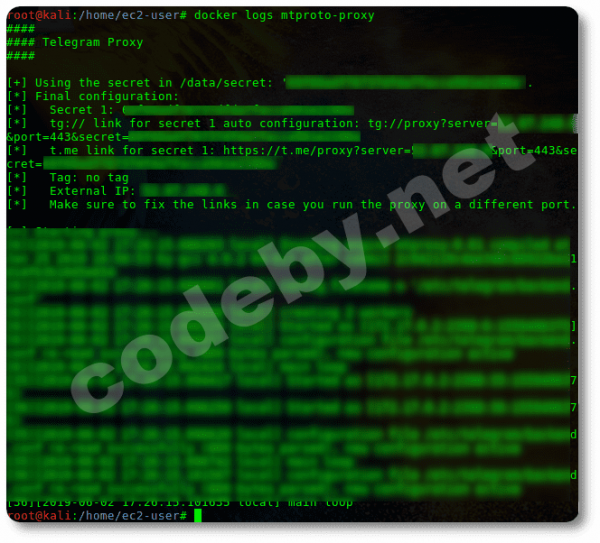
In the output of this log, we see (blacked out):
A) our server's IP (external server IP);
B) and a random secret — a random string in HEX.
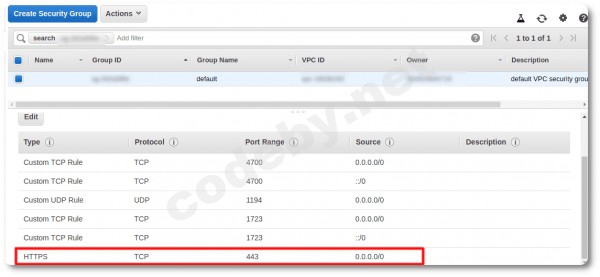
Before registering our MtproProxy, we need to configure the main firewall over iptables (no matter how you redirect traffic on this VPC, it will be disobedient since the main firewall in Amazon-EC2 is located in the web interface and has higher priority over iptables).
Go to “console Amazon-EC2” in Security Group and open the incoming port 443 (logical masking of traffic for now).
Take our data "ip and secret" from the log and go to the Telegram messenger, find the official MTProxy Admin Bot (@MTProxybot) and register our MtproProxy: run the command [\/newproxy] and enter [our_ip:443], then enter our [secret\/HEX].
If you mess up when entering the data, the bot will get angry and send you to…
If you fill in both lines correctly, you will receive approval and a working link to your active MtprotoProxyTelegram, which you can share with anyone.
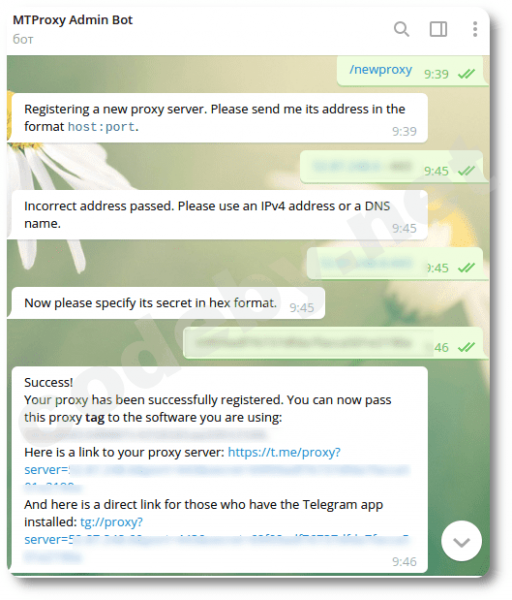
Also through this bot, you can add your sponsorship channel (but not a chat), where you will impose your views on users who have connected to your server, or you can choose not to "spam" and not disturb your potential clients by not showing the channel in the pinned list of the messenger.
A few more words about the bot, you can request statistics there, but it's "also a bagel". Apparently "statistics" are available when you have a crowd of "freeloaders" from Makhachkala following you.
Monitoring
How many users can we connect to our server? And in general, who/what is there? What? And how many?
Let's see what the official documentation says… Aha, to do it like this:
$ curl http://localhost:2398/stats or like this $ docker exec mtproto-proxy curl http://localhost:2398/stats # and we will receive the statistics directly in the CLI."Keep your pockets wider" With the suggested commands, we will always receive a similar error:
«curl: (7) Failed to connect to localhost port 2398: Connection refused»
Our proxy will work. But! A bagel, and not the statistics we will receive.
You can take care of business for the red-eyed ones: check
$ netstat -an | grep 2398 and...At first, I thought it was just another mistake by the Telegram developers (and I still think that), then I found a temporary decent solution: polish the Docker container with a file.
Later, I came across some information:
about the government's antics around 'statistics' by Roskomnadzor.
'We have blocked part of the public proxies on our servers using the firehol project databases. This project monitors lists of public proxies and creates databases with them.
Since then (almost two days now), not a single IP address of our Russian proxy has been blocked.
3. We explain how to create a proxy that is almost invulnerable to Roskomnadzor and share a script to block public proxies.
— Update the Docker container (or daemon) for the MTProto proxy to the latest version: Roskomnadzor detects old versions by the statistics port, which was bound to 0.0.0.0 and clearly identified itself to the entire internet. Or better — open the necessary ports using iptables, and close the rest (remember, with Docker containers, you should use the FORWARD rule).
— Roskomnadzor has long learned to dump traffic: they can see requests within HTTP and SOCKS5 proxies, as well as the old version of MTProto proxy obfuscation.
When clients from some providers with such dumpers access Telegram through these proxies, Roskomnadzor sees such requests and immediately blocks these proxies. The same applies to MTProto proxies with old obfuscation.
Solution: provide clients connecting to the proxy with a secret that starts with dd (there’s no need to specify additional letters dd in the MTProto proxy settings). This will enable an obfuscation version that dumpers cannot detect.
And no HTTP or SOCKS5 proxies.
— An adjustment that every Telegram proxy owner regularly facing bans from Roskomnadzor can use to completely (or almost completely) stop the blocks (and at the same time confirm that Roskomnadzor is lying).
A script that bans public proxies and a small manual for it.
→ Source
Our proxy is pro-Western; I encountered no problems/blockages during the spring and cool summer days, so I didn’t bother with a loss of pace and didn’t add the dd* prefix to the key.
The manual "statistics retrieval/monitoring" according to the official MtprotoProxyTelegram instructions is non-functional/outdated; we'll need to fix the docker image.
Let's fix it.
Our container is still running:
$ docker stop mtproto-proxy #stop our running docker container and start a new image with the missing statistics flag
$ docker run --net=host --name=mtproto-proxy2 -d -p443:443 -v proxy-config:/data -e SECRET=your_previous_secret_hex telegrammessenger/proxy:latest
Let's check the statistics:
$ curl http://localhost:2398/statscurl: (7) Failed to connect to 0.0.0.0 port 2398: Connection refused
Statistics are still unavailable...!
Let's find out the docker container ID:
$ docker psCONTAINER ID IMAGE COMMAND CREATED STATUS PORTS NAMES
f423c209cfdc telegrammessenger/proxy:latest "/bin/sh -c '/bin/ba…" About an hour ago Up About a minute 0.0.0.0:443->443/tcp mtproto-proxy2
Let's go inside the docker container with our instructions:
$ sudo docker exec -it f423c209cfdc /bin/bash

$ apt-get update
$ apt-get install nano
$ nano -$ run.sh
At the very last line of the script "run.sh", add the missing flag:
«--http-stats»
"exec /usr/local/bin/mtproto-proxy -p 2398 -H 443 -M "$WORKERS" -C 60000 --aes-pwd /etc/telegram/hello-explorers-how-are-you-doing -u root $CONFIG --allow-skip-d h --nat-info "$INTERNAL_IP:$IP" $SECRET_CMD $TAG_CMD"
Add "--http-stats", something like this should result:
"exec /usr/local/bin/mtproto-proxy -p 2398 --http-stats -H 443 -M \"$WORKERS\" -C 60000 --aes-pwd /etc/telegram/hello-explorers-how-are-you-doing -u root $CONFIG --allow-skip-d h --nat-info \"$INTERNAL_IP:$IP\" $SECRET_CMD $TAG_CMD"
Ctrl+o/Ctrl+x/Ctrl+d (save/exit nano/exit from the container).
We restart our docker container:
$ docker restart mtproto-proxy2All set, now with the command:
$ curl http://localhost:2398/stats #retrieve detailed statistics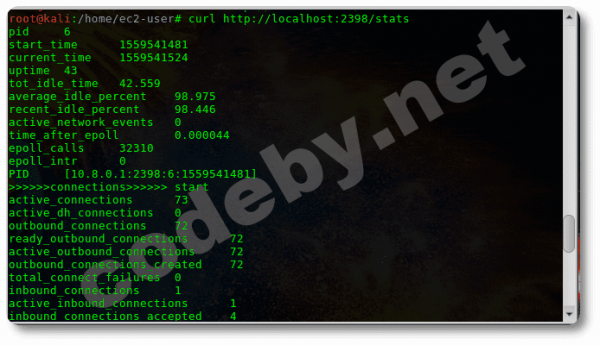
The statistics contain a lot of "junk" (in the screenshot 1/3 of it), let's create an alias:
$ echo "alias telega='curl localhost:2398/stats | grep -e total_special -e load_average_total'" >> .bashrc && bashWe get what we polished the docker container for: the number of connections and load:
$ telega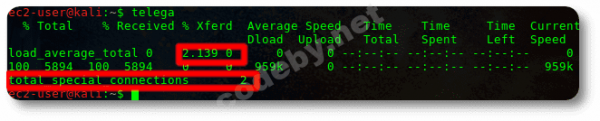
The docker container is running, the statistics are spinning.
Resources used
No matter how cool you are, Stuart Redman, you still leave a mark of trouble on your pants. A running Docker image leaves quite a mark.
It makes no sense to describe the advantages and disadvantages of docker images; a docker container is a mini-virtual machine consuming fewer resources than a "real" virtual machine, for example, VirtualBox, but consuming nonetheless.
1) Whether the docker image runs with statistics or without it, two clients are busy or ten — resources are utilized ~equally: 75% of the total CPU performance of t2.micro.
2) Let's look at the VPC server monitoring:
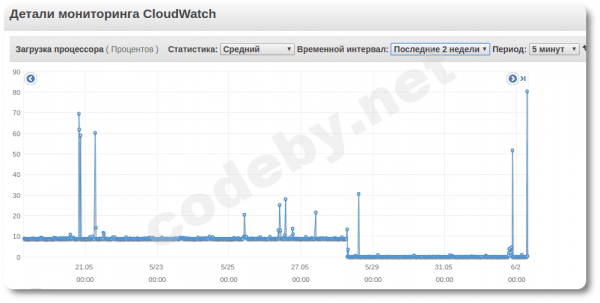
From the resource utilization chart on VPC, we see that the Docker container consistently consumes about 7.5% of the total maximum CPU performance, and it was intentionally/temporarily stopped by me on May 28. (Note - OpenVPN & pptp are also running on the server.)
Why is 10% constant CPU load the limit for this server?
Because there are limitations from Amazon EC2 calculated in credits:
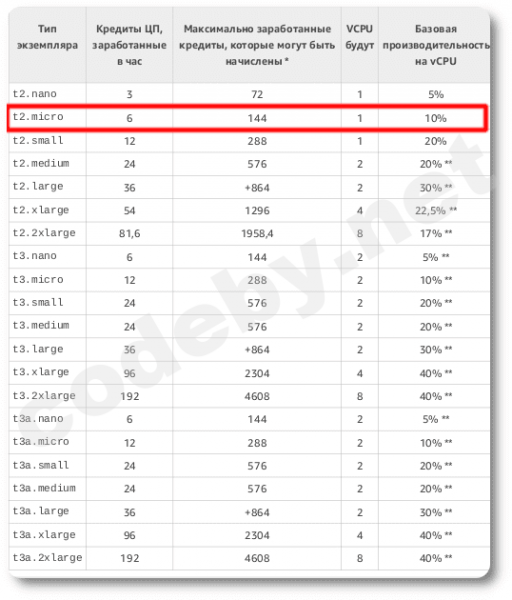
1 CPU credit = 1 CPU running at 100% load for one minute, and we have 6 credits (meaning that peak 100% CPU utilization is possible for 6 minutes, after which CPU power will decrease). Other combinations: for example, 1 CPU credit = 1 CPU running at 50% load for two minutes (meaning we can use CPU at 50% load for 12 minutes), or, for example, a constant 10% CPU load all the time.
Conclusions
- We are a part of the "Digital Resistance." We provided our "moms and dads" with a reliable communication channel.
- If you have MtprotoProxyTelegram and OpenVPN deployed on the server, but no more, there will be no delays/pings/failures. However, if you constantly experiment with your t2/micro, expect connection slowdowns.
- My overseas ping is ~100-250ms, and there are no noticeable delays in voice communication.
- The financial costs for all "this" (including VPC resources) = 0₽.
Reprinting my article.
UPD: Thanks to some Habr users for the useful comments, indeed, it is possible (is the statistics supported?), there are better alternatives to the official Docker image of Mtproto proxy Telegram.
Source: habr.com
