

Performance enhancement technologies based on the use of SSDs, which have long been invented and widely applied in storage systems, primarily involve the use of SSDs as storage space. This method is highly efficient but expensive. Therefore, tiering and caching technologies come into play, where SSDs are used only for the most frequently accessed ('hot') data. Tiering is suitable for long-term (days-weeks) use of 'hot' data, while caching is used for short-term (minutes-hours) access. Both options are implemented in storage systems. . In this article, we will examine the implementation of the second algorithm – .
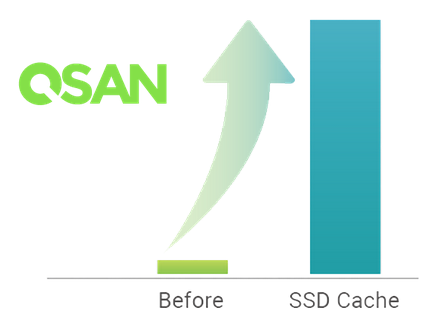
The essence of SSD caching technology is to use SSDs as an intermediate cache between hard drives and the controller's RAM. The performance of SSDs is, of course, lower than that of the controller's own cache, but the capacity is significantly higher. Thus, we achieve a compromise between speed and volume.
Indicators for using SSD cache for reading:
- A predominance of read operations over write operations (most commonly characteristic for databases and web applications);
- The presence of a bottleneck in the performance of the hard disk array;
- The volume of the requested data is less than the volume of the SSD cache.
The indicators for using SSD cache for read+write operations are the same reasons, except for the nature of the operations – a mixed type (e.g., file server).
Most storage vendors use SSD cache in their products only for read operations. A fundamental difference is the ability to use the cache for write operations as well. To activate the SSD caching functionality in QSAN storage systems, a separate license purchase is required (delivered electronically).
The SSD cache in XCubeSAN is physically implemented as separate SSD cache pools, of which there can be up to four in the system. Each pool naturally uses its own set of SSDs. In the properties of the virtual disk, we specify whether it will use a cache pool and which one. The use of cache for volumes can be enabled or disabled in online mode without halting input/output operations. Additionally, SSDs can be added to or removed from the pool in a hot state. When creating an SSD cache pool, it is necessary to choose its operating mode: read-only or read+write. This affects its physical organization. Since there can be multiple cache pools, their functionality may vary (meaning the system can have both read-only and read+write cache pools simultaneously).
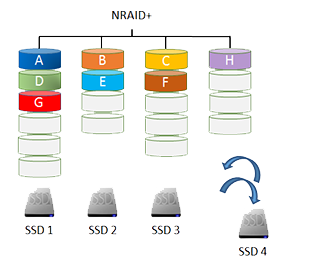
In the case of using a cache pool for read-only purposes, it can consist of 1-8 SSDs. The drives do not need to be of the same capacity or vendor, as they are combined into an NRAID+ structure. All SSDs in the pool are used collectively. The system independently attempts to parallelize incoming requests across all SSDs to achieve maximum performance. If one of the SSDs fails, there is no cause for concern: the cache only contains a copy of the data stored on the hard disk array. The available capacity of the SSD cache will simply be reduced (or become zero in the case of an initial SSD cache comprising a single drive).
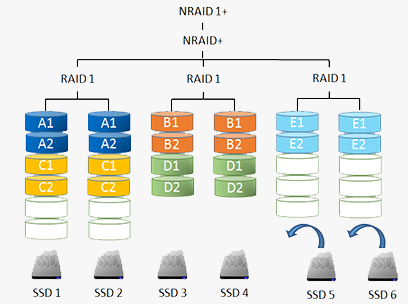
If the cache is used for read + write operations, the number of SSDs in the pool must be even, as the content is mirrored across pairs of drives (using the NRAID 1+ structure). Cache duplication is necessary because it may contain data that has not yet been written to the hard disks. In this case, if an SSD from the cache pool fails, it would result in data loss. However, with the NRAID 1+ configuration, a failure of an SSD will simply convert the cache to a "read-only" state, with unsaved data being flushed to the hard disk array. After replacing the faulty SSD, the cache will return to its original operating mode. For greater safety, a dedicated hot spare can be assigned to the read + write cache.
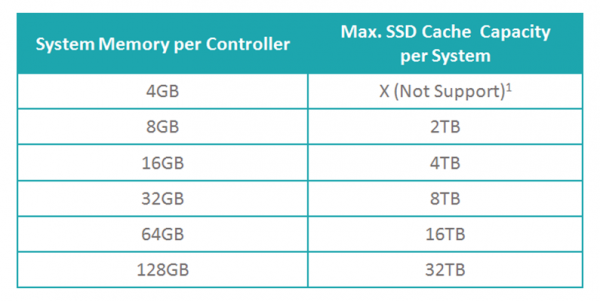
When using the SSD caching feature in XCubeSAN, there are several requirements regarding the memory capacity of the storage controllers: the more system memory available, the larger the cache pool will be.
Unlike most storage manufacturers, who only offer an on/off option for SSD caching, QSAN provides greater capabilities. Specifically, you can select the cache operating mode based on the type of workload. There are three pre-set templates that closely align with corresponding services: database, file system, and web service. Additionally, the administrator can create a custom profile by specifying the desired parameter values:
- Block size (Cache Block Size) – 1/2/4 MB
- Number of read requests for a block to be copied to the cache (Populate-on-Read Threshold) – 1..4
- Number of write requests for a block to be copied to the cache (Populate-on-Write Threshold) – 0..4
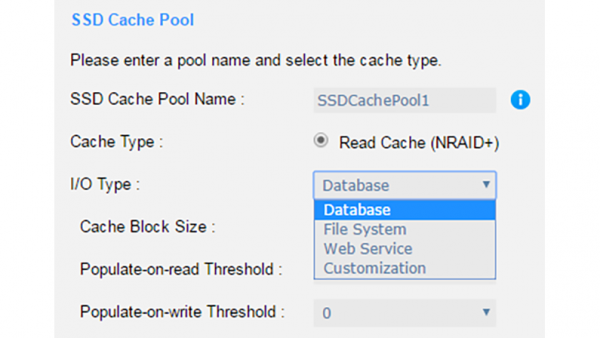
Profiles can be changed 'on the fly', but, of course, with a reset of the cache contents and a new 'warming-up' process.
When considering how SSD cache works, we can identify the main operations involved:
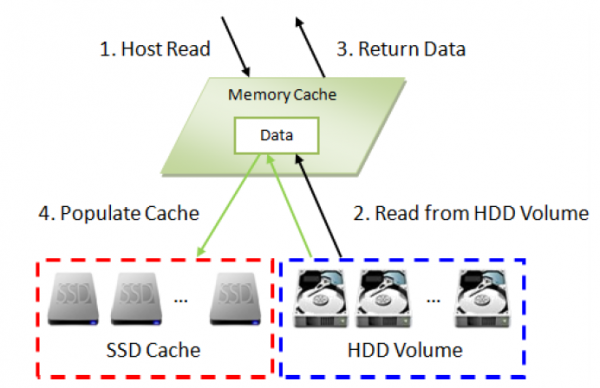
Reading data when it's not present in the cache
- A request from the host reaches the controller;
- Since the requested data is not in the SSD cache, it is read from the hard disks;
- The read data is sent to the host. At the same time, a check is performed to see if these blocks are 'hot';
- If so, they are copied to the SSD cache for future use.
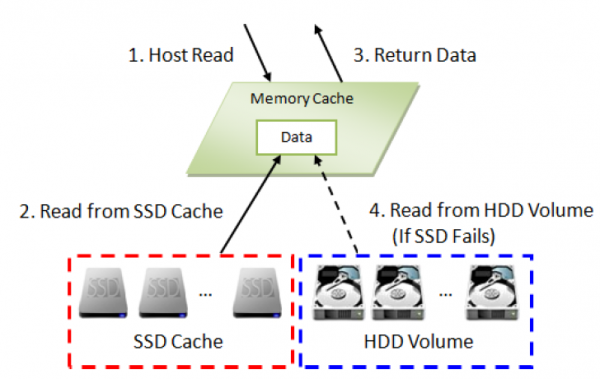
Reading data when it's present in the cache
- A request from the host reaches the controller;
- Since the requested data is in the SSD cache, it is read from there;
- The read data is sent to the host.
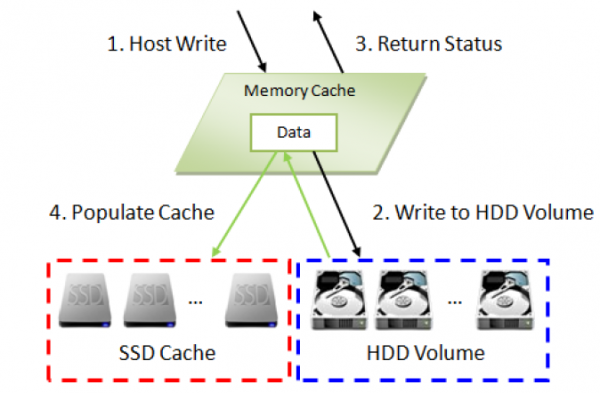
Writing data using the read cache
- A write request from the host reaches the controller;
- The data is written to the hard disks;
- The host receives a response confirming successful writing;
- Simultaneously, a check is made to see if the block is 'hot' (comparing with the Populate-on-Write Threshold). If so, it is copied to the SSD cache for subsequent use.
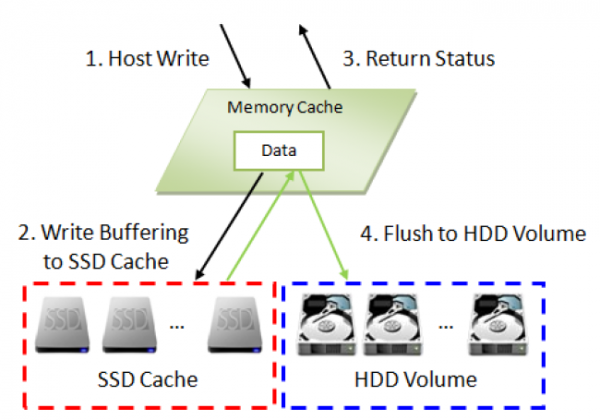
Writing data using the read + write cache
- A write request from the host reaches the controller;
- Data is written to the SSD cache;
- The host receives a response confirming successful writing;
- Data from the SSD cache is written to hard disks in the background;
Check in action
Test Stand
2 servers (CPU: 2 x Xeon E5-2620v3 2.4Hz / RAM: 32GB) connected via two ports directly to the XCubeSAN XS5224D (16GB RAM/controller) through Fibre Channel 16G.
16 x Seagate Constellation ES, ST500NM0001, 500GB, SAS 6Gb/s were used, combined in RAID5 (15+1) for the data array and 8 x HGST Ultrastar SSD800MH.B, HUSMH8010BSS200, 100GB, SAS 12Gb/s as cache.
2 volumes were created: one for each server.
Test 1. SSD cache in read-only mode with 1-8 SSDs
SSD Cache
- I/O Type: Customization
- Cache Block Size: 4MB
- Populate-on-read Threshold: 1
- Populate-on-write Threshold: 0
I/O Pattern
- Tool: IOmeter V1.1.0
- Workers: 1
- Outstanding (Queue Depth): 128
- Access Specifications: 4KB, 100% Read, 100% Random
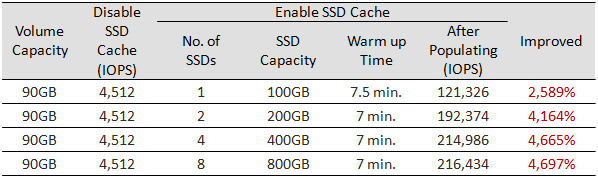
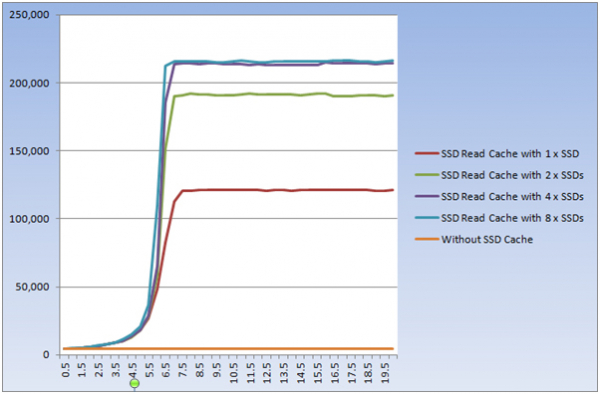
In theory, the more SSDs in the cache pool, the higher the performance. This was confirmed in practice. The only significant increase in the number of SSDs with a small number of volumes does not lead to an explosive effect.
Test 2. SSD cache in read + write mode with 2-8 SSDs
SSD Cache
- I/O Type: Customization
- Cache Block Size: 4MB
- Populate-on-read Threshold: 1
- Populate-on-write Threshold: 1
I/O Pattern
- Tool: IOmeter V1.1.0
- Workers: 1
- Outstanding (Queue Depth): 128
- Access Specifications: 4KB, 100% Write, 100% Random
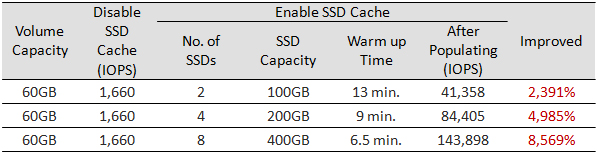
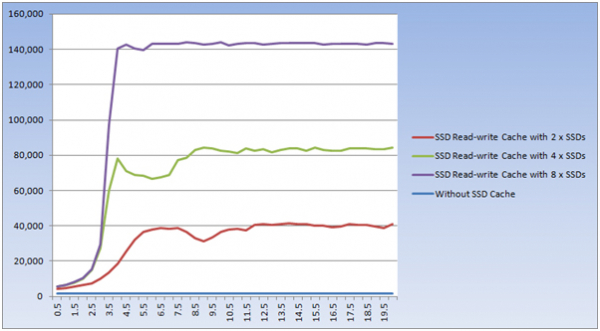
The same result: explosive performance growth and scalability with the increase in the number of SSDs.
In both tests, the volume of working data was less than the total cache volume. Therefore, over time, all blocks were copied to the cache. The operations were essentially performed with SSDs, hardly involving hard disks. The aim of these tests was to clearly demonstrate the efficiency of cache warming and its performance scaling depending on the number of SSDs.
Now let’s come back down to earth and check a more realistic situation where the data volume exceeds the cache size. To ensure the test concludes in a reasonable time (the "warming" period of the cache increases significantly with larger volume size), we'll limit the volume size to 120GB.
Test 3. Emulation of database operation
SSD Cache
- I/O Type: Database
- Cache Block Size: 1MB
- Populate-on-read Threshold: 2
- Populate-on-write Threshold: 1
I/O Pattern
- Tool: IOmeter V1.1.0
- Workers: 1
- Outstanding (Queue Depth): 128
- Access Specifications: 8KB, 67% Read, 100% Random

Verdict
As an obvious conclusion, a good efficiency of SSD cache usage to enhance the performance of any storage system is indeed evident. This statement fully applies: the SSD caching function is implemented excellently. This includes support for read and read + write modes, flexible configuration for any use case, and overall system performance. Therefore, for a very reasonable cost (the license price is comparable to the cost of 1-2 SSDs), you can significantly enhance overall performance.
Source: habr.com
