

1. Introduction
Companies that had not organized remote access systems were urgently deploying them a couple of months ago. Not all administrators were prepared for such 'heat', resulting in security oversights: incorrect service configurations or even the installation of outdated software versions with previously discovered vulnerabilities. Some have already faced the consequences of these oversights, while others have been luckier, but everyone should draw conclusions. Loyalty to remote work has increased significantly, and more companies are accepting remote work as a viable format on a permanent basis.
There are many options for ensuring remote access: various VPNs, RDS, and VNC, TeamViewer and others. Administrators have a wide range of choices, depending on the specifics of the corporate network and devices within it. VPN solutions remain the most popular; however, many small companies opt for RDS (Remote Desktop Services) as they are simpler and faster to deploy.
In this article, we will talk in more detail about the security of RDS. We will provide a brief overview of known vulnerabilities, as well as discuss several scenarios for initiating attacks on network infrastructure based on Active Directory. We hope that our article will help someone rectify errors and enhance security.
2. Recent vulnerabilities in RDS/RDP
Any software has bugs and vulnerabilities that can be exploited by malicious actors, and RDS is no exception. Recently, Microsoft has frequently reported new vulnerabilities, and we decided to provide a brief overview of them:
This vulnerability puts users connecting to a compromised server at risk. An attacker could gain control over the user device or establish persistence in the system to maintain constant remote access.
- / /
This group of vulnerabilities allows an unauthorized attacker to remotely execute arbitrary code on a server with RDS via a specially crafted request. They can also be used to create worms—malicious software that infects neighboring network devices on its own. Thus, these vulnerabilities can jeopardize the entire company's network, and timely updates are the only protection.
Remote access software has received increased attention from both researchers and attackers, so we may soon hear about new similar vulnerabilities.
The good news is that not all vulnerabilities have publicly available exploits. The bad news is that an attacker with expertise can easily write an exploit for a vulnerability based on its description or by using techniques like Patch Diffing (as discussed by our colleagues in ). Therefore, we recommend regularly updating the software and keeping an eye out for new reports of discovered vulnerabilities.
3. Attacks
We move on to the second part of the article, where we will show how attacks on Active Directory-based network infrastructure begin.
The described methods apply to the following attacker model: an attacker with a user account who has access to the Remote Desktop Gateway—a terminal server (often accessible, for example, from an external network). By using these methods, the attacker can continue their assault on the infrastructure and establish their presence in the network.
The network configuration may vary in each case, but the techniques described are quite universal.
Examples of escaping a restricted environment and escalating privileges
When accessing the Remote Desktop Gateway, the attacker is likely to encounter a somewhat restricted environment. When connecting to the terminal server, an application is launched: a window for connecting via the Remote Desktop protocol for internal resources, a file explorer, office suites, or any other software.
The attacker's goal will be to gain access to command execution, i.e., to launch cmd or powershell. This can be assisted by several classic escape techniques for Windows. Let's discuss them further.
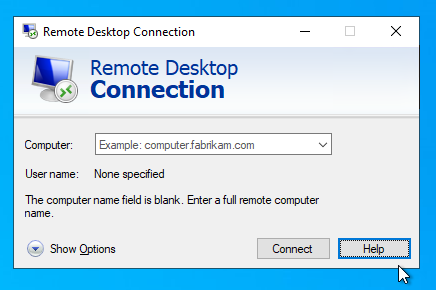
Option 1. The attacker has access to the Remote Desktop connection window within the Remote Desktop Gateway:
The “Show Options” menu is revealed. Options for manipulating the connection configuration files appear:
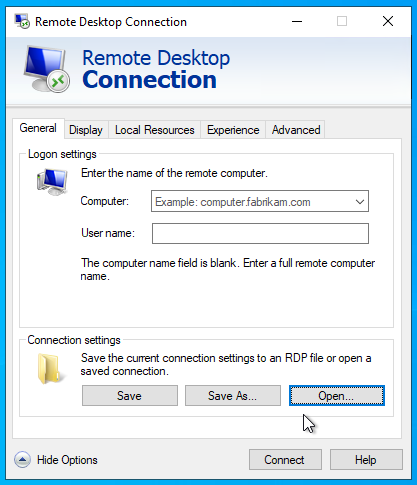
From this window, it is possible to easily access the Explorer by clicking any of the “Open” or “Save” buttons:
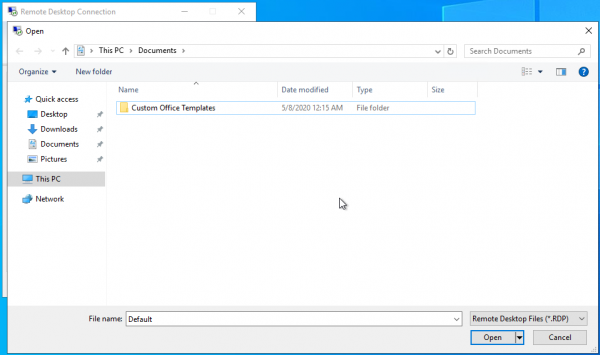
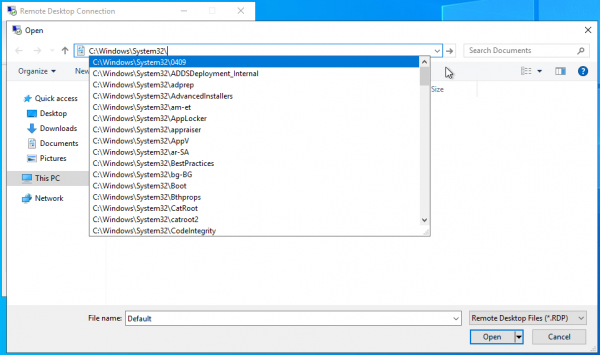
The File Explorer opens. Its 'address bar' allows for launching authorized executable files as well as listing the file system. This can be beneficial to an attacker if system disks are hidden and direct access to them is not possible:
→
A similar scenario can be simulated, for example, by using Excel from the Microsoft Office suite as remote software.
→
Furthermore, one should not forget about macros used in this office package. Our colleagues have examined the security issues related to macros in this .
Option 2. Using the same inputs as in the previous instance, the attacker initiates multiple connections to the remote desktop under the same account. Upon reconnection, the first one will be closed, and an error notification will appear on the screen. The help button in this window will call Internet Explorer on the server, after which the attacker can access File Explorer.
→
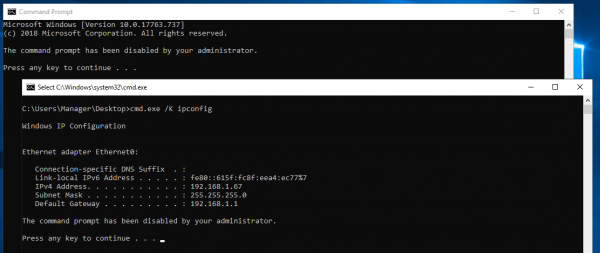
Option 3. When there are restrictions set on executing files, the attacker may encounter a situation where group policies prevent the administrator from launching cmd.exe.
There is a way to bypass this by running a bat file on the remote desktop with contents like cmd.exe /K . An error when launching cmd and a successful example of executing a bat file are shown in the figure below.
Option 4. Blocking application launches using blacklists based on executable file names is not a panacea; they can be circumvented.
Let's consider the following scenario: we have blocked access to the command line, prohibited the launch of Internet Explorer and PowerShell using group policies. The attacker tries to invoke help — no response. Attempts to launch PowerShell via the context menu of the modal window triggered by holding the Shift key — a message indicating that launch is prohibited by the administrator. Attempts to launch PowerShell via the address bar — again no response. How to bypass the restriction?
It is sufficient to copy powershell.exe from the C:\Windows\System32\WindowsPowerShell\v1.0 folder to the user's folder, rename it to something other than powershell.exe, and the launch capability will appear.
By default, when connecting to a remote desktop, access to the client's local drives is provided, from which the attacker can copy powershell.exe and, after renaming it, launch.
→
We have provided just a few methods for bypassing restrictions; many more scenarios can be imagined, but they all involve accessing Windows Explorer. There are numerous applications that utilize standard Windows tools for file operations, and when placed in a restricted environment, similar techniques can be applied.
4. Recommendations and Conclusion
As we see, even in a restricted environment, there is room for attack development. However, it is possible to make life more difficult for the attacker. Here are some general recommendations that will be useful both in the scenarios we discussed and in other cases.
- Limit program launches using black/white lists through group policies.
In most cases, there remains the possibility of code execution. We recommend familiarizing yourself with the project , to understand undocumented methods of file manipulation and code execution in the system.
We recommend combining both types of restrictions: for example, allowing the execution of executable files signed by Microsoft while restricting the launch of cmd.exe. - Disable the Internet Explorer settings tabs (this can be done locally in the registry).
- Disable the call to Windows built-in help via regedit.
- Disable the ability to mount local drives for remote connections, unless such a restriction is critical for users.
- Restrict access to the local disks of the remote machine, allowing access only to user folders.
We hope you found this interesting, and at best, this article will help make your company's remote work more secure.
Source: habr.com
