

On January 29, the technical committee of the CNCF (Cloud Native Computing Foundation), which is behind Kubernetes, Prometheus, and other open-source products from the world of containers and cloud-native technology, approved the project Rook into its ranks. A great opportunity to get to know this "orchestrator of distributed data storage systems in Kubernetes" better.
What is Rook?
— is software written in Go ( under the open-source Apache License 2.0), designed to empower data storage with automated functions that make them self-managing, self-scaling, and self-healing. To achieve this, Rook automates (for data storage used in a Kubernetes environment): deployment, bootstrapping, configuration, provisioning, scaling, updates, migrations, failure recovery, monitoring, and resource management.
The project is currently in alpha stage and specializes in orchestrating the distributed storage system Ceph in Kubernetes clusters. The authors also announce plans to support other storage systems, but this will not happen in the upcoming releases.
Components and Technical Structure
At the core of Rook's operation within Kubernetes is a special operator (we previously wrote about Kubernetes Operators in ), which automates storage configuration and implements monitoring of it.
So, The Rook operator is represented by a container that contains everything needed for deploying and subsequently maintaining the storage. Among the operator's responsibilities are:
- creating a DaemonSet for Ceph storage demons () with a simple RADOS cluster;
- creating pods for monitoring Ceph (with , which check the cluster's state; usually, three instances are deployed for quorum, and if any of them fails, a new one is brought up);
- managing CRDs () for the , , (sets of resources and services for handling HTTP requests that perform PUT/GET for objects — they are compatible with the S3 and Swift API), as well as ;
- initializing pods to run all necessary services;
- creating Rook agents.
Rook agents are represented by individual pods that are deployed on each Kubernetes node. The agent's purpose is to configure the , providing support for storage volumes in Kubernetes. The agent implements storage operations: connects storage network devices, mounts volumes, formats the filesystem, etc.
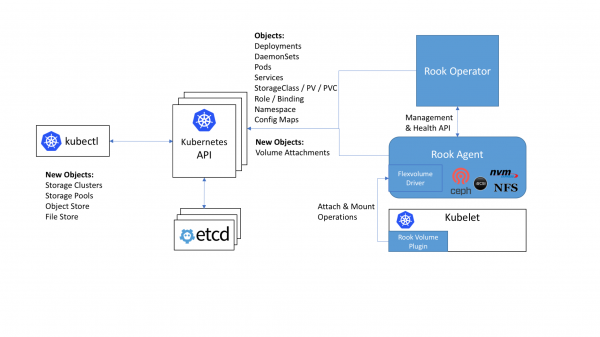
The place and role of Rook components in the overall Kubernetes cluster scheme
Rook offers three types of storage:
- (Block,
StorageClass) — mounts storage to a single pod; - (Object,
ObjectStore) — accessible inside and outside the Kubernetes cluster (via S3 API); - (Shared File System,
Filesystem) — a filesystem that can be mounted for read and write access from multiple pods.
The internal structure of Rook includes:
- Mons — pods for monitoring Ceph (with the previously mentioned ceph-mon);
- OSDs — pods with ceph-osd demons (Object Storage Daemons);
- MGR — pods with the daemon (Ceph Manager), providing additional monitoring capabilities and interfaces for external systems (monitoring/management);
- RGW (optional) — pods with object storage;
- MDS (optional) — pods with the shared FS.
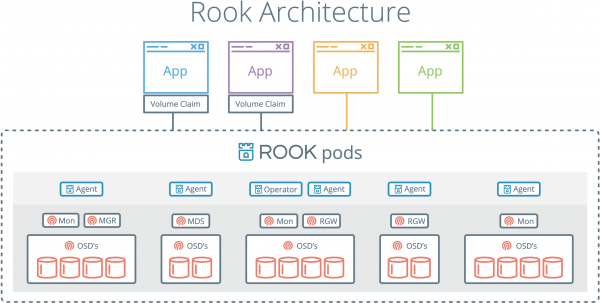
All Rook demons (Mons, OSDs, MGR, RGW, MDS) are compiled into a single binary (rook), which runs in a container.
For a brief introduction to the Rook project, this short (12-slide) presentation by Bassam Tabbara (CTO at Quantum Corp) may also be helpful.
Operation of Rook
The Rook operator fully supports Kubernetes version 1.6 and above (and partially, the older K8s release — 1.5.2). Its installation downward API support (simultaneously with this in looks like this:
cd cluster/examples/kubernetes
kubectl create -f rook-operator.yaml
kubectl create -f rook-cluster.yaml
Additionally, a has been prepared for the Rook operator, allowing for installation in this manner as well:
helm repo add rook-alpha https://charts.rook.io/alpha
helm install rook-alpha/rook
There is a small number of (for example, you can disable support , if that feature is not used in your cluster), which are passed in helm install via the parameter --set key=value[,key=value] (or store in a separate YAML file, passing it via -f values.yaml).
After installing the Rook operator and starting the pods with its agents, you need to create the Rook cluster itself, the simplest configuration of which looks like this (rook-cluster.yaml):
apiVersion: v1
kind: Namespace
metadata:
  name: rook
---
apiVersion: rook.io/v1alpha1
kind: Cluster
metadata:
  name: rook
  namespace: rook
spec:
  dataDirHostPath: /var/lib/rook
  storage:
    useAllNodes: true
    useAllDevices: false
    storeConfig:
      storeType: bluestore
      databaseSizeMB: 1024
journalSizeMB: 1024Note: special attention should be paid to the attribute dataDirHostPath, the correct value of which is necessary to maintain the cluster after reboots. For use cases as a permanent storage location, Rook authors recommend having at least 5 GB of free disk space in this directory on Kubernetes hosts.
Next, you need to create the cluster from the configuration and ensure that the pods were created in the cluster (in the namespace rook):
kubectl create -f rook-cluster.yaml
kubectl -n rook get pod
NAME                              READY     STATUS    RESTARTS   AGE
rook-api-1511082791-7qs0m         1/1       Running   0          5m
rook-ceph-mgr0-1279756402-wc4vt   1/1       Running   0          5m
rook-ceph-mon0-jflt5              1/1       Running   0          6m
rook-ceph-mon1-wkc8p              1/1       Running   0          6m
rook-ceph-mon2-p31dj              1/1       Running   0          6m
rook-ceph-osd-0h6nb               1/1       Running   0          5m
Upgrade Updating the Rook cluster (up to the new version) is a procedure that currently requires the sequential updating of all its components in a specific order, and you can only start it after ensuring that the current Rook installation is in a fully 'healthy' state. A detailed step-by-step guide for upgrading Rook from version 0.5.0 to 0.5.1 can be found in .
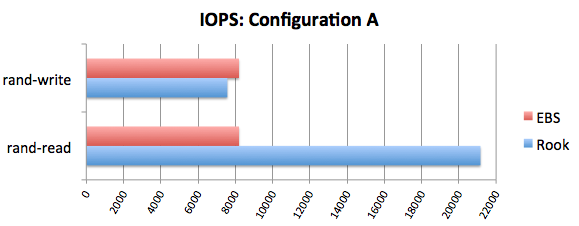
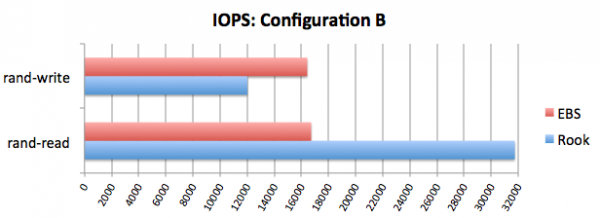
In November last year, Rook's blog comparisons performance. with EBS. The results are noteworthy, and to summarize briefly, they are as follows:
Prospects
The current status of Rook is alpha, and the latest major release to date is , released in November 2017 (the current patch is — released on December 14). In the first half of 2018, more mature releases are expected: beta and stable (officially ready for production use).
According to of the project, the developers have a detailed vision for the evolution of Rook at least in the next two releases: 0.7 (its readiness in the GitHub tracker at 60%) and 0.8. Among the expected changes are the transition of Ceph Block and Ceph Object support to beta status, dynamic provisioning of volumes for CephFS, an advanced logging system, automated cluster updates, and support for snapshots for volumes.
The inclusion of Rook among is currently at the very early stage — 'inception-level', alongside and ) is a kind of guarantee of the growing interest in the product. How firmly it will take root in the world of cloud applications will become clearer after the stable versions appear, which will undoubtedly bring Rook new 'testers' and users.
P.S.
Also read in our blog:
- «»;
- «»;
- «»;
- «»;
- «».
Source: habr.com
