

Creating Your First DevOps Pipeline in Five Steps for Beginners.
DevOps has become a cure for slow, disconnected, and other problematic development processes. However, minimal knowledge of DevOps is necessary. This article will cover concepts such as the DevOps pipeline and how to create one in five steps. It is not a complete guide, but rather a 'fishing line' that can be expanded upon. Let's start with some history.
My Introduction to DevOps
Once upon a time, I worked with cloud services at Citi Group and developed an IaaS web application to manage Citi's cloud infrastructure, but I was always curious about how to optimize the development pipeline and improve the culture among developers. Greg Lavender, our technical director for cloud architecture and infrastructure, recommended a book . It explains the principles of DevOps beautifully, and reads like a novel.
The table on the reverse side shows how often companies release new versions:
How do Amazon, Google, and Netflix manage to release so frequently? It's simple: they have figured out how to create an almost perfect DevOps pipeline.
At Citi, things were quite different until we transitioned to DevOps. At that time, my team had different environments, but the deployment to the development server was done manually. All developers had access to only one development server based on IBM WebSphere Application Server Community Edition. When trying to deploy simultaneously, the server would 'crash', and we had to 'painfully' negotiate with one another each time. Moreover, we had insufficient test coverage, a labor-intensive manual deployment process, and no way to track code deployment related to a specific task or client requirement.
It was evident that something needed to be done urgently, and I found a like-minded colleague. Together, we decided to create our first DevOps pipeline—he set up a virtual machine and a Tomcat application server, while I worked on Jenkins, integration with Atlassian Jira and BitBucket, as well as test code coverage. The project was successful: we fully automated the development pipeline, achieved almost 100% uptime for the development server, were able to track and improve test code coverage, and linked the Git branch to deployment and Jira tasks. Almost all the tools we used to build the DevOps pipeline were open-source.
In fact, the chain was simplified, as we didn't even use advanced configurations with Jenkins or Ansible. But we succeeded. This may be a result of the principle (also known as the 80/20 rule).
A brief overview of the DevOps and CI/CD chain
DevOps has various definitions. Like Agile, DevOps encompasses different disciplines. However, most would agree on the following definition: DevOps is a method, or lifecycle, of software development, the main principle of which is to create a culture where developers and other employees are 'on the same wavelength,' manual work is automated, everyone does what they do best, the frequency of delivery increases, productivity improves, and flexibility rises.
And while just having tools is not enough to create a DevOps environment, they are essential. The most important of these is Continuous Integration and Continuous Delivery (CI/CD). In the chain, there are different stages for each environment (for example, DEV (development), INT (integration), TST (testing), QA (quality assurance), UAT (user acceptance testing), STG (staging), PROD (production)), manual tasks are automated, developers can produce quality code, deliver it, and easily reconfigure.
This note describes how to create a DevOps chain in five steps, as shown in the picture below, using open-source tools.
Let's get down to business.
Step 1: CI/CD Platform
First of all, you need a CI/CD tool. Jenkins is an open-source CI/CD tool written in Java with an MIT license, which initiated the popularization of the DevOps movement and has become the de facto standard for CI/CD.
So, what is Jenkins? Imagine you have a magical remote control for various services and tools. On its own, a CI/CD tool like Jenkins is useless, but with different tools and services, it becomes all-powerful.
Besides Jenkins, there are many other open-source tools; choose any one.
Here’s what the DevOps process looks like with a CI/CD tool.
You have a CI/CD tool on localhost, but there's not much to do yet. Let's move on to the next step.
Step 2: Version Control
The best (and perhaps simplest) way to test the magic of a CI/CD tool is to integrate it with a source control management (SCM) tool. Why do you need version control? Let's say you are developing an application. You are writing it in Java, Python, C++, Go, Ruby, JavaScript, or any other language you can think of. What you're writing is called source code. Initially, especially if you're working solo, you might save everything in a local directory. However, as the project grows and more people join, you need a way to share changes in the code while avoiding conflicts during merges. Additionally, you need a way to restore previous versions without using backups or applying the copy-paste method for your code files.
This is where SCM comes into play. SCM saves code in repositories, manages its versions, and coordinates it among developers.
There are many SCM tools available, but Git has rightfully become the de facto standard. I recommend using it, although there are other options.
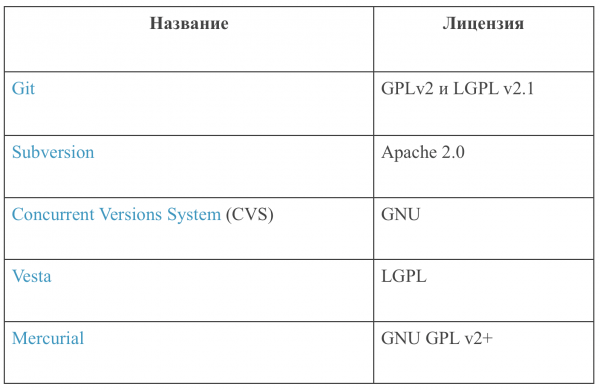
Here's what the DevOps pipeline looks like after adding SCM.
A CI/CD tool can automate the uploading and downloading of source code and facilitate team collaboration. Not bad, right? But how do we turn this into a working application loved by billions of users?
Step 3: Build Automation Tool
Everything is going smoothly. You can upload code and commit changes in the version control system, as well as invite friends to collaborate with you. But you still don’t have an application. For it to be a web application, it needs to be compiled and packaged for delivery or run as an executable file. (You don’t need to compile interpreted programming languages like JavaScript or PHP.)
Make use of a build automation tool. Whatever tool you choose, it will build the code in the desired format and automate cleaning, compilation, testing, and delivery. Build tools vary depending on the language, but commonly used open-source options include the following.
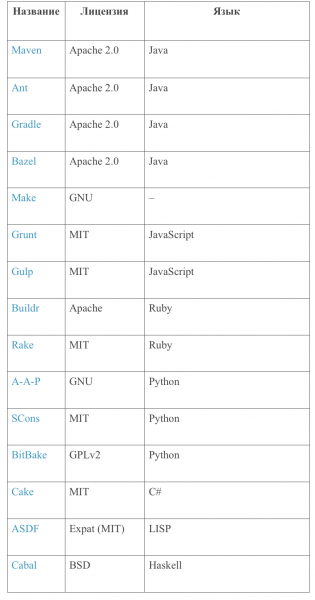
Great! Now let's insert the configuration files of the build automation tool into the version control system so that the CI/CD tool can gather them.
Everything seems fine. But where do we deploy all this now?
Step 4: Web Application Server
So, you have a packaged file that can be executed or deployed. For the application to be truly useful, it needs to have some service or interface, but you need to host all of this somewhere.
A web application can be hosted on an application server. The application server provides the environment where the program logic from the package can be executed, the interface can be rendered, and web services can be opened via a socket. You need an HTTP server and a few other environments (like a virtual machine, for example) to set up the application server. For now, let’s assume you’re familiar with all of this as we go along (although I'll talk about containers below).
There are several open application servers available.
We have almost created a functioning DevOps chain. Great job!
Basically, you could stop here; you can handle the rest on your own, but it's worth discussing code quality a bit more.
Step 5: Test Coverage
Testing takes a lot of time and effort, but it’s better to identify bugs early and improve the code to delight the end users. For this purpose, there are many open tools that not only test the code but also suggest how to enhance it. Most CI/CD tools can integrate with these tools to automate the process.
Testing is divided into two parts: testing frameworks for writing and executing tests, and tools with suggestions for improving code quality.
Testing frameworks
Quality suggestion tools
Most of these tools and frameworks are written for Java, Python, and JavaScript because C++ and C# are proprietary (though GCC has open source code).
We applied test coverage tools, and now the DevOps pipeline should look like the diagram at the beginning of the guide.
Additional steps
Containers
As I mentioned, an application server can be hosted on a virtual machine or server, but containers are more popular.
? Вкратце, в виртуальной машине операционная система чаще всего занимает больше места, чем приложение, а контейнеру обычно достаточно нескольких библиотек и конфигурации. В некоторых случаях без виртуальных машин не обойтись, но контейнер вмещает приложение вместе с сервером без лишних затрат.
For containers, Docker and Kubernetes are usually chosen, although there are other options as well.
Read articles about Docker and Kubernetes on :
Middleware automation tools
Our DevOps chain is focused on collaboratively building and delivering applications, but with DevOps tools, you can do other interesting things as well. For example, you can use "infrastructure as code" (IaC) tools, which are also known as middleware automation tools. These tools help automate installation, management, and other tasks for middleware. For instance, an automation tool can take applications (application server, database, monitoring tools) with the correct configurations and deploy them to the application server.
Here are some open-source middleware automation tools:
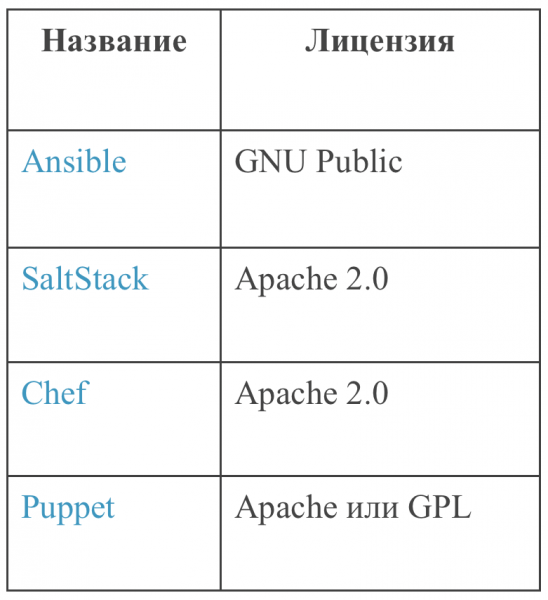
Details in articles on :
So, what now?
This is just the tip of the iceberg. The DevOps chain can do much more. Start with a CI/CD tool and discover what else you can automate to make your work easier. Don't forget about for effective collaboration.
Here are some more great articles on DevOps for beginners:
You can also integrate DevOps with open tools for agile:
Source: habr.com
