

Automating web application testing with Selenium is a common solution among test automation developers, and C# it's one of the most popular programming languages, so combining these tools is not surprising. For development using these technologies, popular proprietary software from Microsoft for Windows is often used, but I was curious to find out what free alternatives could be used without deviating from the Selenium + C# stack for this task.
Since I didn't find any articles on this topic in Russian, I will share my experience setting up an environment for developing and debugging automated tests in C# on Linux.
The OS used was Kubuntu 18.04 64-bit with Linux kernel 4.15.0-99-generic, installed from an ISO image downloaded from . I believe any modern and relatively popular Linux distribution will suffice.
For C#, the CLR was the Mono JIT compiler version 6.6.0.166. Its installation consisted of sequentially copying and executing commands in the terminal (in Kubuntu, it's Konsole) from .
And as for the IDE used, it was , installed similarly to Mono.
Selenium supports multiple browsers, but I was too lazy to torture myself and limited myself to Activated's, installing .
Next, we create a solution in MonoDevelop:
- launching MonoDevelop
- going to the 'File' menu
- selecting 'Create Solution'
- clicking on '.NET'
- choosing 'NUnit Class Library Project' and pressing 'Next'
- specifying the name and path of the solution, clicking 'Create'
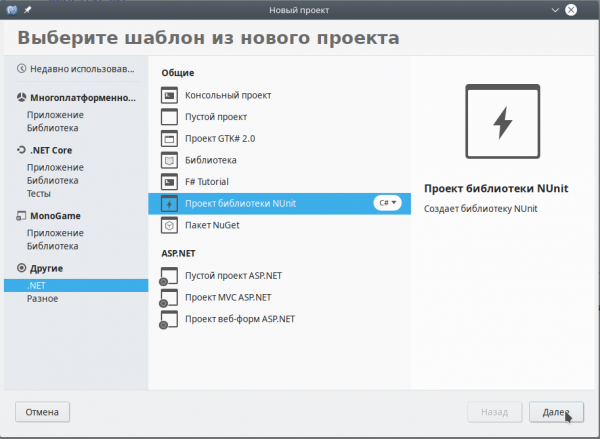
To control the browser, you will also need a couple of NuGet packages:
- we go to the 'Project' menu and select 'Manage NuGet Packages'
- search for and install the Selenium.WebDriver package
- search for and install the Selenium.WebDriver.ChromeDriver package
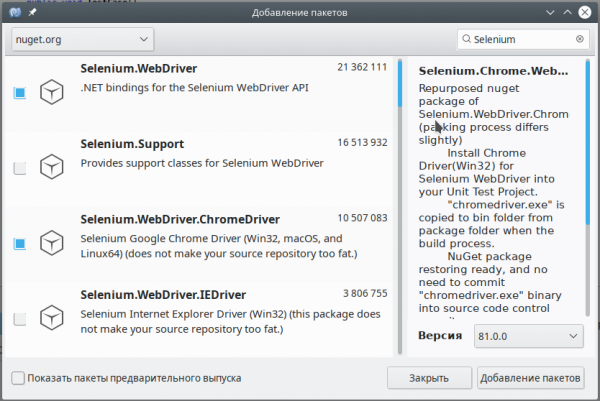
That's basically it, all that's left is to write some code to check that everything is set up correctly. When creating a solution, a file for test methods Test.cs is automatically created, into which I placed the following lines of code:
using NUnit.Framework;
using System;
using OpenQA.Selenium.Chrome;
using OpenQA.Selenium;

namespace SeleniumTests
{
    [TestFixture()]
    public class Test
    {
        [Test()]
        public void TestCase()
        {
            IWebDriver driver = new ChromeDriver();
            driver.Navigate().GoToUrl("http://habr.com/");
            Assert.IsTrue(driver.Url.Contains("habr.com"), "Something is wrong =(");
            driver.Quit();
        }
    }
}
Running the test is done from the 'Unit Tests' tab; if it is not displayed, go to the 'View' menu and select 'Test'.
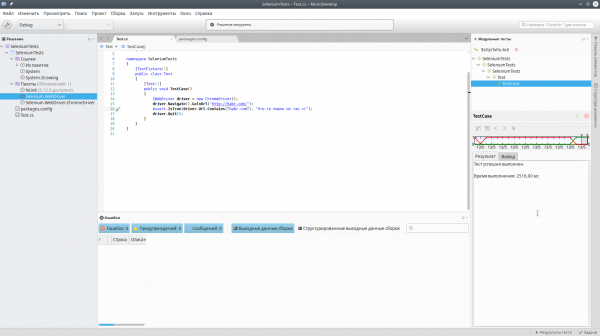
Successful automation =)
Source: habr.com
