

We are starting a series of posts where we will demonstrate some of the many capabilities of the Istio Service Mesh in conjunction with Red Hat OpenShift and Kubernetes.

Part one, today:
- We will explain the concept of Kubernetes sidecar containers and outline the theme of this series of posts: "You don't need to change anything in your code".
- Let's introduce the fundamental aspect of Istio – routing rules. All other capabilities of Istio are built upon these rules, as they allow traffic to be directed to microservices using YAML files external to the service code. We will also consider the Canary Deployment scheme. As a New Year's bonus – 10 interactive sessions on Istio.
Part two, which will be out soon, will tell you:
- How Istio implements Pool Ejection in conjunction with Circuit Breakers and demonstrate how Istio allows you to remove a non-functional or poorly performing pod from the load-balancing scheme.
- We will also revisit the Circuit Breaker topic from the first post to see how Istio can be applied here. We will show how to route traffic and handle network errors using YAML configuration files and terminal commands without making any changes to the service code.
Part three:
- A discussion on tracing and monitoring, which are already built-in or easily added to Istio. We will demonstrate how to use tools like Prometheus, Jaeger, and Grafana alongside OpenShift scaling to manage microservice architecture effortlessly.
- We will shift from monitoring and error handling to intentionally introducing errors into the system. In other words, we will learn how to perform fault injection without changing the source code, which is crucial for testing — as altering the code for this purpose risks introducing additional errors.
Finally, in the concluding post on Istio Service Mesh:
- We will venture to the Dark Side. More precisely, we will learn how to use the Dark Launch scheme, where code is deployed and tested directly on production data without affecting system operations. Here, Istio's ability to split traffic comes in handy. The capacity to test on live production data without impacting the operational system is the most convincing method of validation.
- Building on Dark Launch, we will show how to use the Canary Deployment model to reduce risks and simplify the introduction of new code. While Canary Deployment itself is not a new concept, Istio allows the implementation of this scheme using simple YAML files.
- In conclusion, we will demonstrate how to use Istio Egress to provide access to services for those outside your clusters, leveraging Istio's capabilities when working with the internet.
So, let's get started...
Monitoring and management tools of Istio – everything you need for coordinating microservices in a service mesh. .
What is Istio service mesh
The service mesh implements features for a set of services, such as traffic monitoring, access control, discovery, security, resilience, and other useful functionalities. Istio allows you to achieve all this without any changes in the service code itself. What’s the magic secret? Istio attaches its proxy to each service in the form of a sidecar container, after which all traffic to that service goes through the proxy, which, guided by predefined policies, decides how, when, and whether this traffic should reach the service. Istio also enables advanced DevOps techniques like canary deployments, circuit breakers, fault injection, and many more.
How Istio works with containers and Kubernetes
Istio service mesh is a sidecar implementation of everything needed to create and manage microservices: monitoring, tracing, circuit breakers, routing, load balancing, fault injection, retries, timeouts, mirroring, access control, rate limiting, and much more. And while there are many libraries to implement these functions directly in code today, with Istio, you can achieve all of this without changing your code.
According to the sidecar model, Istio runs in a Linux container located in the same -pod as the controlled service and injects and extracts functionality and information according to the given configuration. Let’s emphasize that this is your own configuration, and it resides outside your code. Therefore, the code becomes much simpler and shorter.
What is also important is that the operational component of microservices is not tied to the code itself, meaning IT specialists can manage their operation smoothly. Indeed, why should a developer be responsible for circuit breakers and fault injection? They should react, yes, but handle and create them? If all of this is removed from the code, programmers can fully concentrate on application functionality. The code itself will also become shorter and simpler.
Service Mesh
Istio, which implements microservice management functions outside their code, embodies the concept of a Service Mesh. In other words, it is a coordinated group of one or more binaries that form a network of network functions.
How Istio Works with Microservices
Here’s how sidecar containers work in conjunction with and from a bird's-eye view: you launch a Minishift instance, create a project for Istio (let's call it 'istio-system'), and install and run all components related to Istio. Then, as you create projects and pods, you add configuration details to your deployments, and your pods start using Istio. A simplified diagram looks like this:
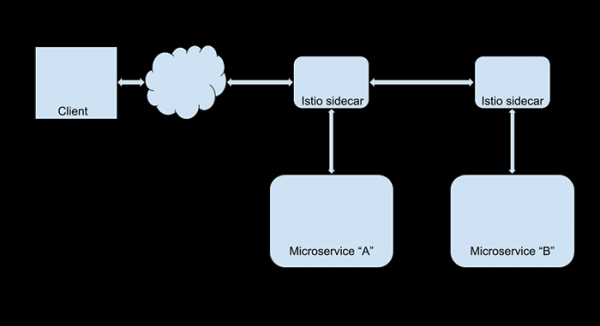
You can now modify Istio settings to implement fault injection, support or other Istio capabilities—without ever touching the code of the applications themselves. For instance, if you want to redirect all web traffic from users of your largest client (Foo Corporation) to the new version of the site, all you need to do is create an Istio routing rule that looks for @foocorporation.com in the user ID and performs the corresponding redirect. For all other users, nothing will change. Meanwhile, you can quietly test the new version of the site. And note, you don’t need to involve developers at all.
Will it be expensive?
Not at all. Istio works quite quickly; it is written in and creates very little overhead. Moreover, any potential loss in online performance is compensated by increased developer productivity. At least in theory: remember that developer time is expensive. As for software costs, Istio is open-source, so it can be obtained and used for free.
Learn it yourself
The Red Hat Developer Experience Team has developed a comprehensive practical on Istio (in English). It works on Linux, MacOS, and Windows, with code examples in Java and Node.js.
10 interactive sessions on Istio
Block 1 — For beginners
Introduction to Istio
30 minutes
Getting acquainted with Service Mesh, learning to install Istio in an OpenShift Kubernetes cluster.
Deploying microservices in Istio
30 minutes
Using Istio to deploy three microservices with Spring Boot and Vert.x.
Block 2 – Intermediate level
Monitoring and tracing in Istio
60 minutes
Exploring Istio’s built-in monitoring tools, configurable metrics, and OpenTracing through Prometheus and Grafana.
Simple routing in Istio
60 minutes
Learning to manage routing in Istio using simple rules.
Advanced routing rules
60 minutes
Getting to know smart routing in Istio, access management, load balancing, and rate limiting.
Block 3 – Advanced user
Fault Injection in Istio
60 minutes
Studying failure handling scenarios in distributed applications, creating HTTP errors and network delays, and learning to apply chaos engineering for environment recovery.
Circuit Breaker in Istio
30 minutes
Installing Siege for stress testing websites and learning to ensure backend fault tolerance using retries, circuit breakers, and pool ejection.
Egress and Istio
10 minutes
Using Egress routes to create rules for internal services to interact with external APIs and services.
Istio and Kiali
15 minutes
Learning to use Kiali to get an overview of the service mesh and study request and data flows.
Mutual TLS in Istio
15 minutes
Creating an Istio Gateway and VirtualService, followed by an in-depth study of mutual TLS (mTLS) and its configurations.
Block 3.1 — Deep dive: Istio Service Mesh for microservices
About the book:
- What is a service mesh.
- The Istio system and its role in microservices architecture.
- Using Istio to solve the following challenges:
- Fault tolerance;
- Routing;
- Chaos testing;
- Security;
- Telemetry collection using tracing, metrics, and Grafana.
Series of articles on service meshes and Istio
Try it for yourself
This series of posts does not aim to provide a deep dive into the world of Istio. We just want to introduce you to the concept and perhaps inspire you to try Istio on your own. You can do this completely for free, and Red Hat provides all the necessary tools to start mastering OpenShift, Kubernetes, Linux containers, and Istio, specifically: , and other resources on our . Don’t wait, start today!
Istio routing rules: directing service requests where they need to go
and effectively handle requests to being routed to the appropriate pods. This is one of the goals of Kubernetes – routing and load balancing. But what if you need more granular and sophisticated routing? For example, to use two versions of a microservice simultaneously. How can Istio Route Rules help here?
Routing rules are the rules that actually define the routing choice. Regardless of the complexity level of the system, the overall principle of these rules remains simple: requests are routed based on specific parameters and HTTP header values.
Let’s look at examples:
Kubernetes by default: trivial "50-50"
In our example, we will show how to use two versions of a microservice, which we will call v1 and v2, simultaneously in OpenShift. Each version runs in its own Kubernetes pod, and by default, evenly balanced round-robin routing operates here. Each pod receives its share of requests based on the number of instances of its microservice, in other words, replicas. Istio allows you to manually change this balance.
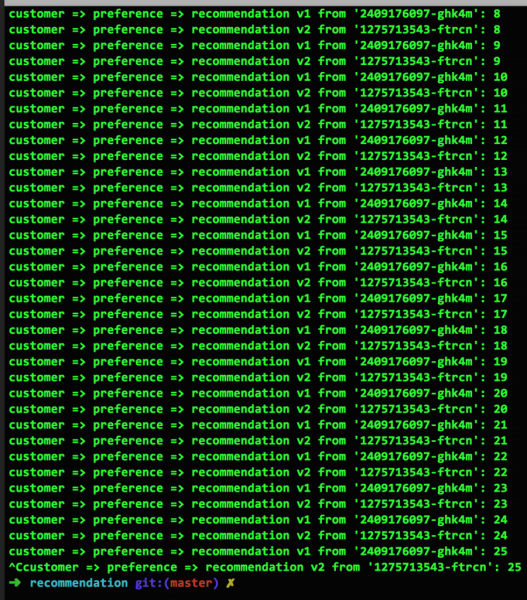
Suppose we have deployed two versions of our recommendation service on OpenShift, recommendation-v1 and recommendation-v2.
Figure 1 shows that when each service is represented by a single instance, requests alternate evenly between them: 1-2-1-2-... This is how Kubernetes routing works by default:
Weighted distribution between versions
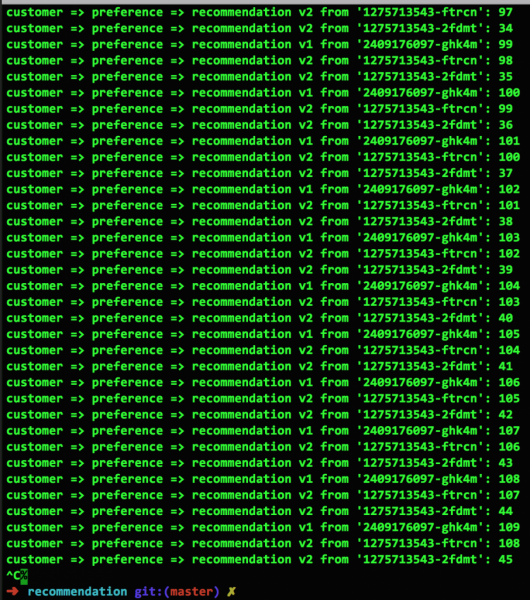
Figure 2 illustrates what will happen if the number of replicas of service v2 is increased from one to two (this is done with the command oc scale —replicas=2 deployment/recommendation-v2). As we can see, requests between v1 and v2 are now split in a "one to three" ratio: 1-2-2-1-2-2-…:
Version ignoring with Istio
Istio makes it easy to change the distribution of requests in the desired way. For example, to send all traffic only to recommendation-v1 using the following Istio yaml file:
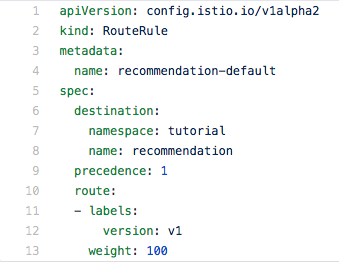
Take note of the following: pods are selected according to labels. In our example, the label v1 is used. The parameter "weight: 100" means that 100% of the traffic will be routed to all pods of the service that have the v1 label.
Directive distribution between versions (Canary Deployment)
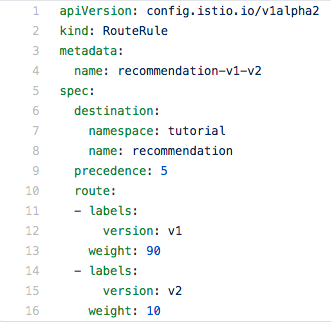
Next, using the weight parameter, we can direct traffic to both pods, ignoring the number of instances of microservices running in each of them. For example, here we are directing 90% of the traffic to v1 and 10% to v2:
Separate routing for mobile users
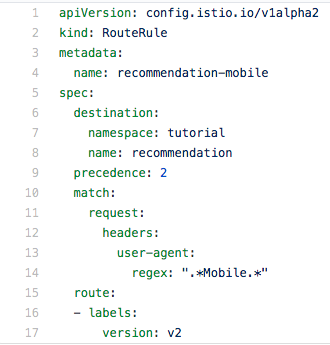
In conclusion, let’s show how to force route mobile users’ traffic to service v2, while directing all others to v1. For this, we analyze the user-agent value in the request header using regular expressions:
Now it’s your turn
The example with regular expressions for analyzing headers should motivate you to seek out your own options for applying Istio routing rules. Moreover, the possibilities here are quite extensive, as header values can be formed in the application source code.
And remember, it’s Ops, not Dev
Everything we've shown in the examples above is done without the slightest changes to the source code, except in cases where special request headers need to be formed. Istio will be useful for both developers, who can apply it during the testing phase, and IT system operations specialists, who will find it very helpful in production.
So let's repeat the main theme of this series of posts: you don’t need to change anything in your codeThere is no need to gather new images or launch new containers. All of this is implemented outside the code.
Ignite your imagination
Just imagine the opportunities that analyzing headers with regular expressions opens up. Want to redirect your biggest client to a special version of your ? Легко! Нужна отдельная версия для браузера Chrome? Не проблема! Вы можете маршрутизировать трафик практически по любой его характеристике.
Try it for yourself
Reading about Istio, Kubernetes, and OpenShift is one thing, but why not get hands-on experience? The team has prepared a detailed guide (in English) that will help you get up to speed with these technologies as quickly as possible. The guide is also 100% open source and is available to the public. The file works on macOS, Linux, and Windows, and the source code is available in Java and node.js versions (other languages will be available soon). Just open the corresponding git repository in your browser. .
In the next post: elegantly addressing issues
Today, you saw what Istio's routing rules are capable of. Now imagine all of that applied to error handling. That’s what we will discuss in the next post.
Source: habr.com
