

The importance of collaborative document editing in modern business cannot be overstated. The ability to draft contracts and agreements with the involvement of legal department employees, to write commercial proposals under the supervision of management in real-time, and so on, allows a company to save thousands of man-hours that were previously spent on numerous approvals. That is why one of the main innovations in is the introduction of Zextras Docs — a solution that enables full collaborative work with documents directly in the Zimbra Collaboration Suite Open-Source Edition web client.
Currently, Zextras Docs supports collaborative work with text documents, spreadsheets, and presentations, and it can handle a vast number of file formats. The interface of the solution is not much different from that of any text editor, which means employees will not need to spend much time training to switch to using Zextras Docs. But the most interesting features, as always, are 'under the hood'. Let's take a look together at how Zextras Docs is structured and what advantages this solution for document collaboration can offer.
Zextras Docs will appeal most to those who already use Zimbra OSE and Zextras Suite in their organization. With this solution, you can implement a new service in production without increasing the number of information systems and, consequently, avoid rising IT infrastructure ownership costs. It should be noted that Zextras Docs is only compatible with Zimbra OSE version 8.8.12 and later. Therefore, if you are still using outdated versions of Zimbra, we strongly recommend upgrading to version 8.8.15 LTS. Thanks to its long support lifecycle, this version will remain current and secure for several more years, and it will be compatible with all relevant add-ons.
The advantages of Zextras Docs also include the ability to fully deploy it on the enterprise's infrastructure. This allows for the avoidance of information transfer to third parties, which is often the case when using hybrid or cloud services. This is why Zextras Docs is ideal for enterprises with strict information security policies and for system administrators who prefer to have complete control over data flows and processes within the organization. Furthermore, a locally deployed document collaboration service helps mitigate risks associated with the unavailability of a cloud service in the event of issues with the service provider or problems with high-speed internet access.
Zextras Docs consists of three components: an autonomous server, an extension, and a zimlet. Each of these three components performs its specific function:
- The Zextras Docs server is based on the LibreOffice engine, optimized for collaboration and integration with Zimbra OSE. It is on the Zextras Docs server that all documents accessed by users are opened, processed, and stored. It must be installed on a dedicated computing node running Ubuntu 16.04, Ubuntu 18.04, or CentOS 7. If the load on the Zextras Docs service is sufficiently high, multiple servers can be allocated for it.
- The Zextras Docs extension does not require installation, as it is built into the Zextras Suite. This extension facilitates the connection between the user and the Zextras Docs server, as well as load balancing when using multiple servers. Additionally, through the Zextras Docs extension, multiple users can connect to the same document simultaneously, and files can be uploaded from local storage to the server.
- The Zextras Docs zimlet, in turn, is needed for integrating the service into the web client. It is thanks to this zimlet that the Zimbra web client gains the ability to create and preview documents from Zextras Docs.
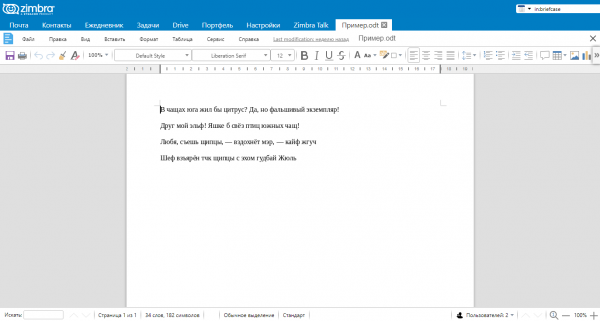
To deploy Zextras Docs within the enterprise, it is necessary first to allocate one or more physical or virtual servers for it. After that, the server application distribution files for , or , and then unpack and install it. In the final stage of installation, the server will ask you to specify the IP address of the LDAP server, as well as a username/password pair that will be used to enter the new server's data into LDAP. Note that after the installation is complete, each Zextras Docs server will be visible to all other nodes in the infrastructure.
Since the Zextras Docs extension is already included in the Zextras Suite, it will be sufficient to enable its use for those users and groups that should have access to document collaboration tools. The Zextras Docs zimlet can be activated from the Zimbra administrator console. Note that after adding the Zextras Docs server to the Zimbra OSE infrastructure, it is necessary to update the configuration of the Zimbra proxy server. To do this, simply execute the file /opt/zimbra/libexec/zmproxyconfgen as the Zimbra user, and then run the command zmproxyctl restart to restart the proxy service.
For all inquiries related to Zextras Suite, you can contact the company's representative, Katerina Triandafili, at katerina@zextras.com.
Source: habr.com
