

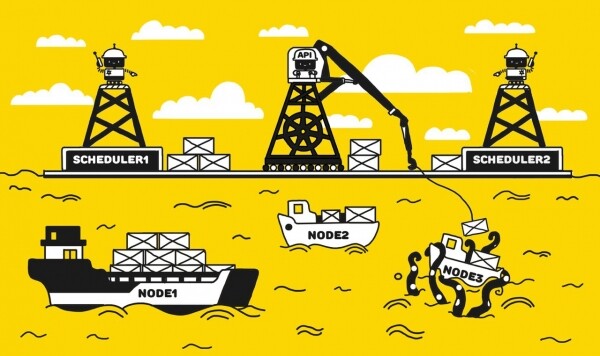
Kube-scheduler is an essential component of Kubernetes responsible for scheduling pods onto nodes according to specified policies. Often, while operating a Kubernetes cluster, we don’t need to think about the policies used for scheduling pods, as the default kube-scheduler policy set works for most everyday tasks. However, there are situations where it's crucial to finely manage the pod distribution process, and there are two ways to achieve this:
- Create a kube-scheduler with a custom rule set
- Write your own scheduler and teach it to work with the API server requests
In this article, I will describe the implementation of the first option to solve the problem of uneven pod scheduling in one of our projects.
A brief introduction to how kube-scheduler works
It is important to note that kube-scheduler is not responsible for the actual scheduling of pods; it only determines which node to place a pod on. In other words, the result of kube-scheduler's work is the name of the node, which it returns to the API server in response to a scheduling request, and that concludes its task.
First, kube-scheduler creates a list of nodes where a pod can be scheduled according to the predicates policies. Then, each node from this list receives a certain number of points based on the priorities policies. As a result, the node with the highest score is selected. If there are nodes with the same maximum score, one is chosen randomly. You can find the list and description of predicates (filtering) and priorities (scoring) policies in .
Problem statement description
Despite the large number of different Kubernetes clusters managed by Nixys, we encountered the issue of pod scheduling for the first time only recently, when we needed to run a significant number of periodic tasks (~100 CronJob entities) for one of our projects. To simplify the problem description, let’s take one microservice as an example, where a cron job runs every minute, creating some CPU load. Three nodes with identical specifications (24 vCPUs each) were allocated for the cron job.
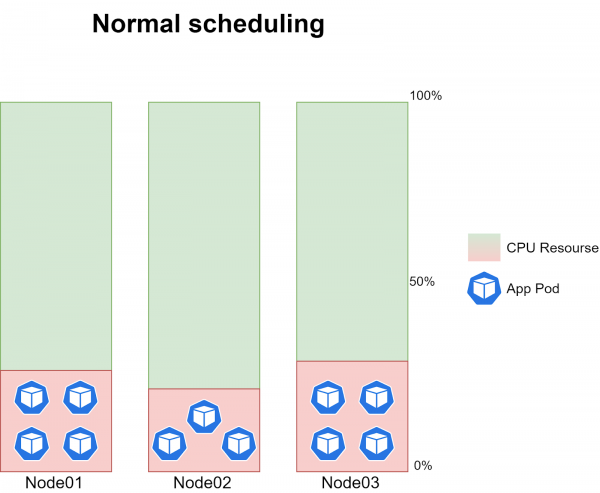
At the same time, it's impossible to accurately predict how long the CronJob will take because the volume of input data constantly changes. On average, under normal kube-scheduler operation, 3-4 job instances run on each node, creating about 20-30% CPU load on each node:
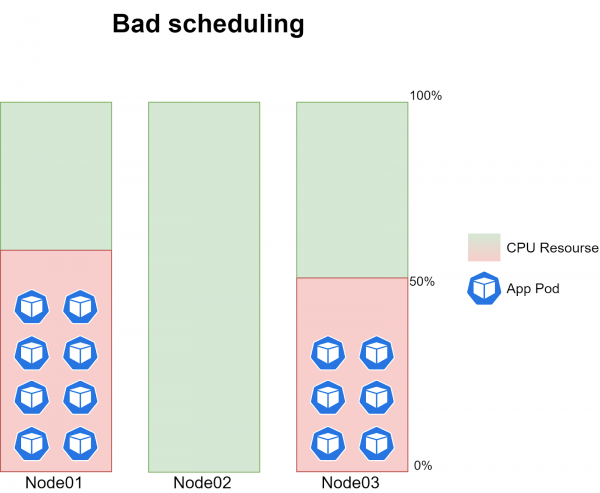
The problem itself is that sometimes the pods of the cron jobs stopped being scheduled on one of the three nodes. That is, at a certain point in time, no pods were being scheduled on one node, while the other two nodes had 6-8 job instances running, creating about 40-60% CPU load:
The issue occurred with absolutely random periodicity and occasionally correlated with the moment a new version of the code was deployed.
By increasing the logging level of kube-scheduler to 10 (-v=10), we began recording the scores each node obtained during the evaluation process. During normal scheduling operation, we could see the following information in the logs:
resource_allocation.go:78] cronjob-1574828880-mn7m4 -> Node03: BalancedResourceAllocation, capacity 23900 millicores 67167186944 memory bytes, total request 1387 millicores 4161694720 memory bytes, score 9
resource_allocation.go:78] cronjob-1574828880-mn7m4 -> Node02: BalancedResourceAllocation, capacity 23900 millicores 67167186944 memory bytes, total request 1347 millicores 4444810240 memory bytes, score 9
resource_allocation.go:78] cronjob-1574828880-mn7m4 -> Node03: LeastResourceAllocation, capacity 23900 millicores 67167186944 memory bytes, total request 1387 millicores 4161694720 memory bytes, score 9
resource_allocation.go:78] cronjob-1574828880-mn7m4 -> Node01: BalancedResourceAllocation, capacity 23900 millicores 67167186944 memory bytes, total request 1687 millicores 4790840320 memory bytes, score 9
resource_allocation.go:78] cronjob-1574828880-mn7m4 -> Node02: LeastResourceAllocation, capacity 23900 millicores 67167186944 memory bytes, total request 1347 millicores 4444810240 memory bytes, score 9
resource_allocation.go:78] cronjob-1574828880-mn7m4 -> Node01: LeastResourceAllocation, capacity 23900 millicores 67167186944 memory bytes, total request 1687 millicores 4790840320 memory bytes, score 9
generic_scheduler.go:726] cronjob-1574828880-mn7m4_project-stage -> Node01: NodeAffinityPriority, Score: (0)
generic_scheduler.go:726] cronjob-1574828880-mn7m4_project-stage -> Node02: NodeAffinityPriority, Score: (0)
generic_scheduler.go:726] cronjob-1574828880-mn7m4_project-stage -> Node03: NodeAffinityPriority, Score: (0)
interpod_affinity.go:237] cronjob-1574828880-mn7m4 -> Node01: InterPodAffinityPriority, Score: (0)
generic_scheduler.go:726] cronjob-1574828880-mn7m4_project-stage -> Node01: TaintTolerationPriority, Score: (10)
interpod_affinity.go:237] cronjob-1574828880-mn7m4 -> Node02: InterPodAffinityPriority, Score: (0)
generic_scheduler.go:726] cronjob-1574828880-mn7m4_project-stage -> Node02: TaintTolerationPriority, Score: (10)
selector_spreading.go:146] cronjob-1574828880-mn7m4 -> Node01: SelectorSpreadPriority, Score: (10)
interpod_affinity.go:237] cronjob-1574828880-mn7m4 -> Node03: InterPodAffinityPriority, Score: (0)
generic_scheduler.go:726] cronjob-1574828880-mn7m4_project-stage -> Node03: TaintTolerationPriority, Score: (10)
selector_spreading.go:146] cronjob-1574828880-mn7m4 -> Node02: SelectorSpreadPriority, Score: (10)
selector_spreading.go:146] cronjob-1574828880-mn7m4 -> Node03: SelectorSpreadPriority, Score: (10)
generic_scheduler.go:726] cronjob-1574828880-mn7m4_project-stage -> Node01: SelectorSpreadPriority, Score: (10)
generic_scheduler.go:726] cronjob-1574828880-mn7m4_project-stage -> Node02: SelectorSpreadPriority, Score: (10)
generic_scheduler.go:726] cronjob-1574828880-mn7m4_project-stage -> Node03: SelectorSpreadPriority, Score: (10)
generic_scheduler.go:781] Host Node01 -> Score 100043
generic_scheduler.go:781] Host Node02 -> Score 100043
generic_scheduler.go:781] Host Node03 -> Score 100043
That is, according to the information obtained from the logs, each node accumulated an equal number of total points, and a random one was selected for planning. At the time of problematic planning, the logs appeared as follows:
resource_allocation.go:78] cronjob-1574211360-bzfkr -> Node02: BalancedResourceAllocation, capacity 23900 millicores 67167186944 memory bytes, total request 1587 millicores 4581125120 memory bytes, score 9
resource_allocation.go:78] cronjob-1574211360-bzfkr -> Node03: BalancedResourceAllocation, capacity 23900 millicores 67167186944 memory bytes, total request 1087 millicores 3532549120 memory bytes, score 9
resource_allocation.go:78] cronjob-1574211360-bzfkr -> Node02: LeastResourceAllocation, capacity 23900 millicores 67167186944 memory bytes, total request 1587 millicores 4581125120 memory bytes, score 9
resource_allocation.go:78] cronjob-1574211360-bzfkr -> Node01: BalancedResourceAllocation, capacity 23900 millicores 67167186944 memory bytes, total request 987 millicores 3322833920 memory bytes, score 9
resource_allocation.go:78] cronjob-1574211360-bzfkr -> Node01: LeastResourceAllocation, capacity 23900 millicores 67167186944 memory bytes, total request 987 millicores 3322833920 memory bytes, score 9
resource_allocation.go:78] cronjob-1574211360-bzfkr -> Node03: LeastResourceAllocation, capacity 23900 millicores 67167186944 memory bytes, total request 1087 millicores 3532549120 memory bytes, score 9
interpod_affinity.go:237] cronjob-1574211360-bzfkr -> Node03: InterPodAffinityPriority, Score: (0)
interpod_affinity.go:237] cronjob-1574211360-bzfkr -> Node02: InterPodAffinityPriority, Score: (0)
interpod_affinity.go:237] cronjob-1574211360-bzfkr -> Node01: InterPodAffinityPriority, Score: (0)
generic_scheduler.go:726] cronjob-1574211360-bzfkr_project-stage -> Node03: TaintTolerationPriority, Score: (10)
selector_spreading.go:146] cronjob-1574211360-bzfkr -> Node03: SelectorSpreadPriority, Score: (10)
selector_spreading.go:146] cronjob-1574211360-bzfkr -> Node02: SelectorSpreadPriority, Score: (10)
generic_scheduler.go:726] cronjob-1574211360-bzfkr_project-stage -> Node02: TaintTolerationPriority, Score: (10)
selector_spreading.go:146] cronjob-1574211360-bzfkr -> Node01: SelectorSpreadPriority, Score: (10)
generic_scheduler.go:726] cronjob-1574211360-bzfkr_project-stage -> Node03: NodeAffinityPriority, Score: (0)
generic_scheduler.go:726] cronjob-1574211360-bzfkr_project-stage -> Node03: SelectorSpreadPriority, Score: (10)
generic_scheduler.go:726] cronjob-1574211360-bzfkr_project-stage -> Node02: SelectorSpreadPriority, Score: (10)
generic_scheduler.go:726] cronjob-1574211360-bzfkr_project-stage -> Node01: TaintTolerationPriority, Score: (10)
generic_scheduler.go:726] cronjob-1574211360-bzfkr_project-stage -> Node02: NodeAffinityPriority, Score: (0)
generic_scheduler.go:726] cronjob-1574211360-bzfkr_project-stage -> Node01: NodeAffinityPriority, Score: (0)
generic_scheduler.go:726] cronjob-1574211360-bzfkr_project-stage -> Node01: SelectorSpreadPriority, Score: (10)
generic_scheduler.go:781] Host Node03 -> Score 100041
generic_scheduler.go:781] Host Node02 -> Score 100041
generic_scheduler.go:781] Host Node01 -> Score 100038
It is clear that one of the nodes scored fewer total points than the others, and therefore the scheduling was only performed on the two nodes that achieved the maximum score. This allowed us to confirm that the issue lies specifically in pod scheduling.
The next step in solving the problem was obvious to us — to analyze the logs, understand the exact priority by which the node failed to gain points, and, if necessary, adjust the policies of the default kube-scheduler. However, we encountered two significant difficulties here:
- At the maximum logging level (10), a score set is reflected only for some priorities. In the excerpt of logs provided above, it can be seen that for all the priorities reflected in the logs, the nodes score the same number of points during normal and problematic scheduling, yet the final result differs in problematic scheduling. Thus, we can conclude that for some priorities, the score counting occurs 'behind the scenes', and we have no way of understanding which exact priority the node failed to score on. We described this problem in detail in the Kubernetes repository on GitHub. At the time of writing the article, we received feedback from the developers that logging support would be added in updates of Kubernetes v1.15, v1.16, and v1.17.
- There is no straightforward way to understand which specific set of policies the kube-scheduler is currently operating with. Yes, it is listed in this list, but it does not provide information about the specific weights assigned to each of the priorities. We can only see the weights or edit the default kube-scheduler policies in .
It is worth noting that once we were able to identify that a node did not score points under the ImageLocalityPriority policy, which awards points to a node if it already has the image needed to launch the application. That is, at the time of rolling out a new version of the application, the cron job was able to start on two nodes, pulling the new image from the docker registry, and thus these two nodes received a higher overall score compared to the third.
As I mentioned earlier, we do not see any information in the logs regarding the evaluation of the ImageLocalityPriority policy. To test my assumption, we deployed an image with a new version of the application on the third node, after which scheduling worked correctly. The scheduling problem was observed quite rarely due to the ImageLocalityPriority policy; more often it was related to something else. Since we could not thoroughly debug each of the policies in the list of priorities of the default kube-scheduler, we found a need for flexible management of pod scheduling policies.
Task Definition
We wanted the solution to the problem to be as targeted as possible, meaning the main entities of Kubernetes (referring to the default kube-scheduler) should remain unchanged. We did not want to solve one problem in one place and create it in another. Thus, we came up with two options for resolving the issue, which were outlined in the introduction to the article — creating an additional scheduler or writing our own. The main requirement for scheduling cron jobs is to evenly distribute the load across three nodes. This requirement can be met with the existing policies of the kube-scheduler, so there is no need to write our own scheduler for our task.
The instructions for creating and deploying an additional kube-scheduler are described in . However, we felt that the Deployment entities were insufficient to ensure fault tolerance for such a critical service as kube-scheduler, so we decided to deploy a new kube-scheduler as a Static Pod, which will be monitored directly by Kubelet. Thus, we established the following requirements for the new kube-scheduler:
- The service must be deployed as a Static Pod on all masters of the cluster.
- Fault tolerance must be provided in case the active pod with kube-scheduler is unavailable.
- The primary priority during scheduling should be the number of available resources on the node (LeastRequestedPriority).
Implementation of the solution.
It should be noted right away that all work will be carried out in Kubernetes v1.14.7, as this version was used in the project. We will start by writing the manifest for our new kube-scheduler. We will base it on the manifest of the default (\/etc\/kubernetes\/manifests\/kube-scheduler.yaml) and modify it to the following form:
kind: Pod
metadata:
  labels:
    component: scheduler
    tier: control-plane
  name: kube-scheduler-cron
  namespace: kube-system
spec:
      containers:
      - command:
        - /usr/local/bin/kube-scheduler
        - --address=0.0.0.0
        - --port=10151
        - --secure-port=10159
        - --config=/etc/kubernetes/scheduler-custom.conf
        - --authentication-kubeconfig=/etc/kubernetes/scheduler.conf
        - --authorization-kubeconfig=/etc/kubernetes/scheduler.conf
        - --v=2
        image: gcr.io/google-containers/kube-scheduler:v1.14.7
        imagePullPolicy: IfNotPresent
        livenessProbe:
          failureThreshold: 8
          httpGet:
            host: 127.0.0.1
            path: /healthz
            port: 10151
            scheme: HTTP
          initialDelaySeconds: 15
          timeoutSeconds: 15
        name: kube-scheduler-cron-container
        resources:
          requests:
            cpu: '0.1'
        volumeMounts:
        - mountPath: /etc/kubernetes/scheduler.conf
          name: kube-config
          readOnly: true
        - mountPath: /etc/localtime
          name: localtime
          readOnly: true
        - mountPath: /etc/kubernetes/scheduler-custom.conf
          name: scheduler-config
          readOnly: true
        - mountPath: /etc/kubernetes/scheduler-custom-policy-config.json
          name: policy-config
          readOnly: true
      hostNetwork: true
      priorityClassName: system-cluster-critical
      volumes:
      - hostPath:
          path: /etc/kubernetes/scheduler.conf
          type: FileOrCreate
        name: kube-config
      - hostPath:
          path: /etc/localtime
        name: localtime
      - hostPath:
          path: /etc/kubernetes/scheduler-custom.conf
          type: FileOrCreate
        name: scheduler-config
      - hostPath:
          path: /etc/kubernetes/scheduler-custom-policy-config.json
          type: FileOrCreate
        name: policy-config
A brief summary of the main changes:
- Changed the pod and container name to kube-scheduler-cron
- Specified the use of ports 10151 and 10159 since the option is set
hostNetwork: trueand we cannot use the same ports as the default kube-scheduler (10251 and 10259) - Using the --config parameter, specified the configuration file from which the service should start
- Configured the mounting of the configuration file (scheduler-custom.conf) and the scheduling policy file (scheduler-custom-policy-config.json) from the host
Keep in mind that our kube-scheduler will require permissions similar to the default one. We edit its cluster role:
kubectl edit clusterrole system:kube-scheduler...
resourceNames:
- kube-scheduler
- kube-scheduler-cron
...Now let's talk about what should be included in the configuration file and the scheduling policy file:
- Configuration file (scheduler-custom.conf)
To obtain the default kube-scheduler's configuration, you need to use the parameter--write-config-tofrom . The acquired configuration will be placed in the file /etc/kubernetes/scheduler-custom.conf and will be structured as follows:
apiVersion: kubescheduler.config.k8s.io/v1alpha1
kind: KubeSchedulerConfiguration
schedulerName: kube-scheduler-cron
bindTimeoutSeconds: 600
clientConnection:
  acceptContentTypes: ""
  burst: 100
  contentType: application/vnd.kubernetes.protobuf
  kubeconfig: /etc/kubernetes/scheduler.conf
  qps: 50
disablePreemption: false
enableContentionProfiling: false
enableProfiling: false
failureDomains: kubernetes.io/hostname,failure-domain.beta.kubernetes.io/zone,failure-domain.beta.kubernetes.io/region
hardPodAffinitySymmetricWeight: 1
healthzBindAddress: 0.0.0.0:10151
leaderElection:
  leaderElect: true
  leaseDuration: 15s
  lockObjectName: kube-scheduler-cron
  lockObjectNamespace: kube-system
  renewDeadline: 10s
  resourceLock: endpoints
  retryPeriod: 2s
metricsBindAddress: 0.0.0.0:10151
percentageOfNodesToScore: 0
algorithmSource:
   policy:
     file:
       path: "/etc/kubernetes/scheduler-custom-policy-config.json"
A brief summary of the main changes:
- In the schedulerName parameter, we set the name of our service kube-scheduler-cron.
- In the parameter
lockObjectNamewe also need to set the name of our service and ensure that the parameterleaderElectis set to true (if you have a single master node, it can be set to false). - We specified the path to the file containing the scheduling policy in the
algorithmSource.
It's worth elaborating on the second point, where we edit the parameters for the leaderElectionkey. To ensure fault tolerance, we activated the leader election process among the pods of our kube-scheduler using a shared endpoint for them (leaderElectresourceLock) named kube-scheduler-cron () in the kube-system namespace (lockObjectNamelockObjectNamespace). More about how high availability of core components (including kube-scheduler) is achieved in Kubernetes can be found inThe scheduling policy file (scheduler-custom-policy-config.json) .
- As I mentioned earlier, to find out which specific policies the default kube-scheduler operates with, we can only analyze its code. This means we cannot obtain a file with the scheduling policies of the default kube-scheduler, similar to the configuration file. We will describe the policies we are interested in the file /etc/kubernetes/scheduler-custom-policy-config.json as follows:
{
  "kind": "Policy",
  "apiVersion": "v1",
  "predicates": [
    {
      "name": "GeneralPredicates"
    }
  ],
  "priorities": [
    {
      "name": "ServiceSpreadingPriority",
      "weight": 1
    },
    {
      "name": "EqualPriority",
      "weight": 1
    },
    {
      "name": "LeastRequestedPriority",
      "weight": 1
    },
    {
      "name": "NodePreferAvoidPodsPriority",
      "weight": 10000
    },
    {
      "name": "NodeAffinityPriority",
      "weight": 1
    }
  ],
  "hardPodAffinitySymmetricWeight" : 10,
  "alwaysCheckAllPredicates" : false
}
{
"kind": "Policy",
"apiVersion": "v1",
"predicates": [
{
"name": "GeneralPredicates"
}
],
"priorities": [
{
"name": "ServiceSpreadingPriority",
"weight": 1
},
{
"name": "EqualPriority",
"weight": 1
},
{
"name": "LeastRequestedPriority",
"weight": 1
},
{
"name": "NodePreferAvoidPodsPriority",
"weight": 10000
},
{
"name": "NodeAffinityPriority",
"weight": 1
}
],
"hardPodAffinitySymmetricWeight" : 10,
"alwaysCheckAllPredicates" : false
}Thus, the kube-scheduler first creates a list of nodes where a pod can be scheduled according to the GeneralPredicates policy (which includes a set of policies such as PodFitsResources, PodFitsHostPorts, HostName, and MatchNodeSelector). It then evaluates each node based on the set of policies in the priorities array. For the purposes of our task, we believe that this set of policies will be the optimal solution. Let me remind you that the set of policies with their detailed descriptions is available in . To achieve your goal, you can simply change the set of policies used and assign them corresponding weights.
The manifest for the new kube-scheduler that we created at the beginning of the chapter will be called kube-scheduler-custom.yaml and placed at the following path /etc/kubernetes/manifests on the three master nodes. If everything is done correctly, Kubelet on each node will launch the pod, and in the logs of our new kube-scheduler, we will see information indicating that our policy file was successfully applied:
Creating scheduler from configuration: {{ } [{GeneralPredicates } ] [{ServiceSpreadingPriority 1 } {EqualPriority 1 } {LeastRequestedPriority 1 } {NodePreferAvoidPodsPriority 10000 } {NodeAffinityPriority 1 } ] [] 10 false}
Registering predicate: GeneralPredicates
Predicate type GeneralPredicates already registered, reusing.
Registering priority: ServiceSpreadingPriority
Priority type ServiceSpreadingPriority already registered, reusing.
Registering priority: EqualPriority
Priority type EqualPriority already registered, reusing.
Registering priority: LeastRequestedPriority
Priority type LeastRequestedPriority already registered, reusing.
Registering priority: NodePreferAvoidPodsPriority
Priority type NodePreferAvoidPodsPriority already registered, reusing.
Registering priority: NodeAffinityPriority
Priority type NodeAffinityPriority already registered, reusing.
Creating scheduler with fit predicates 'map[GeneralPredicates:{}]' and priority functions 'map[EqualPriority:{} LeastRequestedPriority:{} NodeAffinityPriority:{} NodePreferAvoidPodsPriority:{} ServiceSpreadingPriority:{}]'
Now we just need to specify in the spec of our CronJob that all scheduling requests for its pods should be handled by our new kube-scheduler:
...
 jobTemplate:
    spec:
      template:
        spec:
          schedulerName: kube-scheduler-cron
...
Conclusion
Ultimately, we have obtained an additional kube-scheduler with a unique set of scheduling policies, which is monitored directly by kubelet. Furthermore, we configured the election of a new leader among the pods of our kube-scheduler in case the old leader becomes unavailable for any reason.
Regular applications and services continue to be scheduled through the default kube-scheduler, while all cron jobs have been fully transitioned to the new system. The load generated by cron jobs is now evenly distributed across all nodes. Given that most cron jobs run on the same nodes as the main applications of the project, this has significantly reduced the risk of pod migration due to resource shortages. Following the implementation of the additional kube-scheduler, issues with uneven scheduling of cron jobs ceased to occur.
Also, read other articles in our blog:
Source: habr.com
