

What are the key requirements for business applications? Some of the most important include the following tasks:
- Ease of changing/adapting the application's operation logic to changing business tasks.
- Ease of integration with other applications.
The way the first task is addressed in 1C was briefly described in the section ‘Customization and Support’ ; we will return to this interesting topic in one of our future articles. Today, however, we will discuss the second task, integration.
Integration Tasks
Integration tasks can vary. For some, a simple interactive data exchange is sufficient — for example, sending a list of employees to the bank for processing payroll plastic cards. For more complex tasks, a fully automated data exchange may be necessary, possibly involving interaction with the business logic of an external system. There are tasks with a specialized nature, such as integration with external hardware (e.g., trade equipment, mobile scanners, etc.) or with legacy or niche systems (e.g., RFID tag recognition systems). It is crucial to select the most suitable integration mechanism for each task.
Integration Opportunities with 1C
There are various approaches to implementing integration with 1C applications; which one to choose depends on the requirements of the task.
- Implementation based on , provided by the platform, or its own specialized API on the 1C application side (e.g., a set of Web or HTTP services that third-party applications will call to exchange data with the 1C application). The advantage of this approach is the API's resilience to changes in the implementation on the 1C application side. A characteristic of this approach is that it requires changing the source code of the standard 1C solution, which may potentially require effort when merging source codes upon transitioning to a new version of the configuration. In this case, new progressive functionality may come to the rescue - Extensions are essentially plugin mechanisms that allow for the creation of add-ons for application solutions without altering the original applications. Moving the integration API to the configuration extension will prevent complications when merging configurations during an upgrade to a new version of the standard solution.
- Utilizing the integration mechanisms of the platform, which provide external access to the application's object model and do not require modifications to the application or the creation of an extension. The advantage of this approach is that there is no need to change the 1C application. The downside is that if the 1C application has been modified, it may require adjustments in the integrated application. An example of this approach is using the OData protocol for integration, implemented on the 1C:Enterprise platform (more details below).
- Using готовые application protocols implemented in 1C standard solutions. Many standard solutions from 1C and its partners create their own application protocols based on the integration mechanisms provided by the platform, tailored to specific tasks. When using these mechanisms, no coding is required on the 1C application side, as we utilize the built-in capabilities of the application solution. On the 1C application side, we only need to make certain configurations.
Integration mechanisms in the 1C:Enterprise platform
File import/export
Suppose we have a task of bidirectional data exchange between the 1C application and an arbitrary application. For example, we need to synchronize the product list (the Nomenclature reference) between the 1C application and an arbitrary application.
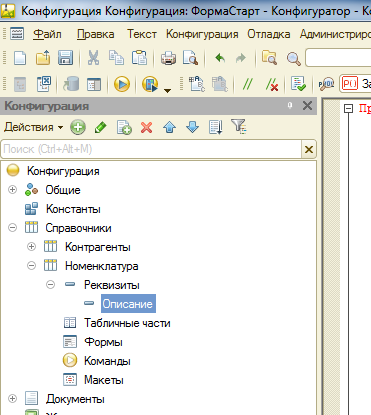
To tackle this task, we can write an extension that exports the Nomenclature reference to a file in a specific format (text, XML, JSON, etc.) and is capable of reading this format.
The platform implements a mechanism for serializing application objects to XML both directly, via the global context methods WriteXML/ReadXML, and using a helper object XDTO (XML Data Transfer Objects).
Any object in the 1C:Enterprise system can be serialized into an XML representation and vice versa.
This function will return the object's representation in XML format:
Function Object_In_XML(Object)
    XMLRecord = New XMLRecord();
    XMLRecord.SetString();
    WriteXML(XMLRecord, Object);
    Return XMLRecord.Close();
EndFunction
This is how the export of the Catalog Nomenclature to XML using XDTO would look:
&OnServer
Procedure ExportXMLOnServer()
	NewXDTOSerializer = XDTOSerializer;
	NewXMLRecord = New XMLRecord();
	NewXMLRecord.OpenFile("C:DataNomenclature.xml", "UTF-8");

	NewXMLRecord.WriteXMLAnnouncement();
	NewXMLRecord.WriteStartElement("CatalogNomenclature");

	Selection = Catalogs.Nomenclature.Select();

	While Selection.Next() Loop
		NomenclatureObject = Selection.GetObject();
		NewXDTOSerializer.WriteXML(NewXMLRecord, NomenclatureObject, XMLTypeAssignment.Explicit);
	EndLoop;

	NewXMLRecord.WriteEndElement();
	NewXMLRecord.Close();
EndProcedure
By slightly modifying the code, we export the catalog to JSON. The products will be recorded in an array; for variety, here’s an English syntax variant:
&AtServer
Procedure ExportJSONOnServer()
	NewXDTOSerializer = XDTOSerializer;
	NewJSONWriter = New JSONWriter();
	NewJSONWriter.OpenFile("C:DataNomenclature.json", "UTF-8");

	NewJSONWriter.WriteStartObject();
	NewJSONWriter.WritePropertyName("CatalogNomenclature");
	NewJSONWriter.WriteStartArray();

	Selection = Catalogs.Nomenclature.Select();

	While Selection.Next() Do
		NomenclatureObject = Selection.GetObject();

		NewJSONWriter.WriteStartObject();

		NewJSONWriter.WritePropertyName("Nomenclature");
		NewXDTOSerializer.WriteJSON(NewJSONWriter, NomenclatureObject, XMLTypeAssignment.Implicit);

		NewJSONWriter.WriteEndObject();
	EndDo;

	NewJSONWriter.WriteEndArray();
	NewJSONWriter.WriteEndObject();
	NewJSONWriter.Close();
EndProcedure
Next, we just need to transfer the data to the end consumer. The 1C:Enterprise platform supports the main internet protocols HTTP, FTP, POP3, SMTP, IMAP, including their secure versions. Data can also be transmitted using HTTP and/or Web services.
HTTP and web services
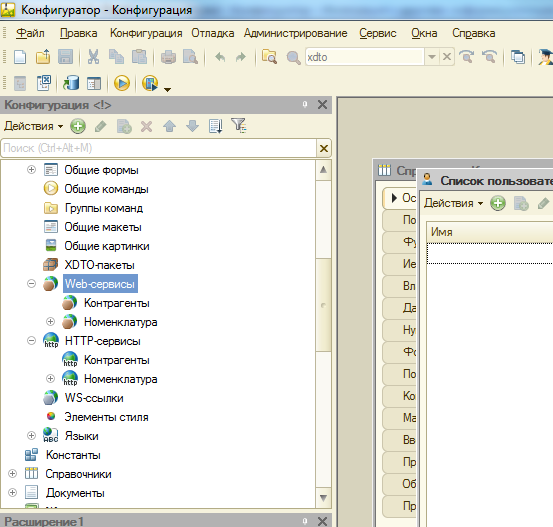
1C applications can implement their own HTTP and web services, as well as call HTTP and web services implemented by third-party applications.
REST interface and OData protocol
Starting from version 8.3.5, the 1C:Enterprise platform can automatically for the entire application solution. Any configuration object (catalog, document, information register, etc.) can be made available for data retrieval and modification through the REST interface. The platform uses the protocol version 3.0. Publishing OData services is done from the Configuration menu "Administration -> Publishing on the Web Server"; the checkbox "Publish standard OData interface" must be checked. Formats atom/XML and JSON are supported. Once the application is published on the web server, external systems can access it via the REST interface using HTTP requests. No programming on the 1C side is required to work with the application via the OData protocol.
Thus, a URL of the form http:////odata/standard.odata/Catalog_Products will return the contents of the Products catalog in XML format — a collection of entry elements (the message header is omitted for brevity):
http://server/Config/odata/standard.odata/Catalog_Products(guid'35d1f6e4-289b-11e6-8ba4-e03f49b16074')
By adding the string "?$format=application/json" to the URL, we get the contents of the Products catalog in JSON format (URL of the form http:////odata/standard.odata/Catalog_Products?$format=application/json ):
{
"odata.metadata": "http://server/Config/odata/standard.odata/$metadata#Catalog_Products",
"value": [{
"Ref_Key": "35d1f6e4-289b-11e6-8ba4-e03f49b16074",
"DataVersion": "AAAAAgAAAAA=",
"DeletionMark": false,
"Code": "000000001",
"Description": "Air Conditioner Mitsubishi",
"Description2": "Power 2.5 kW, operating modes: heat/cold"
},{
"Ref_Key": "35d1f6e5-289b-11e6-8ba4-e03f49b16074",
"DataVersion": "AAAAAwAAAAA=",
"DeletionMark": false,
"Code": "000000002",
"Description": "Air Conditioner Daikin",
"Description2": "Power 3 kW, operating modes: heat/cold"
}, …
External data sources
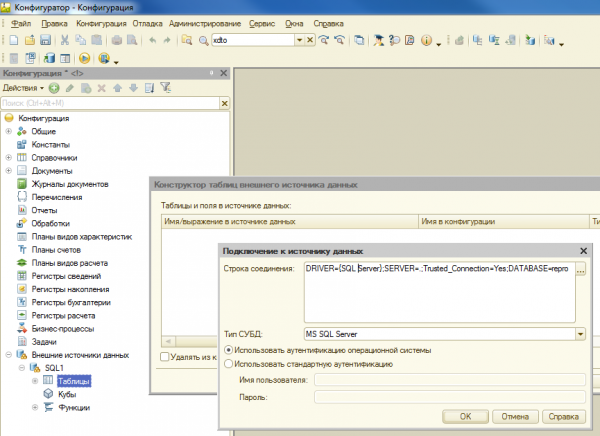
In some cases, data exchange via may turn out to be the optimal solution. External data sources are an application object in the 1C configuration that allows interaction with any ODBC-compatible database for both reading and writing. External data sources are available on both Windows and Linux.
Data exchange mechanism
is intended for creating geographically distributed systems based on 1C:Enterprise as well as for organizing data exchange with other information systems not based on 1C:Enterprise.
This mechanism is widely used in 1C implementations, and the range of tasks it addresses is quite broad. This includes data exchange between 1C applications installed at the organization's branches, data exchange between a 1C application and an online store website, and data exchange between a server-side 1C application and a mobile client (created using the 1C:Enterprise mobile platform), among others.
One of the key concepts in the data exchange mechanism is the exchange plan. The exchange plan is a special type of application object in the 1C platform that defines, among other things, the composition of the data that will participate in the exchange (which specific directories, documents, registers, etc.). The exchange plan also contains information about the participants in the exchange (so-called exchange nodes).
The second component of the data exchange mechanism is the change registration mechanism. This mechanism automatically tracks changes in the system that should be transmitted to end users as part of the exchange plan. Using this mechanism, the platform monitors changes that have occurred since the last synchronization and allows minimizing the amount of data transmitted during the next synchronization session.
Data exchange occurs through XML messages of a specific structure. The message contains data that has changed since the last synchronization with the node, along with some service information. The message structure supports message numbering and allows for confirmations from the receiving node regarding the reception of messages. Such a confirmation is included in each message coming from the receiving node as the number of the last received message. Message numbering helps the platform understand which data has already been successfully transmitted to the receiving node, avoiding retransmission by sending only the data changed since the sender node received the last message with the receipt of the data received by the receiving node. This scheme ensures guaranteed delivery even over unreliable transmission channels and in the event of message loss.
External Components
In some cases, when addressing integration tasks, one may encounter specific requirements, such as interaction protocols and data formats that are not supported by the 1C:Enterprise platform. For such tasks, the platform provides , which allows for the creation of dynamically connectable modules that extend the functionality of 1C:Enterprise.
A typical example of a task with such requirements may involve the integration of the 1C application solution with trading equipment, ranging from scales to cash registers and barcode scanners. External components can be connected both on the server side of 1C:Enterprise and on the client side (including, among others, the web client, as well as 1C:Enterprise). The external component technology provides a relatively simple and understandable programming (C++) interface for the interaction of the component with the 1C:Enterprise platform, which must be implemented by the developer.
The possibilities opened up by using external components are quite extensive. It is possible to implement interaction via a specific data exchange protocol with external devices and systems, integrate specific algorithms for data processing and data formats, etc.
Deprecated Integration Mechanisms
The platform offers integration mechanisms that are not recommended for use in new solutions; they are retained for backward compatibility and in case another party cannot work with more modern protocols. One of them is working with DBF files (supported in the built-in language using the XBase object).
Another deprecated integration mechanism is the use of COM technology (available only on the Windows platform). The 1C:Enterprise platform provides two integration methods for Windows that utilize COM technology: Automation server and External Connection. They are very similar, but one key difference is that in the case of the Automation server, a full-fledged client application of 1C:Enterprise 8 is launched, while in the case of the External Connection, a relatively small in-process COM server is launched. This means that when working through the Automation server, you can leverage the functionality of the client application and perform actions similar to interactive user actions. When using the External Connection, only business logic functions can be used, which can be executed either on the client side of the connection, where the in-process COM server is created, or by calling business logic on the 1C:Enterprise server side.
COM technology can also be used to call external systems from the application code on the 1C:Enterprise platform. In this case, the 1C application acts as a COM client. However, it should be noted that these mechanisms will only work if the 1C server operates in a Windows environment.
Integration mechanisms implemented in standard configurations
EnterpriseData Format
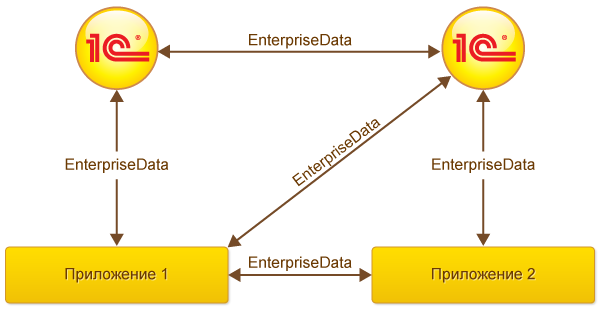
In several 1C configurations (listed below), a ready data exchange mechanism with external applications has been implemented based on the aforementioned platform data exchange mechanism, which does not require modification of the configuration source code (data exchange preparation is done in the settings of application solutions):
- 1C:ERP Enterprise Management 2.0
- Comprehensive Automation 2
- Enterprise Accounting, Edition 3.0
- Enterprise Accounting CORP, Edition 3.0
- Retail, Edition 2.0
- "Trade Management Basic", Edition 11
- "Trade Management", Edition 11
- "Payroll and HR Management CORP", Edition 3
Data exchange is done using the format , based on XML. The format is business-oriented – the data structures described correspond to business entities (documents and directory elements) represented in the 1C programs, for example: act of completed works, cash receipt, counterparty, nomenclature, etc.
Data exchange between the 1C application and a third-party application can occur:
- through a dedicated file directory
- through an FTP directory
- through a web service deployed on the 1C application side. The data file is passed as a parameter to the web methods
- via email
In the case of exchange via web service, the third-party application will initiate the data exchange session by calling the appropriate web methods of the 1C application. In other cases, the initiator of the exchange session will be the 1C application (by placing the data file in the corresponding directory or sending the data file to the configured email address).
Also, on the 1C side, it is configured how often synchronization will occur (for options with file exchange via directory and email):
- according to a schedule (with a specified frequency)
- manually; the user will need to manually start synchronization each time it is needed
Acknowledgment of messages
1C applications keep track of sent and received synchronization messages and expect the same from third-party applications. This allows for the use of the message numbering mechanism described above in the "Data Exchange Mechanism" section.
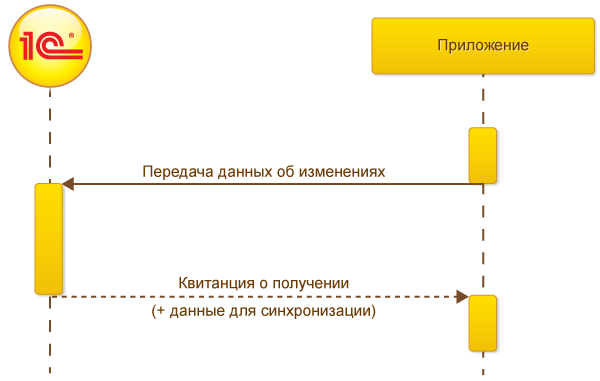
1C applications only transmit information about changes that have occurred to business entities since the last synchronization (to minimize the amount of transmitted data) during synchronization. During the first synchronization, the 1C application will export all business entities (for example, items from the catalog of goods) in EnterpriseData format to an XML file (since all of them are 'new' for the external application). The external application must process the information from the received XML file from 1C and during the next synchronization session, place in the file sent to 1C a special section of XML indicating that the message from 1C with a specific number has been successfully received. The acknowledgment message serves as a signal for the 1C application that all business entities have been successfully processed by the external application, and there is no need to transmit information about them anymore. In addition to the acknowledgment, the XML file from the external application may also contain data for synchronization from the application's side (for example, documents for the sale of goods and services).
After receiving the acknowledgment message, the 1C application marks all changes transmitted in the previous message as successfully synchronized. Only unsynchronized changes in business entities (creation of new entities, modification, and deletion of existing ones) will be sent to the external application during the next synchronization session.
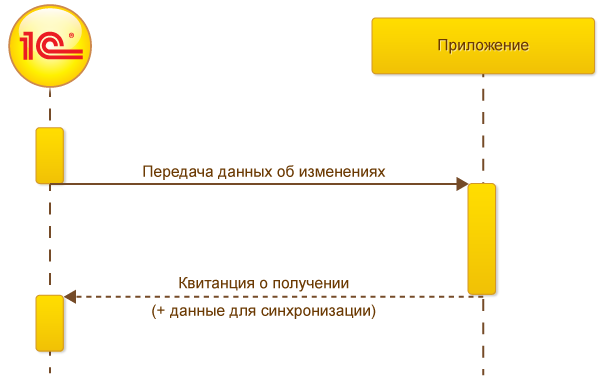
When transmitting data from the external application to the 1C application, the picture changes to the opposite. The external application must fill in the acknowledgment section of the XML file accordingly and place business data for synchronization from its side in EnterpriseData format.
Simplified data exchange without acknowledgment.
For cases of simple integration, where it is sufficient to only transmit information from the external application to the 1C application and there is no need for reverse data transmission from the 1C application to the external application (for example, the integration of an online store transmitting sales information to '1C:Accounting'), there is a simplified option for operation through a web service (without acknowledgment), which does not require settings on the 1C application side.
Specialized integration solutions.
There is a standard solution called "1C: Data Conversion," which uses platform mechanisms for data conversion and exchange between standard 1C configurations, but can also be used for integration with third-party applications.
Integration with banking solutions
Standard , developed by 1C specialists over 10 years ago, has effectively become the industry standard in Russia. The next step in this direction is the technology , which allows sending payment documents to the bank and receiving bank statements directly from the "1C:Enterprise" system with the push of a button in the "1C" program; no need to install and run additional programs on the client computer.
There is also .
Other
Deserve mention are , the standard for exchanging commercial information (developed in cooperation with Microsoft, Intel, Price.ru, and other companies), .
Source: habr.com
