

I currently work at a software vendor company, particularly focusing on access management solutions. My experience 'from a previous life' is linked to the customer side – a large financial organization. At that time, our access control group in the information security department couldn't boast extensive competencies in IdM. We learned a lot along the way and had to face numerous challenges to establish a functioning user rights management mechanism in the company's information systems.

By combining my hard-earned experience from the customer side with vendor knowledge and expertise, I want to share with you a step-by-step guide: how to create a role-based access management model in a large company and what it will yield. My guide consists of two parts: the first – preparing to build the model, the second – actually building it. Here is the first part, the preparatory stage.
N.B. Building a role-based model is, unfortunately, not an end result but rather a process. More precisely, it is part of the process of creating an access management ecosystem within the company. So, get ready for a long-term endeavor.
First, let's clarify what role-based access management actually is. Suppose you have a large bank with tens or even hundreds of thousands of employees (subjects), each of whom has access rights to dozens of internal information systems (objects). Now, multiply the number of objects by the number of subjects – that's the minimum number of relationships you need to establish and then monitor. Is it feasible to do this manually? Of course not – that's why roles were created.
A role is a set of permissions required by a user or a group of users to perform specific work tasks. Each employee can have one or several roles, and each role may contain from one to many permissions granted to the user within that role. Roles can be tied to specific positions, departments, or functional tasks of employees.

Roles are usually created from individual employee permissions in each information system. Then, global business roles are formed from the roles of each system. For example, the business role of a 'credit manager' will encompass several individual roles across the information systems used in the bank's client office. This includes systems such as the primary automated banking system, cash module, electronic document management system, service manager, and others. Business roles are typically tied to the organizational structure—essentially, to the set of company divisions and their positions. This forms a global role matrix (example provided in the table below).
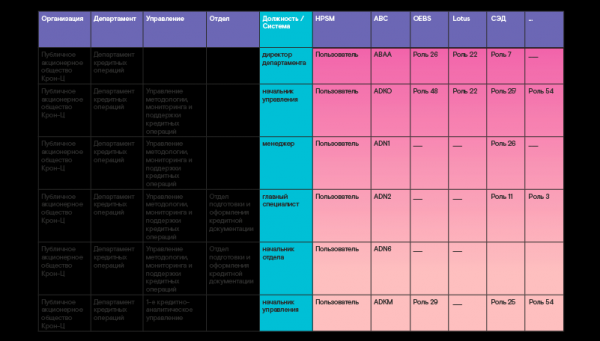
It is worth noting that building a 100% role model, providing all necessary rights for employees in every position within a commercial structure, is simply impossible. Moreover, it isn't necessary. A role model cannot be static, as it depends on a constantly changing environment. Changes in the company's business operations subsequently influence organizational structure and functionality. Additionally, there may be a lack of full resource provision, violations of job descriptions, the pursuit of profit at the expense of security, and many other factors. Therefore, a role model should be built that can cover up to 80% of users' needs for necessary basic rights upon appointment to a position. The remaining 20% can be requested later through separate requests when necessary.
Of course, you might ask: 'Are there really no 100% role models?' Well, they do exist, for example, in non-profit organizations that are not subject to frequent changes—like a research institute. Or in defense industry organizations with a high level of security, where safety is paramount. Such models can also be found in commercial structures, but only within a specific department where operations are relatively static and predictable.
The main advantage of role management is the simplification of rights issuance, as the number of roles is significantly smaller than the number of users in the information system. This holds true for any industry.
Let's take a retail company: thousands of sellers work there, but they all have the same set of rights in system N, and only one role will be created for them. When a new seller joins the company, they are automatically assigned the appropriate role in the system, which already contains all the necessary privileges. Similarly, with just one click, you can change the rights for thousands of sellers at once, for example, by adding a new option for report generation. There’s no need to perform a thousand operations, linking a new right to each account — it’s enough to add this option to the role, and it will be available to all sellers at the same time.
Another advantage of role-based management is the exclusion of conflicting privileges. This means that an employee with a specific role in the system cannot simultaneously hold another role whose rights should not coincide with the first. A clear example is the prohibition against combining the functions of entering and controlling financial transactions.
Anyone interested in how role-based access management came about can
dive into a historical overview
Looking back, the IT community first pondered access management methods in the 1970s. Although the applications were quite simple at that time, just as now, everyone wanted to manage access to them conveniently. Granting, changing, and controlling user rights – simply to make it easier to understand what access each of them has. However, back then, there were no common standards; the first access management systems were being developed, and each company relied on its own understanding and rules.
Today, many different access management models are known, but they didn’t appear all at once. We will focus on those that have made a significant contribution to the development of this field.
The first and perhaps the simplest model is Discretionary (selective) access control (DAC – Discretionary access control). This model implies shared rights among all participants of the access process. Each user gains access to specific objects or operations. Essentially, here many rights subjects correspond to many objects. This model was deemed too flexible and overly complex to maintain: access lists eventually become enormous and difficult to control.
The second model is Mandatory access control (MAC — Mandatory access control). In this model, each user gets access to an object according to the granted permission for a specific level of data confidentiality. Consequently, objects must be categorized by their level of confidentiality. Unlike the first flexible model, this one turned out to be too strict and limiting. Its implementation does not justify itself when a company has a wide variety of information resources: to delineate access to different resources, many categories will need to be introduced that do not overlap.
In light of the evident shortcomings of these two methods, the IT community continued to develop models that are more flexible and more or less universal for supporting different types of organizational access control policies. This is when the third role-based access control model emerged! This approach has proven to be the most promising, as it requires not only user identity authorization but also their job functions within systems.
The first clearly defined structure of the role-based model was proposed by American scholars David Ferraiolo and Richard Kuhn from the National Institute of Standards and Technology in 1992. It was then that the term RBAC (Role-based access control) was first introduced. These studies and descriptions of essential components, as well as their interrelationships, formed the basis for the still-active standard INCITS 359-2012, approved by the International Committee for Information Technology Standards (INCITS).
The standard defines a role as "a job function within the context of an organization with some related semantics regarding the authority and responsibilities assigned to the user designated to the role". The document establishes the basic elements of RBAC – users, sessions, roles, permissions, operations, and objects, as well as the relationships and connections between them.
The standard provides the minimally necessary structure for building a role model – consolidating rights into roles and then granting access to users through these roles. It specifies the mechanisms for composing roles from objects and operations, describes role hierarchies, and privilege inheritance. In any company, there are roles that combine basic privileges necessary for all employees. This may include access to email, document management systems, corporate portals, etc. These privileges can be grouped into a single overall role called "employee", eliminating the need to list all basic rights in each higher-level role repeatedly. It is enough to simply indicate the inheritance of the "employee" role.
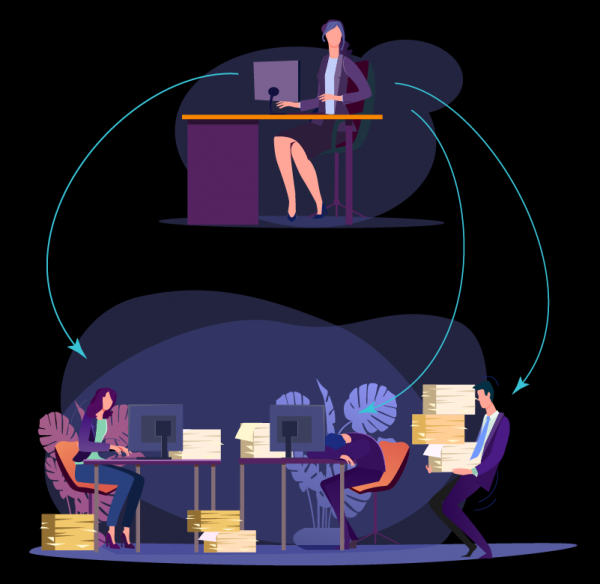
Later, the standard was enhanced with new access attributes related to the constantly changing environment. It introduced the possibility of implementing static and dynamic constraints. Static constraints imply the impossibility of role overlap (the input and control of operations previously mentioned). Dynamic constraints can be defined by changing parameters, such as time (working/non-working hours or days), location (office/home), etc.
It is also important to mention attribute-based access control (ABAC). This approach is based on granting access through attribute-sharing rules. This model can be used independently, but it often actively complements the classical role-based approach: attributes of users, resources, and devices can be added to a specific role, as well as attributes like time or location. This allows for fewer roles, introduces additional constraints, and minimizes access, thereby enhancing security.
For example, an accountant can be granted access to accounts if they work in a specific region. In that case, the specialist's location will be compared to a certain benchmark value. Alternatively, access to accounts can be granted only if the user authenticates from a device registered in the allowed list. This is a good addition to the role model, but it is not often used independently due to the need to create many rules and tables for permissions or restrictions.
Let me provide an example of ABAC from my 'previous life'. In our bank, there were several branches. Employees at the customer offices in these branches performed absolutely identical operations but were required to work in the main system only with accounts from their region. Initially, we started creating separate roles for each region – and there ended up being a huge number of roles with redundant functionality but with access to different accounts! Then, by using the location attribute for the user and linking it to a specific range of accounts for verification, we significantly reduced the number of roles in the system. As a result, only roles for one branch remained, which were replicated to the corresponding positions in all other territorial divisions of the bank.
Now let's talk about the necessary preparatory steps without which it is simply impossible to build a functioning role model.
Step 1. We create a functional model.
It starts with creating a functional model – a high-level document that details the functions of each department and position. Typically, the information in this model comes from various documents: job descriptions and regulations pertaining to individual departments – divisions, management, and departments. The functional model must be agreed upon with all interested departments (business, internal control, security) and approved by the company's management. What is the purpose of this document? It serves as a reference for the role model. For instance, if you plan to build a role model based on existing employee rights – extracted from the system and 'harmonized'. Then, when coordinating the obtained roles with the business owner of the system, you can refer to a specific point in the functional model, on the basis of which a particular right is included in the role.
Step 2. Audit IT systems and develop a prioritization plan
In the second stage, an audit of IT systems should be conducted to understand how access to them is organized. For example, in my financial company, several hundred information systems were in use. Most of these systems had some rudimentary form of role management, with various roles, but mostly documented on paper or in the system directory – they were outdated, and access was granted based on users' actual requests. Naturally, building a role model across several hundred systems at once is simply impossible; you have to start somewhere. We carried out a thorough analysis of the access management process to determine its maturity level. During the analysis, we established criteria for prioritizing information systems – criticality, readiness, decommissioning plans, etc. Using these criteria, we established the sequence for developing/updating role models for these systems. Then we integrated the role models into the plan for integration with the Identity Management solution to automate access management.
So, how do you determine the criticality of a system? Answer the following questions:
- Is the system associated with operational processes upon which the core activities of the company depend?
- Will a system malfunction affect the integrity of the company's assets?
- What is the maximum allowable downtime for the system, beyond which it is impossible to restore operations after an interruption?
- Can a breach of information integrity in the system lead to irreversible consequences, both financial and reputational?
- Fraud criticality. The presence of functionality under which, with insufficient control, internal/external fraudulent activities may occur;
- What are the legislative requirements, as well as internal rules and procedures for these systems? Will there be penalties from regulators for non-compliance?
In our financial company, we conducted an audit as follows. Management developed the Access Right Review audit procedure to address existing users and their rights, starting with the information systems listed as top priorities. The security department was appointed as the owner of this process. However, to obtain a complete picture of access rights within the company, it was necessary to involve the IT and business departments in the process. This is where disputes, misunderstandings, and sometimes even sabotage began: no one wants to disengage from their current responsibilities and engage in some seemingly unclear activities.
N.B. Large companies with developed IT processes are certainly familiar with the IT audit procedure – IT General Controls (ITGC), which helps identify weaknesses in IT processes and establish control to improve them in accordance with best practices (ITIL, COBIT, IT Governance, etc.). Such an audit allows IT and business to understand each other better and develop a joint development strategy, analyze risks, optimize costs, and create more effective working approaches.
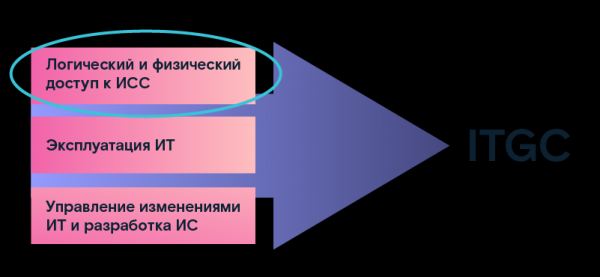
One of the audit areas is determining the parameters of logical and physical access to information systems. The data we obtained served as the basis for further use in building a role model. As a result of this audit, we created a registry of IT systems, which defined their technical parameters and provided descriptions. Moreover, for each system, a business unit owner was identified, who was responsible for the business processes that this system served: they were accountable for the corresponding business processes. An IT service manager was also appointed, responsible for the technical implementation of business needs in specific information systems. The most critical systems for the company and their technical parameters, as well as the timelines for commissioning and decommissioning were documented. These parameters greatly assisted in the preparatory process for building the role model.
Step 3 Creating a methodology
The key to success in any endeavor is a properly chosen method. Therefore, to build a role model and conduct an audit, we need to create a methodology that describes the interaction between departments, establishes responsibility in company regulations, and so on.
First, all existing documents that establish the procedure for granting access and rights need to be researched. Ideally, the processes should be documented at several levels:
- general corporate requirements;
- requirements for information security areas (which depend on the organization’s business activities);
- requirements for technological processes (instructions, access matrices, methodological guidelines, configuration requirements).
In our financial company, we discovered many outdated documents – we had to align them with the new processes being implemented.
By order of management, a working group was established, consisting of representatives from security, IT, business, and internal control. The order outlined the objectives for creating the group, its area of activity, duration, and the responsible individuals from each party. Additionally, we developed a methodology for conducting the audit and a framework for establishing the role model: these were agreed upon by all responsible representatives and approved by the company's management.
Documents outlining the procedures for carrying out work, timelines, responsibilities, etc., are the key to ensuring that on the path to the cherished goal—initially not obvious to everyone—no one will raise questions like 'what are we doing this for, and why do we need it?' and there will be no opportunity to 'back out' or slow down the process.

Step 4. Fix the parameters of the existing access management model
We create what's called a 'system passport' regarding access management. Essentially, this is a questionnaire about a specific information system, where all access management algorithms are documented. Companies that have already implemented IdM-class solutions are likely familiar with such a questionnaire, as it is where the systems research begins.
Some parameters about the system and its owners have flowed into the questionnaire from the IT registry (see step 2, audit), but new ones have been added:
- how account management is carried out (directly in the database or via APIs);
- how users log into the system (using a separate account or utilizing an AD, LDAP, or other accounts);
- what levels of access to the system are used (application level, system level, use of network file resources by the system);
- description and parameters servers, on which the system operates;
- what account management operations are supported (locking, renaming, etc.);
- by what algorithms or rules the user identifier of the system is formed;
- by what attribute a link can be established to the employee record in the personnel system (full name, employee number, or other);
- all possible account attributes and rules for their completion;
- what access rights exist in the system (roles, groups, atomic rights, etc., whether there are nested or hierarchical rights);
- access rights segregation mechanisms (by position, department, functions, etc.);
- are there segregation of duties (SOD) rules in the system, and how do they work;
- how are events of absence, transfer, dismissal, data updates about employees, etc., processed in the system.
This list can be continued with details on various parameters and other objects involved in the access management process.
Step 5. Create a business-oriented description of powers
Another document we will need when building the role model is a directory of all possible permissions (rights) that can be granted to users in the information system, with a detailed description of the underlying business function. Often, permissions in the system are encoded with certain names consisting of letters and numbers, making it difficult for business employees to understand what these symbols represent. They then approach the IT department, which also may not be able to provide answers, for example, about rarely used rights. This leads to the need for additional testing.
It’s beneficial if a business description already exists or if there is even a grouping of these rights into roles. For some applications, best practice is to create such a directory during the development stage. However, this is rare, so we return to the IT department to gather information about all possible rights and describe them. Our directory will ultimately contain the following:
- the name of the power, including the object to which the access right applies;
- the action permitted on the object (viewing, editing, etc., with possible restrictions, such as by territorial criteria or client group);
- power code (the code and name of the system function/request that can be executed using the power);
- power description (a detailed description of actions in the IS when applying the power and their consequences for the process;
- power status: "Active" (if the power is assigned to at least one user) or "Inactive" (if the power is not being used).
Step 6 Export user and rights data from the systems and cross-reference with the HR source.
In the final stage of preparation, it is necessary to extract data from information systems about all users and the rights they currently have. There are two possible scenarios here. First: the security department has direct access to the system and the means to extract corresponding reports, which is rarely the case but very convenient. Second: we send a request to IT for reports in the desired format. Practice shows that negotiating with IT and obtaining the necessary data on the first attempt is often unsuccessful. Several attempts are needed before the information is received in the required form and format.
What data needs to be extracted:
- Account name
- Full name of the employee to whom it is assigned
- Status (active or blocked)
- Account creation date
- Last usage date
- List of available rights/groups/roles
So, we have received the extracts from the system with all the users and all the rights granted to them. We immediately set aside all blocked accounts, as the work on building the role model will only be conducted for active users.
Next, if your company does not have automated means to revoke access for terminated employees (which is often the case), or if there is patchy automation that does not always work correctly, you need to identify all 'dead souls.' This refers to the accounts of already terminated employees whose rights have not been blocked for some reason — these need to be blocked. To do this, we correlate the extracted data with the personnel source. The personnel extract also needs to be obtained beforehand from the department that maintains the personnel database.
We need to separately set aside accounts for which the owners have not been identified in the personnel database, those that are not assigned to anyone—meaning they are ownerless. For this list, we will need the date of last use: if it is relatively recent, we will still have to look for the owners. This can include accounts of external contractors or service accounts not assigned to anyone, but related to certain processes. To determine the ownership of the accounts, we can send out emails to all departments asking for responses. Once the owners are found, we enter their information into the system: in this way, all active accounts are identified, and the rest are blocked.
Once our exports are cleared of unnecessary entries and only active accounts remain, we can begin creating a role model for a specific information system. But I will discuss this in the next article.
Author: Lyudmila Sevastyanova, Promotion Manager at Solar inRights
Source: habr.com
