

Many of us enjoy listening to the radio in the mornings. One fine morning, I realized that I didn't want to listen to the local FM stations. They were uninteresting. But the habit turned out to be detrimental. So, I decided to replace my FM receiver with an internet receiver. I quickly bought parts on AliExpress and assembled the internet receiver.
About the internet receiver. The heart of the receiver is the ESP32 microcontroller. The firmware is from KA-radio. The cost of the parts was 12 dollars. The simplicity of assembly allowed me to put it together in just a couple of days. It works well and stably. In 10 months of operation, it froze only a couple of times, and that was only because of my experiments. A convenient and well-thought-out interface lets you control it from a smartphone and a computer. In short, this is a wonderful internet receiver.
Everything is great. But one early morning, I concluded that despite having access to tens of thousands of radio stations, there weren't any interesting ones. I was annoyed by the ads and the silly jokes of the hosts. I kept switching from one station to another. I like Spotify and Yandex.Music. But the sad thing is that they don't work in my country. I would love to listen to them via the internet receiver.
I remembered my childhood. I had a tape recorder and a couple of dozen cassettes. I used to swap cassettes with friends. It was wonderful. I decided that I should stream my audio archives directly to the internet receiver. Of course, there's the option to connect an audio player or iPod to the speakers and not worry. But that's not our way! I hate connecting cables.)
I started looking for ready-made solutions. There is a service on the market to create your own internet radio from Radio-Tochka.com. I tested it for 5 days. Everything worked perfectly with my internet receiver. But the price turned out to be unappealing to me. I opted out of that option.
I have a paid hosting plan with 10 GB. I decided to write a script in something that would stream the audio from my mp3 files. I chose to write it in PHP. I quickly wrote and launched it. Everything worked great! But a couple of days later, I received a letter from the hosting administration. It stated that I exceeded the limit of CPU minutes and needed to upgrade to a higher plan. I had to delete the script and abandon that option.
How is this possible? I can't live without radio. If they won’t let me run a script on someone else's hosting, then I need my own server. Where I can do what my soul desires.
I have an old netbook sitting without a battery (CPU — 900 MHz, RAM — 512 Mb). It’s already 11 years old. It will work just fine as a server. I’ll install Ubuntu 12.04. Then I’ll set up Apache2 and PHP 5.3, Samba. My server is ready.
I decided to try Icecast. I read a lot of manuals about it. However, it seemed too complicated to me. So I went back to the option with a PHP script. A couple of days were spent debugging this script. And everything worked perfectly. Then I also wrote a script for playing podcasts. I liked it so much that I decided to create a small project. I named it IWScast. .
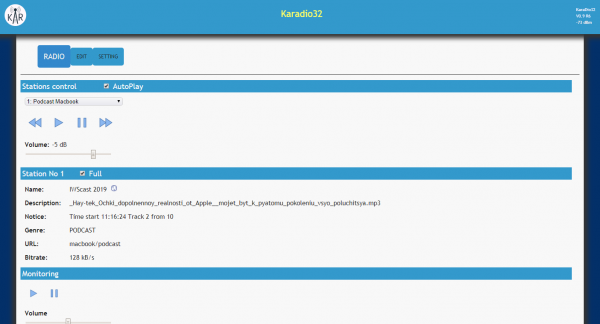
It’s very simple. I copy the mp3 files and the index.php file to the root folder of Apache /var/www/ and they play randomly. About 300 songs are enough for the whole day.
The index.php file is the script itself. The script reads all the mp3 file names in the directory into an array. It creates an audio stream and inserts the names of the mp3 files. There are moments when you hear a song you like. You think, who sings this? For such cases, there is a record of the titles of the listened tracks in the log log.txt.
The complete script code.
<?php
set_time_limit(0);
header('Content-type: audio/mpeg');
header("Content-Transfer-Encoding: binary");
header("Pragma: no-cache");
header("icy-br: 128 ");
header("icy-name: your name");
header("icy-description: your description");
$files = glob("*.mp3");
shuffle($files); //Random on

for ($x=0; $x array(
       'method' =>'GET',
       'header' =>'Icy-MetaData: 1',
       'header' =>"Accept-language: enrn"
       )
     )
   );
//Save to log
  $fl = $filePath;
  $log = date('Y-m-d H:i:s') . ' Song - ' . $fl;
  file_put_contents('log.txt', $log . PHP_EOL, FILE_APPEND);
  $fpOrigin=fopen($filePath, 'rb', false, $strContext);
  while(!feof($fpOrigin)){
   $buffer=fread($fpOrigin, 4096);
   echo $buffer;
   flush();
 }
 fclose($fpOrigin);
}
?>
If you need the tracks to play in order, you must comment out the line in index.php.
shuffle($files); //Random onFor podcasts, I use /var/www/podcast/. There is another script index.php in it. It remembers the podcast tracks. The next time the internet receiver is turned on, the next track of the podcast will play. There’s also a log of the played tracks.
In the counter.dat file, you can specify the track number and the podcast will start playing from there.
I wrote parsers for automatically downloading podcasts. It fetches the latest 4 tracks from RSS and downloads them. All of this works wonderfully on smartphones, IPTV boxes, and in browsers.
Recently, I had a thought one morning that it would be great to remember the playback position on a track. But I currently don't know how to do this in PHP.
The script can be downloaded
Source: habr.com
