

Introduction
In this article, I will discuss the well-known Huffman algorithm and its application in data compression.
As a result, we will create a simple archiver. This has already been covered in but without practical implementation. The theoretical material in this post is taken from school computer science lessons and Robert Lafore's book "Data Structures and Algorithms in Java." So, let’s dive in!
A Few Thoughts
In a regular text file, one character is encoded using 8 bits (ASCII encoding) or 16 bits (Unicode encoding). Here, we will focus on ASCII encoding. For example, let’s take the string s1 = "SUSIE SAYS IT IS EASYn." There are a total of 22 characters in the string, naturally including spaces and the newline character — ‘n’. A file containing this string would weigh 22*8 = 176 bits. The question immediately arises: is it rational to use all 8 bits to encode 1 character? We are not using all the characters in the ASCII encoding. Even if we did, it would be more rational to assign the shortest possible code to the most frequent letter — S — and a longer code to the least common letter — T (or U, or ‘n’). This is the essence of the Huffman algorithm: it is necessary to find the optimal coding variant that results in the file being of minimum weight. It is quite reasonable for different characters to have different code lengths — this is the foundation of the algorithm.
Encoding
Why not assign the character ‘S’ a code, say, 1 bit long: 0 or 1? Let’s choose 1 for this. Then for the second most frequent character — ‘ ‘ (space) — we can assign 0. Imagine you start decoding your message — the encoded string s1 — and see that the code starts with 1. So, what to do: is it the character S, or is it some other character, like A? Hence, an important rule arises:
No code should be a prefix of another
This rule is key to the algorithm. Therefore, code creation begins with a frequency table, which indicates the frequency (number of occurrences) of each character:
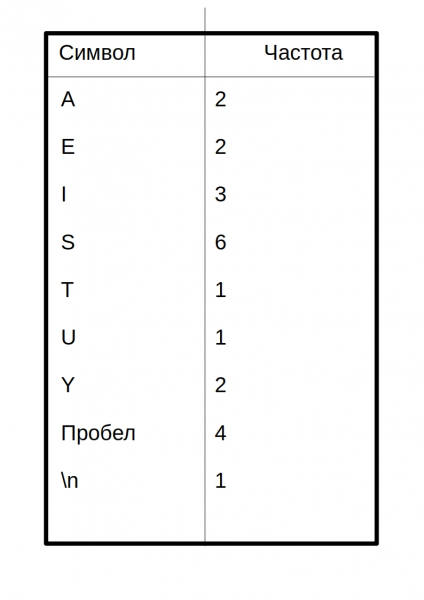 Characters with the highest number of occurrences should be encoded with the smallest possible amount of bits. Here’s an example of one possible code table:
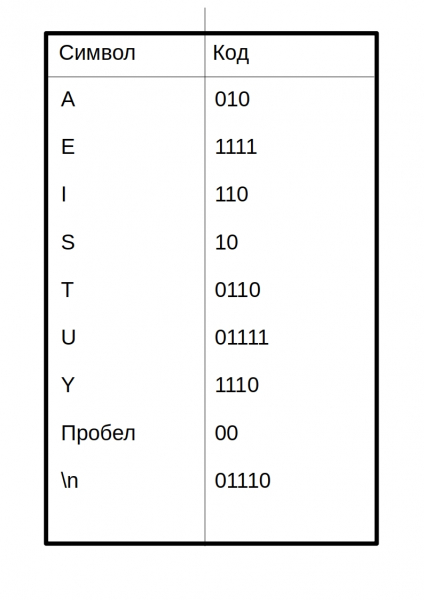 Thus, the encoded message would look like this:
10 01111 10 110 1111 00 10 010 1110 10 00 110 0110 00 110 10 00 1111 010 10 1110 01110 I separated the code of each character with a space. In an actual compressed file, there won't be any spaces!
The question arises: how did this newbie come up with the code to create a table of codes? This will be discussed below.
Building a Huffman Tree
Binary search trees come to the rescue here. Don’t worry, search, insertion, and deletion methods won’t be needed here. Here’s the tree structure in Java:
public class Node {
    private int frequency;
    private char letter;
    private Node leftChild;
    private Node rightChild;
    ...
}
class BinaryTree {
    private Node root;

    public BinaryTree() {
        root = new Node();
    }
    public BinaryTree(Node root) {
        this.root = root;
    }
    ...
}
This is not the complete code, the full code will be provided below.
Here is the algorithm for building the tree:
- Create a Node object for each character from the message (string s1). In our case, there will be 9 nodes (Node objects). Each node consists of two data fields: character and frequency.
- Create a BinaryTree object for each Node. The node becomes the root of the tree.
- Insert these trees into a priority queue. The lower the frequency, the higher the priority. Thus, when extracted, the tree with the lowest frequency is always chosen.
Next, we need to cyclically do the following:
- Extract two trees from the priority queue and make them the children of a new node (the just created node without a letter). The frequency of the new node is equal to the sum of the frequencies of the two child trees.
- For this node, create a tree with the root at this node. Insert this tree back into the priority queue. (Since the tree has a new frequency, it’s likely to take a new place in the queue.)
- Continue executing steps 1 and 2 until only one tree remains in the queue — the Huffman tree.
Let’s consider this algorithm on the string s1:
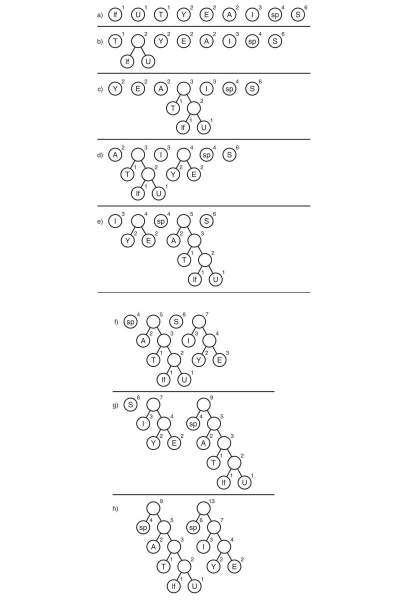
Here, the symbol "lf" (linefeed) denotes a switch to a new line, while "sp" (space) refers to a space.
What comes next?
We have built a Huffman tree. Okay, and what do we do with it? Even for free, nobody would take it. Next, we need to trace all possible paths from the root to the leaves of the tree. Let’s agree to denote an edge as 0 if it leads to a left child and 1 if it leads to a right one. Strictly speaking, in these designations, the code of a character is the path from the root of the tree to the leaf containing that character.
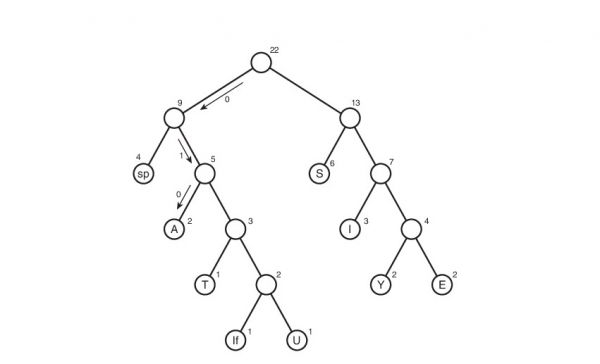
This is how the code table was created. It is worth noting that if we look at this table, we can draw a conclusion about the 'weight' of each symbol — this is the length of its code. Therefore, in compressed form, the original file will weigh: 2 * 3 + 2 * 4 + 3 * 3 + 6 * 2 + 1 * 4 + 1 * 5 + 2 * 4 + 4 * 2 + 1 * 5 = 65 bits. Initially, it weighed 176 bits. Consequently, we reduced its size by approximately 176/65 = 2.7 times! But that's utopia. Such a coefficient is unlikely to be achieved. Why? We'll discuss this a bit later.
Decoding
Well, perhaps the simplest task remains — decoding. I think many of you guessed that it’s impossible to just create a compressed file without any clues about how it was encoded — we won’t be able to decode it! Yes, it was hard for me to accept, but we'll have to create a text file table.txt containing the compression table:
01110
 00
A010
E1111
I110
S10
T0110
U01111
Y1110
The table is written in the form ‘symbol’«code of the symbol». Why is 01110 without a symbol? In fact, it has a symbol; the Java tools I used to output to the file convert the newline character — ‘n’ — into a line break (as silly as it may sound). Therefore, the empty line at the top is actually the symbol for the code 01110. The code 00 represents a space at the beginning of the line. I must say that this storage method for the table could claim the title of the most irrational. However, it is simple to understand and implement. I would be happy to hear your recommendations in the comments regarding optimization.
With this table, decoding becomes very simple. Let’s recall the rule we followed when creating the encoding:
No code may be a prefix of another
This is where it plays a facilitative role. We read sequentially bit by bit, and as soon as the obtained string d, made up of the read bits, matches the encoding corresponding to the symbol character, we immediately know that the symbol character was encoded (and only it!). Next, we write character to the decoding string (the string that contains the decoded message), reset string d, and continue reading the encoded file.
Implementation
It’s time to humiliate my code by writing an archiver. Let's call it Compressor.
Let's start from the beginning. First, we’ll write the Node class:
public class Node {
    private int frequency; // frequency
    private char letter; // letter
    private Node leftChild; // left child
    private Node rightChild; // right child

    public Node(char letter, int frequency) { // constructor
        this.letter = letter;
        this.frequency = frequency;
    }

    public Node() {} // overload constructor for unnamed nodes (see above in the section on constructing the Huffman tree)
    public void addChild(Node newNode) { // add child
        if (leftChild == null) // if the left is empty => the right is also empty => add to the left
            leftChild = newNode;
        else {
            if (leftChild.getFrequency() <= newNode.getFrequency()) // generally, as the left child
                rightChild = newNode; // will be the one with lower frequency
            else {
                rightChild = leftChild;
                leftChild = newNode;
            }
        }

        frequency += newNode.getFrequency(); // total frequency
    }

    public Node getLeftChild() {
        return leftChild;
    }

    public Node getRightChild() {
        return rightChild;
    }

    public int getFrequency() {
        return frequency;
    }

    public char getLetter() {
        return letter;
    }

    public boolean isLeaf() { // check if leaf
        return leftChild == null && rightChild == null;
    }
}
Now the tree:
class BinaryTree {
    private Node root;

    public BinaryTree() {
        root = new Node();
    }

    public BinaryTree(Node root) {
        this.root = root;
    }

    public int getFrequency() {
        return root.getFrequency();
    }

    public Node getRoot() {
        return root;
    }
}
Priority queue:
import java.util.ArrayList; // yes, the queue will be based on a list

class PriorityQueue {
    private ArrayList data; // list of the queue
    private int nElems; // number of elements in the queue

    public PriorityQueue() {
        data = new ArrayList();
        nElems = 0;
    }

    public void insert(BinaryTree newTree) { // insertion
        if (nElems == 0)
            data.add(newTree);
        else {
            for (int i = 0; i  newTree.getFrequency()) { // if the frequency of the inserted tree is less
                    data.add(i, newTree); // than the current one, shift all trees on the right positions by 1 cell
                    break; // then place the new tree in the current position
                }
                if (i == nElems - 1)
                    data.add(newTree);
            }
        }
        nElems++; // increase the number of elements by 1
    }

    public BinaryTree remove() { // removal from the queue
        BinaryTree tmp = data.get(0); // copy the element to be removed
        data.remove(0); // actually remove it
        nElems--; // decrease the number of elements by 1
        return tmp; // return the removed element (the element with the lowest frequency)
    }
}
Class creating the Huffman tree:
public class HuffmanTree {
    private final byte ENCODING_TABLE_SIZE = 127; // length of the encoding table
    private String myString; // message
    private BinaryTree huffmanTree; // Huffman tree
    private int[] freqArray; // frequency table
    private String[] encodingArray; // encoding table


    //----------------constructor----------------------
    public HuffmanTree(String newString) {
        myString = newString;

        freqArray = new int[ENCODING_TABLE_SIZE];
        fillFrequenceArray();

        huffmanTree = getHuffmanTree();

        encodingArray = new String[ENCODING_TABLE_SIZE];
        fillEncodingArray(huffmanTree.getRoot(), "", "");
    }

    //--------------------frequency array------------------------
    private void fillFrequenceArray() {
        for (int i = 0; i < myString.length(); i++) {
            freqArray[(int)myString.charAt(i)]++;
        }
    }

    public int[] getFrequenceArray() {
        return freqArray;
    }

    //------------------------huffman tree creation------------------
    private BinaryTree getHuffmanTree() {
        PriorityQueue pq = new PriorityQueue();
        // algorithm described above
        for (int i = 0; i < ENCODING_TABLE_SIZE; i++) {
            if (freqArray[i] != 0) { // if the character exists in the string
                Node newNode = new Node((char) i, freqArray[i]); // create a Node for it
                BinaryTree newTree = new BinaryTree(newNode); // create BinaryTree for the Node
                pq.insert(newTree); // insert into the queue
            }
        }

        while (true) {
            BinaryTree tree1 = pq.remove(); // extract the first tree from the queue.

            try {
                BinaryTree tree2 = pq.remove(); // extract the second tree from the queue

                Node newNode = new Node(); // create a new Node
                newNode.addChild(tree1.getRoot()); // make the extracted trees its children
                newNode.addChild(tree2.getRoot());

                pq.insert(new BinaryTree(newNode));
            } catch (IndexOutOfBoundsException e) { // only one tree left in the queue
                return tree1;
            }
        }
    }

    public BinaryTree getTree() {
        return huffmanTree;
    }

    //-------------------encoding array------------------
    void fillEncodingArray(Node node, String codeBefore, String direction) { // fill the encoding table
        if (node.isLeaf()) {
            encodingArray[(int)node.getLetter()] = codeBefore + direction;
        } else {
            fillEncodingArray(node.getLeftChild(), codeBefore + direction, "0");
            fillEncodingArray(node.getRightChild(), codeBefore + direction, "1");
        }
    }

    String[] getEncodingArray() {
        return encodingArray;
    }

    public void displayEncodingArray() { // for debugging
        fillEncodingArray(huffmanTree.getRoot(), "", "");

        System.out.println("======================Encoding table====================");
        for (int i = 0; i < ENCODING_TABLE_SIZE; i++) {
            if (freqArray[i] != 0) {
                System.out.print((char)i + " ");
                System.out.println(encodingArray[i]);
            }
        }
        System.out.println("========================================================");
    }
    //-----------------------------------------------------
    String getOriginalString() {
        return myString;
    }
}
A class that encodes/decodes:
public class HuffmanOperator {
    private final byte ENCODING_TABLE_SIZE = 127; // length of the table
    private HuffmanTree mainHuffmanTree; // Huffman tree (used only for compression)
    private String myString; // original message
    private int[] freqArray; // frequency table
    private String[] encodingArray; // encoding table
    private double ratio; // compression ratio


    public HuffmanOperator(HuffmanTree MainHuffmanTree) { // for compress
        this.mainHuffmanTree = MainHuffmanTree;

        myString = mainHuffmanTree.getOriginalString();

        encodingArray = mainHuffmanTree.getEncodingArray();

        freqArray = mainHuffmanTree.getFrequenceArray();
    }

    public HuffmanOperator() {} // for extract;

    // ---------------------------------------compression-----------------------------------------------------------
    private String getCompressedString() {
        String compressed = "";
        String intermidiate = ""; // intermediate string (without added zeros)
        // System.out.println("=============================Compression=======================");
        // displayEncodingArray();
        for (int i = 0; i
        // we need to add zeros at the end (can be 1, doesn't matter)
        byte counter = 0; // number of added zeros at the end (a byte is enough: 0 <= counter < 8 < 127)
        for (int length = intermidiate.length(), delta = 8 - length % 8;
                counter < delta; counter++) { // delta - the number of added zeros
            intermidiate += "0";
        }

        // concatenate the number of added zeros in binary representation and the intermediate string
        compressed = String.format("%8s", Integer.toBinaryString(counter & 0xff)).replace(" ", "0") + intermidiate;

        // idealized ratio
        setCompressionRatio();
        // System.out.println("===============================================================");
        return compressed;
    }

    private void setCompressionRatio() { // calculate the idealized ratio
        double sumA = 0, sumB = 0; // A-the original sum
        for (int i = 0; i < ENCODING_TABLE_SIZE; i++) {
            if (freqArray[i] != 0) {
                sumA += 8 * freqArray[i];
                sumB += encodingArray[i].length() * freqArray[i];
            }
        }
        ratio = sumA / sumB;
    }

    public byte[] getBytedMsg() { // final compression
        StringBuilder compressedString = new StringBuilder(getCompressedString());
        byte[] compressedBytes = new byte[compressedString.length() / 8];
        for (int i = 0; i < compressedBytes.length; i++) {
                compressedBytes[i] = (byte) Integer.parseInt(compressedString.substring(i * 8, (i + 1) * 8), 2);
        }
        return compressedBytes;
    }
    // ---------------------------------------end of compression----------------------------------------------------------------
    // ------------------------------------------------------------extract-----------------------------------------------------
    public String extract(String compressed, String[] newEncodingArray) {
        String decompressed = "";
        String current = "";
        String delta = "";
        encodingArray = newEncodingArray;

        // displayEncodingArray();
        // get the number of inserted zeros
        for (int i = 0; i < 8; i++)
            delta += compressed.charAt(i);
        int ADDED_ZEROES = Integer.parseInt(delta, 2);

        for (int i = 8, l = compressed.length() - ADDED_ZEROES; i < l; i++) {
            // i = 8, since the first byte represents the number of inserted zeros
            current += compressed.charAt(i);
            for (int j = 0; j < ENCODING_TABLE_SIZE; j++) {
                if (current.equals(encodingArray[j])) { // if matched
                    decompressed += (char)j; // then add the element
                    current = ""; // and reset the current string
                }
            }
        }

        return decompressed;
    }

    public String getEncodingTable() {
        String enc = "";
        for (int i = 0; i < encodingArray.length; i++) {
            if (freqArray[i] != 0)
                enc += (char)i + encodingArray[i] + 'n';
        }
        return enc;
    }

    public double getCompressionRatio() {
        return ratio;
    }


    public void displayEncodingArray() { // for debugging
        System.out.println("======================Encoding table====================");
        for (int i = 0; i < ENCODING_TABLE_SIZE; i++) {
            // if (freqArray[i] != 0) {
                System.out.print((char)i + " ");
                System.out.println(encodingArray[i]);
            // }
        }
        System.out.println("========================================================");
    }
}
Class that simplifies writing to a file:
import java.io.File;
import java.io.PrintWriter;
import java.io.FileNotFoundException;
import java.io.FileOutputStream;
import java.io.IOException;
import java.io.Closeable;

public class FileOutputHelper implements Closeable {
    private File outputFile;
    private FileOutputStream fileOutputStream;

    public FileOutputHelper(File file) throws FileNotFoundException {
        outputFile = file;
        fileOutputStream = new FileOutputStream(outputFile);
    }

    public void writeByte(byte msg) throws IOException {
        fileOutputStream.write(msg);
    }

    public void writeBytes(byte[] msg) throws IOException {
        fileOutputStream.write(msg);
    }

    public void writeString(String msg) {
    	try (PrintWriter pw = new PrintWriter(outputFile)) {
    		pw.write(msg);
    	} catch (FileNotFoundException e) {
    		System.out.println("Invalid path or file does not exist!");
    	}
    }

    @Override
    public void close() throws IOException {
        fileOutputStream.close();
    }

    public void finalize() throws IOException {
        close();
    }
}
Class that simplifies reading from a file:
import java.io.FileInputStream;
import java.io.EOFException;
import java.io.BufferedReader;
import java.io.InputStreamReader;
import java.io.Closeable;
import java.io.File;
import java.io.IOException;

public class FileInputHelper implements Closeable {
	private FileInputStream fileInputStream;
	private BufferedReader fileBufferedReader;

	public FileInputHelper(File file) throws IOException {
		fileInputStream = new FileInputStream(file);
		fileBufferedReader = new BufferedReader(new InputStreamReader(fileInputStream));
	}


    public byte readByte() throws IOException {
    	int cur = fileInputStream.read();
    	if (cur == -1) // if end of file reached
    		throw new EOFException();
    	return (byte)cur;
    }

    public String readLine() throws IOException {
    	return fileBufferedReader.readLine();
    }

    @Override
    public void close() throws IOException{
    	fileInputStream.close();
    }
}
Well, and the main class:
import java.io.File;
import java.nio.charset.MalformedInputException;
import java.io.FileNotFoundException;
import java.io.IOException;
import java.nio.file.Files;
import java.nio.file.NoSuchFileException;
import java.nio.file.Paths;
import java.util.List;
import java.io.EOFException;
public class Main {
	private static final byte ENCODING_TABLE_SIZE = 127;

    public static void main(String[] args) throws IOException {
        try { // specify the instruction using command line arguments
            if (args[0].equals("--compress") || args[0].equals("-c"))
                compress(args[1]);
            else if ((args[0].equals("--extract") || args[0].equals("-x"))
            		&& (args[2].equals("--table") || args[2].equals("-t"))) {
            	extract(args[1], args[3]);
            }
            else
                throw new IllegalArgumentException();
        } catch (ArrayIndexOutOfBoundsException | IllegalArgumentException e) {
            System.out.println("Invalid argument format");
            System.out.println("Refer to Readme.txt");
            e.printStackTrace();
        }
    }

	public static void compress(String stringPath) throws IOException {
        List stringList;
        File inputFile = new File(stringPath);
        String s = "";
        File compressedFile, table;

        try {
            stringList = Files.readAllLines(Paths.get(inputFile.getAbsolutePath()));
        } catch (NoSuchFileException e) {
            System.out.println("Invalid path, or such file does not exist!");
            return;
        } catch (MalformedInputException e) {
        	System.out.println("The current file encoding is not supported");
        	return;
        }

        for (String item : stringList) {
            s += item;
            s += 'n';
        }

        HuffmanOperator operator = new HuffmanOperator(new HuffmanTree(s));

        compressedFile = new File(inputFile.getAbsolutePath() + ".cpr");
        compressedFile.createNewFile();
        try (FileOutputHelper fo = new FileOutputHelper(compressedFile)) {
        	fo.writeBytes(operator.getBytedMsg());
        }
        // create file with encoding table:

        table = new File(inputFile.getAbsolutePath() + ".table.txt");
        table.createNewFile();
        try (FileOutputHelper fo = new FileOutputHelper(table)) {
        	fo.writeString(operator.getEncodingTable());
        }

        System.out.println("Path to the compressed file: " + compressedFile.getAbsolutePath());
        System.out.println("Path to the encoding table: " + table.getAbsolutePath());
        System.out.println("Without the table, the file cannot be extracted!");

        double idealRatio = Math.round(operator.getCompressionRatio() * 100) / (double) 100; // idealized ratio
        double realRatio = Math.round((double) inputFile.length()
        		/ ((double) compressedFile.length() + (double) table.length()) * 100) / (double)100; // actual ratio

        System.out.println("The ideal compression ratio is " + idealRatio);
        System.out.println("The compression ratio considering the encoding table is " + realRatio);
    }

    public static void extract(String filePath, String tablePath) throws FileNotFoundException, IOException {
        HuffmanOperator operator = new HuffmanOperator();
        File compressedFile = new File(filePath),
        	 tableFile = new File(tablePath),
        	 extractedFile = new File(filePath + ".xtr");
        String compressed = "";
        String[] encodingArray = new String[ENCODING_TABLE_SIZE];
        // read compressed file
        // !!!!!!!!!!!!!!!!!!!!!!!!!!!!!!!!!!!! check here:
        try (FileInputHelper fi = new FileInputHelper(compressedFile)) {
        	byte b;
        	while (true) {
        		b = fi.readByte(); // method returns EOFException
        		compressed += String.format("%8s", Integer.toBinaryString(b & 0xff)).replace(" ", "0");
        	}
        } catch (EOFException e) {

        }

        // --------------------

        // read encoding table:
        try (FileInputHelper fi = new FileInputHelper(tableFile)) {
        	fi.readLine(); // skip first empty string
        	encodingArray[(byte)'n'] = fi.readLine(); // read code for 'n'
        	while (true) {
        		String s = fi.readLine();
        		if (s == null)
        			throw new EOFException();
        		encodingArray[(byte)s.charAt(0)] = s.substring(1, s.length());
        	}
        } catch (EOFException ignore) {}

        extractedFile.createNewFile();
        // extract:
		try (FileOutputHelper fo = new FileOutputHelper(extractedFile)) {
			fo.writeString(operator.extract(compressed, encodingArray));
		}

		System.out.println("Path to the unpacked file: " + extractedFile.getAbsolutePath());
    }
}
You will have to write the readme.txt instruction file yourself 🙂
Conclusion
I guess that’s everything I wanted to say. If you have any comments about my incompetence regarding improvements in the code, the algorithm, or any optimization, feel free to write. If I didn’t explain something clearly, let me know as well. I would be happy to hear from you in the comments!
P.S.
Yes, yes, I'm still here because I haven't forgotten about the compression ratio. For string s1, the encoding table weighs 48 bytes — much more than the original file, and don't forget about the padding zeros (the number of added zeros is 7) => the compression ratio will be less than one: 176/(65 + 48*8 + 7)=0.38. If you noticed this too, just don't show it on your face, you did well. Yes, this implementation will be quite ineffective for small files. But what happens with large files? The file sizes far exceed the size of the encoding table. This is where the algorithm works as it should! For example, for the archiver gives a real (not idealized) ratio of 1.46 — almost one and a half times! And yes, it was assumed that the file would be in English.
Source: habr.com
