

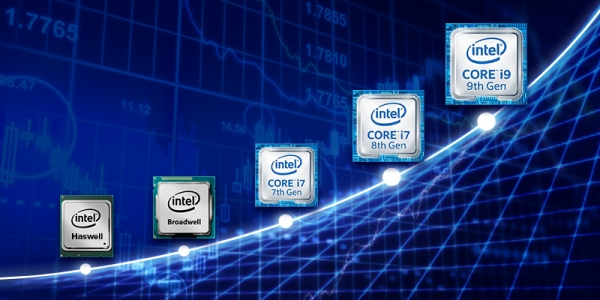
With the arrival of Intel's seventh-generation Core processors, it became clear to many that the 'Tick-Tock' strategy that Intel had been following all this time had failed. The promise to shrink the manufacturing process from 14 to 10 nm remained just a promise, leading to a lengthy era of 'Tock' with Skylake, during which Kaby Lake (seventh generation) and the sudden Coffee Lake (eighth) emerged with a minor change in the process node from 14 nm to 14 nm+, and even Coffee Lake Refresh (ninth). It seems Intel really needed a short coffee break. As a result, we have several processors from different generations built on the same Skylake microarchitecture on one side, and Intel's assurances that each new processor is better than the previous one on the other. However, it's not very clear how exactly...
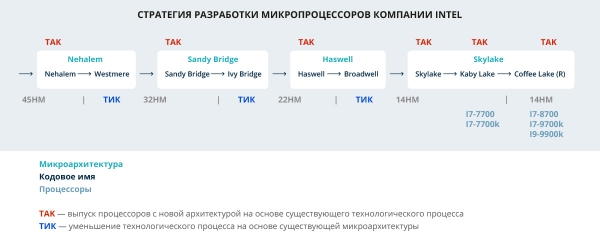
So, let's return to our generations and see how they differ.
Kaby Lake
The retail launch of these processors occurred in early 2017. What’s new in this family compared to its predecessor? First of all, there's a new graphics core — Intel UHD 630. Additionally, it supports Intel Optane memory technology (3D Xpoint), as well as a new 200 series chipset (the sixth generation worked with the 100 series). And that's really it for the truly interesting innovations.
Coffee Lake
The eighth generation, codenamed Coffee Lake, was released in late 2017. This generation of processors added cores and proportionally increased the third level cache, raised Turbo Boost by 200 megahertz, added support for DDR4-2666 (previously it was DDR4-2400), but removed support for DDR3. The graphics core remained the same, but it received a 50 MHz boost. All the frequency increases came at the cost of raising the thermal design power to 95 watts. And of course, there is a new 300 series chipset. The latter was not strictly necessary since specialists were able to run this family on the 100 series chipsets quite soon, although Intel representatives claimed this was impossible due to the power circuit design. Later, however, Intel officially acknowledged it was wrong. So what’s new in the eighth family? In fact, it looks more like a standard refresh with the addition of cores and frequencies.
Coffee Lake Refresh
Ha! Here we have the refresh! In the fourth quarter of 2018, Coffee Lake 9th generation processors were released, equipped with hardware protections against certain Meltdown/Spectre vulnerabilities. The hardware changes made to the new chips protect against Meltdown V3 and L1 Terminal Fault (L1TF Foreshadow). Software and microcode modifications protect against Spectre V2, Meltdown V3a, and V4 attacks. Protection against Spectre V1 will still be implemented through operating system-level patches. The introduction of fixes at the chip level should reduce the impact of software patches on processor performance. However, Intel implemented all this joy with protections only in processors for the mass market segment: i5-9600k, i7-9700k, i9-9900k. All others, including server solutions, were not given these hardware protections. For the first time in the history of consumer processors, Intel's Coffee Lake Refresh supports up to 128 GB of RAM. And that's it, no more changes.
So, what do we have in the end? Two years of refreshes, games with cores and frequencies, plus a set of minor improvements. I really wanted to objectively assess and compare the performance of key representatives from these families. Therefore, when I had a set from the seventh to the ninth generation at hand — our i7-7700 and i7-7700k were recently joined by the fresh i7-8700, i7-9700k, and i9-9900k, I took the opportunity to make five different Intel Core processors show what they are capable of.
Testing
The testing involves five Intel processors: i7-7700, i7-7700k, i7-8700, i7-9700k, i9-9900k.
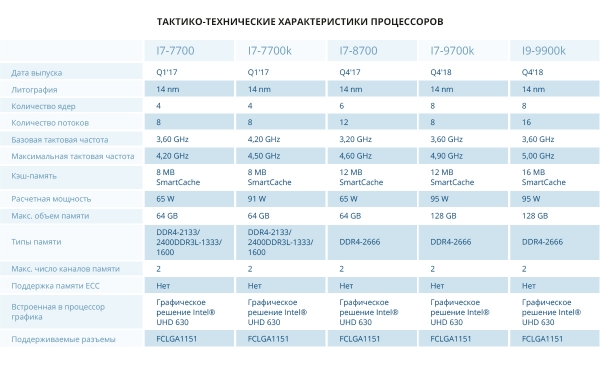
Tactical and technical specifications of the platforms
The Intel i7-8700, i7-9700k, and i9-9900k processors have the same base configuration:
- Motherboard: Asus PRIME H310T (BIOS 1405),
- RAM: 16 GB DDR4-2400 MT/s Kingston, 2 sticks, totaling 32 GB.
- SSD: 240 GB Patriot Burst, 2 in RAID 1 (a habit developed over years).
The Intel i7-7700 and i7-7700k processors also operate on the same platform:
- Motherboard: Asus H110T (BIOS 3805),
- RAM: 8 GB DDR4-2400 MT/s Kingston, 2 sticks, totaling 16 GB.
- SSD: 240 GB Patriot Burst, 2 in RAID 1.
We use custom-made chassis that are 1.5 units tall. They house four platforms.
Software part: OS CentOS Linux 7 x86_64 (7.6.1810).
Kernel: 3.10.0-957.1.3.el7.x86_64
Optimizations made compared to the standard installation: added kernel boot options elevator=noop selinux=0.
Testing is conducted with all patches from Spectre, Meltdown, and Foreshadow attacks backported to this kernel. It is possible that the testing results on newer and more relevant Linux kernels may differ, and the metrics will be better. But, firstly, I personally prefer CentOS 7, and secondly, RedHat actively backports innovations related to hardware support from new kernels into its LTS. That's what I hope for 🙂
Tests used for the research
- Sysbench
- Geekbench
- Phoronix Test Suite
Sysbench Test
Sysbench is a testing (or benchmarking) package for evaluating the performance of different subsystems of a computer: CPU, RAM, storage devices. The test is multithreaded, utilizing all cores. In this test, I measured two metrics:
- CPU speed events per second — the number of operations performed by the CPU per second: the higher the value, the more powerful the system.
- General statistics total number of events — the total number of completed events. The higher the metric, the better.
Geekbench Test
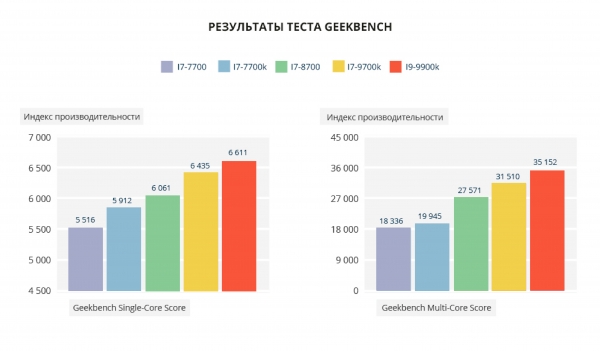
A set of tests conducted in both single-threaded and multi-threaded modes. As a result, a performance index for both modes is issued. Below are links to the test results. In this test, we will examine two main metrics:
— Single-Core Score — single-threaded tests.
— Multi-Core Score — multi-threaded tests.
Units of measurement: abstract 'parrots'. The more 'parrots', the better.
Phoronix Test Suite Test
Phoronix Test Suite is a very rich set of tests. Although all tests from the pts/cpu package were conducted, I will present the results only for those that seemed particularly interesting to me, especially since the results of the missed tests only reinforce the overall trend.
Nearly all the tests presented here are multithreaded. The only exceptions are two single-threaded tests: Himeno and LAME MP3 Encoding.
In these tests, the higher the metric, the better.
- Multithreaded test John the Ripper for password cracking. Let's take the Blowfish cryptographic algorithm. It measures the number of operations per second.
- Himeno Test is a linear solver for Poisson pressure using the Jacobi point method.
- 7-Zip Compression — 7-Zip test using p7zip with an integrated performance testing function.
- OpenSSL is a set of tools implementing SSL (Secure Sockets Layer) and TLS (Transport Layer Security) protocols. It measures the performance of RSA 4096-bit OpenSSL.
- Apache Benchmark measures how many requests per second a system can handle when executing 1,000,000 requests, with 100 requests being processed simultaneously.
If there are fewer, that's better.
- C-Ray tests CPU performance on floating-point calculations. This test is multi-threaded (16 threads per core), shooting 8 rays from each pixel for smoothing and generating a 1600×1200 image. The execution time of the test is measured.
- Parallel BZIP2 Compression measures the time required to compress a file (a .tar package of the Linux kernel source code) using BZIP2 compression.
- Audio and video data encoding. The LAME MP3 Encoding test runs in a single thread, while the ffmpeg x264 test is multi-threaded. The time taken to complete the test is measured.
As you can see, the testing set consists solely of synthetic tests that demonstrate the differences between processors when performing specific tasks, such as password cracking, media encoding, and cryptography.
A synthetic test, unlike a test conducted under conditions close to reality, can provide a certain purity of the experiment. This is precisely why the choice fell on synthetic testing.
It is possible that in addressing specific tasks in real-world conditions you might achieve very interesting and unexpected results, but the overall average will closely resemble my test results. It’s also possible that disabling Spectre/Meltdown protection while testing 9th generation processors could yield higher results. However, I can already say that they performed excellently.
Spoiler: cores, threads, and frequencies will dominate.
Even before the testing, I carefully studied the architecture of these processor families, so I expected that there wouldn’t be any significant differences among the subjects. Moreover, not so much significant as extraordinary: why expect interesting results in the tests if you are measuring processors built essentially on the same core? My expectations were justified, but some things turned out to be not quite as I thought…
And now, the test results.
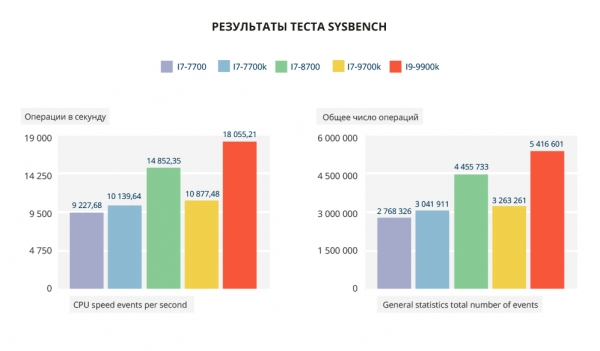
The result is quite predictable: whoever has more threads and a higher frequency scores higher. Accordingly, the i7-8700 and i9-9900k lead the pack. The gap between the i7-7700 and i7-7700k is 10% in single-threaded and multi-threaded tests. The i7-7700 lags behind the i7-8700 by 38% and the i9-9900k by 49%, which is almost double, but the lag behind the i7-9700k is only 15%.
Links to the test results:
Test results from The Phoronix Test Suite
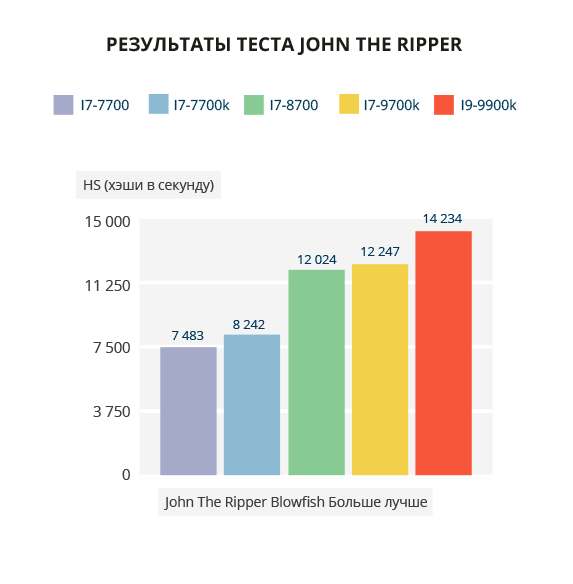
In the John The Ripper test, the difference between the twin brothers i7-7700 and i7-7700k is 10% in favor of the 'k', due to the difference in Turbo Boost. The difference between the i7-8700 and i7-9700k is quite insignificant. The i9-9900k outperforms all due to a larger number of threads and higher clock frequency, almost doubling the twins.
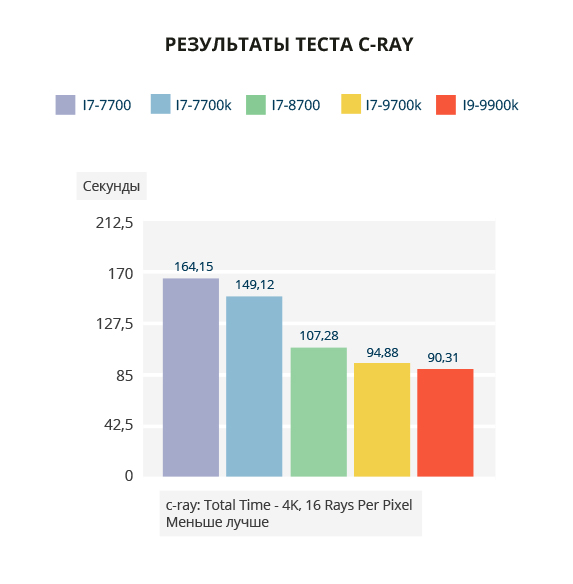
I find the C-Ray test result the most interesting. The presence of Hyper-Threading technology in the i9-9900k provides only a slight advantage in this multi-threaded test compared to the i7-9700k. However, the twins fell behind the leader by almost double.
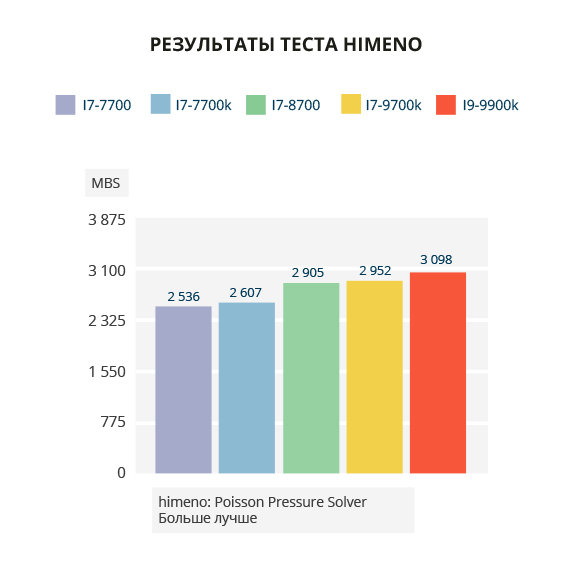
In the single-threaded Himeno test, the difference is not as pronounced. The noticeable gap between the 8th and 9th generations and the twins: the i9-9900k surpasses them by 18% and 15% respectively. The difference between the i7-8700 and i7-9700k is within the margin of error.
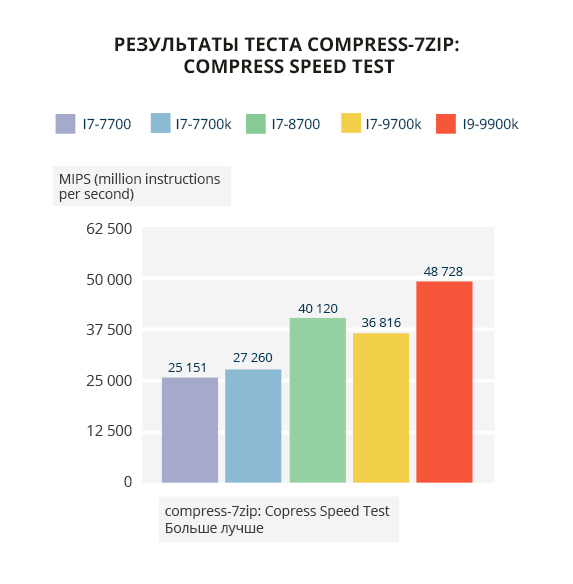
In the 7zip compression test, the twins perform 44-48% worse than the leader i9-9900k. Thanks to a larger number of threads, the i7-8700 surpasses the i7-9700k by 9%. But this is not enough to outpace the i9-9900k, resulting in a lag of almost 18%.
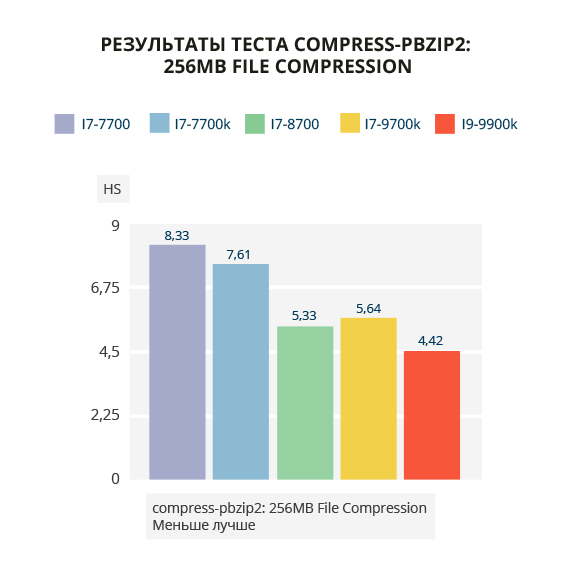
The test with the BZIP2 compression algorithm shows similar results: the threads win.
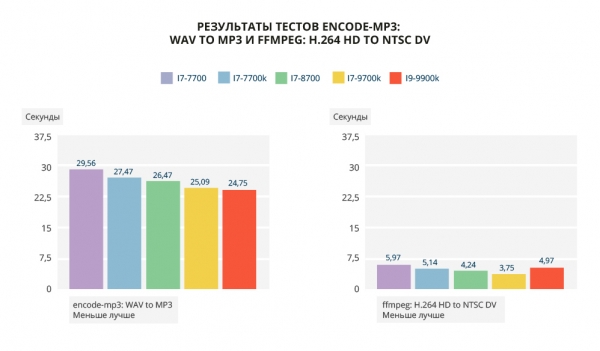
MP3 encoding shows a "staircase" with a maximum gap of 19.5%. In the ffmpeg test, the i9-9900k underperforms compared to the i7-8700 and i7-9700k, but surpasses the dual-core processors. I've retested this several times with the i9-9900k, but the results always remain the same. This is quite unexpected 🙂 In the multithreaded test, the most multithreaded processor of those tested showed a surprisingly low result, lower than both the 9700k and 8700. There are no clear explanations for this phenomenon, and I prefer not to speculate.
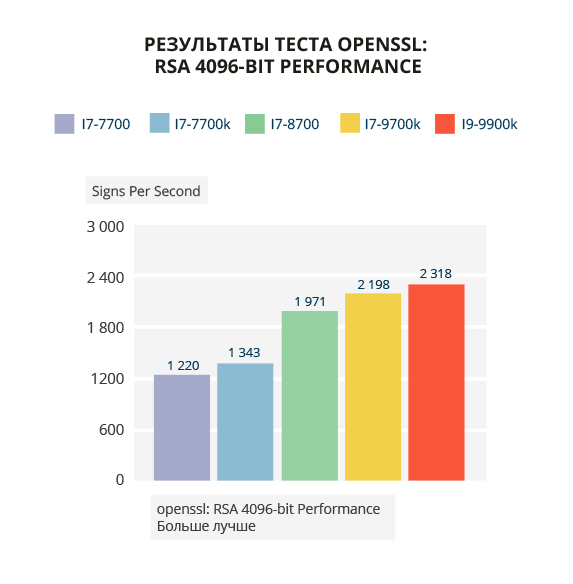
The openssl test displays a "staircase" with a gap between the second and third levels. The difference between the dual-core processors and the leader i9-9900k ranges from 42% to 47%. The gap between the i7-8700 and i9-9900k is 14%. The main factors are threads and frequencies.
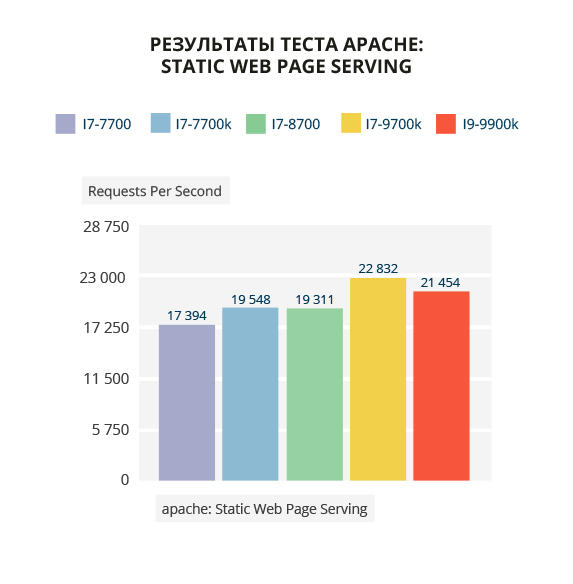
In the Apache test, the i7-9700k outperformed all, including the i9-9900k (by 6%). However, overall the difference is not significant, although there is a 24% gap between the worst performing i7-7700 and the best i7-9700k.
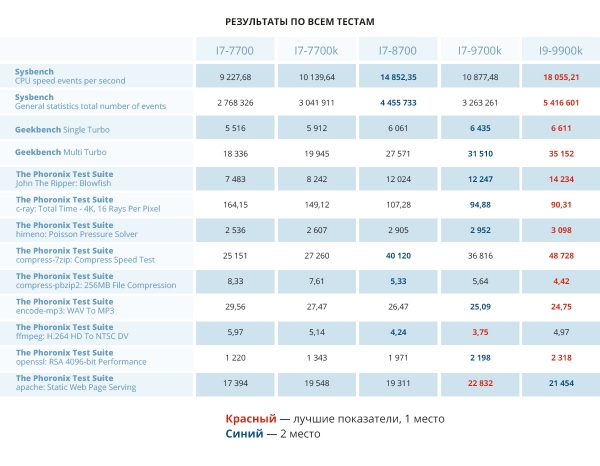
Overall, the i9-9900k leads in most tests, with a notable failure only in ffmpeg. If you plan to work with video, it's better to choose the i7-9700k or i7-8700. The i7-9700k holds second place overall, only slightly trailing the leader, and in ffmpeg and apache tests, it even surpasses it. Therefore, I confidently recommend both it and the i9-9900k for those who regularly experience large surges of users on their site. These processors should not let you down. I've already mentioned video.
The i7-8700 shows good performance in Sysbench, 7zip, and ffmpeg tests.
In all tests, the i7-7700k outperforms the i7-7700 by 2% to 14%, with a 16% advantage in the ffmpeg test.
I remind you that I didn't implement any optimizations beyond those mentioned at the start, which means that upon installing a fresh system on a newly purchased dedicated server, you will achieve the exact same results.
Cores, threads, frequencies — that's our everything.
Overall, the results were predictable and expected. In almost all tests, a "staircase to the sky" appears, demonstrating the dependency of performance on the number of cores, threads, and frequencies: more of all this leads to better results.
Since all tested processors are effectively refreshes of the same core on the same process technology and lack fundamental architectural differences, we couldn't obtain "stunning" evidence that these processors qualitatively differ from one another.
The difference between the i7-9700k and i9-9900k processors in all tests, except for Sysbench, approaches zero, as they basically differ only in the presence of Hyper-Threading technology and a hundred additional megahertz in Turbo Boost mode on the i9-9900k. However, in the Sysbench test, the opposite is true: it is not the number of cores that matters but the number of threads.
There is a very large gap in multi-threaded tests between the i7-7700(k) and i9-9900k, sometimes by as much as two times. There is also a difference between the i7-7700 and i7-7700k — the extra 300 MHz adds agility to the latter.
I also cannot speak to the qualitative impact of cache size on test results — it is what it is. Moreover, the enabled protection against Spectre/Meltdown should greatly reduce the impact of its size on the test results, but that is not certain. If the esteemed reader demands "bread and circuses" from our marketing department, I will gladly roll out testing with the protection disabled.
If I were asked: which processor would you choose? — I would first count the money in my pocket and choose the one I can afford. In short, you can get from point A to point B even in a "Zhiguli", but it is certainly faster and more pleasant in a "Mercedes". Processors based on the same architecture will handle a similar range of tasks one way or another — some just do it well, while others do it great. Yes, as the testing showed, there are no global differences between them. But the gap between the i7 and i9 hasn’t gone anywhere.
When choosing a processor for certain specific tasks, such as working with mp3 files, compiling from source, or rendering three-dimensional scenes with light processing, it makes sense to focus on the relevant test metrics. For example, designers can immediately look at the i7-9700k and i9-9900k, while for complex calculations, a processor with Hyper-Threading technology should be chosen, which means any model except the i7-9700k. Here, threads are key.
So I advise you to choose what you can afford, taking into account the specifications, and happiness will follow.
The testing involved servers based on the i7-7700, i7-7700k, i7-8700k, i7-9700k, and i9-9900k processors with . Any of them can be ordered with a 5% discount for 3 months — please contact the with the code phrase "I’m from Habra". When paying for a year, there is an additional 10% off.
All evening in the arena , system administrator of FirstDEDIC
Source: habr.com
