


How often do you make spontaneous purchases, swayed by enticing advertisements, only to find that the once-desired item gathers dust in your closet, storage, or garage until the next clean-up or move? The result is disappointment from unmet expectations and wasted money. It's much worse when this happens in business. Marketing tricks can be so effective that companies invest in expensive solutions without seeing the full picture of their application. However, trial testing of the system helps understand how to prepare the infrastructure for integration, what functionality and to what extent should be implemented. This way, many issues can be avoided due to making a 'blind' product choice. Furthermore, implementing after a well-conducted 'pilot' will save engineers from a lot of stress and gray hair. Let's explore why pilot testing is so crucial for a successful project, using the popular tool for corporate network access control — Cisco ISE — as an example. We'll look at both standard and quite unconventional usage scenarios we have encountered in our practice.
Cisco ISE — "The Radius Server on Steroids"
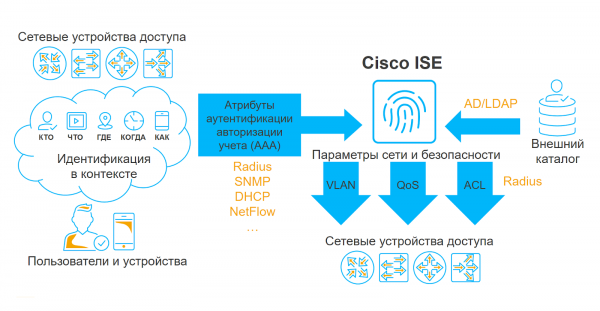
Cisco Identity Services Engine (ISE) is a platform for creating an access control system for an organization's local area network. Within the expert community, the product has been dubbed "the Radius server on steroids" because of its capabilities. Essentially, the solution serves as a Radius server with a vast array of additional services and features that provide extensive contextual information and allow the application of this data into access policies.
Like any other Radius server, Cisco ISE interacts with access layer network equipment, gathers information about all connection attempts to the corporate network, and based on authentication and authorization policies, allows or denies users access to the LAN. However, the ability to profile, perform posturing, and integrate with other security solutions significantly complicates the logic of the authorization policy, thereby addressing quite challenging and interesting tasks.
To Implement or to Pilot: Why Testing is Necessary?
The value of pilot testing lies in demonstrating all the capabilities of the system within the specific infrastructure of a particular organization. I am convinced that piloting Cisco ISE prior to deployment is beneficial for all participants in the project, and here's why.
For integrators, this provides a clear understanding of customer expectations and helps in forming a correct technical specification that contains much more detail than the common phrase, "make it work well." The pilot allows us to truly feel the customer's pain, understand which tasks are a priority for them and which are secondary. For us, this is a great opportunity to identify in advance what equipment is used in the organization, how the deployment will take place, at which sites, their locations, and so on.
Customers, during pilot testing, see the real system in action, get familiar with its interface, can check whether it is compatible with their existing hardware, and gain a holistic view of how the solution will operate after full deployment. The pilot is the moment when one can uncover all the "hidden challenges" that will surely arise during integration and decide how many licenses need to be purchased.
What may "surface" during the pilot
So, how should one properly prepare for the implementation of Cisco ISE? From our experience, we have identified four key points that are important to consider during the pilot testing of the system.
Form Factor
First, it is essential to determine in which form factor the system will be implemented: a physical or virtual appliance. Each option has its advantages and disadvantages. For example, the strong point of a physical appliance is its predictable performance; however, it is important to remember that such devices become outdated over time. Virtual appliances are less predictable since they depend on the hardware on which the virtualization environment is deployed, but they have a significant advantage: if supported, they can always be updated to the latest version.
Is your networking equipment compatible with Cisco ISE?
Of course, the ideal scenario would be to connect all equipment to the system at once. However, this is not always possible, as many organizations still use unmanaged switches or switches that do not support some of the technologies on which Cisco ISE operates. Moreover, it’s not just about switches; this can also apply to wireless network controllers, VPN-hubs, and any other equipment that users connect to. In my experience, there were cases where, after demonstrating the system, the client updated nearly their entire access switch fleet to modern Cisco equipment for full implementation. To avoid unpleasant surprises, it’s worth clarifying the share of unsupported equipment in advance.
Are all your devices standardized?
In any network, there are standardized devices whose connectivity should not pose difficulties: automated workstations, IP phones, Wi-Fi access points, surveillance cameras, and so on. However, there are times when non-standard devices need to be connected to the LAN, such as RS232/Ethernet signal converters, uninterruptible power supply interfaces, various technological equipment, etc. It's important to determine the list of such devices in advance so that you understand how they will technically interact with Cisco ISE during the implementation phase.
Constructive dialogue with IT personnel.
Often, the clients of Cisco ISE are security departments, while the configuration of access switches and Active Directory is usually handled by IT departments. Therefore, productive interaction between security specialists and IT staff is one of the crucial conditions for a smooth system implementation. If the latter resist the integration, it’s essential to explain how the solution will benefit the IT department.
Top 5 use cases for Cisco ISE.
In our experience, the necessary functionality of the system is also identified during the pilot testing phase. Below are some of the most popular and less common use cases for the solution.
Secure wired access to the LAN via EAP-TLS.
As research results from our penetration testers show, cybercriminals often infiltrate a company's network through regular sockets connected to printers, phones, IP cameras, Wi-Fi access points, and other non-personal network devices. Therefore, even if network access is based on dot1x technology, if alternative protocols are used without the application of user authentication certificates, the likelihood of a successful attack through session hijacking and password brute-forcing is high. In the case of Cisco ISE, brute-forcing the certificate will be significantly more challenging — hackers will need much greater computational power, making this case quite effective.
Dual-SSID Wireless Access
The essence of this scenario lies in the use of 2 network identifiers (SSID). One can be conditionally referred to as 'guest.' Through it, both guests and company employees can access the wireless network. The latter, when trying to connect, are redirected to a special portal where provisioning takes place. In other words, a certificate is issued to the user, and their personal device is configured for automatic reconnection to the second SSID, which already employs EAP-TLS, benefiting from all the advantages of the first case.
MAC Authentication Bypass and Profiling
Another popular case involves automatically identifying the type of connecting device and applying the correct restrictions. Why is this interesting? The fact is that there are still many devices that do not support authentication via the 802.1X protocol. Therefore, such devices must be allowed into the network based on their MAC address, which is relatively easy to spoof. Here, Cisco ISE comes to the rescue: the system can observe how the device behaves on the network, create its profile, and match it with a group of other devices, such as an IP telephone and a workstation. If a malicious actor attempts to spoof the MAC address and connect to the network, the system will detect that the device's profile has changed, signal suspicious behavior, and prevent the dubious user from accessing the network.
EAP-Chaining
The EAP-Chaining technology involves the sequential authentication of the workstation and user account. This use case has become widespread, as many companies still do not allow employees' personal devices to connect to the corporate LAN. By using this approach to authentication, it is possible to verify whether a specific workstation is a member of the domain, and if the answer is negative, the user either won't access the network or will log on with certain restrictions.
Posturing
In this case, the focus is on assessing the compliance of the workstation's software with IT security requirements. This technology can check whether the software on the workstation is updated, whether protection measures are installed, whether the host firewall is configured, etc. Interestingly, this technology also allows for addressing other tasks not related to security, such as verifying the presence of necessary files or the installation of common system software.
Less common usage scenarios for Cisco ISE include access control with end-to-end domain authentication (Passive ID), SGT-based micro-segmentation and filtering, as well as integration with mobile device management (MDM) systems and vulnerability scanners.
Non-standard projects: why else might Cisco ISE be needed, or 3 rare cases from our practice
Access control for Linux servers
Once, we were solving a rather non-trivial case for one of our clients who already had a Cisco ISE system implemented: we needed to find a way to monitor user actions (mainly admins) on servers running Linux OS. In search of an answer, we came up with the idea to use the free PAM Radius Module software, which allows logging into Linux servers with authentication on an external RADIUS server. Everything would have been fine, if not for one "but": the RADIUS server, when responding to an authentication request, only provides the username and the result—either assess accepted or assess rejected. Meanwhile, to authorize in Linux, at least one more parameter needs to be set—the home directory, so the user can actually get somewhere. We couldn't find a way to return this as a RADIUS attribute, so we wrote a special script for remotely creating accounts on hosts in a semi-automated mode. This task was quite feasible since we were dealing with administrator accounts, the number of which was not very large. Then users would log into the necessary device, after which they were granted the required access. A reasonable question arises: is it necessary to use Cisco ISE in such cases? In fact, no—any RADIUS server will do, but since the client already had this system, we simply added a new feature to it.
Inventory of hardware and software in the local area network
Once, we worked on a project to deliver Cisco ISE to a client without a prior pilot. There were no clear requirements for the solution, and on top of that, we were dealing with a flat, unsegmented network, which complicated our task. During the project, we configured all possible profiling methods supported by the network: NetFlow, DHCP, SNMP, integration with AD, etc. Ultimately, access was configured via MAR, allowing users to enter the network even after unsuccessful authentication. This means that even if authentication failed, the system would still allow the user onto the network, gather information about them, and record it in the ISE database. This network monitoring over several weeks helped us identify connected systems and non-personal devices and develop an approach to their segmentation. After that, we additionally set up post-sharing to install the agent on workstations to collect information about the software installed on them. What was the outcome? We managed to segment the network and identify the list of software that needed to be uninstalled from the workstations. I won’t hide it; further tasks related to distributing users across domain groups and delineating access rights took us quite a bit of time, but this way, we obtained a complete picture of the hardware present in the client’s network. By the way, this was not difficult due to the effective out-of-the-box profiling. Well, where profiling didn’t help, we looked ourselves, isolating the switch port to which the equipment was connected.
Remote software installation on workstations
This case is one of the strangest in my experience. One day, a client reached out to us in a panic—something went wrong during the implementation of Cisco ISE, everything broke down, and no one could access the network anymore. We started investigating and found the following. The company had 2000 computers, which were managed under the administrator account due to the lack of a domain controller. To address this, Cisco ISE was implemented within the organization. It was necessary to find out whether antivirus software was installed on the existing PCs, whether the software environment was updated, etc. Since the IT administrators introduced the network equipment into the system, it was logical that they had access to it. After observing how it worked and conducting an audit of their PCs, the admins came up with the idea of remotely installing software on employees' workstations without personal visits. Just imagine how many steps could be saved in a day! The admins ran several checks on workstations to look for a specific file in the directory C:Program Files, and if it was absent, an automatic remediation was triggered with a link leading to a storage location for the .exe installation file. This allowed ordinary users to access the file share and download the necessary software from there. Unfortunately, the admin did not have a good grasp of the ISE system and messed up the auditing mechanisms—writing the policy incorrectly, which led to the issue that required us to step in. Personally, I'm genuinely surprised by such a creative approach, as it would have been much cheaper and less labor-intensive to create a domain controller. But as a proof of concept, it worked.
Learn more about the technical nuances that arise during the implementation of Cisco ISE in my colleague's article. .
Artem Bobrikov, Design Engineer at the Information Security Center of ‘Ingosystems Jet’
Afterword:
Although this post discusses the Cisco ISE system, the issues described are relevant for the entire class of NAC solutions. It doesn't matter which vendor's solution is planned for implementation—most of what has been said will still apply.
Source: habr.com
