

The canary is a small bird that constantly sings. These birds are sensitive to methane and carbon monoxide. Even at low concentrations of harmful gases in the air, they can lose consciousness or die. Gold miners and miners used to take canaries into the mines: as long as the canaries sing, work can continue, but if they stop, it means there is gas in the mine, and it’s time to leave. Miners sacrificed the little bird to escape the mines alive.

A similar practice has found its place in IT. For example, in the standard task of deploying a new version of a service or application to production with testing beforehand. Test environments can be too expensive, automated tests do not cover everything one would like, and not testing while sacrificing quality is risky. This is where the Canary Deployment approach helps, allowing a little real production traffic to flow to the new version. This approach helps safely check the new version in production, sacrificing a little for a greater goal. Further details on how the approach works, its benefits, and how to implement it will be shared by Andrey Markelov (), using an example from the implementation at Infobip.
Andrey Markelov — a lead software engineer at Infobip, has been developing Java applications in the financial and telecommunications sectors for 11 years. He develops Open Source products, actively participates in the Atlassian Community, and writes plugins for Atlassian products. An evangelist for Prometheus, Docker, and Redis.

About Infobip
It is a global telecommunications platform that allows banks, retailers, online stores, and transportation companies to send messages to their clients using SMS, push notifications, emails, and voice messages. Stability and reliability are crucial in this business to ensure clients receive messages on time.
Infobip's IT infrastructure in numbers:
- 15 data centers around the world;
- 500 unique services in operation;
- 2500 service instances, which is significantly more than the number of teams;
- 4.5 TB of monthly traffic;
- 4.5 billion phone numbers;
The business is growing, and with it, the number of releases. We conduct about 60 releases a day, because clients demand more features and capabilities. But it’s challenging — there are many services and few teams. We have to quickly write code that must work in production without errors.
Releases
A typical release goes like this. For example, we have services A, B, C, D, and E, each developed by a separate team.
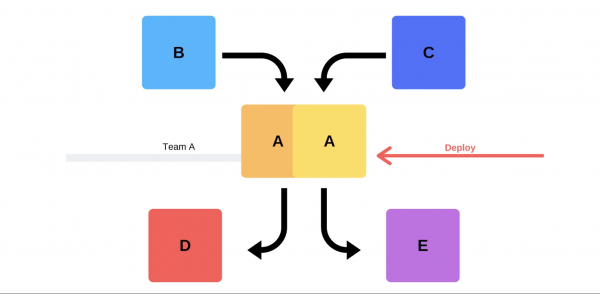
At some point, team A decides to deploy a new version, but teams for services B, C, D, and E are unaware of this. Team A has two options.
Conduct an incremental release: first replacing one version, and then the second.
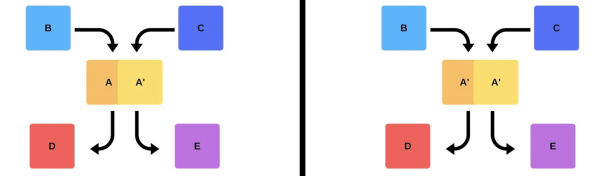
But there’s a second option: the team finds additional resources and machines, deploys the new version, and then switches the router, so the version starts running in production.
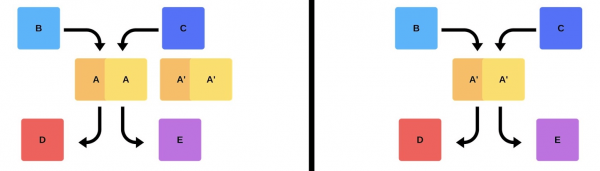
In any case, after deployment, problems almost always arise, even if the version was tested. Testing can be manual, automated, or skipped—problems will occur regardless. The simplest and most effective way to resolve them is to roll back to a working version. Only afterward can one assess the damage, the causes, and fix them.
So, what do we want?
We don’t want problems. If clients discover them before we do, it will hurt our reputation. Therefore, we must find problems faster than our clients.By working proactively, we minimize the damage.
At the same time, we want to accelerate deployment, making it happen quickly, easily, naturally, and without stress for the team. Engineers, DevOps engineers, and programmers need to be valued—releasing a new version is stressful. The team is not disposable; we aim to use human resources efficiently..
Deployment Issues
Client traffic is unpredictable.It is impossible to predict when client traffic will be at its lowest. We don’t know where and when clients will start their campaigns—it could be tonight in India or tomorrow in Hong Kong. Given the large time differences, deploying at 2 AM doesn’t guarantee that clients won’t be affected.
Provider Issues.Messengers and providers are our partners. Sometimes they experience failures that cause errors during the deployment of new versions.
Distributed Teams.The teams developing the client side and the backend are in different time zones. Due to this, they often struggle to coordinate with each other.
Data centers cannot be replicated in staging.In one data center, there are 200 racks; it is impossible to replicate this approximately in a sandbox.
Downtimeis unacceptable! We have an acceptable level of availability (Error Budget) when we operate 99.99% of the time, for example, and the remaining percentage is our 'margin of error'. Achieving 100% reliability is impossible, but it's important to continuously monitor for drops and outages.
Classic solutions
Writing bug-free code. When I was a young developer, managers would approach me asking to release with no bugs, but this is not always possible.
Writing tests. Tests work, but sometimes not in the way that the business wants. Making money is not the responsibility of tests.
Testing on stage. In my 3.5 years at Infobip, I have never seen the state of the staging environment even partially align with production.
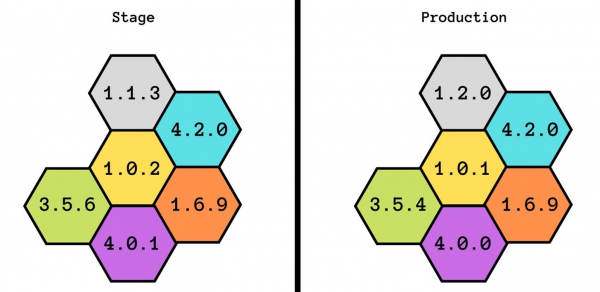
We even tried to develop this idea: first we had staging, then pre-production, and then pre-production of pre-production. But this did not help either - they didn't even match in capacity. With staging, we can guarantee basic functionality, but we don't know how it will perform under load.
The release is made by the one who developed it. This is a good practice: even if someone changes the name of a comment, it should go directly to production. This helps foster accountability and reminds everyone of the changes made.
There are additional complexities. For the developer, it's stressful to spend a lot of time checking everything manually.
Coordinated releases. This option is usually suggested by management: 'Let's agree that you will test and add new versions daily.' This does not work: there is always a team waiting for everyone else or vice versa.
Smoke tests
Another way to solve our deployment issues. Let's consider how smoke tests work in the previous example when Team A wants to deploy a new version.
First, the team deploys one instance to production. Messages in the instance from mocks simulate real traffic, so that it matches the normal daily traffic. If all goes well, the team switches the new version to live user traffic.
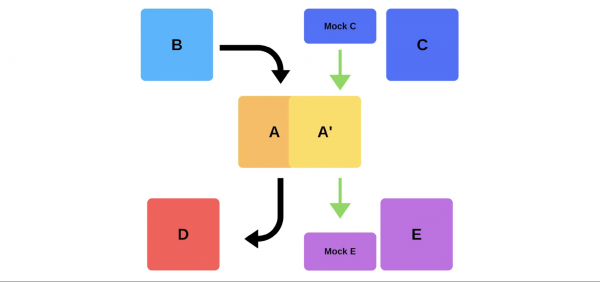
The second option is to deploy with additional hardware. The team tests it in production, then switches it over, and everything works.
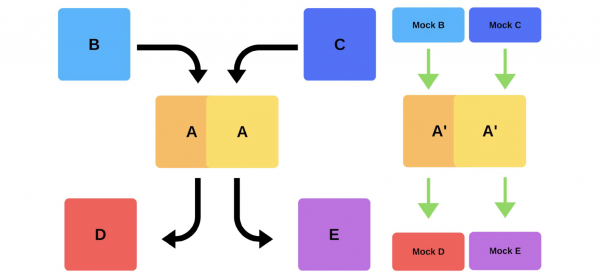
Disadvantages of smoke tests:
- You can't trust tests. Where can you get the same traffic as in production? You can use yesterday's or a week-old traffic, but it doesn't always match the current one.
- It's difficult to maintain. You'll have to manage test accounts, constantly resetting them before each deployment when active records are sent to the storage. This is more complicated than writing tests in your sandbox.
The only bonus here is you can check performance.
Canary releases
Due to the shortcomings of smoke tests, we started using canary releases.
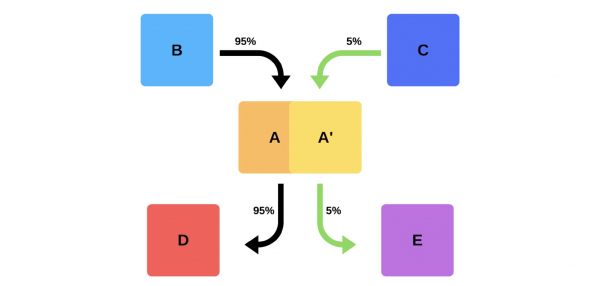
The practice, similar to how miners used canaries to indicate gas levels, has found its place in IT. We send out some real production traffic to the new version, while trying to stay within the Service Level Agreement (SLA). The SLA is our 'margin for error,' which we can use once a year (or over some other period). If everything goes well, we will add more traffic. If not, we will revert to previous versions.
Implementation and nuances
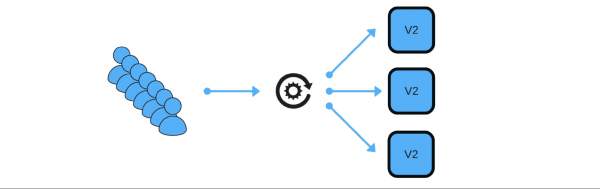
How did we implement canary releases? For example, a group of customers sends messages through our service.
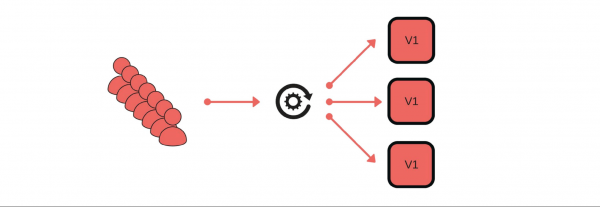
The deployment process is as follows: we take one node out of the load balancer (1), change the version (2), and separately send a bit of traffic (3).

Overall, everyone in the group will be happy, even if one user is dissatisfied. If all goes well, we will update all versions.
I'll show schematically how this looks for microservices in most cases.
There is Service Discovery and two more services: S1N1 and S2. The first service (S1N1) notifies Service Discovery when it starts, and Service Discovery remembers it. The second service with two nodes (S2N1 and S2N2) also notifies Service Discovery at startup.
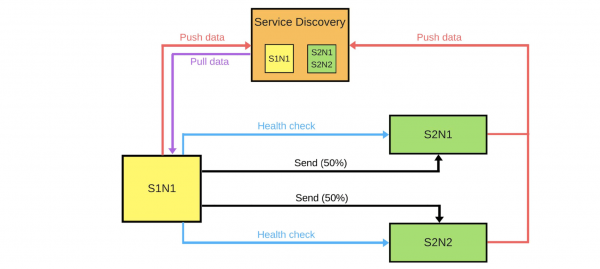
The second service operates as a server for the first. The first requests information about its servers from Service Discovery, and when it receives it, it searches for and checks them ('health check'). Once verified, it sends them messages.
When someone wants to deploy a new version of the second service, they inform Service Discovery that the second node will be a canary node: it will receive less traffic because deployment is occurring now. We remove the canary node from the load balancer, and the first service does not send traffic to it.
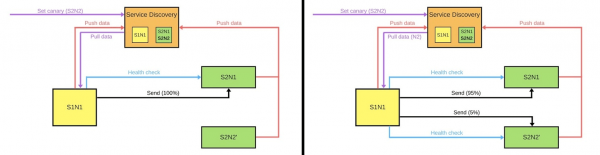
We change the version, and Service Discovery knows that the second node is now the canary— it can handle less load (5%). If everything goes well, we change the version, restore the load, and continue working.
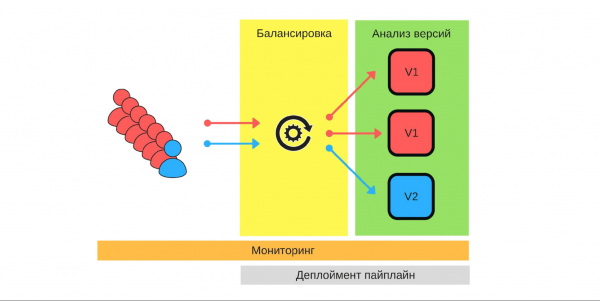
To implement all of this, we need:
- load balancing;
- monitoring, as it is important to know what each user expects and how our services work in detail;
- version analysis, to understand how well the new version will work in production;
- automation — we write the deployment sequence (deployment pipeline).
Load Balancing
This is the first thing we need to think about. There are two load balancing strategies.
The simplest option, where one node is always the canary. This node always receives less traffic, and we start the deployment with it. In case of issues, we will compare its performance before and during the deployment. For example, if the number of errors has doubled, then the damage has also doubled.
The canary node is designated during the deployment. When the deployment ends and we remove its canary status, the traffic balance will be restored. With fewer machines, we achieve a fair distribution.
Monitoring
The cornerstone of canary releases. We must clearly understand why we are doing this and what metrics we want to collect.
Examples of metrics we collect from our services.
- The number of errors, which are logged. This is an obvious indicator that everything works as it should. Overall, it's a good metric.
- Response time (latency). This metric is monitored by everyone, because everyone wants to work quickly.
- Queue size (throughput).
- The number of successful responses per second.
- The execution time for 95% of all requests.
- Business metrics: how much money the business earns over a specific time period or user churn. These metrics might be more important for our new version than those that engineers add.
Examples of metrics in most popular monitoring systems.
Counter. This is some increasing quantity, for example, the number of errors. This metric can be easily interpolated and the graph analyzed: yesterday there were 2 errors, and today there are 500, meaning something has gone wrong.
The number of errors per minute or per second is a crucial metric calculable using Counter. This data provides a clear view of the system's performance over time. Let's consider the example of the error count per second for two versions of the production system.
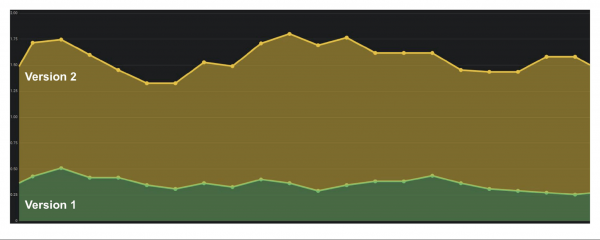
The first version had few errors, possibly due to audit not being operational. In the second version, things are much worse. It's clear that there are problems, so we need to roll back this version.
Gauge. Metrics are similar to Counter, but we record values that can both increase and decrease. For instance, response times or queue sizes.
The graph shows an example of latency. It’s evident that the versions are similar and manageable. But upon closer inspection, you can see how the values change. If response times increase as the number of users rises, it becomes clear that there is an issue — this wasn't the case before.
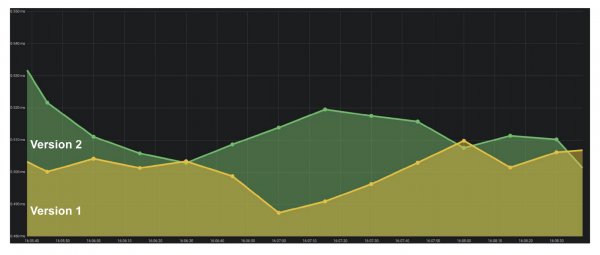
Summary. One of the key indicators for a business is percentiles. The metric indicates that in 95% of cases our system operates as intended. We can accept problems in some areas because we understand the overall trend of how well or poorly things are going.
Tools
ELK Stack. Implementing canary is possible using Elasticsearch — we log errors when events occur. A simple API call can provide the error count at any given moment and compare it with past intervals: GET /applg/_count?q=level:error.
Prometheus. It performed well at Infobip. It allows for implementing multidimensional metrics because labels are used.
We can use level, instance, cat << EOF | sudo tee -a /etc/systemd/system/lxd-hddpool.service [Unit] Description=Losetup LXD Storage Pool (hddpool) After=local-fs.target[Service] Type=oneshot ExecStart=/sbin/losetup /dev/loop1 /mnt/work/lxd/hddpool.img RemainAfterExit=true[Install] WantedBy=local-fs.target EOF, combining them in a single system. With offset we can check, for example, the value of a metric from a week ago with just one command GET /api/v1/query?query={query}, where {query}:
rate(logback_appender_total{
    level="error",
    instance=~"$instance"
}[5m] offset $offset_value)
Version analysis
There are several strategies for version analysis.
Monitor metrics only for the canary node. One of the simplest options: deploy a new version and only study its performance. However, if an engineer starts looking at logs during this time, constantly nervously refreshing pages, this solution is no different from others.
The canary node is compared with any other node.This comparison is with other instances that operate under full traffic. For example, if the situation is worse or no better with low traffic than on real instances, then something is wrong.
The canary node is compared to itself in the past. Nodes allocated for canary can be compared with historical data. For instance, if everything was good a week ago, we can use that data to understand the current situation.
Automation
We want to free engineers from manual comparisons, so it's important to implement automation. The deployment process (deployment pipeline) usually looks like this:
- we start;
- we remove the node from under the balancer;
- we set the canary node;
- we enable the balancer with a limited amount of traffic;
- we compare.
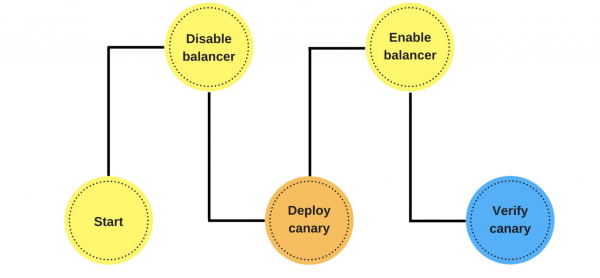
At this stage, we implement automatic comparison. We will see how it can look and why it is better than checking after deployment using a Jenkins example.
This is the pipeline to Groovy.
while (System.currentTimeMillis() < endCanaryTs) {
    def isOk = compare(srv, canary, time, base, offset, metrics)
    if (isOk) {
        sleep DEFAULT SLEEP
    }   else {
        echo "Canary failed, need to revert"
        return false
    }
}
Here in the loop, we set that we will compare the new node for an hour. If the canary process has not yet completed, we call the function. It indicates whether everything is good or not: def isOk = compare(srv, canary, time, base, offset, metrics).
If everything is fine — sleep DEFAULT SLEEP, for example, for a second, and we continue. If not, we exit — the deployment has failed.
Description of the metric. Let's see how the function compare can look using the DSL example.
metric(
    'errorCounts',
    'rate(errorCounts{node=~"$canaryInst"}[5m] offset $offset)',
    {   baseValue, canaryValue ->
        if (canaryValue > baseValue * 1.3) return false
        return true
    }
)
Suppose we are comparing the number of errors and want to know the error count per second over the last 5 minutes.
We have two values: the base and the canary node. The canary node value is the current one. The base is baseValue — this is the value of any other non-canary node. We compare the values against each other based on the formula we set based on our experience and observations. If the value of canaryValue is bad, then the deployment failed, and we roll back.
Why is all this necessary?
A person cannot check hundreds and thousands of metrics., especially to do it quickly. Automatic comparison helps to check all metrics and promptly alerts about problems. The alert time is critical: if something happened in the last 2 seconds, the damage will be less severe than if it occurred 15 minutes ago. While someone notices the issue, writes to support, and support reverts it for us, we can lose clients.
If the process passes and everything is fine, we automatically deploy all other nodes. During this time, engineers do nothing. Only when they launch the canary do they decide which metrics to take, how long to conduct the comparison, and what strategy to use.
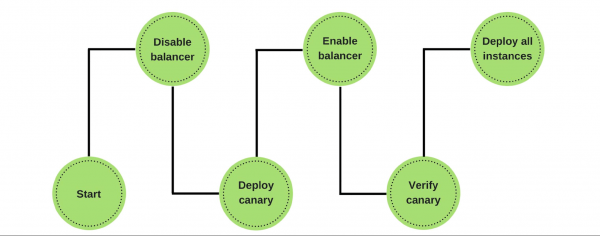
If problems arise, we automatically roll back the canary node, work on the previous versions, and fix the errors we found. Metrics make it easy to identify them and see the damage from the new version.
Obstacles
Implementing this is certainly not easy. First and foremost, a common monitoring systemis needed. Engineers have their own metrics, support and analysts have different ones, and the business has third ones. A common system is the common language that business and development speak.
It needs to be validated in practice the stability of metrics. Validation helps to understand what minimal set of metrics is needed to ensure quality..
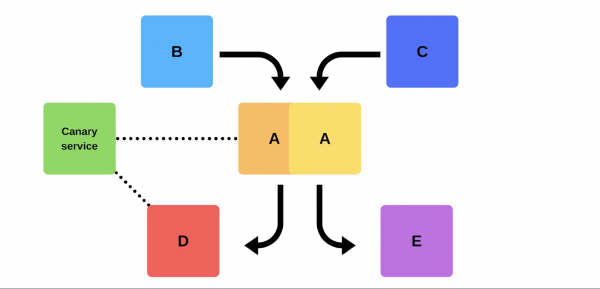
How can this be achieved? Using the canary service not at the time of deployment. We add a certain service on the old version that can take any designated node at any time, reducing traffic without deployment. After that, we compare: we examine the errors and look for that boundary when we achieve quality.
What benefits have we gained from canary releases?
We minimized the percentage of damage from bugs. Most deployment errors occur due to data inconsistency or priority issues. Such errors have decreased significantly because we can solve problems in the first seconds.
We optimized team performance. Novices have a 'right to make mistakes': they can deploy to production without fear of making an error, which fosters additional initiative and motivation to work. If they break something, it won't be critical, and they won't be fired for making a mistake.
We automated deployment. It is no longer a manual process as before, but a true automated one. However, it takes longer.
We highlighted important metrics.The entire company, from business to engineers, understands what truly matters in our product, such as metrics like user churn and influx. We monitor the process: testing metrics, introducing new ones, observing how old ones perform, in order to build a system that generates revenue more efficiently.
We have many great practices and systems that help us. Nevertheless, we strive to be professionals and perform our work well, regardless of whether we have a system to assist us or not.
Engineering approaches and practices — . If you have made progress on the path to technical excellence and are willing to share what has helped you — .
We plan to hold on June 8. We understand that it is currently difficult to make decisions about attending the conference. However, we believe that quarantine is not a reason to halt professional communication and development. Therefore, we will find a way to discuss the challenges of tech leads and approaches to solving them — if necessary, we will move online and expand networking there!
Source: habr.com
