

became one of the most popular ... After in 2015 number exceeded thousands and Ansible became probably the most used deployment and orchestration system. Its wide range of applications is very impressive.
Ansible works through SSH connections to remote hosts. It opens an SSH session, logs in, copies the Python code over the network and writes it to a separate temporary file. After that, it runs this file on the remote machine. This whole sequence of operations is quite long and tedious, so there are various ways to optimize it.
One of these ways is which allows us to use one SSH session to execute instructions, rather than opening a new session each time, which can save us a lot of time. (Just don't forget to disable requiretty setting for sudo in your /etc/sudoers file on the remote machine)
The new way to "overclock" Ansible is the python library by name . if someone has not heard about it, then I will briefly describe its functionality. It allows fast execution of python code on a remote machine and Ansible is just one of the use cases. Mitogen uses a UNIX pipe on the remote machine and transfers python code compressed by zlib and serialized with pickle. This helps to complete it faster and saves bandwidth. If you are interested in a more detailed explanation, it is best to read about it on the page . But today we will focus only on how the library works with Ansible.
Mitogen under certain circumstances can speed up your Ansible code by several times and significantly reduce traffic consumption. Let's check out the most popular use cases and see how it helps us.
The things I use Ansible the most are: creating configuration files on a remote machine, installing packages, copying files to and from a remote machine. Perhaps you have other examples - write in the comments.
Let's go!
The Mitogen configuration for Ansible is very simple:
Install Mitogen library:
pip install mitogenNow there are two equivalent ways - either configure options in the ansible.cfg configuration file, or set the necessary environment variables.
Let's assume that the path to the installed Mitogen will be /usr/lib/python2.7/site-packages/ansible_mitogen/plugins/strategy... Then:
export ANSIBLE_STRATEGY_PLUGINS=/usr/lib/python2.7/site-packages/ansible_mitogen/plugins/strategy
export ANSIBLE_STRATEGY=mitogen_linear
or
[defaults]
strategy = mitogen_linear
strategy_plugins = /usr/lib/python2.7/site-packages/ansible_mitogen/plugins/strategy
Install Ansible in virtualenv, with and without Mitogen:
virtualenv mitogen_ansible
./mitogen_ansible/bin/pip install ansible==2.7.10 mitogen
virtualenv pure_ansible
./pure_ansible/bin/pip install ansible==2.7.10
Please note that Mitogen 0.2.7 does not work with Ansible 2.8 (as of May 2019)
Making aliases:
alias pure-ansible-playbook='$(pwd)/pure_ansible/bin/ansible-playbook'
alias mitogen-ansible-playbook='ANSIBLE_STRATEGY_PLUGINS=$(pwd)/mitogen_ansible/lib/python3.7/site-packages/ansible_mitogen/plugins/strategy ANSIBLE_STRATEGY=mitogen_linear $(pwd)/mitogen_ansible/bin/ansible-playbook'
Now let's try to run a playbook that creates files on a remote machine:
---
- hosts: all
  gather_facts: false
  tasks:
    - name: Create files with copy content module
      copy:
        content: |
          test file {{ item }}
        dest: ~/file_{{ item }}
      with_sequence: start=1 end={{ n }}
And run with and without Mitogen to create 10 files:
time mitogen-ansible-playbook file_creation.yml -i hosts -e n=10 &>/dev/null

real    0m2.603s
user    0m1.152s
sys     0m0.096s

time pure-ansible-playbook file_creation.yml -i hosts -e n=10 &>/dev/null

real    0m5.908s
user    0m1.745s
sys     0m0.643s
We see a 2x improvement. Let's check for 20, 30, ..., 100 files:
time pure-ansible-playbook file_creation.yml -i hosts -e n=100 &>/dev/null

real    0m51.775s
user    0m8.039s
sys     0m6.305s

time mitogen-ansible-playbook file_creation.yml -i hosts -e n=100 &>/dev/null

real    0m4.331s
user    0m1.903s
sys     0m0.197s
As a result, we accelerated the execution by more than 10 times!
Now let's try different scenarios and see how much faster everything works for us:
Script for copying files to a remote host from a local host (with the module
copy):

Script to create files on a remote host with
copymodule:
Scenario with downloading files from a remote host to a local one:
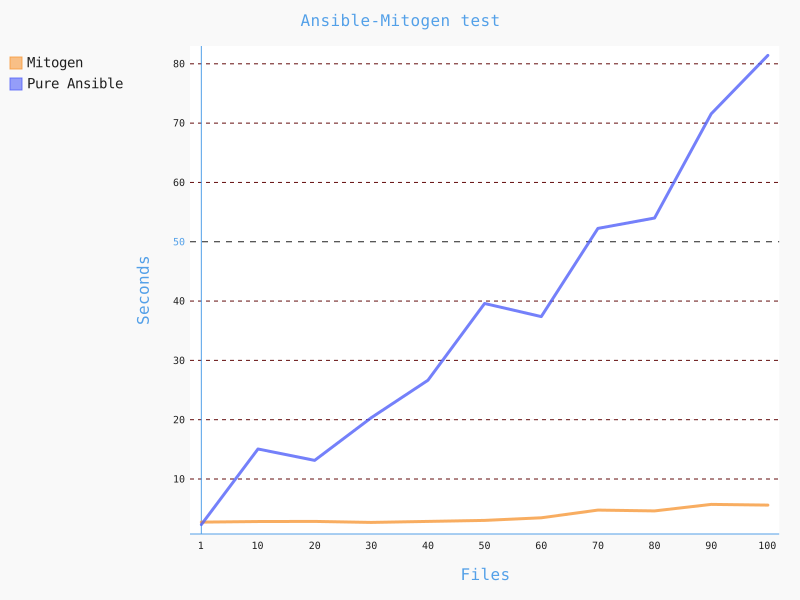
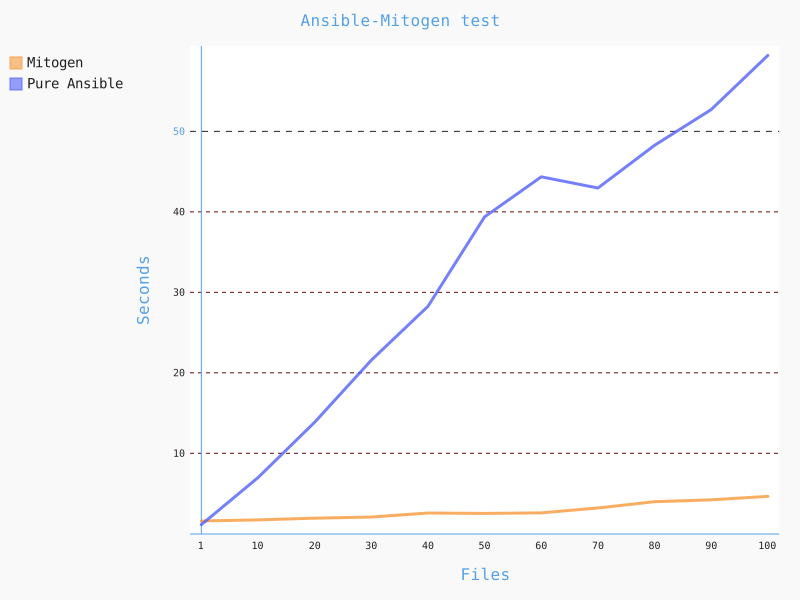
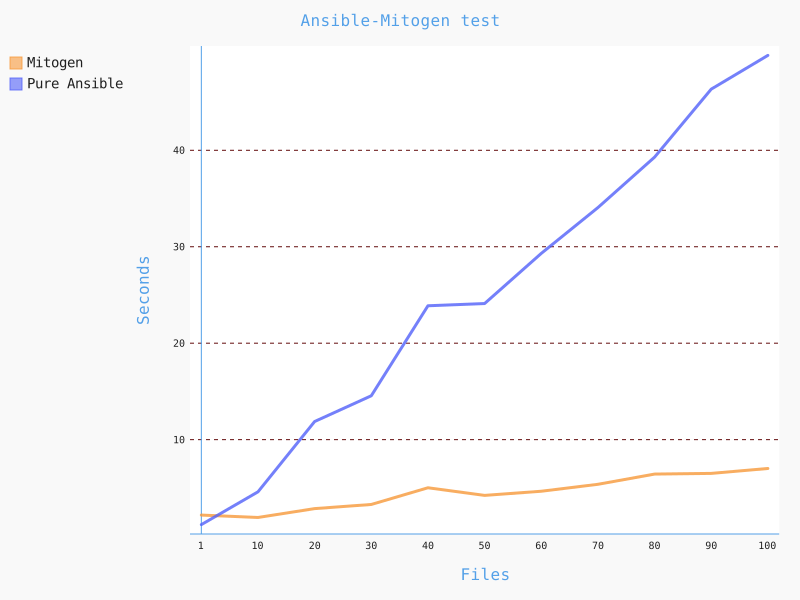
Let's try a scenario with multiple (3) remote machines, such as copying files to a remote host:
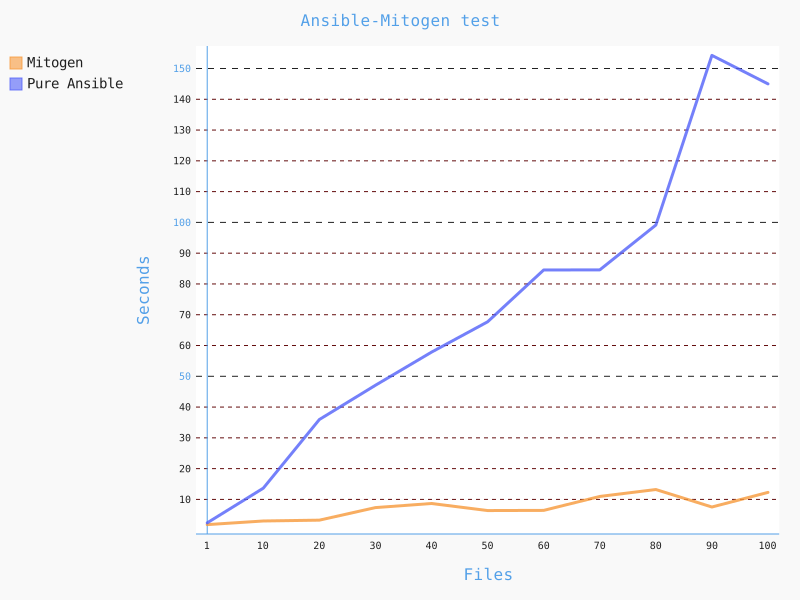
As you can see, Mitogen saves us both time and traffic in these scenarios. But if the "bottleneck" is not in Ansible, but for example in disk I / O or network, or anywhere else, then it's hard to expect Mitogen to help us.
Let's try a scenario with installing yum/dnf packages and python modules using pip. The packets were cached so as not to depend on glitches in the network:
---
- hosts: all
  gather_facts: false
  tasks:
    - name: Install packages
      become: true
      package:
        name:
          - samba
          - httpd
          - nano
          - ruby
        state: present

    - name: Install pip modules
      become: true
      pip:
        name:
          - pytest-split-tests
          - bottle
          - pep8
          - flask
        state: present
With Mitogen it took 12 seconds, as well as without it.
On page you can see other benchmarks and tests. As the page states:
Mitogen cannot speed up a module while it is running. It can only make the execution of this module as fast as possible.
Therefore, it is important to find your deployment bottlenecks and if they are due to Ansible, then Mitogen will help you solve them and significantly speed up the execution of your playbooks.
Source: habr.com
