

has become one of the most popular . After in 2015, the number of exceeded thousands, and Ansible became perhaps the most widely used deployment and orchestration system. Its extensive range of applications is truly impressive.
Ansible operates through SSH connections to remote hosts. It opens an SSH session, logs in, copies Python code across the network, and writes it to a separate temporary file. After that, it executes this file on the remote machine. This entire sequence of operations is quite lengthy and tedious, which is why there are various ways to optimize it.
One of these methods is which allows using a single SSH session to execute instructions instead of opening a new session each time, which can save us a lot of time. (Just don’t forget to disable requiretty in your sudo configuration file on the remote machine) /etc/sudoers )
A new way to 'speed up' Ansible is a Python library called . If someone hasn’t heard of it — I’ll briefly describe its functionality. It allows for fast execution of Python code on the remote machine, and Ansible is just one example of its use. Mitogen uses UNIX pipes on the remote machine and transmits Python code compressed with zlib and serialized using pickle. This helps execute it faster and saves bandwidth. If you’re interested in a more detailed explanation, it’s best to read about it on the page. But today we'll focus only on the library's work with Ansible.
Mitogen, in certain circumstances, can speed up your Ansible code several times and significantly reduce bandwidth consumption. Let’s check out the most popular use cases and see how much it helps us.
I mostly use Ansible for: creating configuration files on remote machines, installing packages, copying files to and from remote machines. You may have other examples — feel free to share in the comments.
Let's go!
The configuration of Mitogen for Ansible is very simple:
Install the Mitogen library:
pip install mitogenNow there are two equivalent ways — either configure options in the ansible.cfg configuration file or set the necessary environment variables.
Assuming that the path to the installed Mitogen will be /usr/lib/python2.7/site-packages/ansible_mitogen/plugins/strategy. Then:
export ANSIBLE_STRATEGY_PLUGINS=/usr/lib/python2.7/site-packages/ansible_mitogen/plugins/strategy
export ANSIBLE_STRATEGY=mitogen_linear
or
[defaults]
strategy = mitogen_linear
strategy_plugins = /usr/lib/python2.7/site-packages/ansible_mitogen/plugins/strategy
Let's install Ansible in a virtualenv, with and without Mitogen:
virtualenv mitogen_ansible
./mitogen_ansible/bin/pip install ansible==2.7.10 mitogen
virtualenv pure_ansible
./pure_ansible/bin/pip install ansible==2.7.10
Note that Mitogen 0.2.7 does not work with Ansible 2.8 (as of May 2019)
Let's create aliases:
alias pure-ansible-playbook='$(pwd)/pure_ansible/bin/ansible-playbook'
alias mitogen-ansible-playbook='ANSIBLE_STRATEGY_PLUGINS=$(pwd)/mitogen_ansible/lib/python3.7/site-packages/ansible_mitogen/plugins/strategy ANSIBLE_STRATEGY=mitogen_linear $(pwd)/mitogen_ansible/bin/ansible-playbook'
Now let's try to run a playbook that creates files on a remote machine:
---
- hosts: all
  gather_facts: false
  tasks:
    - name: Create files with copy content module
      copy:
        content: |
          test file {{ item }}
        dest: ~/file_{{ item }}
      with_sequence: start=1 end={{ n }}
And we'll run it with and without Mitogen to create 10 files:
time mitogen-ansible-playbook file_creation.yml -i hosts -e n=10 &>/dev/null

real    0m2.603s
user    0m1.152s
sys     0m0.096s

time pure-ansible-playbook file_creation.yml -i hosts -e n=10 &>/dev/null

real    0m5.908s
user    0m1.745s
sys     0m0.643s
We see an improvement of 2 times. Let's check for 20, 30, ..., 100 files:
time pure-ansible-playbook file_creation.yml -i hosts -e n=100 &>/dev/null

real    0m51.775s
user    0m8.039s
sys     0m6.305s

time mitogen-ansible-playbook file_creation.yml -i hosts -e n=100 &>/dev/null

real    0m4.331s
user    0m1.903s
sys     0m0.197s
As a result, we accelerated execution by over 10 times!
Now let's try various scenarios and see how much faster everything works:
Scenario of copying files to a remote host from local (using the module
copy):

Scenario of creating files on a remote host with
copythe module:
Scenario of downloading files from a remote host to local:
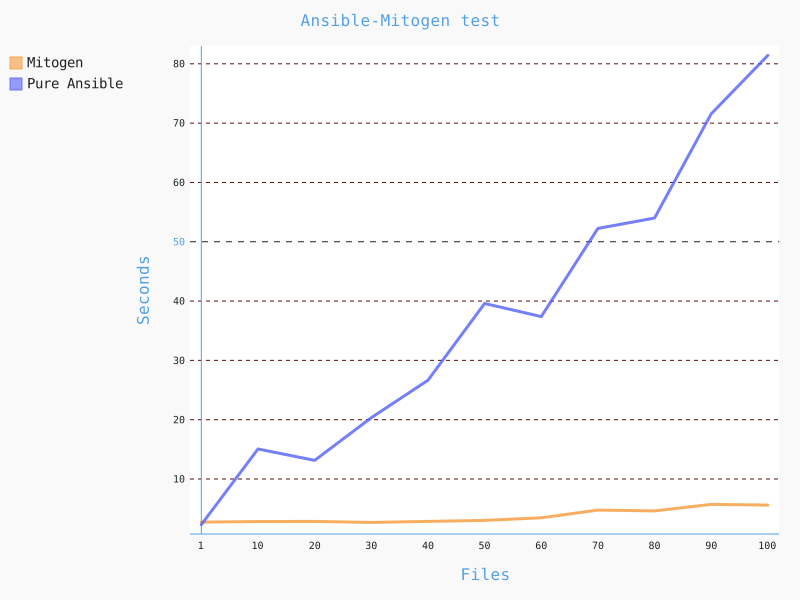
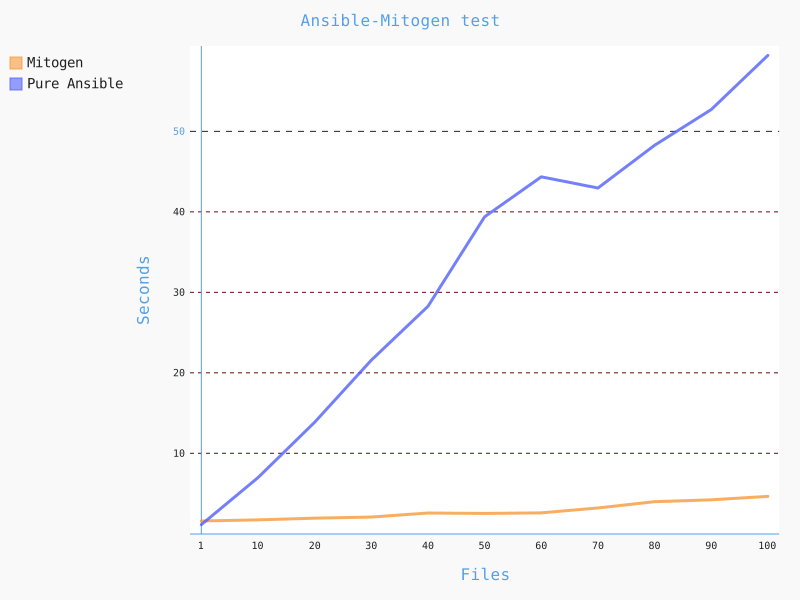
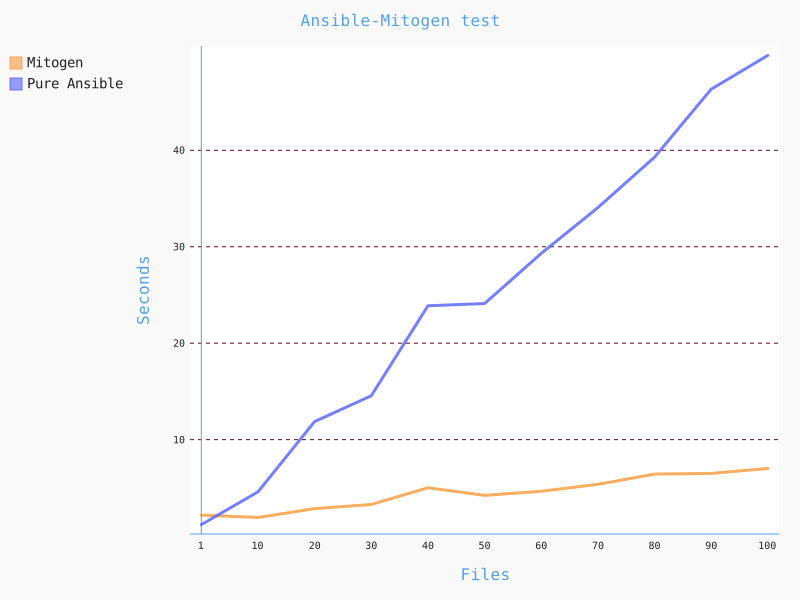
Let's try a scenario with multiple (3) remote machines, for example a scenario of copying files to a remote host:
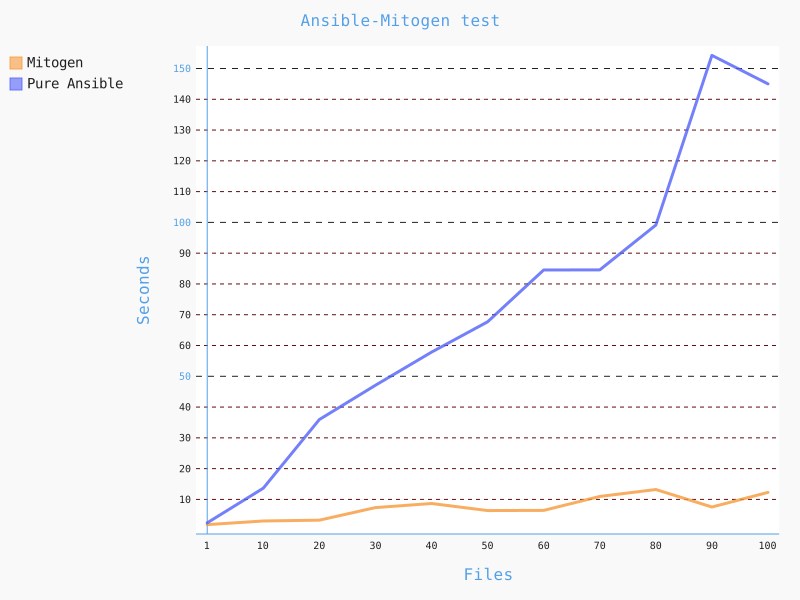
As we can see, Mitogen saves us both time and traffic in these scenarios. However, if the bottleneck is not in Ansible, but in disk I/O or the network, or elsewhere, then it's hard to expect that Mitogen will help us.
Let's try a scenario of installing packages with yum/dnf and Python modules using pip. The packages were cached to avoid being affected by network glitches:
---
- hosts: all
  gather_facts: false
  tasks:
    - name: Install packages
      become: true
      package:
        name:
          - samba
          - httpd
          - nano
          - ruby
        state: present

    - name: Install pip modules
      become: true
      pip:
        name:
          - pytest-split-tests
          - bottle
          - pep8
          - flask
        state: present
With Mitogen, it took 12 seconds, just like without it.
On the page You can view other benchmarks and tests. As stated on the page:
Mitogen cannot speed up a module while it is being executed. It can only make the execution of that module as fast as possible.
That's why it's crucial to identify your bottlenecks in deployment, and if they're caused by Ansible, then Mitogen will help you address them and significantly speed up the execution of your playbooks.
Source: habr.com
