

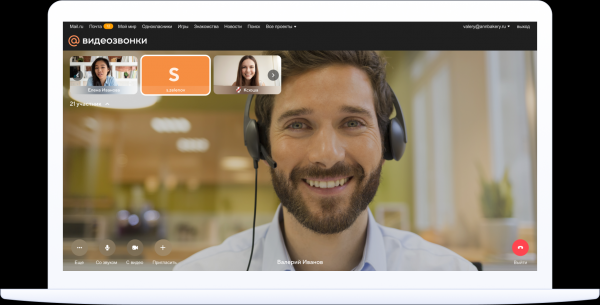
Back in April, a news article was published on Habr about Mail.ru Group . It is positioned as a universal service that enables online lessons, meetings, webinars, or simply talking with family and friends.
I couldn't find many details about it, so I tried to assess the functionality and practicality of 'Video Calls' on my own. I often have to conduct video conferences with several participants, so my interest in this new service is not trivial.
In brief
First, let’s discuss its main features and capabilities. The key feature is that the service is available to all users, including 'Mail.ru Domain Mail' for businesses. Calls themselves are not a unique feature; they have long been available in Myteam, 'Mail.ru Agent', ICQ, and other products of the group. However, during the isolation period, it became clear that a new service was needed for a wide audience. It was also evident that the service should have the simplest possible interface.
Regarding the history of creating 'Calls', Mail.ru mentioned that the project was launched simultaneously with the issuance of the quarantine decree. The service was developed in just a month, but without haste — a necessary balance was maintained between speed and perfectionism during development. Information about the technologies underlying the service and the history of the calls themselves can be read in previously published articles on Habr — and . In short, in a single sentence, the new service is based on the video call technology of the social network 'Odnoklassniki'.
What features does the video and audio call tool offer?
Full functionality without registration. To participate in the conference, registration is not required. You simply need to click on the link sent by the organizer. The organizer acts as the event administrator — they can add or remove participants.
You can gather up to 100 participants for a call. So there are no issues with large meetings — you can confidently invite all employees from your department. However, the question of how 100 people can communicate effectively at the same time is more of an organizational challenge than a problem with the service.
There are no time limits — in the same Zoom it is 40 minutes (in the business version), which isn’t always enough. On the other hand, the half-hour limit encourages discussions to be quick and prevents wasting time. But it depends on what works best for everyone.
You can share your screen with other conference participants — students, colleagues, or attendees of an online event.
No need to download an application — the organizer starts the conference online by sending invitations. Participants join the meeting by clicking on them. Calls are available on both computers and phones; however, in the latter case, you need to install the Mail.ru 'Mail' app. Even if the organizer leaves the conference, the other participants can continue the conversation.
How to get started with the service?
Computer
To create a call, you need to launch the service, log in to your Mail.ru account, and click the 'Create Call' button. Then it’s standard — set up the camera, microphone, and start the conference. A special link is created for it, which needs to be sent to the people you want to call. The link is valid for two months.
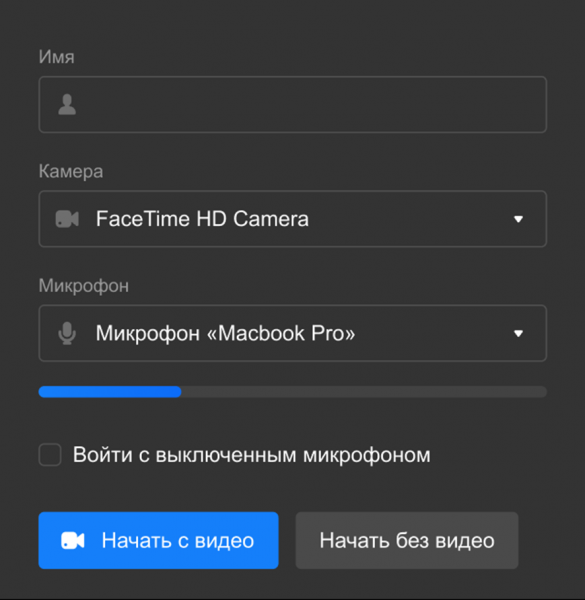
Using the dropdown menu, you can select other devices if the defaults don’t work for some reason.
You can send the link via any messenger or email. Clicking it opens a menu where you need to enter your details and configure the camera and microphone. Both can be turned off if desired.
You have the option to share your screen with other participants. To do this, click the icon with additional functions ('more') and select 'Share Screen.'
Mobile phone
You need to perform similar actions on your mobile phone. First, open the 'Mail.ru Mail' app, click '+', select 'Create Call', and allow access to the camera and microphone of the device. Then, the link to the call is sent to all participants.
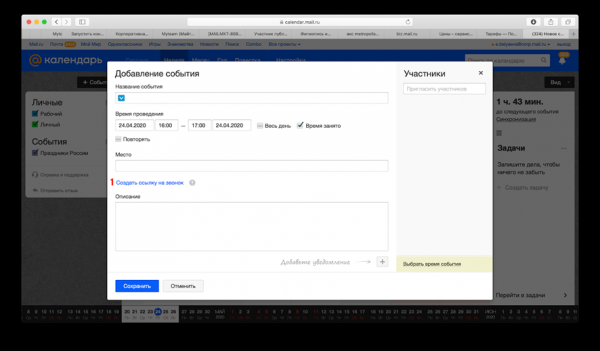
You can generate an invitation for the call directly in Mail (select 'Write a letter' and then 'Invitation to a call') and in Calendar (select '+Event', enter the details, and choose 'Create a link to the call').
Personal impressions
The service is currently in beta, but everything works perfectly. No issues have been noticed either when using a computer or initiating a call from a phone—there are no lags, artifacts, etc. This may be related to the fact that both my connection and the interlocutor's are good, whether via Ethernet or WiFi. The equipment works as it should; both video and audio function excellently.
A few words about comparisons with other applications and communication services. There are quite a few options right now, including Skype, Zoom, and Google Hangouts Meet. Unfortunately, Skype has become less convenient than it was many years ago—mainly because it consumes an excessive amount of computer resources. The situation is a bit better on mobile phones.
Zoom has a time limit, and I honestly have not tried Google Hangouts Meet in practice, so I cannot compare it with that.
I see a plus in Mail.ru's 'Video Calls' service because, firstly, millions of Russian-speaking users have Mail.ru email accounts, which applies to both regular and business users. Secondly, there's no need to download applications on a computer or extra apps on a mobile phone—if 'Mail.ru Mail' is installed on a smartphone, everything works within it. Plus, the service is entirely in Russian and as straightforward as possible.
Overall, it's good that another accessible communication tool has appeared, allowing video conferences with dozens of participants.
Source: habr.com
