

Hello everyone! We continue to launch new streams for the courses you already love, and we're excited to announce a new enrollment for the course , which will start at the end of April. A new publication will be dedicated to this event. You can find the original material .
Virtual file systems serve as a kind of magical abstraction that allows the philosophy of Linux to state that 'everything is a file.'

What is a file system? Referring to the words of one of the first contributors and authors of Linux, , 'A file system is a hierarchical storage of data organized according to a specific structure.' Nevertheless, this definition equally applies to VFAT (Virtual File Allocation Table), Git, and (). So, what exactly defines the concept of a 'file system'?
Fundamentals of a file system
The Linux kernel has specific requirements for an entity that can be considered a file system. It must implement the methods open(), read() and write() for persistent objects that have names. From the perspective of object-oriented , the kernel defines a generic file system as an abstract interface, and these three main functions are considered 'virtual' and lack specific definition. Consequently, the default implementation of a file system is called the virtual file system (VFS).
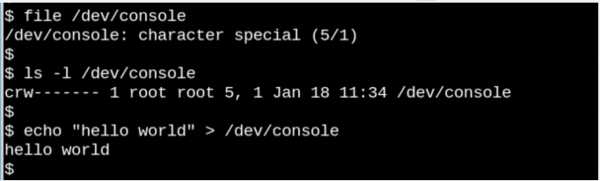
If we can open, read, and write to an entity, that entity is considered a file, as we see in the example in the console above.
The phenomenon of VFS emphasizes the observation characteristic of Unix-like systems, which states that 'everything is a file.' Consider how strange it is that the small example above with /dev/console shows how the console actually works. The picture depicts an interactive Bash session. Sending a line to the console (virtual console device) displays it on the virtual screen. VFS has other, even stranger properties. For instance, it allows searching across .
Familiar systems like ext4, NFS, and /proc have three important functions in the C data structure known as . Additionally, certain file systems extend and redefine VFS functions in a familiar object-oriented manner. As noted by Robert Love, the VFS abstraction allows Linux users to effortlessly copy files to or from foreign operating systems or abstract entities like pipes, without worrying about their internal data formats. From the user's perspective, using a system call, a process can copy from a file into kernel data structures using the read() method of one file system, and then use the write () method of another file system to output data.
Function definitions belonging to core VFS types are found in source code files of the kernel, while subdirectories fs/ contain specific file systems. The kernel also includes entities, such as cgroups, /dev and tmpfs, which are necessary during the boot process and are therefore defined in the kernel subdirectory init/. Note that they do not invoke the 'big three' functions cgroups, /dev and tmpfs , but directly read and write to memory. file_operationsThe diagram below illustrates how userspace interacts with different types of file systems, typically mounted in Linux systems. Structures such as
pipes dmesg, POSIX clocks and , which also implement the structure, accessed through the VFS layer. file_operationsVFS acts as a 'shell layer' between system calls and the implementations of specific
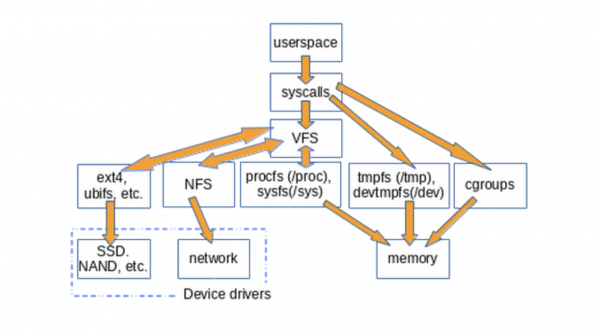
procfs. file_operations, such as ext4 and Functionscan interact either with device drivers or with memory access devices. file_operations devtmpfs tmpfs, do not utilize and cgroups , but directly access memory. file_operationsThe existence of VFS enables code reuse, as the core methods associated with file systems do not need to be re-implemented by each file system type. Code reuse is a widely practiced principle among software engineers! However, if the reused code contains
serious bugs A simple way to detect that VFS is present in the system is to enter
/tmp: Простая подсказка
mount | grep -v sd | grep -v :/ , which will show all mounted (mounted) file systems that are not resident on the disk and are not NFS, which is true for most computers. One of the listed mounts (mounts) will undoubtedly be VFS.) VFS will undoubtedly be /tmp, right?

Everyone knows that storing / tmp on a physical medium is madness! .
Why is it undesirable to store /tmp on a physical medium? Because files in /tmp are temporary, and storage devices are slower than the memory where tmpfs is created. Moreover, physical media are more prone to wear during rewriting than memory. Finally, files in /tmp may contain confidential information, so their disappearance upon each reboot is an essential feature.
Unfortunately, some Linux distribution installation scripts create /tmp on the storage device by default. Do not despair if this has happened to your system. Follow a few simple instructions from , to fix this, and remember that the memory allocated for tmpfs becomes unavailable for other purposes. In other words, a system with a giant tmpfs and large files in it may exhaust all the memory and crash. Another tip: when editing the file /etc/fstab, remember that it must end with a new line; otherwise, your system won't boot.
/proc и /sys
Besides /tmp, VFS (virtual file systems), which are most familiar to Linux users, are /proc and /sys. (/dev stored in shared memory and have no file_operations). Why these two components specifically? Let's explore this issue.
Functions creates a snapshot of the instant state of the kernel and the processes it controls for userspace. In /proc the kernel outputs information about what resources it has, such as interrupts, virtual memory, and the scheduler. Additionally, /proc/sys is where parameters set via the command sysctl, are available for userspace. The status and statistics of individual processes are output in directories /proc/.
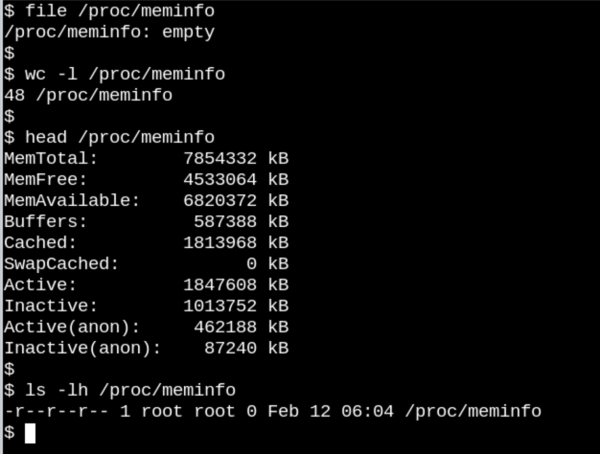
Here /proc/meminfo — is an empty file, but it still contains valuable information.
The behavior /proc of files shows how different disk file systems can be for VFS. On one hand, /proc/meminfo contain information that can be viewed with the command free. On the other hand, there's nothing there! How is that possible? The situation resembles the famous article titled , written by Cornell University physics professor David Mermin in 1985. The truth is that the kernel collects memory statistics when a request is made to /proc, and in reality, in the files. /proc Nothing exists when no one is looking there. As said by , "The fundamental quantum doctrine states that measurement, as a rule, does not reveal a pre-existing value of the measured property." (And think about the question regarding the moon as homework!)
The apparent emptiness Functions makes sense, since the information located there is dynamic. A slightly different situation occurs with sysfs. Let’s compare how many files of at least one byte there are in /proc and in /sys.

Procfs which has one file, namely the exported kernel configuration, which is an exception since it needs to be generated only once per boot. On the other hand, in /sys there lie many more voluminous files, many of which occupy a whole page of memory. Usually, the files sysfs contain exactly one number or string, unlike the tables of information obtained when reading such files as /proc/meminfo.
The goal sysfs is to provide properties available for reading and writing of what the kernel calls "kobjects" in userspace. The sole purpose of kobjects is reference counting: when the last reference to the kobject is removed, the system will reclaim the resources associated with it. However, /sys makes up a large part of the famous of the kernel, which can never be . This does not mean that the files in sysfs are static, which would contradict the reference counting of unstable objects.
The kernel’s stable application binary interface (ABI) restricts what may appear in /sys, rather than what is actually present at that specific moment. The listing of file permissions in sysfs provides insight into how configurable parameters of devices, modules, filesystems, etc., can be set or read. We conclude logically that procfs is also part of the kernel's stable ABI, even though it is not explicitly stated in .
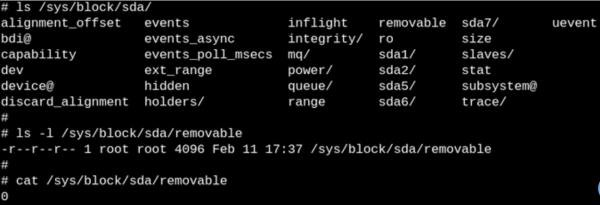
Files in sysfs describe one specific property for each entity and may be readable, writeable, or both at the same time. "0" in the file indicates that the SSD cannot be removed.
We will start the second part of the translation by observing VFS using eBPF and bcc tools, and now we await your comments and traditionally invite you to , which will be held on April 9 by our instructor — .
Source: habr.com
