

Hello, Habr. I continue the series of articles on the VxLAN EVPN technology, which were written specifically for the launch of the course from OTUS. Today we will explore an interesting part of the tasks — routing. As banal as it may sound, within the framework of a network fabric, it can be quite complex.

In the previous part, we achieved a single broadcast domain constructed over the network fabric on the Nexus 9000v. However, this is far from the entire range of tasks that need to be addressed within the data center network. Today, we will consider the next task — routing between networks or between VNIs.
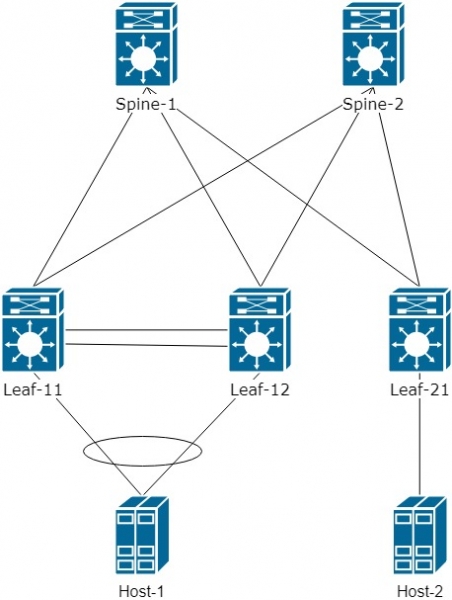
Let me remind you that we are using a Spine-Leaf topology:
First, let's analyze how routing works and what the particular features are.
To simplify understanding, we will streamline the logical diagram and add another VNI 20000 for Host-2. The result is:
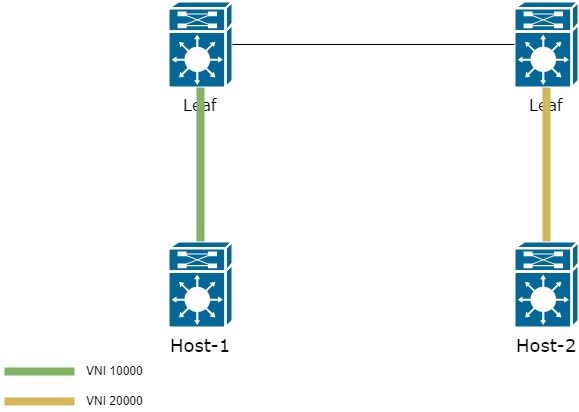
How can we transmit traffic from one Host to another in this case?
There are two options:
- Keep information about all VNIs on all Leaf switches, so that all routing occurs on the first Leaf in the network;
- Use a dedicated — L3 VNI
The first method is simple and convenient. All that is required is to bring all VNIs onto all Leaf switches. However, introducing several hundred or thousands of VNIs onto all Leaf switches no longer seems like an easy task. Therefore, it is rarely used in practice.
Let's analyze the second method, which is more interesting and a bit more complex, but offers greater flexibility in configuring the fabric.
We will add the VRF "PROD" to the topology. We will add interface vlan 10 on pair Leaf-11/12 and interface VLAN 20 on Leaf-21. VLAN 20 is associated with VNI 20000.
vrf context PROD
  rd auto       ! The Route Distinguisher is not critical and can be automatically generated
  address-family ipv4 unicast
    route-target both auto      ! We specify the Route-target used for importing and exporting prefixes to/from VRF
vlan 20
  vn-segment 20000

interface nve 1
  member vni 20000
    ingress-replication protocol bgp

interface Vlan10
  no shutdown
  vrf member PROD
  ip address 192.168.20.1/24
  fabric forwarding mode anycast-gateway
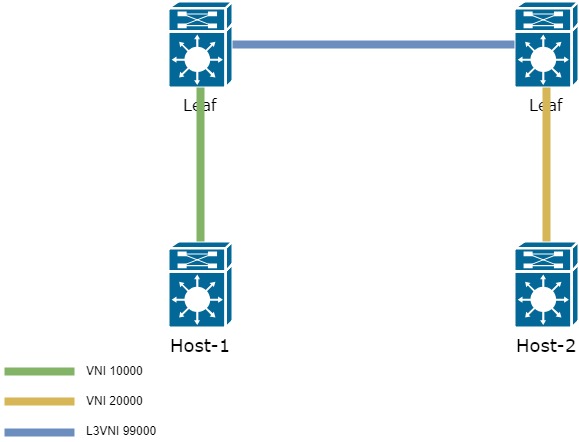
To use L3 VNI, a new VLAN must be created, associated with a new VNI. The new VNI must be the same on all Leaf switches that are interested in the information about VLAN 10 and 20.
vlan 99
  vn-segment 99000

interface nve1
  member vni 99000 associate-vrf        ! Creating L3 VNI

vrf context PROD
  vni 99000                             ! Linking L3 VNI to a specific VRF
As a result, the scheme will be represented as follows:
There's just a little bit left to finish — add one more interface — interface vlan 99 in VRF PROD
interface Vlan99
  no shutdown
  vrf member PROD
  ip forward  ! The interface should not have an IP. It is used only for forwarding packets between Leaf
In the end, the logic of frame passage from Host-1 to Host-2 is as follows:
- The frame sent by Host-1 arrives at the Leaf in VLAN 10, which is associated with VNI 10000;
- The Leaf checks where the destination address is located and finds it through L3 VNI on the second Leaf switch;
- Once the route to the destination address is found, the Leaf encapsulates the frame in a header with the necessary L3VNI 99000 — and sends it towards the second Leaf;
- The second Leaf switch receives the data from L3VNI 99000. It extracts the original frame and transfers it to the necessary L2VNI 20000 and further to VLAN 20.
As a result of this operation, L3VNI eliminates the need to hold information about all VNIs present in the network on all Leaf switches.
Consequently, when we send traffic from Host-1 to Host-2, the packet is encapsulated inside VxLAN with a new VNI — 99000:

We need to understand how exactly Leaf-1 learns about the MAC address from another VNI. This happens similarly using EVPN route-type 2 (MAC/IP).
Below is shown the process of route dissemination for a prefix located in another VNI:
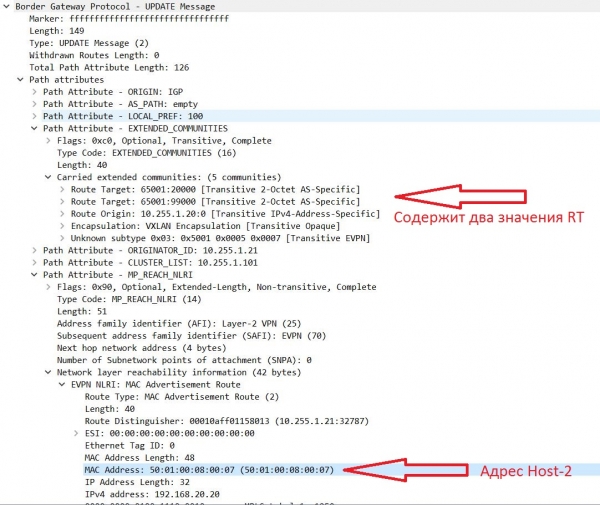
That is, addresses obtained from VNI 20000 have two RT.
Let me remind you that routes received from Update enter the BGP table with the Route-target specified in the VRF settings (the process is somewhat more complex, but we won't delve into that in this article).
The RT itself is formed according to the formula: AS:VNI (if automatic mode is used).
Example of RT formation in automatic and manual modes:
vrf context PROD
  address-family ipv4 unicast
    route-target import auto - automatic mode
    route-target export 65001:20000 - manual RT formation mode
As seen above, prefixes from another VNI have two RT values.
One of them is 65001:99000 — an additional L3 VNI. Since this VNI is the same across all Leaf switches and falls under our import rules in VRF settings, the prefix enters the BGP table, which can be seen from the output:
sh bgp l2vpn evpn

   Network            Next Hop            Metric     LocPrf     Weight Path
Route Distinguisher: 10.255.1.11:32777    (L2VNI 10000)
*>l[2]:[0]:[0]:[48]:[5001.0007.0007]:[0]:[0.0.0.0]\/216
                      10.255.1.10                       100      32768 i
*>l[2]:[0]:[0]:[48]:[5001.0007.0007]:[32]:[192.168.10.10]\/272
                      10.255.1.10                       100      32768 i
*>l[3]:[0]:[32]:[10.255.1.10]\/88
                      10.255.1.10                       100      32768 i

Route Distinguisher: 10.255.1.21:32787
* i[2]:[0]:[0]:[48]:[5001.0008.0007]:[32]:[192.168.20.20]\/272    ! Prefix received from VNI 20000
                      10.255.1.20                       100          0 i
*>i                   10.255.1.20                       100          0 i
If we take a closer look at the received update, we can see that this prefix has two RT:
Leaf11# sh bgp l2vpn evpn 5001.0008.0007
BGP routing table information for VRF default, address family L2VPN EVPN
Route Distinguisher: 10.255.1.21:32787
BGP routing table entry for [2]:[0]:[0]:[48]:[5001.0008.0007]:[32]:[192.168.20.20]\/272, version 5164
Paths: (2 available, best #2)
Flags: (0x000202) (high32 00000000) on xmit-list, is not in l2rib\/evpn, is not in HW

  Path type: internal, path is valid, not best reason: Neighbor Address, no labeled nexthop
  AS-Path: NONE, path sourced internal to AS
    10.255.1.20 (metric 81) from 10.255.1.102 (10.255.1.102)
      Origin IGP, MED not set, localpref 100, weight 0
      Received label 20000 99000                                 ! Two labels for VxLAN operation
      Extcommunity: RT:65001:20000 RT:65001:99000 SOO:10.255.1.20:0 ENCAP:8     ! Two Route-target values based on which this prefix was added
          Router MAC:5001.0005.0007
      Originator: 10.255.1.21 Cluster list: 10.255.1.102
In the routing table on Leaf-1, we can also observe the prefix 192.168.20.20\/32:
Leaf11# sh ip route vrf PROD
192.168.10.0/24, ubest/mbest: 1/0, attached
 *via 192.168.10.1, Vlan10, [0/0], 01:29:28, direct
192.168.10.1/32, ubest/mbest: 1/0, attached
 *via 192.168.10.1, Vlan10, [0/0], 01:29:28, local
192.168.10.10/32, ubest/mbest: 1/0, attached
 *via 192.168.10.10, Vlan10, [190/0], 01:27:22, hmm
192.168.20.20/32, ubest/mbest: 1/0 ! Address Host-2
 *via 10.255.1.20fault, [200/0], 01:20:20, bgp-65001, internal, tag 65001 ! Accessible through Leaf-2
(evpn) segid: 99000 tunnelid: 0xaff0114 encap: VXLAN ! Through VNI 99000
Noticed the absence of the primary prefix 192.168.20.0\/24 in the routing table?
Exactly, it's not there. This means that remote Leafs only receive information about the hosts that exist in your network. And this is the correct behavior. In all the updates above, it's clear that information is received containing MAC\/IP. There is no mention of prefixes.
This is the Host Mobility Manager (HMM) protocol that populates the ARP table from which the BGP table is further filled (we will skip this process in this article). Based on the information obtained from HMM, EVPN route-type 2 is formed (MAC\/IP is transmitted).
However, what should be done if there is a need to convey information about some prefix?
For this type of information, there is an EVPN route-type 5 — it allows the transmission of prefixes via address-family l2vpn evpn (this type of route is currently only in draft version at the time of writing this article. , due to this, the behavior of this type of route may vary among different manufacturers)
To transmit prefixes, it is necessary to add the prefixes that will be announced during the BGP process for the VRF:
router bgp 65001
  vrf PROD
    address-family ipv4 unicast
      redistribute direct route-map VNI20000        ! In this case, we announce prefixes connected directly to Leaf in VNI 20000
route-map VNI20000 permit 10
  match ip address prefix-list VNI20000_OUT    ! Specify which prefix-list to use

ip prefix-list VNI20000_OUT seq 5 permit 192.168.20.0/24   ! Specify which networks will be included in the EVPN route-type 5
As a result, the Update will be:
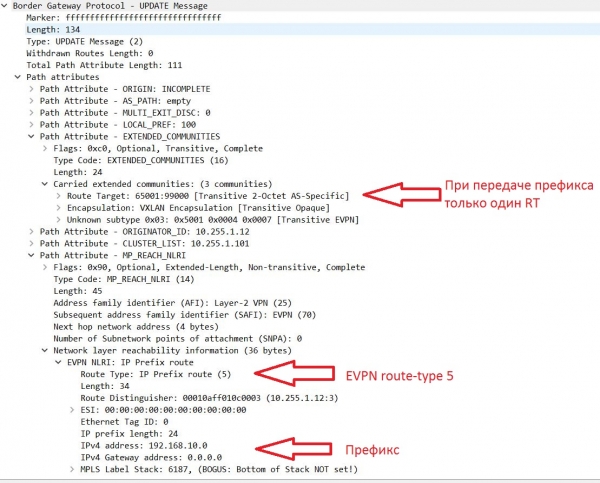
Let's take a look at the BGP table. In addition to EVPN route-types 2 and 3, routes of type 5 have appeared, containing network number information:
Network            Next Hop            Metric     LocPrf     Weight Path
Route Distinguisher: 10.255.1.11:3
* i[5]:[0]:[0]:[24]:[192.168.10.0]/224
                      10.255.1.10              0        100          0 ?
*>i                   10.255.1.10              0        100          0 ?

Route Distinguisher: 10.255.1.11:32777
* i[2]:[0]:[0]:[48]:[5001.0007.0007]:[0]:[0.0.0.0]/216
                      10.255.1.10                       100          0 i
*>i                   10.255.1.10                       100          0 i
* i[2]:[0]:[0]:[48]:[5001.0007.0007]:[32]:[192.168.10.10]/272
                      10.255.1.10                       100          0 i
*>i                   10.255.1.10                       100          0 i
* i[3]:[0]:[32]:[10.255.1.10]/88
                      10.255.1.10                       100          0 i
*>i                   10.255.1.10                       100          0 i

Route Distinguisher: 10.255.1.12:3
*>i[5]:[0]:[0]:[24]:[192.168.10.0]/224      ! EVPN route-type 5 with prefix number
                      10.255.1.10              0        100          0 ?
* i
The prefix also appeared in the routing table:
Leaf21# sh ip ro vrf PROD
192.168.10.0/24, ubest/mbest: 1/0
 *via 10.255.1.10fault, [200/0], 00:14:32, bgp-65001, internal, tag 65001 ! Remote prefix accessible through Leaf1/2 (Next-hop address = virtual IP between the pair of VPC)
(evpn) segid: 99000 tunnelid: 0xaff010a encap: VXLAN ! Prefix accessible through L3VNI 99000

192.168.10.10/32, ubest/mbest: 1/0
 *via 10.255.1.10fault, [200/0], 02:33:40, bgp-65001, internal, tag 65001
(evpn) segid: 99000 tunnelid: 0xaff010a encap: VXLAN

192.168.20.0/24, ubest/mbest: 1/0, attached
 *via 192.168.20.1, Vlan20, [0/0], 02:39:44, direct
192.168.20.1/32, ubest/mbest: 1/0, attached
 *via 192.168.20.1, Vlan20, [0/0], 02:39:44, local
192.168.20.20/32, ubest/mbest: 1/0, attached
 *via 192.168.20.20, Vlan20, [190/0], 02:35:46, hmm
We will conclude the second part of the article series on VxLAN EVPN here. In the next part, we will examine various routing options between VRF.
Source: habr.com
