


From the very first days of working on the cloud video surveillance system, we faced a problem that, if unresolved, could have meant the end for Ivideon – it was our Everest, a climb that consumed immense energy, but now we have finally planted our ice axe at the summit of this cross-platform riddle.
The system for transmitting sound and video over the Internet must not depend on hardware, web clients, or the standards they support, and must function correctly even in the presence of Network Address Translators and firewalls. A cloud video surveillance user wishes to access the service even if they are using analog cameras, while preferring to view live video on the latest devices.
It is quite significant that the user wants to watch video with minimal latency. The virtually only way to show video with low delay in a browser is to use WebRTC (web real-time communications). WebRTC is a set of technologies for peer-to-peer transmission of video and audio in browsers, originally designed for the low-latency transmission and playback of video streams. For this purpose, among other things, the UDP protocol is used.
Before we discuss what the new engine offers the user, let's remind you why we support HLS technologies and why we decided to move forward.
HLS Engine: Pros and Cons

()
The HLS (HTTP Live Streaming) technology was developed by Apple, so it is not surprising that its support first appeared on devices from that brand. Today, HLS video streams can also be played on nearly all television set-top boxes and many devices running the Android OS.
The HLS engine uses the well-known H264 video codec for streaming video data in combination with AAC or MP3 audio streams. The entire stream of audio and video data is packed into a transport container MPEG-TS. For transmission via the HTTP protocol, the information contained in the stream is divided into fragments described in m3u8 playlists. Only then are these fragments, along with the playlists, transmitted via HTTP. Fragmentation automatically introduces a delay measured in seconds. This is a characteristic of the MPEG-TS container.
The HLS engine also supports multi-bitrate streams, Live/VOD.
The main advantages of HLS:
- Built-in support in all major browsers;
- Ease of implementation (compared to WebRTC);
- It is very convenient and effective to organize various broadcasts for a large audience because segments can be loaded once onto the CDN.
Despite the simplicity of the engine, things are not as smooth as they seem. The main problem is that third-party player developers have deviated from Apple's recommendations, for example, regarding supported audio formats. In particular, many developers have started adding support for popular audio streams: mpeg2 video, mpeg2 audio, etc. As a result, it was necessary to create different playlist formats for different players.
However, one of the biggest problems with the HLS engine is the high latency in data transmission.
The roots of the "lag"
The main reason for high latency in HLS lies in the fact that programmers created the engine to achieve the highest quality image. Therefore, the parameters of the frame interval and the size of the playback buffer are simply not suitable for live video broadcasts. As a result, a fairly high latency in video transmission occurs, which can be 5-7 seconds.
On the one hand, this is a small amount, for example, for those who watch a movie from a video hosting server. But for surveillance systems, the latency in video transmission can be very significant.
If you are watching an office where employees take breaks from their monitors every hour, then a 5-second delay is of no concern. But people have started to complain that, for instance, during a football match broadcast, the chat has already said GOAL, but it's not yet visible in the video :). We already have several user cases where Ivideon must practically replace Skype.
Can latency in HLS be overcome? The answer to this question sounds like an experienced rat exterminator's speech at a lecture for beginner pest controllers: 'You can't exterminate rats, but you can keep their population to a reasonable minimum.' So it is with latency in HLS; it won't be possible to eliminate it completely, but there are solutions on the market that can significantly reduce latency.
Small segments
Another drawback of the engine is the use of small-sized files for data transmission. One might wonder, what's wrong with that?
Anyone who has tried to copy a large number of small files from one storage device to another has surely noticed that the write speed for such a batch is much lower than that of a single large file of the same volume. Additionally, the intensity of requests to the hard drive increases significantly, which negatively affects the overall performance of the computer. Therefore, transmitting video data in small 10-second fragments also contributes to increased latency in the engine.
Let’s briefly summarize all the pros and cons of HLS technology.
Advantages of HLS:
- Compatibility with any devices. You can watch videos on any modern device, whether it's a smartphone, tablet, laptop, or desktop PC. The main requirement is that the web browser must be a modern version and compatible with HTML5 and Media Source Extensions.
- Excellent image quality. The adaptive bitrate streaming function allows for dynamically changing the quality of the video stream based on the bandwidth of the internet connection, while the algorithm aims to maintain the highest quality.
- No need for complex user equipment setup.
Disadvantages:
- Limited support for running the engine on some devices.
- High image transmission latency.
- Significant increase in overhead and complexity in optimization due to the use of small-sized files. Due to the peculiarities of the container, we can never achieve a latency less than the size of the segment.
The disadvantages of HLS outweighed its advantages for us and forced us to seek alternative options.
What is WebRTC
()
The WebRTC platform was developed by Google in 2011 to transmit streaming video and audio data between browsers and mobile applications with minimal latency. It uses the standard UDP protocol and special flow control algorithms. Today, it is an open-source project that is actively supported and developed by Google.
WebRTC is a set of technologies for peer-to-peer video and audio transmission. This means, for example, that users' browsers can send data directly to each other using WebRTC, without relying on remote servers for data storage and processing. All information is also processed by the browsers and mobile applications of the end users.
The convenience and extensive capabilities of this technology have been rightly appreciated by developers of all popular browsers. Today, WebRTC support is implemented in Mozilla Firefox, Opera, Google Chrome (and all Chromium-based browsers), as well as in mobile applications on Android and iOS.
Despite its undeniable advantages, WebRTC has several significant drawbacks.
Challenges of Selection
The WebRTC technology is much more complex in terms of network interactions due to its P2P nature. It is difficult to debug and test, and it can behave unpredictably. Additionally, we need to overcome NAT and firewalls, and ensure functionality in networks where UDP is blocked.
Google's WebRTC implementation is very challenging to use. There is even an entire company that provides services for assembling SDKs. Plus, integrating Google's implementation with our system has been very difficult without re-encoding all video.
However, we have long wanted to provide users with the ability to work with a full-fledged 'live' video stream and minimize the latency of the image on the screen compared to the actual events. Additionally, we wanted to make the use of PTZ cameras more comfortable, where delays are critically important.
Given that other implementations for combating lag currently have limited functionality and perform noticeably worse, we decided to use WebRTC.
What We Did
Properly implementing the WebRTC platform is no easy task. Any miscalculation or inaccuracy can lead to video transmission delays not only failing to decrease compared to other platforms but increasing instead.
For WebRTC to function correctly, it is essential first to conduct a technological modernization of the stack for web video. That’s exactly what we did.
First, we implemented a signaling protocol server for WebRTC over WebSocket and deployed a WebRTC peer server in the cloud based on the SDK from webrtc.org. Its purpose is to distribute video streams to client WebRTC peers in H.264 + Opus/G.711 format without video transcoding.
We chose WebSocket as the signaling protocol because it has robust support across all popular web browsers. This significantly reduces not only development overhead but also eliminates the time and resources spent on repeated TCP and TLS handshakes compared to AJAX.
The issue is that by default, WebRTC does not provide a signaling protocol necessary for correctly establishing, maintaining, and terminating real-time video connections between the source and client applications.
To implement the signaling technology on our own, we needed to develop our signaling server supporting multiple web protocols (WebSocket, WebRTC) along with secure session management and real-time notifications, video management, and many other parameters.
We overcame P2P limitations by reducing latency not through P2P, but through UDP and flow control aimed at minimizing delays. This is also embedded in WebRTC, as the primary use case is P2P conversations through the browser.
In the mobile client, we implemented a player using the SDK from webrtc.org, as it correctly handles stream management, includes all known Forward Error Correction (FEC) schemes, and has an appropriate packet retransmission mechanism for all browsers. Additionally, it is important that the SDK from webrtc.org is actively developed by Google.
What results did we achieve from implementing WebRTC?
To view live video from cameras, we added a new optimized player based on WebRTC to the personal account. It ensures high video loading speeds and completely eliminates the problem of latency accumulation over extended viewing times.
After implementing WebRTC support in the Ivideon cloud service, we can confidently say that our clients now have access to full live video streaming. The delay when broadcasting video now does not exceed one second! In comparison, the previous HLS engine delivered video with a delay of 5-7 seconds. The difference in video playback speed is significant, and users will notice it immediately upon starting to use our video service.
As we anticipated, the implementation of the new player has improved the responsiveness of PTZ and voice communication with the camera.
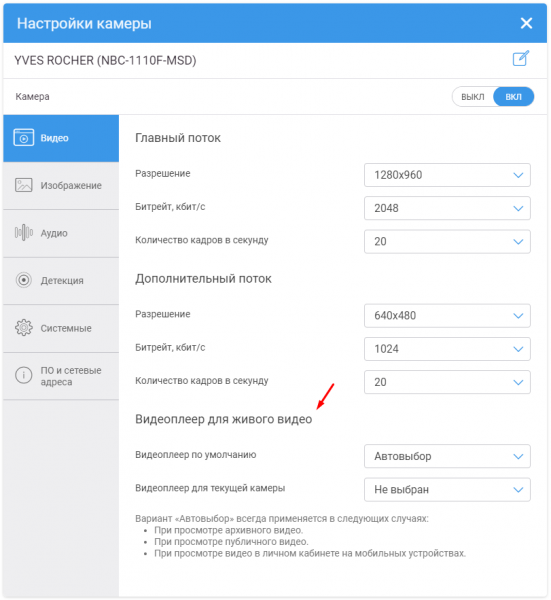
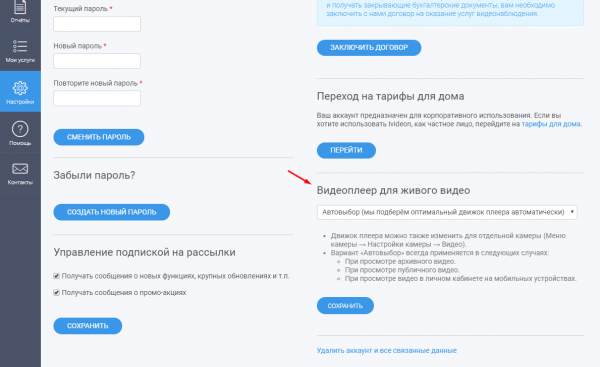
There is just one subtle point we want to highlight. The new WebRTC player is currently operating in test mode. This is why we are not enabling it for all our clients by default. However, you can activate it yourself by enabling the relevant option in the camera settings (you need to go to the ).
Features of WebRTC Implementation in the Ivideon Service
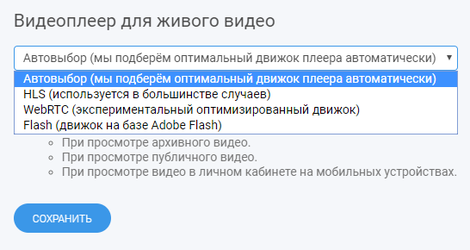
WebRTC is still an experimental technology. Its support is not yet correctly implemented in all browsers and user devices, as well as in all cameras.
This explains why we have not made the WebRTC player the default for all users.
For now, we recommend using WebRTC only in Google Chrome browsers. The latest versions of Firefox and Safari also support this technology, but unfortunately, they are still unstable.
We have not yet implemented WebRTC support for mobile browsers. Currently, if you log in from a mobile device and activate WebRTC, this mode will not work. However, WebRTC is available in our mobile applications for and .
In conclusion, as we discuss the specifics of WebRTC implementation in our service, let’s mention two more subtle points.
Firstly, the technology is designed specifically for streaming live video in real time. Therefore, if your channel's bandwidth is insufficient to transmit the video stream, you will notice frame drops (with HLS, you will notice video stuttering and increased delay, but frames will not be dropped), although the video will still be streamed in real time.
Secondly, since the technology is designed to work specifically with live video in real time, we do not use it for working with archived video data.
Other changes in the service
Currently, Flash is no longer involved in the automatic engine selection mechanism. You can still use such a player, but you need to select it manually in your account or camera settings. This is not a trend; according to our service statistics, there are almost no users left working with Flash. Attempting to determine whether the user's browser supports it costs us about 2 seconds of precious time.
Here’s a brief overview of the changes coming to our cloud video surveillance system and your dashboard. Stay with us and keep an eye on the news!
Source: habr.com
