

On May 27, in the main hall of the DevOpsConf 2019 conference, part of the festival , during the "Continuous Delivery" section, a presentation titled "werf — our tool for CI/CD in Kubernetes" was delivered. It discusses the problems and challenges that everyone faces when deploying in Kubernetes, as well as nuances that may not be immediately apparent. By examining potential solutions, we demonstrate how this is implemented in the Open Source tool .
Since the presentation, our utility (formerly known as dapp) has surpassed a historic milestone of 1000 stars on GitHub — we hope that the growing community of its users will simplify life for many DevOps engineers.
So, let’s present (~47 minutes, much more informative than the article) and the main takeaway from it in text form. Let’s go!
Code Delivery in Kubernetes
The talk will no longer focus primarily on werf but on CI/CD in Kubernetes, assuming that our software is packaged in Docker containers (I discussed this in ), and K8s will be used for its launch in production (discussed in ).
How does delivery look in Kubernetes?
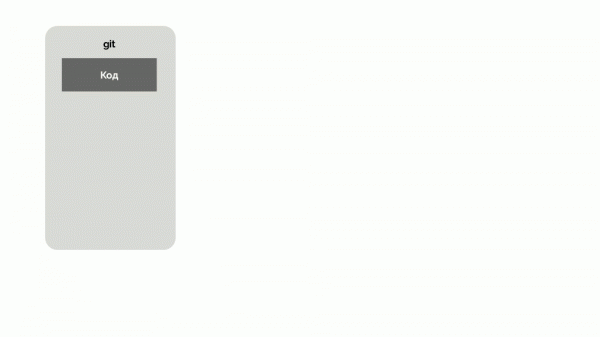
- There is a Git repository with the code and instructions for building it. The application is built into a Docker image and published to the Docker Registry.
- In the same repository, there are instructions for deploying and running the application. At the deployment stage, these instructions are sent to Kubernetes, which retrieves the necessary image from the registry and launches it.
- Additionally, there are usually tests. Some of them can be run when publishing the image. It's also possible (using the same instructions) to deploy a copy of the application (in a separate K8s namespace or separate cluster) and run tests there.
- Finally, a CI system is needed, which receives events from Git (or button clicks) and triggers all designated stages: build, publish, deploy, test.
There are a few important notes here:
- Since we have immutable infrastructure (immutable infrastructure), the application image used at all stages (staging, production, etc.) must be the same. I discussed this in more detail with examples .
- Since we follow the infrastructure as code (IaC), the application's code, instructions for building and running it must reside in one repository. For more details, see the .
- The delivery chain (delivery) We usually see it this way: the application is built, tested, and released. (release stage) And that's it — the delivery has occurred. But in reality, the user gets what you've deployed only when you delivered it to production, and when they were able to access it and the production was running. Therefore, I believe that the delivery chain ends do not only at the operational stage (run) , and to be more precise, even at the moment when the code was removed from production (replacing it with a new one).Let's return to the delivery scheme outlined above in Kubernetes: it was invented not just by us, but literally by everyone who dealt with this problem. Essentially, this pattern is now called GitOps.
(you can read more about the term and the ideas behind it . Let's look at the stages of the scheme. )Build stage
One might think that in 2019 there's not much to say about building Docker images when everyone knows how to write Dockerfiles and run them.
The weight of the image docker build?.. Вот нюансы, на которые хотелось бы обратить внимание:
- matters, so use multi-stage The number of layers
- should be minimized by combining commands that are logically connected. However, this adds problems
RUNto debugging, - because when a build fails, you have to find the specific command in the chain that caused the issue. Build speedis important because we want to quickly roll out changes and see the results. For instance, we don't want to rebuild dependencies in language libraries with every application build.
- Often, one Git repository requires many images,
- which can be solved with a set of Dockerfiles (or named stages in one file) and a Bash script to build them in sequence. This was just the tip of the iceberg that everyone encounters. But there are other issues, particularly:Often at the build stage, we need to
mount something
- (for example, cache the result of an apt-type command in an external directory). We want instead of writing in shell.
- to build without Docker Ansible (why do we need an additional virtual machine where everything needs to be configured when there's already a Kubernetes cluster where containers can be run?).
- to build without Docker Parallel build. (why do we need an additional virtual machine to configure everything for this when we already have a Kubernetes cluster where we can run containers?).
- Parallel build, which can be understood differently: various commands from a Dockerfile (if using multi-stage), multiple commits of one repository, multiple Dockerfiles.
- Distributed Build: we want to build something in pods that are "ephemeral", as they lose their cache, meaning it needs to be stored somewhere separately.
- Finally, I called the pinnacle of wishes automagic: it would be ideal to enter the repository, type some command, and receive a ready-made image, built with an understanding of how and what should be done correctly. However, personally, I am not sure that all nuances can be accounted for in that way.
And there are projects:
- — a builder from Docker Inc (already integrated into the current versions of Docker), which is trying to solve all these issues;
- — a builder from Google, allowing builds without Docker;
- — an attempt by CNCF to create automagic and, in particular, an interesting rebasing solution for layers;
- and a whole bunch of other utilities, such as , …
… and take a look at how many stars they have on GitHub. So, on one hand, docker build there is and can do something, but in reality the issue is not completely resolved — evidence of this is the parallel development of alternative builders, each addressing some part of the problems.
Building in werf
This is how we got to (previously like dapp) — an Open Source utility from Flant, which we have been developing for many years. It all started about 5 years ago with Bash scripts that optimized the building of Dockerfiles, and for the last 3 years, a full development has been taking place within one project with its own Git repository (initially in Ruby, then in Go, and at the same time renamed). What build issues are addressed in werf?
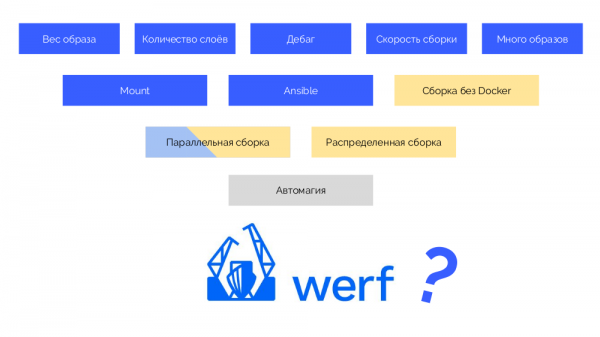
The problems marked in blue have already been implemented, parallel builds have been made within one host, and the issues highlighted in yellow we plan to complete by the end of summer.
Publishing stage in the registry (publish)
We gathered docker push… — what could be difficult about uploading an image to the registry? And here comes the question: "What tag should be assigned to the image?" It arises because we have Gitflow (or another Git strategy) and Kubernetes, and the industry aims to ensure that what happens in Kubernetes aligns with what is done in Git. After all, Git is our only source of truth.
What's difficult about this? Guaranteeing reproducibility: from a commit in Git, which is inherently immutable (immutable), to a Docker image that must remain the same.
It is also important for us to determine the origin, because we want to understand which commit the application running in Kubernetes was built from (then we can do diffs and similar tasks).
Tagging strategies
The first is a simple git tag. We have a registry with an image tagged as 1.0. In Kubernetes, there is a stage and production where this image is pushed. In Git, we make commits and at some point place a tag 2.0. We build it according to the instructions from the repository and store it in the registry with the tag 2.0. We roll it out to the stage and, if everything is fine, then to production.
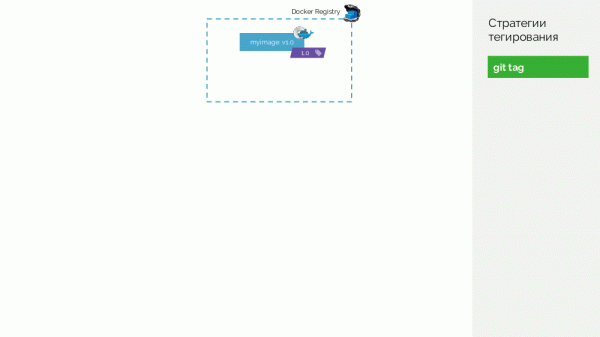
The problem with this approach is that we first tagged it and only then tested and rolled it out. Why? Firstly, it is simply illogical: we are issuing a version of the software that we haven't even tested (we can't do it another way since to test, we need to place a tag). Secondly, this path does not fit with Gitflow.
The second option is git commit + tag. In the master branch, there is a tag 1.0; for it in the registry — an image deployed on production. Additionally, in the Kubernetes cluster, there are preview and staging environments. Next, we follow Gitflow: in the main development branch (develop) we create new features, resulting in a commit with the identifier #c1. We build and publish it in the registry using this identifier (#c1). With the same identifier, we roll it out to preview. We do the same with commits #c2 and #c3.
When we realize that the features are sufficient, we begin to stabilize everything. In Git, we create a branch release_1.1 (based on #c3 from develop). We won’t need to build this release since it was done in the previous step. Therefore, we can simply push it to staging. We fix bugs in #c4 and likewise roll it out to staging. At the same time, development continues in develop, where changes are periodically pulled from release_1.1. At some point, we end up with a built and pushed commit on staging that we are satisfied with (#c25).
. Then we perform a merge (with fast-forward) of the release branch (release_1.1) into master. We place a tag with the new version on this commit (1.1). But this image is already built in the registry, so to avoid building it again, we simply add a second tag to the existing image (now it has tags in the registry #c25 and 1.1). After that, we roll it out to production.
There is a downside that on staging a single image is pushed (#c25), while on production — a sort of other one (1.1), but we know that 'physically' it's the same image from the registry.
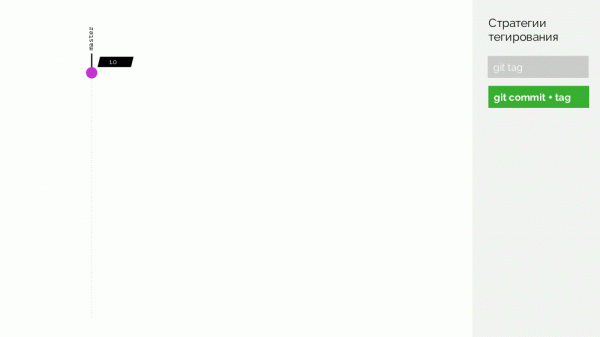
The real downside is that there is no support for merge commits; you have to do a fast-forward.
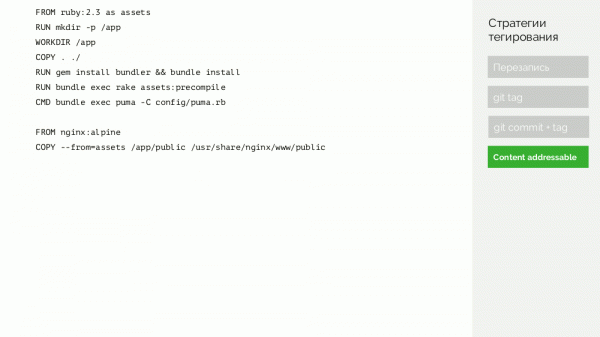
We can go further and do a trick… Let's consider an example of a simple Dockerfile:
FROM ruby:2.3 as assets
RUN mkdir -p /app
WORKDIR /app
COPY . ./
RUN gem install bundler && bundle install
RUN bundle exec rake assets:precompile
CMD bundle exec puma -C config/puma.rb

FROM nginx:alpine
COPY --from=assets /app/public /usr/share/nginx/www/public
We'll build a file based on the principle of taking:
- SHA256 of the identifiers of used images (
ruby:2.3andnginx:alpine), which are checksums of their contents; - all commands (
RUN,CMDetc.); - SHA256 of the files that were added.
... and we'll take the checksum (again SHA256) of such a file. This is the signature of everything that defines the contents of a Docker image.
Let's return to the scheme and instead of commits, we will use such signatures, i.e., tag images with signatures.
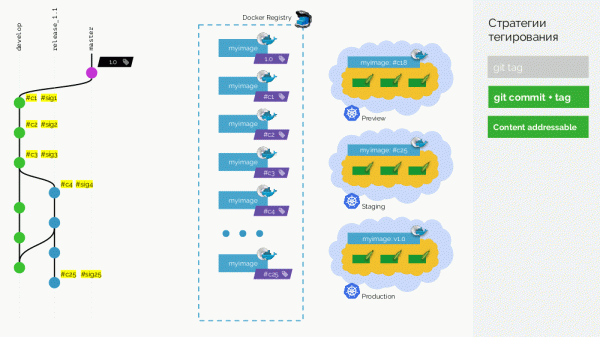
Now, when we need to 'merge' changes from the release into master, we can do a real merge commit: it will have a different identifier but the same signature. With the same identifier, we will deploy the image to production.
The downside is that now it will be impossible to determine which commit was deployed to production — checksums only work one way. This problem is solved with an additional layer of metadata — I will explain this further.
Tagging in werf
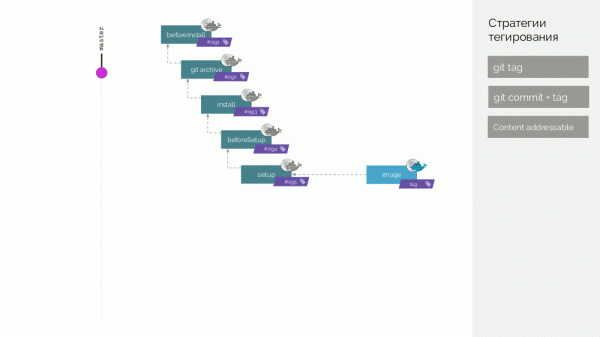
In werf, we have gone even further and are preparing to implement distributed builds with a cache that is not stored on a single machine… So, we assemble Docker images of two types, which we call stage and image.
In the Git repository, werf stores specific instructions for building, describing different stages of the build (beforeInstall, install, beforeSetup, setup). We build the first stage image with a signature defined as the checksum of the initial steps. Then we add the source code; for the new stage image, we calculate its checksum… These operations are repeated for all stages, resulting in a set of stage images. We then create the final image that also contains metadata about its origin. And this image we tag in various ways (details later).
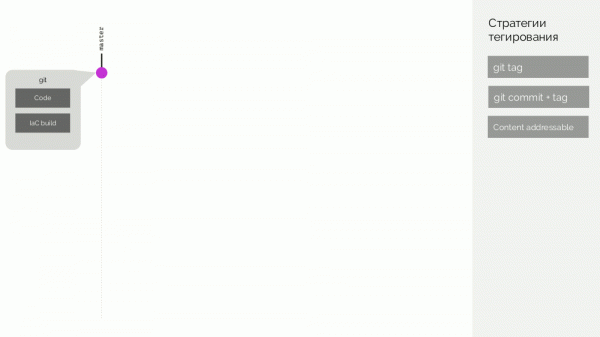
Let a new commit be generated afterwards, which only modifies the application code. What will happen? A patch will be created for the code changes, a new stage image will be prepared. Its signature will be defined as the checksum of the old stage image and the new patch. From this image, a new final image will be formed. The same behavior will occur with changes at other stages.
Thus, stage images are a cache that can be stored distributedly, while the images created from them are uploaded to the Docker Registry.
Cleaning the registry
This is not about deleting layers that remain dangling after deleted tags — this is a standard capability of Docker Registry itself. It’s about the situation where many Docker tags accumulate, and we understand that some of them are no longer needed, yet they occupy space (and/or we pay for it).
What cleaning strategies are there?
- One can simply do nothing not clean. Sometimes it is indeed easier to pay a bit for extra space than to untangle a huge mess of tags. But this only works up to a certain point.
- Complete reset. If all images are deleted and only the current ones are rebuilt in the CI system, a problem may arise. If a container on production restarts, it will pull a new image — one that has not been tested by anyone. This undermines the idea of immutable infrastructure.
- Blue-green. One registry started to fill up — we upload images to another. The same problem as in the previous method: at what point can we clean the registry that started to overflow?
- By time. Remove all images older than 1 month? But there will definitely be a service that has not been updated for a whole month...
- Manually determine what can already be deleted.
There are truly viable options: do nothing or a combination of blue-green + manual. In the latter case, when you realize it’s time to clean the registry, you create a new one and add all new images to it over, for example, a month. After a month, see which pods in Kubernetes are still using the old registry and move them to the new registry as well.
Where we ended up in werf? Мы собираем:
- Git head: all tags, all branches — assuming that everything tagged in Git is needed in the images (and if not, then it needs to be deleted in Git);
- all pods that are currently being pulled in Kubernetes;
- old ReplicaSets (what was recently pulled), as well as planned scans of Helm releases to select the latest images there.
… and we create a whitelist from this set — a list of images that we will not delete. Everything else is cleaned up, after which we find orphaned stage images and remove them as well.
Deployment stage
Reliable declarativity
The first point to draw attention to in deployment is the rollout of an updated resource configuration, declared declaratively. The original YAML document describing Kubernetes resources often differs significantly from the result that actually works in the cluster. This is because Kubernetes adds to the configuration:
- identifiers;
- metadata;
- numerous default values;
- a section with the current status;
- changes made during the admission webhook operation;
- the results of various controllers' (and scheduler's) work.
Therefore, when a new resource configuration (new) appears, we cannot simply overwrite the current, 'live' configuration (live). For this, we need to compare new with the previously applied configuration ("last-applied") and apply the obtained patch. live This approach is called
2-way merge. It is used, for example, in Helm.There is also a
3-way merge, which differs in that:when comparing,
- we look at what has been removed; "last-applied" and newwe look at what has been added or changed;
- we look at what has been removed; new and livethe summarized patch is applied to
- We deploy over 1000 applications with Helm, so we effectively live with 2-way merge. However, it has a number of issues that we resolved with our patches, helping Helm function properly. live.
Actual rollout status
After our CI system generates a new configuration for Kubernetes upon a recurring event, it passes it for application
(apply) to the cluster — using Helm or . The described N-way merge then occurs, to which the Kubernetes API responds positively to the CI system, and it to its user. kubectl applyHowever, there is a huge problem: the
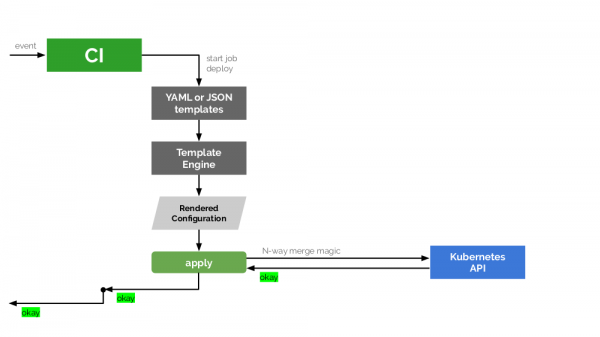
successful application does not mean a successful rollout. If Kubernetes understands what changes need to be applied and applies them — we still do not know what the outcome will be. For example, updating and restarting pods in the frontend may succeed, while in the backend it may not, and we end up with different versions of the application images running.. If Kubernetes understands what changes need to be applied, it applies them — we still don't know what the outcome will be. For example, the update and restart of pods in the frontend may succeed, while in the backend it may fail, resulting in different versions of the application images being launched.
To do everything correctly, an additional link is suggested in this scheme — a special tracker that will receive status information from the Kubernetes API and pass it on for further analysis of the actual situation. We created an Open Source library in Go — (see its announcement ), — which solves this problem and is integrated into werf.
The behavior of this tracker at the werf level is configured using annotations applied to Deployments or StatefulSets. The main annotation is fail-mode — which understands the following values:
-
IgnoreAndContinueDeployProcess— ignore rollout issues of this component and continue the deployment; -
FailWholeDeployProcessImmediately— an error in this component stops the deployment process; -
HopeUntilEndOfDeployProcess— hope that this component will function by the end of the deployment.
For example, such a combination of resources and annotation values fail-mode:
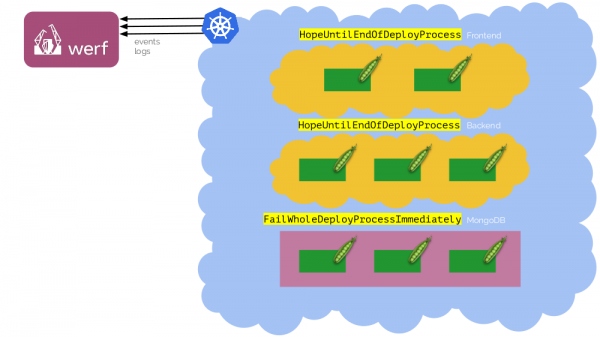
When deploying for the first time, the database (MongoDB) may not yet be ready — the Deployments will fail. But we can wait for it to start, and the deployment will still go through.
There are also two more annotations for kubedog in werf:
-
failures-allowed-per-replica— the number of allowed failures per replica; -
show-logs-until— regulates the point until which werf displays (in stdout) logs from all rolling out pods. By default, this isPodIsReady(to ignore messages that are unlikely to be needed when traffic starts coming to the pod), however, valuesControllerIsReadyandEndOfDeploy.
What else do we want from the deployment?
In addition to the two points already described, we would like to:
- see logs — specifically the relevant ones, not all logs;
- track progress, because if a job is "silently" hanging for several minutes, it is important to understand what is happening;
- have an automatic rollback in case something goes wrong (and therefore it’s critical to know the real status of the deployment). The rollout should be atomic: either it completes successfully or everything reverts to its previous state.
Summary
As a company, to implement all the nuances described at different stages of delivery (build, publish, deploy), we only need a CI system and the utility .
In conclusion:
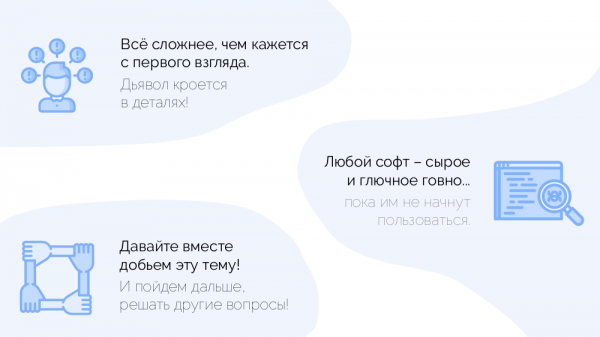
With werf, we have made significant progress in solving a large number of issues faced by DevOps engineers, and we would be happy if a broader community at least tries this utility in action. Achieving good results together will be easier.
Videos and slides
Video of the presentation (~47 minutes):
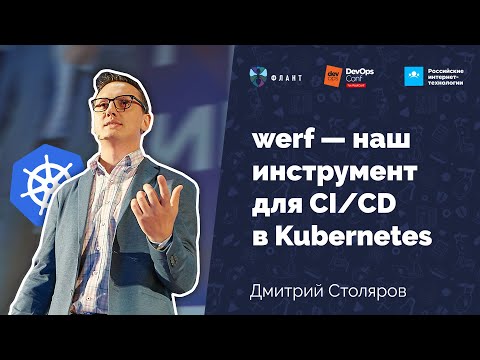
Presentation of the report:
P.S.
Other reports about Kubernetes on our blog:
- «» (Dmitry Stolyarov; April 27, 2019 at "Stachka");
- «» (Andrey Polovov; April 8, 2019 at Saint HighLoad++);
- «» (Dmitry Stolyarov; November 8, 2018 at HighLoad++);
- «» (Dmitry Stolyarov; May 28, 2018, at RootConf);
- «» (Dmitry Stolyarov; November 7, 2017, at HighLoad++);
- «» (Dmitry Stolyarov; June 6, 2017, at RootConf).
Source: habr.com
