


The issuance of certificates began on September 16 of last year. Since then, numerous articles and notes about the new wireless communication standard have been published, including on Habr. Most of these articles are technical specifications of the technology with descriptions of its advantages and disadvantages.
This is all good and as it should be, especially on technical resources. We decided to try to understand why WiFi 6 matters to the average user. Business, industry, etc. — new communication protocols are essential here. But will WiFi 6 change the life of a regular person who isn't planning to download terabytes of movies? Let's try to figure it out.
The Problem with Previous Generations of WiFi
The main problem is that if many devices connect to a wireless access point, the speed drops. This is familiar to anyone who has tried to connect to a shared access point in a cafe, shopping mall, or airport. The more devices connected to the access point, the slower the internet works. All these devices 'compete' for the channel. And the router tries to decide which device gets access. Sometimes it ends up that a smart bulb gets access instead of the phone running an important video conference.
And this is a very significant drawback that is keenly felt by the average user. Companies that rely on reliable connections manage to cope by installing additional access points, reserving communication channels, etc.
What about WiFi 6?
Performance and Stability Boost
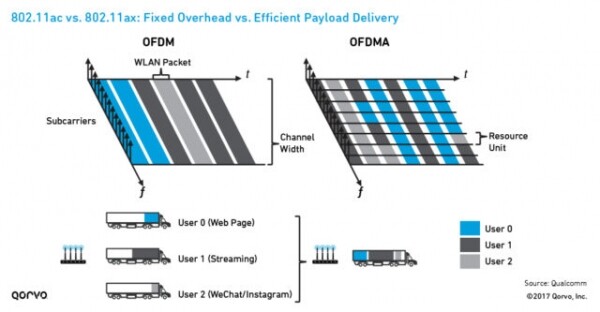
The new standard cannot be called a panacea; it is not a fundamentally new technology, but rather an improvement on an existing one. Nevertheless, one of the innovations is very important; we are talking about OFDMA technology. It significantly enhances the speed and stability of the channel by allowing it to be divided into several (and if necessary, many) subchannels. 'To each her own,' as the saying goes. In the case of WiFi 6 — each device gets its own communication channel. This is called multiple access with orthogonal frequency division.
The previous standard, if we take a logistics company as an analogy, sends shipments sequentially, with each client receiving a separate vehicle for their cargo. These vehicles do not leave simultaneously but rather according to a schedule, strictly one after another. In the case of WiFi 6, one vehicle carries all packages at once, and upon arrival, each recipient selects their own package.
Additionally, the enhanced MU-MIMO technology allows for simultaneous signal transmission, which the devices supporting the previous wireless standard could also achieve in terms of reception. The result is no signal interference; if you take two access points with WiFi 6 support and place them next to each other, they will operate on their respective communication channels without issues. Each will receive the signal directed to its corresponding device. Moreover, the number of simultaneous connections has increased to 8.
The previous communication standard did not allow access points to distinguish between 'own' traffic and 'foreign' traffic. As a result, in multi-apartment buildings, data transfer speeds are relatively low because routers, detecting foreign signals, perceive the communication channel as congested. WiFi 6 eliminates this issue with the BSS Coloring feature, which enables the recognition of 'own' and 'foreign' signals. Data packets are signed with a digital signature, ensuring there is no confusion.
Increased Speed
It is increasing. The maximum bandwidth of the communication channel reaches 11 Gbps. This is possible not only due to everything described above but also because of efficient data compression. New wireless chips are more powerful, allowing encoding and decoding to occur faster than before.
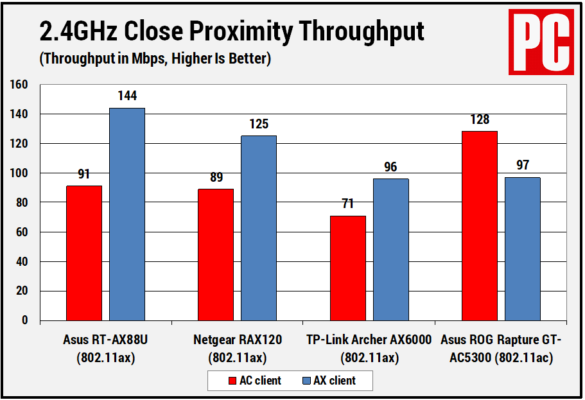
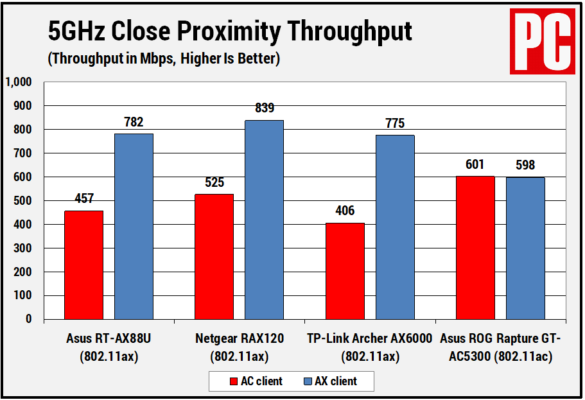
The speed gain is significant. For example, at the start of this technology, PCMag was able to achieve a speed increase of up to 50% within their building, which housed a vast number of smart devices, smartphones, and access points, using various routers.
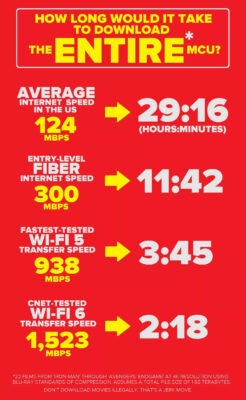
At CNET, they managed to increase from 938 Mbps to 1523!
Extended battery life for devices
We're talking about laptops, tablets, and smartphones. WiFi 6 features a wake-on-demand capability called Target Wake Time (TWT). Devices that support this feature can operate significantly longer than those that are not compatible with the new standard.
The thing is, each time the device is accessed, a time period is set for activating the WiFi module of the gadget, or conversely, to put it into sleep mode.
So when can one take advantage of WiFi 6?
Well, actually, right now, but there are a number of limitations. Firstly, there aren’t many routers that support this standard, although their number is increasing. Secondly, not only the router but also the device connecting to the access point must support the sixth generation wireless technology. Moreover, the communication channel between the provider and the router must also be relatively fast; otherwise, you won't get good results.
So, answering the question posed in the headline, yes, WiFi 6 is necessary for the average user; the new standard will greatly simplify life for all of us, both at work and at home. A stable and fast connection that efficiently conserves the battery life of a laptop or smartphone—what more do you need for happiness?
What does Zyxel offer?
Zyxel, keeping up with the times, has introduced three new business-class access points that support 802.11ax. They will perform excellently in both apartments and offices. The new devices can increase wireless network bandwidth by up to six times, even in high-density client environments. The connection is stable, with minimized data transmission delays and packet loss.
Regarding the devices themselves, they are:
- Access Point . It provides a data transfer speed of 3550 Mbps (2400 Mbps in the 5 GHz band and 1150 Mbps in the 2.4 GHz band).
- Access Point . It offers a maximum data transfer speed of 1775 Mbps (1200 Mbps in the 5 GHz band and 575 Mbps in the 2.4 GHz band).
- Access Point . It offers a maximum data transfer speed of 1775 Mbps (1200 Mbps in the 5 GHz band and 575 Mbps in the 2.4 GHz band).
Source: habr.com
