

We continue to share insights about working on virtual servers with Windows Server 2019 Core. In previous posts, we discussed how we prepare client virtual machines using our new plan with Server Core for 99 rubles. Next, we'll cover how to work with Windows Server 2019 Core and how to install a GUI on it.
In this article, we have added specific programs and provided a table of their compatibility with Windows Server Core.
Compatibility
This edition lacks DirectX rendering, completely missing hardware encoding and decoding systems; video plays successfully in Google Chrome on the CPU, but without sound, and sound processing systems are absent in the Core version.
Key differences and features between a standard installation and a Core installation:
CORE
GUI
Memory Usage
~600
~1200
Disk Space Used
~4 GB
~6 GB
Sound Output
No
Yes
DirectX
No
Yes
OpenGL
No
Yes
Hardware multimedia decoding
No
Yes
View Images
Yes**
Yes
A list of compatible programs that we have tested ourselves. Will be updated based on your requests:
CORE
GUI
Microsoft Office
Yes**
Yes
Libre Office
Yes**
Yes
Foobar 2000
Yes**
Yes
MPV
No
Yes
Google Chrome
Yes
Yes
Winrar
Yes
Yes
CCleaner
No
Yes
Metatrader 5
Yes*
Yes
Quik
Yes*
Yes
SmartX
Yes
Yes
Adobe Photoshop
No
Yes
Vs Code
Yes**
Yes
Oracle Java 8
Yes
Yes
Uninstall Tool
Yes*
Yes
NodeJS
Yes
Yes
Ruby
Yes
Yes
Far Manager
Yes
Yes
7z
Yes
Yes
Server Manager or RSAT
No
Yes
Steam
Yes
Yes
* Works only in the standard Ultravds image. Does not work without Oldedlg.dll
** Works only after installing FOD
Footprint
For example, let's take the ready-made Windows Server images that we prepared like this and look at resource consumption. The size of the swap file depends on the amount of installed RAM, which is why it was removed for this comparison, to understand how much the system itself occupies.
Such a small volume was achieved through the manipulations we listed in this .
Disk:
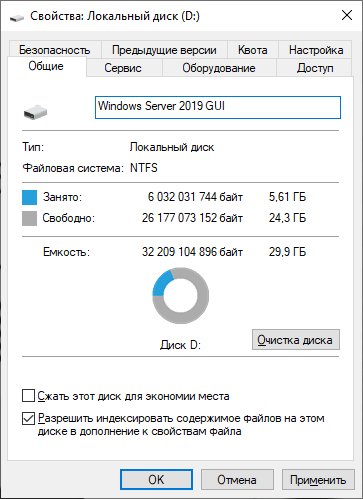
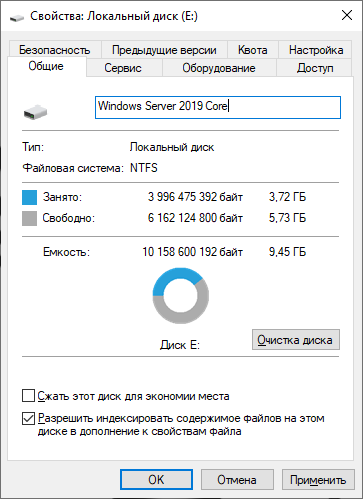
Now, the RAM consumption is:
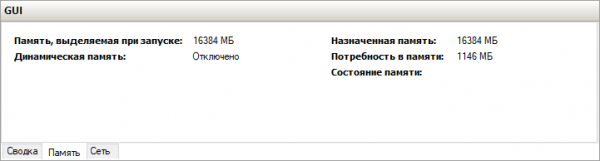
Windows Server 2019 GUI
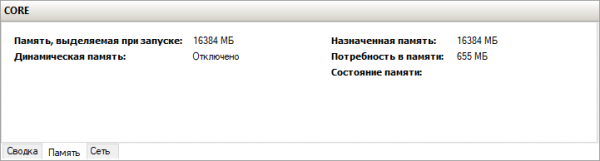
Windows Server 2019 CORE
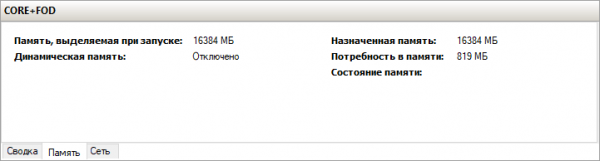
Windows Server 2019 CORE with Feature on Demand installed, how to install it we discussed in time.
Notes from personal experience
Regarding real-world operation, over more than six months of usage and, importantly, regular monthly updates, the operating system was rebooted only once, while during the same period Windows Server 2019 with GUI was rebooted every month.
The only reboot was needed due to .NET 4.7 updates; if you want to avoid unnecessary reboots, simply remove unnecessary components.
Source: habr.com
