

What corporate software is installed in your company? CRM, project management system, helpdesk, ITSM system, 1C (did we guess right)? Do you have a clear sense that all these programs duplicate each other? In fact, functional overlaps do occur; many issues can be addressed by a universal automation system — we are advocates of this approach. However, there are divisions or groups of employees that need their own software for reasons of security, functionality, convenience, etc. Today, we will discuss how CRM and helpdesk systems coexist in the IT zoo of a company using our own example. Also, we have a short survey at the end — we want to know your opinion.
He didn't have a helpdesk — otherwise, he would have quietly responded to the request without losing customers or losing his temper. Love your support staff; they are the front office!
For 13 years, we have been developing CRM systems, conducting complex implementation projects, using our CRM ourselves as our all-in-one solution — both CRM and helpdesk, email, call center, etc. Often, our clients use it in the same way, moving all operational work into the CRM system, sometimes including production, logistics, and warehousing. Nevertheless, we took on the development of a cloud helpdesk system because it was lacking in our IT infrastructure and that of our clients. Of course, we started using our first. So, does a company with an existing CRM system need a helpdesk? Does a non-service company need one? And can a helpdesk replace a CRM? Now we know the answer to these questions.
CRM is already implemented. Why does a company need a helpdesk?
If you have implemented one of the advanced Russian or imported CRM systems, you have probably noticed that it is not just a 'sales program,' but a universal automation tool that addresses tasks related to customer interaction, planning, KPIs, email and telephony, inventory management, and many others (depending on the company). When employees and management learn to fully utilize the CRM system, their operational activities become more organized, faster, and transparent—issues with deadlines, forgotten customers, and stalled processes disappear. In a modern CRM system, everyone works together: salespeople, managers, executives, marketers, support staff, etc. It's very convenient: all information is contained in the client card, allowing each employee to access the data they need. However, helpdesk software does not replace or complement the CRM system; it is standalone software that must be acquired for several reasons.
Security
Let’s start with the most important topic—information security in the company. In management, there is a visualization known as the iceberg of ignorance, proposed based on his research by consultant Sidney Yoshida in 1989. According to his data, top managers are only aware of 4% of the company's problems. This theory has been both supported and challenged based on the fact that these 4% represent the remaining 96%.
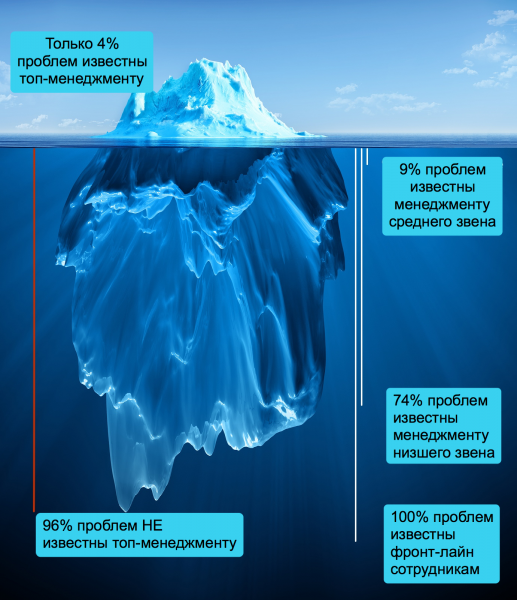
A controversial theory, but if we were to rephrase a famous saying, it could be said that leaders often are indeed the last to know. This is especially true for those who believe they are doing well by learning to delegate and, therefore, think they can pursue hobbies while the business runs itself. In reality, the front office (support and sales) is aware of most customer and commercial problems. And here comes a series of unfortunate coincidences:
- Support and service staff are well-informed about customer issues.
- Support staff have access to the CRM system, which contains critical information about deals, financial flows, the sales funnel, and the client database.
- Support employees are the most unstable personnel, who tend to leave the company quickly and lack strong moral attachment to the organization.
Thus, a CRM system in the hands of a support employee, even under the strictest access restrictions, is a potential security loophole. A helpdesk is a system that is less critical for security: it contains information about tickets and issues, basic information about clients, but no access to commercial information. Therefore, the best option is when the helpdesk system does not contain a CRM module, but integrates with an external CRM system, meaning access for some employees can be completely restricted.
That's exactly how we implemented it. — in the cloud helpdesk, support operators work without access to the CRM system. Currently, integration with our RegionSoft CRM has been implemented, and an API for integration with other services and applications will be available soon. The operator only sees their working information:
Click to enlarge
List of requests
Click to enlarge
Request text
Thus, the helpdesk helps protect the client base from unstable employees who are more likely to take part of the client database with them.
Functional differences
A CRM system is, simply put, a program with a lot of features. All functionality is divided into many interconnected modules, which is quite convenient, but not all employees use all the features of the system. Often, on the desktop of a CRM manager, constantly used functions coexist with those used a few times a month and functions needed from time to time. The architecture and logic of CRM systems are aimed at effective functional management, for which a set of capabilities has been created to cover the customer from all angles.
A CRM system is a complex software solution that is difficult to implement and master, requiring time, training costs, expertise formation, etc. Moreover, in a CRM system, it is practically impossible to master just one specific module without delving into others — this leads to long implementation times and challenges.
Support staff are not focused on the client database or the deal; they work on specific issues (incidents). They don't care whether the deal was worth 1.5 million rubles or 11.5 million rubles — what matters is that assembly 17.3.25 isn't working, node No. 16 has a clutch problem on a multimillion-dollar vehicle, a server in the data center is down, etc. Therefore, information from the CRM is unnecessary, and the interface distracts from the task at hand.
Click to enlarge
The application window that the operator works with contains only the essential information they need.
The help desk must primarily fulfill its core purpose: to inform the operator about the problem, provide its details, and offer a means of communication with the client (chat, email, phone — depending on company policy), allow for sending reminders, and provide the client with a personal account to monitor deadlines and progress.
Additionally, the help desk system has a significant advantage over a CRM system: its implementation does not require analysis, examination, or reorganization of business processes. You can set it up in 2 minutes, configure it, and immediately redirect all client requests to the support portal. It doesn't matter whether there are changes in the spheres of influence between marketing and sales, whether the commercial director is performing well, or whether the sales staff are meeting their targets. The front line of the company is support; the customer service department does its job independently of other processes in its automated system. However, to be fair, disorganization within the company noticeably increases the workload for support. You already know this without us.
By the way, if you are offered something like a CRM for support or a help desk with built-in CRM, carefully analyze the possible information security risks.
The speed of learning and interaction with the system
When we created our , we hardly thought about how we would be perceived in the ITSM community (we didn't think about it at all, actually); we decided to create a simple and understandable environment for any support service (support, help, etc.):
- technical support and outsourcing companies
- service departments
- the IT department within the company (and any other department — in ZEDLine Support, internal tasks can simply be exchanged among designers, admins, marketers, anyone).
- There is no support for a non-technical company (whether it's a construction company or a perfume store).
This indicates a completely different level of technical knowledge of the system user. The decision is made: we remove unnecessary embellishments that we are used to in CRM interface development, create a user-friendly web interface, and integrate detailed training modules directly within the system so that users have hints available until it's no longer necessary (at which point they can just click 'Don't show again').
Mastering a CRM system takes more than just a few hours or a single day—it requires understanding not only one’s immediate tasks but also the interconnections of modules and the logic of their interaction. In simple terms, one must clearly understand what changes when you suddenly alter the tax rate, apply a discount, add a new field in the client card, etc. And this understanding should be grasped by nearly every user in the company. A helpdesk system lacks these complexities (at least in our implementation).
Click to enlarge
Click to enlarge
For comparison—here’s the main window of the CRM system and the client card window.
Click to enlarge
On the left, there are buttons; on the right, a metrics panel; at the top— a menu with submenus, and so on. While working in a CRM system, you feel somewhat like a pilot in front of a control panel, whereas in a helpdesk, you feel like a front office operator who can quickly and clearly resolve or delegate a task. And there's a manual that's 300 pages long.
Click to enlarge
44 tabs, each containing crucial information including commercial secrets—and almost all tabs are used in operational work, with at least 10 used by each manager. This is convenient and fast after training and familiarization with the system, but mastering it takes time and is part of the implementation project.
As you can see, the difference is colossal. And this is not a sign that one software is better than the other—it indicates that each application serves its purpose and meets its user's needs.
Setting up the helpdesk is as simple as possible: the administrator configures the email settings for notification distribution, disk space, and the logic of notification sending. The main entity of any helpdesk is the request creation form, which is also straightforward to configure by selecting the required fields with appropriate data types.
Click to enlarge
The settings window for the profile in the administrator's personal account.
What rules should the helpdesk operations adhere to?
- Be fast — set up quickly, work without lags even with a high volume of requests.
- Be clear — all entities must be understandable, transparent, and related to the main one — the client's request (appeal).
- All interface elements must be interpreted unambiguously — the operator must know exactly what each symbol and function in the interface means.
- Be easy to learn — since support staff can have completely different qualifications and training, the helpdesk should be accessible for a quick start. Training should take place as quickly as possible, as this is the pool of employees that cannot be pulled away from the workflow for long.
The helpdesk is a tool for operational work (like CRM), but above all, it is a front-line tool where the speed of response, ease of interaction, and ability to control the progress of resolving the issue matter almost as much as the professionalism of support.
Speed of work with clients
I am a client of many companies, services, stores, etc. I am an adult, modern, tech-savvy person who wants three things in exchange for my money: good price/quality ratio, excellent service, and accessible, transparent handling of my requirements. If I can't find a way to contact a company, I will find another; if my question or complaint goes unanswered, I will avoid that company in the future; if I receive great and personalized service — I am willing to pay a little more and build a relationship with the brand. This is normal behavior for millions of modern young people — your clients. So what does that mean? It should be convenient for them — including (oh horror!) being able to access your helpdesk and monitor the progress of their case.
In this regard, the CRM system is not the best friend of the client. Yes, there are solutions on the market that allow creating a personal account for clients or partners in CRM, but even in those, not every business will allow their clients access. Moreover, clients also find it less than enjoyable to navigate through the interfaces of CRM systems from all the companies they work with.
The helpdesk is a meeting point for customers and operators while resolving work tasks (problems, incidents). You take the link to your helpdesk and place it everywhere your customers might start searching: on social networks, on your website, in your email signature, or even as a QR code on products, materials, advertisements, etc. The customer follows the link, enters their first name, last name, email, and receives their login and password to access the helpdesk client portal.
Next, they create a request, chat with an operator, attach files, and track changes in operators and statuses related to their issue. It's convenient, fast, and importantly, under control — the customer stays informed. Status changes allow the customer to see the dynamics of work and understand what is happening with their request and how quickly the issue is being resolved.
Click to enlarge
One, two, three — and the customer can create their first ticket.
The ability for customers to self-serve and chat with an operator is a characteristic feature of a helpdesk that is either absent or underutilized in CRM systems.
Thanks to the helpdesk, response times to requests are reduced — this is perhaps the main benefit of having such a program for support staff. When a customer receives ample time for interaction, they feel like they are a particularly important client, which fosters trust and strengthens the relationship with the company (and then there are upsells, revenue, and profit growth — let’s look at the matter strategically!).
Measurable and noticeable work of employees
In reality, having a helpdesk system doesn't necessarily require a dedicated support team in an office — it can suit any employees on the front line dealing with customers (except salespeople, as CRM is still more convenient and functional for them). With the helpdesk, many routine tasks are automated, giving support managers more time to address the customer’s core issues.
At the same time, it is the support staff who are most often subjected to various metrics and KPIs, as their work can be easily quantified — by closed tickets, customer ratings (coming soon), and cost estimates of labor. Different help desks track this differently; we have implemented it through labor accounting (timing): you can enter prices for different types of work and track them for each task, then aggregate them in a labor cost report.
Click to enlarge
Timing settings window in the administrator's personal account
Click to enlarge
Labor cost assessment within the ticket interface (it may be visible to the client or may not be visible thanks to the 'Internal message' function (invisible to the ticket initiator).
The help desk allows the employee to manage their time: when all tasks are displayed with statuses, deadlines, and responsible persons, it is easier to focus and plan work both within the working day and overall across a range of tasks. Along with a reduction in stress levels, the likelihood of making silly, 'nervous' mistakes decreases.
Moreover, the employee can see the completed work (closed tickets) and visually track their results, which serves as a powerful motivator.
In the CRM system, the assessment of employees' labor is much deeper and more complex (for example, we have designed a whole module for working with KPIs), and certain preparations must take place before evaluating each employee's effectiveness. In the help desk, the assessment of support starts from the very first minute of work, without delays for agreeing on metrics, etc.
A few more differences to be aware of
- The update cycle of the CRM system is much longer than that of the help desk system, and support is more complex. To work with a help desk, you do not need a system administrator, programmer, or super-confident PC user.
- If the CRM system has a 'Service' section, it's just a limited section that cannot replace helpdesk. If the helpdesk has a CRM module, it's like a joke, neither a pig nor a sea creature — it's not CRM at all, but, for example, a contact manager. Because CRM, I repeat for the tenth time, is a system for managing all customer relationships, from leads to upselling. You can see the logic of having all this in a helpdesk, except for the rising price of the program itself?
- If initial information about the client is collected from all employees right away, a CRM system would suit you better; if the support doesn't collect initial information and has a narrow range of responsibilities, it needs a helpdesk.
If a company has neither a helpdesk nor CRM, then customer interactions are probably focused on email. There are two common scenarios:
- communication continues in endless email threads, searches are done there as well; when an employee leaves, unpleasant adventures may occur;
- communication is switched to chat or phone and gradually loses cohesiveness as a single array of information.
This is arguably the worst possible scenario. Don't create risks for yourself; work with various automation tools that can address each employee's tasks. Then, you'll preserve a valuable asset — commercial information, work will be convenient for employees, and clients won't feel abandoned.
SURVEY
— please answer a short list of questions, it will help us get better for you 🙂
Only registered users can participate in the survey. , please.
Does your company have a support service?
Yes, there is, a separate group of employees (department)
Yes, there is, but these employees also do other work
There is no formal one — the incident is handled by whoever is closer
We do not provide support to clients
21 users voted. 4 users abstained.
What do these guys do?
They answer customer questions
They forward questions to specialists
They assist clients themselves — fully resolve issues
They handle everything: both installation and support
They sell our products and services
21 users voted. 4 users abstained.
Do support staff change often?
Yes, often, they are students
Yes, often — that's just the nature of the job
Yes, often — they grow quickly within the company
No, not often — this is our super team
19 users voted. 4 users abstained.
What industry does your company operate in?
IT
Non-IT
20 users voted. 4 users abstained.
Does your company have a helpdesk system?
Yes, we have a vendor solution.
Yes, we have a custom solution.
No, we use CRM.
No, we use other software.
Not at all, we work through email, phone, chats.
I'll explain in the comments.
20 users voted. 4 users abstained.
Is it paid?
Yes, it's paid.
No, it's free.
18 users voted. 7 users abstained.
Are you satisfied with your helpdesk system?
Yes, completely.
Partially.
No
We don't have a helpdesk system.
18 users voted. 6 users abstained.
What is important to you in a helpdesk system?
Ease of setup and use.
Speed of operation.
Omni-channel capabilities.
The PerformanceResourceTiming
Security
Client portal (dashboard).
Cost
Employee evaluation.
Control.
17 users voted. 8 users abstained.
How to properly and clearly?
Helpdesk.
Service desk.
Support system.
Ticket system.
Are you kidding? These are all different concepts!
15 users voted. 10 users abstained.
Source: habr.com
