


TL;DR: there will be a description of Keycloak, an open-source access control system, an analysis of its internal structure, and configuration details.
Introduction and Key Ideas
In this article, we will explore the key ideas to keep in mind when deploying a Keycloak cluster on Kubernetes.
If you wish to know more about Keycloak, refer to the links at the end of the article. To dive deeper into the practice, you can study with a module that implements the main ideas of this article (the guide for starting is there as well; in this article, there will be an overview of the structure and settings, translator's note).
Keycloak is a comprehensive system built on Java and based on the application server . In short, it is a framework for authorization, providing application users with federation and the capability of SSO (single sign-on).
We invite you to read the official or for a detailed understanding.
Running Keycloak
Keycloak requires two persistently stored data sources to run:
- A database used for storing persistent data, such as user information
- Datagrid cache, which is used for caching data from the database, as well as for storing some short-lived and frequently modified metadata, such as user sessions. Implemented by , which is usually significantly faster than the database. However, any data stored in Infinispan is ephemeral and should not be saved anywhere upon cluster restart.
Keycloak operates in four different modes:
- Standalone — one and only one process, configured through the file standalone.xml
- Normal cluster (high-availability option) — all processes must use the same configuration, which needs to be synchronized manually. Settings are stored in the file standalone-ha.xml, additionally, a shared database and load balancer must be set up.
- Domain cluster — running a cluster in standalone mode quickly becomes routine and tedious as the cluster grows, since every time the configuration changes, those changes need to be made on each cluster node. Domain mode addresses this issue by setting up a common storage and publishing the configuration. These settings are stored in the file domain.xml
- Replication between data centers — if you want to run Keycloak in a cluster across multiple data centers, often located in different geographical areas. In this operational scenario, each data center will have its own Keycloak server cluster.
In this article, we will take a detailed look at the second option, which is a standard cluster, and we will also touch on the topic of replication between data centers, as these two options make sense to run in Kubernetes. Fortunately, Kubernetes does not have a problem with synchronizing the settings of multiple pods (Keycloak nodes), so a domain cluster will not be particularly difficult to create.
Also, please note that the term cluster will be applied exclusively to the group of Keycloak nodes working together until the end of the article, and there is no need to refer to the Kubernetes cluster.
Standard Keycloak Cluster
To run Keycloak in this mode, you need to:
- set up an external shared database
- install a load balancer
- have an internal network that supports IP multicast
We will not discuss the setup of the external database, as it is not the purpose of this article. Let’s assume that there is a working database somewhere — and we have a connection point to it. We will simply add this information to the environment variables.
To better understand how Keycloak operates in a high-availability (HA) cluster, it is important to know how much it depends on Wildfly's clustering capabilities.
Wildfly uses several subsystems, some of which act as load balancers, while others provide fault tolerance. The load balancer ensures application availability during cluster node overload, while fault tolerance guarantees application availability even if some cluster nodes fail. Some of these subsystems include:
mod_cluster: works with Apache as an HTTP load balancer, relying on TCP multicast for node discovery by default. It can be replaced by an external load balancer.infinispan: a distributed cache that uses JGroups channels as the transport layer. It can additionally use the HotRod protocol for communication with an external Infinispan cluster for cache content synchronization.jgroups: provides group communication support for highly available services based on JGroups channels. Named channels allow application instances in a cluster to connect in groups such that communication has properties like reliability, ordering, and fault sensitivity.
Load Balancer
When installing the load balancer as an ingress controller in a Kubernetes cluster, it's important to keep the following things in mind:
Keycloak operates under the premise that the remote client address connecting via HTTP to the authentication server is the actual IP address of the client machine. The load balancer and ingress settings should correctly establish the HTTP headers X-Forwarded-For and X-Forwarded-Proto, as well as preserve the original header HOST. The latest version ingress-nginx (> 0.22.0)
Activating the flag proxy-address-forwarding by setting the environment variable PROXY_ADDRESS_FORWARDING downward API support (simultaneously with this in true gives Keycloak an understanding that it operates behind a proxy.
It is also necessary to enable sticky sessions in ingress. Keycloak applies the Infinispan distributed cache to persist data related to the current authentication session and user session. Caches typically operate with a single owner by default; this means that this specific session is stored on a particular node in the cluster, while other nodes must retrieve it remotely if they need access to that session.
Specifically, contrary to the documentation, session attachment with the cookie name
AUTH_SESSION_IDdid not work for us. Keycloak entered a redirection loop, so we recommend choosing a different cookie name for the sticky session.
Additionally, Keycloak attaches the name of the node that responded first to AUTH_SESSION_ID, and since each node in a high-availability setup uses the same database, each one a separate and unique node identifier for transaction management. It is recommended to set in JAVA_OPTS parameters jboss.node.name and jboss.tx.node.id unique for each node — you can, for example, use the pod name. If you choose to use the pod name, remember the 23-character limit for jboss variables, so it's better to use StatefulSet instead of Deployment.
Another pitfall is that if a pod is deleted or restarted, its cache is lost. Considering this, it's advisable to set the number of cache owners for all caches to at least two, so a copy of the cache will remain. The solution is to run when starting the pod, placing it in the directory /opt/jboss/startup-scripts in the container:
Script content
embed-server --server-config=standalone-ha.xml --std-out=echo
batch

echo * Setting CACHE_OWNERS to "${env.CACHE_OWNERS}" in all cache-containers

/subsystem=infinispan/cache-container=keycloak/distributed-cache=sessions:write-attribute(name=owners, value=${env.CACHE_OWNERS:1})
/subsystem=infinispan/cache-container=keycloak/distributed-cache=authenticationSessions:write-attribute(name=owners, value=${env.CACHE_OWNERS:1})
/subsystem=infinispan/cache-container=keycloak/distributed-cache=actionTokens:write-attribute(name=owners, value=${env.CACHE_OWNERS:1})
/subsystem=infinispan/cache-container=keycloak/distributed-cache=offlineSessions:write-attribute(name=owners, value=${env.CACHE_OWNERS:1})
/subsystem=infinispan/cache-container=keycloak/distributed-cache=clientSessions:write-attribute(name=owners, value=${env.CACHE_OWNERS:1})
/subsystem=infinispan/cache-container=keycloak/distributed-cache=offlineClientSessions:write-attribute(name=owners, value=${env.CACHE_OWNERS:1})
/subsystem=infinispan/cache-container=keycloak/distributed-cache=loginFailures:write-attribute(name=owners, value=${env.CACHE_OWNERS:1})

run-batch
stop-embedded-server
after which set the environment variable CACHE_OWNERS to the required value.
Private network with support for IP multicast
If you are using Weavenet as CNI, multicast will work immediately — and your Keycloak nodes will see each other as soon as they are started.
If you do not have IP multicast support in the Kubernetes cluster, you can configure JGroups to work with other protocols for node discovery.
The first option is the use of KUBE_DNS, which uses headless service to discover Keycloak nodes, you simply pass JGroups the service name that will be used to find the nodes.
Another option is to use the method KUBE_PING, which works with the API to find nodes (you need to configure serviceAccount with permissions list and get, after which configure the pods to work with this serviceAccount).
Node discovery method for JGroups is configured by setting the environment variables JGROUPS_DISCOVERY_PROTOCOL and JGROUPS_DISCOVERY_PROPERTIES. For KUBE_PING you need to select the pods by setting namespace and labels.
️ If you are using multicast and running two or more Keycloak clusters in a single Kubernetes cluster (let's say one in the namespace
production, the second —staging) — nodes from one Keycloak cluster may join another cluster. Be sure to use a unique multicast address for each cluster by setting the variablesjboss.default.multicast.addressandjboss.modcluster.multicast.addressdownward API support (simultaneously with this inJAVA_OPTS.
Replication between data centers
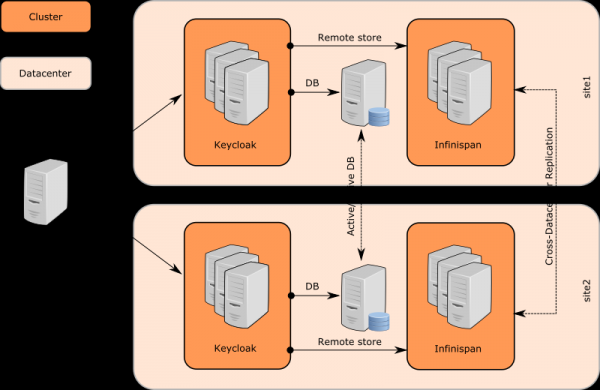
Communication
Keycloak uses multiple separate Infinispan cache clusters for each data center where Keycloak clusters are located, composed of Keycloak nodes. However, there is no difference between Keycloak nodes in different data centers.
Keycloak nodes use an external Java Data Grid (Infinispan servers) for communication between data centers. The communication operates over the protocol .
Infinispan caches must be configured with the attribute remoteStore, so that data can be stored in remote (in another data center, translator's note) caches. There are separate infinispan clusters among the JDG servers, so that data saved on JDG1 at the site site1 will be replicated to JDG2 at the site site2.
Finally, the receiving server JDG notifies the Keycloak servers in its cluster through client connections, which is a feature of the HotRod protocol. Keycloak nodes on site2 update their Infinispan caches, and a specific user session also becomes available on Keycloak nodes on site2.
For some caches, it is also possible not to create backups and completely avoid writing data through the Infinispan server. To do this, the setting must be removed from remote-store for the specific Infinispan cache (in the file standalone-ha.xml), after which some specific replicated-cache will also become unnecessary on the Infinispan server side.
Cache configuration
There are two types of caches in Keycloak:
Local. It is located close to the database and serves to reduce the load on the database as well as to decrease response latency. This type of cache stores the realm, clients, roles, and user metadata. This type of cache is not replicated, even if it is part of the Keycloak cluster. If a certain entry in the cache changes, a message about the change is sent to the other servers in the cluster, after which the entry is removed from the cache. See the description
workbelow for a more detailed description of the procedure.Replicable. It handles user sessions, offline tokens, and also monitors login errors to detect phishing password attempts and other attacks. The data stored in these caches is temporary, only stored in memory, but can be replicated across the cluster.
Infinispan caches
Sessions — a concept in Keycloak, separate caches called authenticationSessions, are used to store data for specific users. Requests from these caches are usually needed by the browser and Keycloak servers, not the applications. This is where the dependency on sticky sessions comes into play, and such caches do not need to be replicated, even in an Active-Active mode.
Action tokensAnother concept, commonly applied to various scenarios, such as when a user needs to do something asynchronously via email. For example, during the procedure forget password cache actionTokens is used to track metadata associated with tokens — for example, a token that has already been used and cannot be activated again. This type of cache typically needs to be replicated across data centers.
Caching and aging of stored data works to reduce the load on the database. Such caching improves performance but adds an obvious challenge. If one Keycloak server updates data, the other servers must be notified so they can refresh their caches. Keycloak uses local caches realms, users and authorization for caching data from the database.
There is also a separate cache work, which is replicated across all data centers. It does not store any database data but serves to send messages about data aging to cluster nodes between data centers. In other words, as soon as data is updated, the Keycloak node sends a message to other nodes in its data center as well as to nodes in other data centers. Upon receiving such a message, each node cleans up the corresponding data in its local caches.
User sessions. Caches named sessions, clientSessions, offlineSessions and offlineClientSessions, are typically replicated across data centers and serve to store data about user sessions that are active during the user's activity in the browser. These caches work with the application processing HTTP requests from end users, so they are associated with sticky sessions and must be replicated across data centers.
Protection against brute force attacks. The cache loginFailures is used to track login error data, such as how many times a user has entered an incorrect password. The replication of this cache is the administrator's responsibility. However, for accurate counting, it is advisable to activate replication between data centers. On the other hand, if these data do not need to be replicated, performance can be improved, and if this issue arises — replication can be disabled.
When rolling out the Infinispan cluster, you need to add cache definitions to the configuration file:
You need to configure and start the Infinispan cluster before launching the Keycloak cluster
Next, you need to configure remoteStore the caches for Keycloak. This can be done using a script that is created similarly to the previous one used for setting up the variable CACHE_OWNERS, save it in a file, and place it in the directory /opt/jboss/startup-scripts:
Script content
embed-server --server-config=standalone-ha.xml --std-out=echo
batch

echo *** Update infinispan subsystem ***
/subsystem=infinispan/cache-container=keycloak:write-attribute(name=module, value=org.keycloak.keycloak-model-infinispan)

echo ** Add remote socket binding to infinispan server **
/socket-binding-group=standard-sockets/remote-destination-outbound-socket-binding=remote-cache:add(host=${remote.cache.host:localhost}, port=${remote.cache.port:11222})

echo ** Update replicated-cache work element **
/subsystem=infinispan/cache-container=keycloak/replicated-cache=work/store=remote:add(
    passivation=false,
    fetch-state=false,
    purge=false,
    preload=false,
    shared=true,
    remote-servers=["remote-cache"],
    cache=work,
    properties={
        rawValues=true,
        marshaller=org.keycloak.cluster.infinispan.KeycloakHotRodMarshallerFactory,
        protocolVersion=${keycloak.connectionsInfinispan.hotrodProtocolVersion}
    }
)

/subsystem=infinispan/cache-container=keycloak/replicated-cache=work:write-attribute(name=statistics-enabled,value=true)

echo ** Update distributed-cache sessions element **
/subsystem=infinispan/cache-container=keycloak/distributed-cache=sessions/store=remote:add(
    passivation=false,
    fetch-state=false,
    purge=false,
    preload=false,
    shared=true,
    remote-servers=["remote-cache"],
    cache=sessions,
    properties={
        rawValues=true,
        marshaller=org.keycloak.cluster.infinispan.KeycloakHotRodMarshallerFactory,
        protocolVersion=${keycloak.connectionsInfinispan.hotrodProtocolVersion}
    }
)
/subsystem=infinispan/cache-container=keycloak/distributed-cache=sessions:write-attribute(name=statistics-enabled,value=true)

echo ** Update distributed-cache offlineSessions element **
/subsystem=infinispan/cache-container=keycloak/distributed-cache=offlineSessions/store=remote:add(
    passivation=false,
    fetch-state=false,
    purge=false,
    preload=false,
    shared=true,
    remote-servers=["remote-cache"],
    cache=offlineSessions,
    properties={
        rawValues=true,
        marshaller=org.keycloak.cluster.infinispan.KeycloakHotRodMarshallerFactory,
        protocolVersion=${keycloak.connectionsInfinispan.hotrodProtocolVersion}
    }
)
/subsystem=infinispan/cache-container=keycloak/distributed-cache=offlineSessions:write-attribute(name=statistics-enabled,value=true)

echo ** Update distributed-cache clientSessions element **
/subsystem=infinispan/cache-container=keycloak/distributed-cache=clientSessions/store=remote:add(
    passivation=false,
    fetch-state=false,
    purge=false,
    preload=false,
    shared=true,
    remote-servers=["remote-cache"],
    cache=clientSessions,
    properties={
        rawValues=true,
        marshaller=org.keycloak.cluster.infinispan.KeycloakHotRodMarshallerFactory,
        protocolVersion=${keycloak.connectionsInfinispan.hotrodProtocolVersion}
    }
)
/subsystem=infinispan/cache-container=keycloak/distributed-cache=clientSessions:write-attribute(name=statistics-enabled,value=true)

echo ** Update distributed-cache offlineClientSessions element **
/subsystem=infinispan/cache-container=keycloak/distributed-cache=offlineClientSessions/store=remote:add(
    passivation=false,
    fetch-state=false,
    purge=false,
    preload=false,
    shared=true,
    remote-servers=["remote-cache"],
    cache=offlineClientSessions,
    properties={
        rawValues=true,
        marshaller=org.keycloak.cluster.infinispan.KeycloakHotRodMarshallerFactory,
        protocolVersion=${keycloak.connectionsInfinispan.hotrodProtocolVersion}
    }
)
/subsystem=infinispan/cache-container=keycloak/distributed-cache=offlineClientSessions:write-attribute(name=statistics-enabled,value=true)

echo ** Update distributed-cache loginFailures element **
/subsystem=infinispan/cache-container=keycloak/distributed-cache=loginFailures/store=remote:add(
    passivation=false,
    fetch-state=false,
    purge=false,
    preload=false,
    shared=true,
    remote-servers=["remote-cache"],
    cache=loginFailures,
    properties={
        rawValues=true,
        marshaller=org.keycloak.cluster.infinispan.KeycloakHotRodMarshallerFactory,
        protocolVersion=${keycloak.connectionsInfinispan.hotrodProtocolVersion}
    }
)
/subsystem=infinispan/cache-container=keycloak/distributed-cache=loginFailures:write-attribute(name=statistics-enabled,value=true)

echo ** Update distributed-cache actionTokens element **
/subsystem=infinispan/cache-container=keycloak/distributed-cache=actionTokens/store=remote:add(
    passivation=false,
    fetch-state=false,
    purge=false,
    preload=false,
    shared=true,
    cache=actionTokens,
    remote-servers=["remote-cache"],
    properties={
        rawValues=true,
        marshaller=org.keycloak.cluster.infinispan.KeycloakHotRodMarshallerFactory,
        protocolVersion=${keycloak.connectionsInfinispan.hotrodProtocolVersion}
    }
)
/subsystem=infinispan/cache-container=keycloak/distributed-cache=actionTokens:write-attribute(name=statistics-enabled,value=true)

echo ** Update distributed-cache authenticationSessions element **
/subsystem=infinispan/cache-container=keycloak/distributed-cache=authenticationSessions:write-attribute(name=statistics-enabled,value=true)

echo *** Update undertow subsystem ***
/subsystem=undertow/server=default-server/http-listener=default:write-attribute(name=proxy-address-forwarding,value=true)

run-batch
stop-embedded-server
Don't forget to set up JAVA_OPTS for Keycloak nodes to work with HotRod: remote.cache.host, remote.cache.port and the service name jboss.site.name.
Links and additional documentation
The article has been translated and prepared for Хабр by the staff of — intensives, video courses, and corporate training from practicing specialists (Kubernetes, DevOps, Docker, Ansible, Ceph, SRE)
Source: habr.com
