

Mail bombing is one of the oldest forms of cyber attacks. Essentially, it resembles a typical DoS attack, but instead of a wave of requests from different IP addresses, a flood of emails is sent to a single email address, causing a significant increase in load. Such an attack can result in the inability to use the mailbox and, in some cases, can even lead to the server's overall failure. The long history of this type of cyber attack has resulted in both positive and negative consequences for system administrators. Positive aspects include a good understanding of mail bombing and the availability of simple ways to defend against such attacks. Negative aspects include the large number of publicly available software solutions for conducting these types of attacks and the potential for attackers to effectively shield themselves from detection.

An important characteristic of this cyber attack is that it is virtually impossible to use it for profit. An attacker floods an email inbox with a barrage of emails, preventing the victim from using their email normally, or hacking someone's corporate mailbox to send thousands of messages across the GAL, causing the server to either crash or slow down to the point of being unusable. But what happens next? Turning this type of cybercrime into real money is nearly impossible, which is why mail bombing is currently quite a rare occurrence, and system administrators might simply forget the need for protection against such cyber attacks when designing infrastructure.
However, despite the fact that mail bombing itself is quite a senseless activity from a commercial standpoint, it often forms a part of other, more complex and multi-stage cyberattacks. For example, when hacking an email and using it to hijack an account on a public service, attackers often "bomb" the victim's mailbox with meaningless emails in order for a confirmation email to be lost in the flow and remain unnoticed. Additionally, mail bombing can be used as a means of economic pressure on a business. Thus, actively bombarding a public email inbox of a business, which receives requests from clients, can severely hinder operations and, as a result, may lead to equipment downtime, unfulfilled orders, as well as loss of reputation and missed profits.
That is why a system administrator should not forget about the possibility of mail bombing and always take the necessary measures to protect against this threat. Considering that this can be done early during the construction of the email infrastructure, and that it takes very little time and effort from the system administrator, there are no objective reasons to avoid securing the infrastructure against mail bombing. Let’s take a look at how protection against this cyberattack is implemented in the Zimbra Collaboration Suite Open-Source Edition.
At the core of Zimbra is Postfix — one of the most reliable and functional open-source Mail Transfer Agents available today. One of the main advantages of its openness is that it supports a wide variety of third-party solutions to extend functionality. In particular, Postfix fully supports cbpolicyd — an advanced utility for ensuring the cybersecurity of the mail server. In addition to protecting against spam and creating whitelists, blacklists, and grey lists, cbpolicyd allows the Zimbra administrator to configure SPF signature verification, as well as set limits on the reception and sending of emails or data. They can provide reliable protection against spam and phishing emails, as well as protect the server from mail bombing.
The first thing required from a system administrator is to activate the cbpolicyd module, which is pre-installed in the Zimbra Collaboration Suite OSE on the infrastructure's MTA server. This is done using the command zmprov ms `zmhostname` +zimbraServiceEnabled cbpolicyd. After that, the web interface will need to be activated to comfortably manage cbpolicyd. To do this, connections on web port number 7780 must be allowed, and a symbolic link must be created using the command ln -s /opt/zimbra/common/share/webui /opt/zimbra/data/httpd/htdocs/webui, and then the settings file must be edited using the command nano /opt/zimbra/data/httpd/htdocs/webui/includes/config.php, where the following lines need to be added:
$DB_DSN='sqlite:/opt/zimbra/data/cbpolicyd/db/cbpolicyd.sqlitedb';
$DB_USER='root';
$DB_TABLE_PREFIX='';
After that, you only need to restart the Zimbra services and Zimbra Apache using the commands zmcontrol restart and zmapachectl restart. After this, you will gain access to the web interface at the address :7780/webui/index.php. A key point is that access to this web interface is currently unprotected, and to prevent unauthorized access, you can simply close the connections on port 7780 after each login to the web interface.
Quotas on email sending, which can be set with the help of cbpolicyd, help protect against the flow of emails originating from the internal network. Such quotas allow you to limit the maximum number of emails that can be sent from one mailbox in a given unit of time. For example, if your company's managers typically send 60-80 emails per hour, you can set a quota of 100 emails per hour, considering a slight buffer. To exhaust such a quota, managers would have to send one email every 36 seconds. On one hand, this is sufficient for full functionality, and on the other hand, with such a quota, malicious actors who gain access to one of your managers' email accounts will not be able to initiate mail bombing or a mass spam attack on the company.
To set such a quota, it is necessary to create a new email sending restriction policy in the web interface and specify that it applies to emails sent both within the domain and to external addresses. This is done as follows:
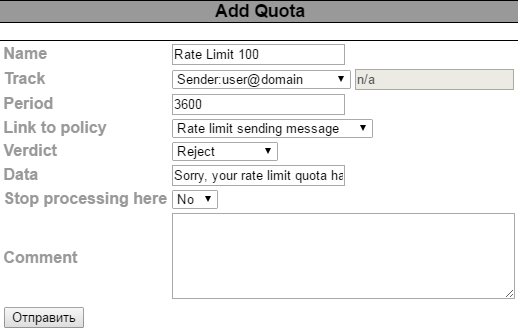
After this, you will be able to specify the restrictions related to sending emails in more detail, including setting a time interval after which the restrictions will be updated, as well as the message that the user exceeding their limit will receive. After that, you can establish the sending limit itself. This can be set either as a number of outgoing emails or as a number of bytes of transmitted information. You can handle emails that are sent beyond the specified limit in different ways. For instance, you can either delete them immediately or save them so they can be sent immediately after the sending limit is updated. The second option can be useful when determining the optimal sending limit for employees.
In addition to the restrictions on sending emails, cbpolicyd allows you to set limits on receiving emails. This kind of restriction may seem like a good solution for protecting against mail-bombing, but in reality, setting such a limit, even a large one, can lead to important emails not reaching you under certain conditions. Therefore, including any restrictions for incoming mail is highly discouraged. However, if you decide to take that risk, you should approach the configuration of the incoming message limit with particular caution. For example, you could limit the number of incoming emails from trusted counterparts to prevent a spam attack on your organization in case their mail server is compromised.
To protect against a flood of incoming messages during mail-bombing, the system administrator should take smarter measures than simply limiting incoming mail. One such solution could be the use of graylisting. The principle behind this is that upon the first attempt to deliver a message from an untrusted sender, the connection to the server is abruptly cut off, causing the delivery of the email to fail. However, if the untrusted server makes another attempt to send the same email after a certain period, the server does not cut the connection, and the delivery proceeds successfully.
The essence of all these actions is that programs for automated bulk email distribution usually do not check the success of delivery for the sent message and do not attempt to resend it. In contrast, a human will certainly verify whether their email was successfully sent or not.
You can also enable greylisting in the cbpolicyd web interface. To ensure everything works, it is necessary to create a policy that includes all incoming emails addressed to users on our server, and then based on this policy, create a Greylisting rule where you can set the interval during which cbpolicyd will wait for a repeated response from an unfamiliar sender. This usually lasts 4-5 minutes. Additionally, greylisting can be configured to account for all successful and unsuccessful delivery attempts from different senders, based on which the decision can be made to automatically add the sender to the whitelist or blacklist.
Please note that implementing greylisting should be approached with maximum responsibility. It is best if the use of this technology goes hand in hand with the ongoing management of whitelists and blacklists to eliminate the possibility of losing truly important emails for the business.
Furthermore, protecting against mail bombing can be aided by adding SPF, DMARC, and DKIM checks. Often, emails that arrive during a mail bombing do not pass these checks. Guidance on how to do this has been provided previously. .
Thus, protecting against threats such as mail bombing is quite simple and can be done at the stage of building the Zimbra infrastructure for your business. However, it is important to continuously monitor that the risks associated with using such protection never outweigh the benefits you receive.
Source: habr.com
