

Hello, dear readers of Habr! This is the corporate blog of the company . We are a systems integrator primarily specializing in IT infrastructure security solutions (, ) and machine data analysis systems (). We'll start our blog with a brief introduction to Check Point technologies.
We pondered for a long time whether to write this article, as it does not contain anything new that cannot be found online. However, despite the abundance of information, we often hear the same questions from clients and partners. Thus, we decided to provide an introduction to the world of Check Point technologies and explain the essence of their solution architectures. All this will be covered in a 'small' post, a quick excursion, if you will. Moreover, we will try to avoid marketing wars, as we are not a vendor, just a system integrator (though we do love Check Point) and will simply cover the main points without comparing them to other manufacturers (such as Palo Alto, Cisco, Fortinet, etc.). The article turned out to be quite extensive, but it cuts out a lot of questions at the stage of getting acquainted with Check Point. If you are interested, welcome below the fold...
UTM/NGFW
When starting a discussion about Check Point, the first thing worth mentioning is the explanation of what UTM and NGFW are and how they differ. We will do this quite concisely, so the post doesn’t get too lengthy (perhaps in the future, we will explore this topic in a bit more detail).
UTM — Unified Threat Management
In short, the essence of UTM is the consolidation of multiple security tools into a single solution. That is, everything in one box or some sort of all-inclusive package. What do we mean by 'multiple security tools'? The most common configuration includes: Firewall, IPS, Proxy (URL filtering), Stream Antivirus, Anti-Spam, VPN, and so on. All of this is integrated within one UTM solution, which simplifies integration, setup, administration, and monitoring, positively impacting the overall security of the network. When UTM solutions first appeared, they were considered exclusively for small companies, as UTM struggled to handle high traffic volumes. This was due to two reasons:
- Packet processing methods. The first versions of UTM solutions processed packets sequentially, one by one through each 'module.' For example, a packet would first be processed by the firewall, then by IPS, followed by a check from the Antivirus, and so on. Naturally, this mechanism introduced significant delays in traffic and heavily consumed system resources (CPU, memory).
- Weak 'hardware.' As mentioned earlier, sequential packet processing significantly drained resources, and the 'hardware' of that era (1995-2005) simply couldn't handle large traffic.
But progress does not stand still. Since then, hardware capabilities have greatly increased, and packet processing has evolved (it must be acknowledged, not all vendors kept up) to allow for almost simultaneous analysis across multiple modules (FW, IPS, Antivirus, etc.). Modern UTM solutions can 'digest' tens or even hundreds of gigabits in deep analysis mode, enabling their use in large business segments or even data centers.
Below is the famous Gartner Magic Quadrant for UTM solutions as of August 2016:
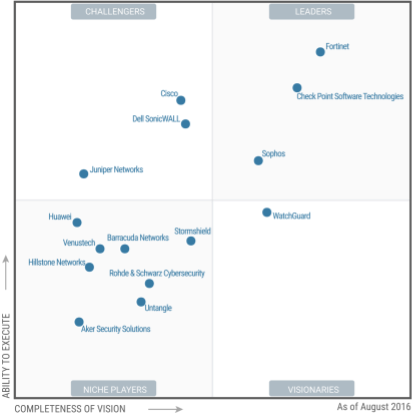
I won’t comment much on this image, just to say that the leaders are in the upper right corner.
NGFW — Next Generation Firewall
The name speaks for itself — next-generation firewall. This concept emerged significantly later than UTM. The main idea of NGFW is deep packet inspection (DPI) using built-in IPS and application-level access control (Application Control). In this case, IPS is necessary to identify specific applications in the stream of packets, allowing for their permission or prohibition. For example: We can allow Skype to operate but prohibit file transfers. We can block the use of Torrent or RDP. Web applications are also supported: Access to VK.com can be permitted while prohibiting games, messages, or video viewing. Essentially, the quality of NGFW depends on the number of applications it can identify. Many believe that the introduction of NGFW was merely a marketing move that coincided with the rapid growth of Palo Alto.
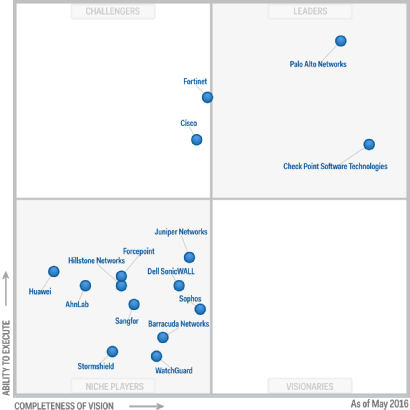
The Gartner Magic Quadrant for NGFW as of May 2016:
UTM vs NGFW
A very common question is, what is better? There is no definitive answer, and there may never be. Especially considering that almost all modern UTM solutions contain NGFW functionality and most NGFW have features typical of UTM (Antivirus, VPN, Anti-Bot, etc.). As always, “the devil is in the details,” so first you need to decide what you specifically need and determine your budget. Based on these decisions, you can choose several options. And everything should definitely be tested, without believing marketing materials.
In several articles, we will attempt to discuss Check Point, how you can try it out, and what functionalities are generally available (almost all of them).
Three entities of Check Point
When working with Check Point, you will inevitably encounter three components of this product:
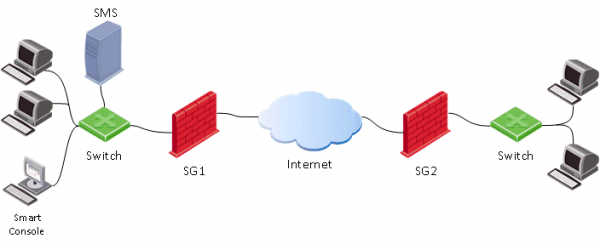
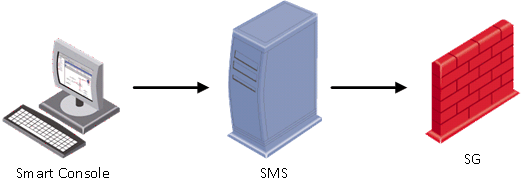
- Security Gateway (SG) — the actual security gateway, which is usually placed on the network perimeter and performs functions of a firewall, streaming antivirus, anti-bot, IPS, etc.
- Security Management Server (SMS) — the management server for gateways. Almost all settings on the gateway (SG) are configured through this server. SMS can also act as a log server and process logs with its built-in event analysis and correlation system—Smart Event (similar to SIEM for Check Point), but we will discuss this a bit later. SMS is used for centralized management of multiple gateways (the number of gateways depends on the SMS model or license), but you must use it even if you have only one gateway. It is worth mentioning that Check Point was one of the first to implement such a centralized management system, which has been recognized as the “gold standard” in reports by Gartner for many years. There’s even a joke: “If Cisco had a proper management system, Check Point would have never appeared.”
- Smart Console — a client console for connecting to the management server (SMS). It is usually installed on the administrator's computer. All changes on the management server are made through this console, and only after that can the settings be applied to the security gateways (Install Policy).

Check Point Operating System
Speaking of the Check Point operating system, three versions come to mind: IPSO, SPLAT, and GAIA.
- IPSO — the operating system from Ipsilon Networks, which belonged to Nokia. In 2009, Check Point acquired this business. It is no longer being developed.
- SPLAT — a proprietary development from Check Point, based on the RedHat kernel. It is no longer being developed.
- Gaia — the current operating system from Check Point, which emerged from the merger of IPSO and SPLAT, incorporating the best features. It was introduced in 2012 and continues to be actively developed.
Speaking of Gaia, it should be noted that the most widely used version at the moment is R77.30. A relatively recent version R80 has appeared, which differs significantly from the previous one (both in functionality and management). We will dedicate a separate post to their differences. Another important point is that currently the FSTEC certification is only available for version R77.10, and the certification for version R77.30 is in progress.
Deployment options (Check Point Appliance, Virtual machine, OpenServer)
There is nothing surprising here; like many vendors, Check Point has several product variations:
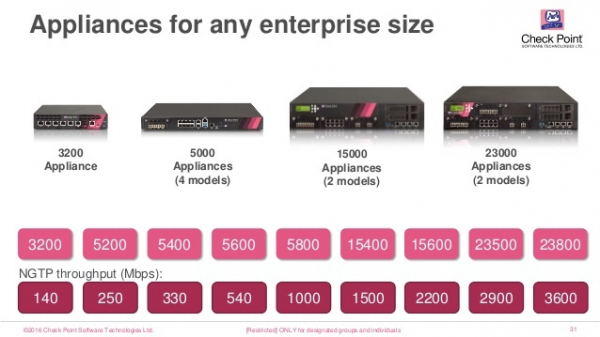
- Appliance — a hardware-software device, i.e., their own "hardware." There are many models that differ in performance, functionality, and form factor (there are options for industrial networks).

- Virtual Machine — a Check Point virtual machine with the Gaia OS. Supported hypervisors include ESXi, Hyper-V, KVM. Licensing is based on the number of CPU cores.
- OpenServer — installation of Gaia directly on a server as the primary operating system (commonly referred to as "Bare metal"). Only certain "hardware" is supported. There are recommendations for this hardware that need to be followed; otherwise, there may be problems with drivers, and technical support may refuse to provide service.
Deployment options (Distributed or Standalone)
We previously discussed what a gateway (SG) and a management server (SMS) are. Now let's explore their deployment options. There are two main methods:
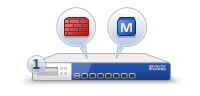
- Standalone (SG+SMS) — an option where both the gateway and the management server are installed on a single device (or virtual machine).

This option is suitable when you have only one gateway that is lightly loaded with user traffic. This option is the most economical since there is no need to purchase a management server (SMS). However, under significant load on the gateway, you may experience a 'sluggish' management system. Therefore, before choosing a Standalone solution, it is best to consult or even test this option. - Distributed — the management server is installed separately from the gateway.

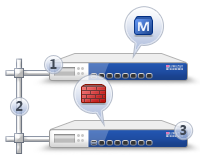
The optimal choice in terms of convenience and performance. It is used when it is necessary to manage multiple gateways at once, such as a central one and branch offices. In this case, a management server (SMS) must be purchased, which can also be in the form of an appliance (hardware) or a virtual machine.
As I mentioned a bit earlier, Check Point has its own SIEM system — Smart Event. You will only be able to use it in the case of a Distributed installation.
Operating modes (Bridge, Routed)
The security gateway (SG) can operate in two main modes:
- Routed — the most common option. In this case, the gateway is used as an L3 device and routes traffic through itself, i.e., Check Point is the default gateway for the protected network.
- Bridge — transparent mode. In this case, the gateway is set up like a regular 'bridge' and passes traffic at the second level (OSI). This option is usually applied when there is no possibility (or desire) to change the existing infrastructure. You will almost not have to change the network topology and there is no need to think about changing IP addressing.
It should be noted that in Bridge mode there are certain limitations on functionality, so we, as integrators, advise all our clients to use the Routed mode, of course, if possible.
Software blades (Check Point Software Blades)
We have reached perhaps the main topic of Check Point, which raises the most questions for clients. What are these 'software blades'? The blades refer to specific functions of Check Point.
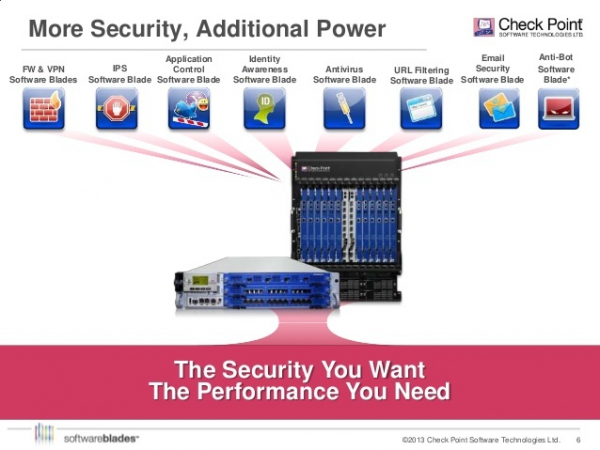
These functions can be enabled or disabled depending on needs. There are blades that are activated exclusively on the gateway (Network Security) and only on the management server (Management). The images below provide examples for both cases:
1) For Network Security (gateway functionality)
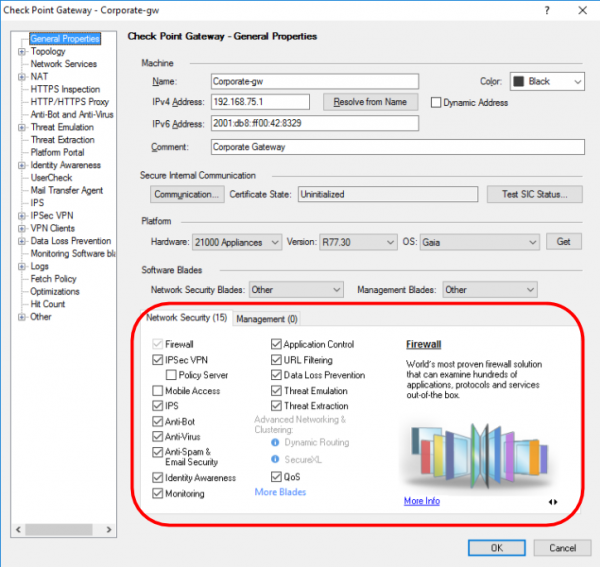
We'll briefly outline this as each blade deserves its own article.
- Firewall — functionality of a firewall;
- IPSec VPN — building private virtual networks;
- Mobile Access — remote access from mobile devices;
- IPS — intrusion prevention system;
- Anti-Bot — protection against botnet networks;
- AntiVirus — stream antivirus;
- AntiSpam & Email Security — corporate email protection;
- Identity Awareness — integration with Active Directory service;
- Monitoring — monitoring of almost all gateway parameters (load, bandwidth, VPN status, etc.)
- Application Control — application-level firewall (NGFW functionality);
- URL Filtering — Web security (+proxy functionality);
- Data Loss Prevention — protection against data leaks (DLP);
- Threat Emulation — sandbox technology;
- Threat Extraction — file cleansing technology;
- QoS — traffic prioritization.
In just a few articles, we will take a closer look at the Threat Emulation and Threat Extraction blades, I am sure it will be interesting.
2) For Management (management server functionality)
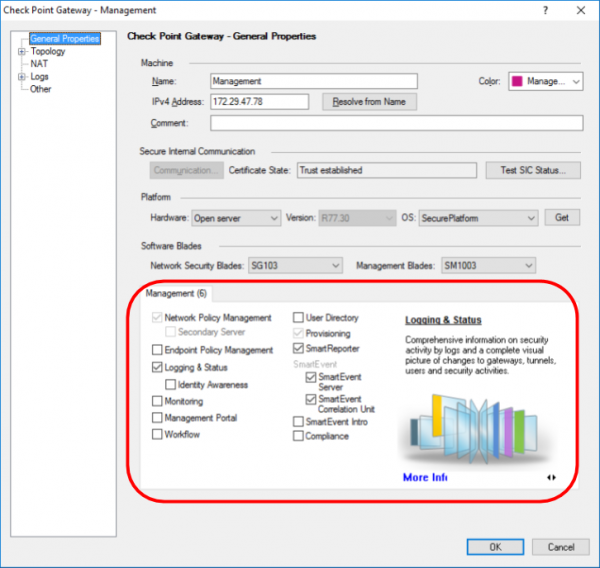
- Network Policy Management — centralized policy management;
- Endpoint Policy Management — centralized management of Check Point agents (yes, Check Point produces solutions not only for network security but also for the protection of workstations (PCs) and smartphones);
- Logging & Status — centralized collection and processing of logs;
- Management Portal — security management from the browser;
- Workflow — control over policy changes, audit of changes, etc.;
- User Directory — integration with LDAP;
- Provisioning — automation of gateway management;
- Smart Reporter — reporting system;
- Smart Event — analysis and correlation of events (SIEM);
- Compliance — automatic configuration checks and recommendations.
We will not delve into licensing issues right now to avoid inflating the article and confusing the reader. Most likely, we will cover this in a separate post.
The architecture of the blades allows for the use of only the truly necessary functions, which reflects on the budget of the solution and the overall performance of the device. Logically, the more blades you activate, the less traffic can be 'pushed through'. That is why each Check Point model comes with the following performance table (for example, we took the specifications of the 5400 model):
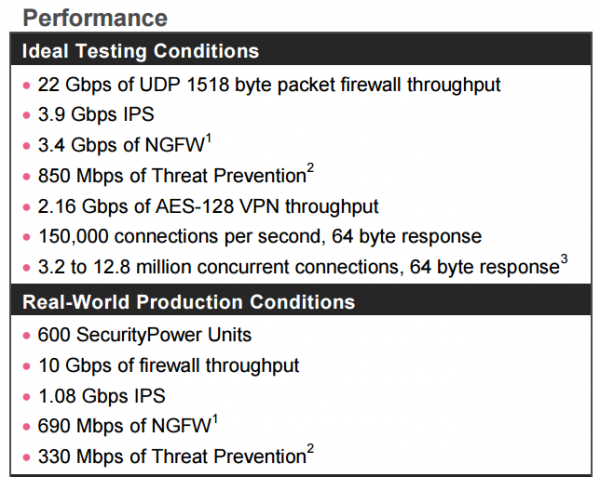
As you can see, there are two categories of tests presented here: synthetic traffic tests and real — mixed traffic tests. Generally speaking, Check Point is compelled to publish synthetic tests because some vendors use such tests as benchmarks without investigating the performance of their solutions on real traffic (or intentionally conceal such data due to its unsatisfactory nature).
In each type of test, you can notice several variants:
- test for Firewall only;
- test for Firewall+IPS;
- test for Firewall+IPS+NGFW (Application control);
- test for Firewall+Application Control+URL Filtering+IPS+Antivirus+Anti-Bot+SandBlast (sandbox)
Pay close attention to these parameters when selecting your solution, or consult for assistance .
I think we can conclude this introductory article dedicated to Check Point technologies. Next, we will examine how to test Check Point and how to combat modern cybersecurity threats (viruses, phishing, ransomware, zero-day).
P.S. An important point. Despite its foreign (Israeli) origin, the solution has certification in Russia from supervisory authorities, which automatically legalizes its presence in government institutions (comment by ).
Only registered users can participate in the survey. , please.
What UTM/NGFW solutions do you use?
Check Point
Cisco Firepower
Fortinet
Palo Alto
Sophos
Dell SonicWALL
Huawei
WatchGuard
Juniper
UserGate
Traffic inspector
Rubicon
Ideco
OpenSource solution
Other
134 users voted. 78 users abstained.
Source: habr.com
