

We have written several times about how our technologies assist and even in processing information from all types of documents and entering data into accounting systems. Today, we will share how we implemented downward API support (simultaneously with this in the largest supplier of heat and hot water in Moscow.
Imagine being an ordinary accountant. We understand it’s not easy, but please try. Every day, you receive a massive amount of paper bills, invoices, certificates, and so on. Especially a lot comes in just before reporting deadlines. You need to quickly and carefully check all the details and amounts, retype them, and enter them into the accounting system, manually process transactions, and send documents to the archive to provide them on time for internal audits, tax services, tariff regulation authorities, and others. Difficult? But this is a longstanding business practice in many companies. Together with MOEK, we simplified this painstaking work and made it more convenient. If you’re curious about how it was done, welcome under the cut.

In the photo – the Moscow CHPP-21, the largest producer of thermal energy in Europe. The heat generated at this station is supplied by MOEK to 3 million residents of northern Moscow. .
MOEK has about fifteen branches in Moscow. They service 15,811 km of heat networks, 94 thermal stations and boiler houses, 10,000 thermal points, and 24 pumping stations, and are also building and establishing new heating supply systems. The company purchases a wide range of equipment and services for its operations: . Document processing in each initiating unit is handled by specialized employees – contract managers.
How is the contract processing organized in a large company? When managers conclude a contract, they receive many important documents from counterparties: shipping invoices, service acceptance acts, invoices, certificates, etc. Typically, the manager scans the business papers and then attaches the scans to the order in the enterprise resource management system. The financial controller manually checks all the data. After that, the manager takes the original documents to the accounting department. Alternatively, a courier may handle this, which can extend the document transfer time from several hours to a couple of days.
And that would be fine, but, like in many other companies:
- Documents can arrive in the accounting department several days before the reporting deadline. In such cases, accountants have to spend nights at the workplace. They need to manually verify if all invoices, shipping documents, etc., are filled out correctly. If everything is accurate, the employee re-enters the data into the accounting system and makes the necessary entries. In this process, 90% of the accountant's time is spent retyping data — details, amounts, dates, item numbers, etc. This creates a risk of errors.
- Documents may arrive already containing errors. Sometimes, certain invoices or certificates are missing. This is sometimes discovered in the last days before the reporting deadline, which can prolong the document approval process.
- After making the entries, accountants store invoices, receipts, and acts in disparate paper and electronic archives. Why does this cause difficulties? For instance, MOEK operates under tariffs, and thus is required to report regularly on its expenditures to the executive authorities. When the accounting department faces another state or tax audit, employees must spend a long time searching for documents.
What the accounting scheme of MOEK looked like before:
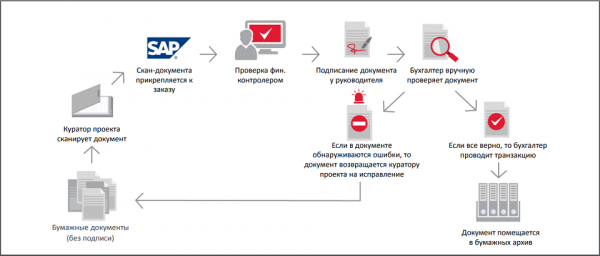
MOEK was the first in the energy sector to decide to restructure and simplify this scheme to close deals and submit reports more quickly, better assess market changes in procurement, and plan its financial strategy. It was not easy to independently change a long-established accounting scheme, so the company chose to transform it in partnership with ABBYY.
Done and dusted
The ABBYY team implemented a universal platform for intelligent information processing at MOEK and configured:
- flexible descriptions (data extraction templates) for document processing. We elaborated on what this entails and why it is necessary on Habr. and MOEK processes over 30 types of documents (for example, an act of installed equipment or an agency fee act) using this solution, extracting more than 50 attributes from them (document number, total amount including VAT, buyer's name, seller, contractor, quantity of goods, etc.);
- a connector for performing checks and data export that linked ABBYY FlexiCapture, SAP, and OpenText. Thanks to the connector, it became possible to automatically verify data from the order and contract against various reference books. We will discuss this in more detail below;
- export of documents to an electronic archive based on OpenText. Now all scanned documents are stored in one place;
- draft accounting entries in SAP ERP with links to scanned images of documents.
Then, ABBYY and MOEK employees developed a search form so that accountants could find important invoices in the electronic archive in seconds based on any attribute and provide them for tax inspections.
Search is possible by 26 different criteria (the image is clickable):
After MOEK successfully tested the entire system, it was put into operation. The whole project, including approvals, clarifications, and improvements, was completed in 10 months.
Workflow diagram after implementing ABBYY FlexiCapture:
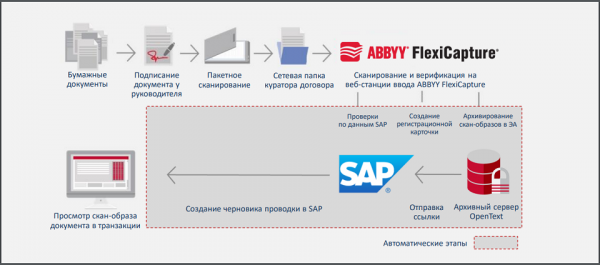
Do you think nothing has changed? Yes, the business process remains the same; it’s just that now a machine performs most of the functions.
Entry, be done!
So, how are things now? Let's say the contract manager received a set of primary documents for a deal involving the supply of pumps for a thermal power plant, or for example, the construction of heating networks. The specialist no longer needs to check the completeness and content of the documents themselves, call a courier, and send the original documents to the accounting department. The manager simply scans the signed set of primary documents, and the technology takes over from there.
Using the network scanning system, the employee sends scans in TIFF or PDF format to their hot folder or email. They then open the ABBYY FlexiCapture input web station and select the type of document set for processing. For example, "purchase of works/services with agency remuneration," "receipt of material and technical resources (MTR)," or "inventory accounting."
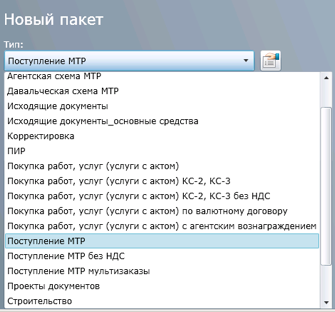
The type of set determines the number and types of required documents and data that the system must classify, recognize, and verify.
The curator uploads the scans for recognition. The system automatically checks for the presence of all documents, the content of each paper, and the server recognizes the details – contract dates, amounts, addresses, TIN, KPP, and other data. Incidentally, MOEK is the first energy company in Russia to use this approach.
If the curator did not upload all the documents or not all data is specified in any invoice, the system notices this and immediately asks the employee to correct the error:
The system notifies and requests the addition of missing documents (hereinafter, screenshots are clickable):
The system noticed that the document is overdue:
Thus, the employee no longer needs to determine whether the document is correctly formatted. If all is correct, then most data checks happen automatically right on the input web station. It is sufficient to enter the order number specified in SAP ERP. After that, the recognized data is matched with the information being processed in SAP: TIN and KPP of the counterparty, contract numbers and amounts, VAT, item classification of the goods or services. Processing and checking one document takes only a couple of minutes.
Based on the details – TIN and KPP – the necessary company can be selected from the directory:
If there is an error in the invoice or bill of lading, it will not allow the document to be exported to the archive. For example, if the document is incorrectly drafted or one of the characters is misrecognized, the system will indicate this and ask the employee to correct all inaccuracies. Here’s an example:
The system detected that OJSC "Vasilok" is not on the list of suppliers for MOEK.
This allows employees to track errors even before the document reaches the accounting department.
If all checks are successfully passed, a scan copy of the document is sent to the OpenText electronic archive with one click, and a link and card with its metadata appear in SAP. The accountant or curator can always view the list of documents for the necessary order and the information about who processed the documents, when, and with what result in the electronic archive.
Petr Petrovich checked the electronic archive, …
…to see who uploaded the documents for order number 1111.
After exporting data and scans from ABBYY FlexiCapture, a draft posting with pre-filled data and links to the scanned images of the documents appears in SAP.
Draft posting:
Then the accountant receives a notification by email with a link to the finished draft and scans. The specialist no longer needs to struggle with paperwork. They only need to verify the final transaction amount in the scans, check for stamps and signatures, and execute the posting. Now, the accountant spends less than a minute on it.
Project Results
- Using ABBYY technologies, MOEK simplified and accelerated not only accounting but also financial control. Employees no longer need to wait for a courier with original documents to make a posting – it's enough to retrieve a scan with already verified data from the electronic archive with a single click. However, the paper document is still needed. But now it can be sent to accounting later. When it arrives, the employee will mark 'Original received' in the accounting system.
- Employees immediately receive all necessary information about the transaction from the scans, carry out postings on time, and prepare all documents for reporting in advance. Now, they are not afraid of either internal or external checks.
- Accountants conduct financial transactions three times faster, and MOEK closes the reporting period ten days earlier.
- All MOEK branches store accounting documents in a unified electronic archive. As a result, finding any invoice, contract, or act of completed work, as well as any attributes from them (amounts, VAT, product or service classifications) can be done four times faster than before.
- The solution processes over 2.6 million pages of documents annually.
In conclusion
MOEK uses For two years now, we have gathered statistics. It turned out that accountants make 95% of entries without making changes to drafts. This means that such entries can be completely automated in the future. Thus, this product has become the company's first step towards implementing elements of artificial intelligence into its business processes: MOEK is developing an appropriate program.
Other Russian companies are also automating accounting work, making it simpler and more convenient. For example, using ABBYY technologies, the financial control service ofreceives important business information twice as fast and spends 20% less time searching for necessary invoices and shipping documents. Intelligent information processing technologies help the accounting staff of thegroup instantly find the required financial documents during mass tax audits. In 2019, the company plans to process about 10 million pages of documents.
Want to learn more about the MOEK and ABBYY project? On April 3 at 11:00, the Deputy Head of the IT Center at MOEK, Vladimir Feoktistov, will discuss the details of the case in a free . Join us if you would like to ask questions.
Elizaveta Titarenko,
editor of the corporate blog at ABBYY
Source: habr.com
