

Any operation involving large data sets requires significant computing power. Moving data from a database to Hadoop can take weeks or cost as much as an airplane wing. Don't want to wait and waste money? Balance the load across different platforms. One way to do this is through pushdown optimization.
I asked leading trainer in Russia for the development and administration of Informatica products, Alexey Ananyev, to explain the pushdown optimization feature in Informatica Big Data Management (BDM). Did you ever learn to work with Informatica products? Chances are, it was Alexey who taught you the basics of PowerCenter and explained how to build mappings.
Alexey Ananyev, Head of the Training Division at DIS Group
What is pushdown?
Many of you are already familiar with Informatica Big Data Management (BDM). The product can integrate large data from various sources, move it between different systems, provide easy access to it, allow profiling, and much more.
In skilled hands, BDM can work wonders: tasks will be performed quickly and with minimal computational resources.
Do you want this too? Learn to use the pushdown feature in BDM to distribute computational load between different platforms. The pushdown technology allows you to turn a mapping into a script and select the environment in which this script will run. The ability to choose allows you to combine the strengths of different platforms and achieve their maximum performance.
To configure the script execution environment, you need to select the type of pushdown. The script can be fully executed on Hadoop or partially distributed between the source and the sink. There are 4 possible types of pushdown. A mapping can remain as a native mapping without being turned into a script. The mapping can be executed as much as possible on the source (source) or fully on the source (full). The mapping can also be turned into a Hadoop script (none).
Pushdown optimization
These 4 types can be combined in various ways to optimize pushdown for the specific needs of the system. For example, it is often more effective to extract data from the database using its own capabilities and process the data using Hadoop to avoid overloading the database.
Let’s consider a case where both the source and the receiver are in the database, and the execution platform for transformations can be chosen: depending on the settings, this could be Informatica, a database server, or Hadoop. This example will best illustrate the technical side of this mechanism. Naturally, in real life, such a situation does not occur, but it is best suited for demonstrating functionality.
Let’s take a mapping for reading two tables in a single Oracle database. And let the results of the reading be written to a table in the same database. The mapping scheme will look like this:
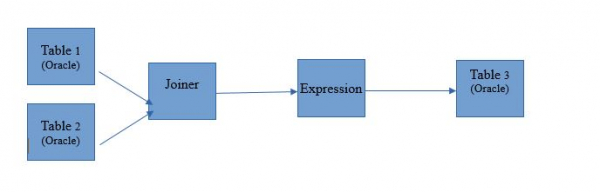
In the form of mapping in Informatica BDM 10.2.1, it looks like this:
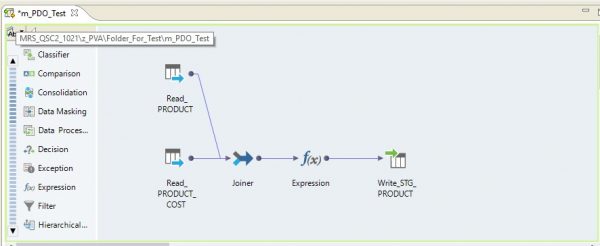
Pushdown type – native
If we choose the native pushdown type, the mapping will be executed on server Informatica. Data will be read from the Oracle server, transferred to the Informatica server, transformed there, and sent to Hadoop. In other words, we will get a typical ETL process.
Pushdown type – source
By selecting the source type, we are able to distribute our process between proxy server the databases (DB) and Hadoop. When executing the process with this setting, queries will be sent to the database to retrieve data from the tables. The rest will be executed in steps on Hadoop.
The execution scheme will look like this:
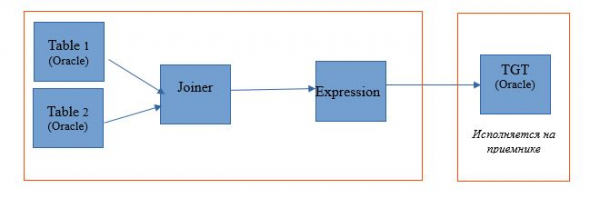
Below is an example of setting up the execution environment.
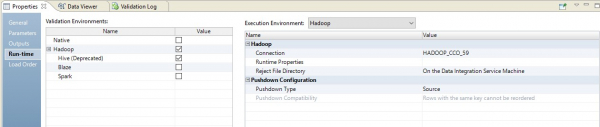
In this case, mapping will be executed in two steps. In its settings, we will see that it has turned into a script that will be sent to the source. Moreover, joining the tables and transforming the data will be done as a rewritten query at the source.
In the image below, we see the optimized mapping in BDM, and at the source – the rewritten query.
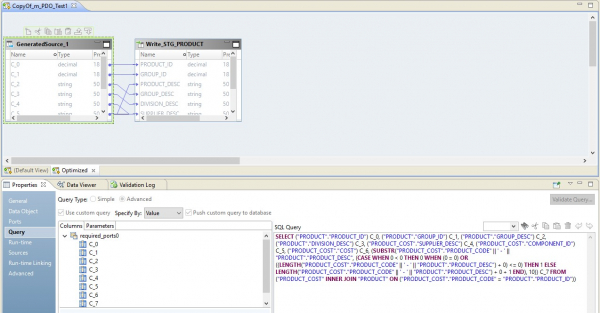
The role of Hadoop in this configuration will be reduced to managing the data flow – conducting it. The result of the query will be directed to Hadoop. After the reading is complete, the file from Hadoop will be written to the receiver.
Pushdown type – full
When selecting the full type, the mapping will completely turn into a query on the database. The result of the query will be directed to Hadoop. The scheme of such a process is presented below.
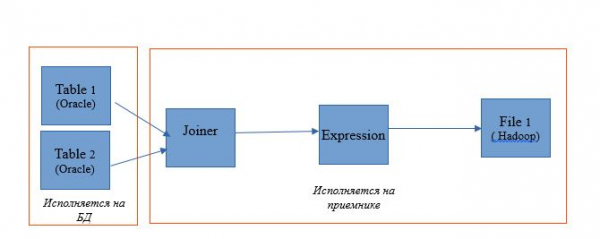
An example of the setup is presented below.
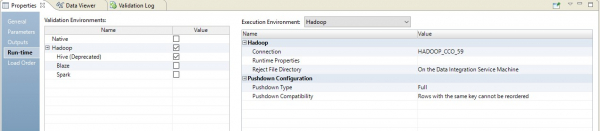
As a result, we will get an optimized mapping similar to the previous one. The only difference is that all the logic is transferred to the receiver in the form of overriding its insertion. An example of the optimized mapping is presented below.
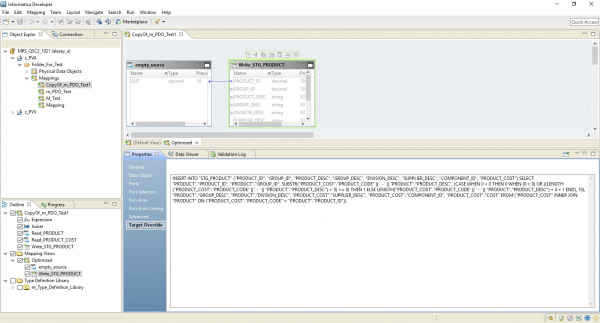
Here, as in the previous case, Hadoop acts as the conductor. However, here the entire source is read, and then at the receiver level, the logic for data processing is executed.
Pushdown type – null
And the last variant is the pushdown type, within which our mapping will turn into a script on Hadoop.
The optimized mapping will now look like this:
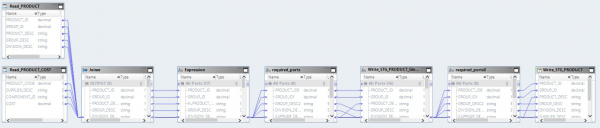
Here, the data from the source files will first be read on Hadoop. Then, using its tools, these two files will be merged. After this, the data will be transformed and exported to the database.
By understanding the principles of pushdown optimization, many processes for handling big data can be organized very efficiently. For instance, just recently, a large company exported massive data from storage to Hadoop in just a few weeks, data that had been collected over several years.
Source: habr.com
