

In 2006, at a major Russian conference, a doctoral scientist presented a report on the expanding information space. With beautiful diagrams and examples, he explained that within 5 to 10 years, information in developed countries would be flowing to individuals in amounts they would be unable to fully comprehend. He spoke about wireless networks, the internet being available at every turn, and wearable electronics, emphasizing that information would need protection, yet ensuring that protection 100% would be impossible. At that time, the audience regarded him as a mad professor living in a world of science fiction.
Thirteen years have passed, and a new study by Acronis has shown that fiction has long since become reality. International Backup Day is the perfect time to share the results and provide some important tips on how to stay protected amid dozens of networks, gigabytes of incoming information, and a multitude of gadgets at hand. And yes, this matters for companies too.
For the cool IT professionals — an internal competition.
Did you back it up for sure? Absolutely sure?
Disclaimer
If you’re a weary systems administrator, exhausted by user screw-ups, and you know exactly where data security problems originate, you can skip to the end of the article — there are 4 cool tasks that, if solved, could earn you useful prizes from Acronis and make your information as secure as possible (though there’s always room for improvement).
The contradiction of contradictions
The first unexpected yet quite explainable result of the survey: 65% of respondents reported that last year either they themselves or someone in their family experienced data loss due to accidental file deletion or hardware or software failures. This figure has increased by 29.4% compared to the previous year.
For the first time in the five-year history of the surveys conducted by Acronis, almost all surveyed consumers (92.7%) back up data from their own computers. This indicator has grown by 24%.
Here’s how Stanislav Protasov, President and Chief Operating Officer of Acronis, explains the contradiction:
At first glance, these two statements seem contradictory, as how can there be a loss of more data when almost all users are now backing it up? Nevertheless, there are reasons why these survey results appear this way. People are using more devices and accessing data from more points than ever before, creating more opportunities for data loss. For example, users may back up the data stored on their laptops, but if they accidentally leave their smartphone in a taxi—one that they don’t back up—then that data will still be lost.
Thus, the reason lies in our reality, where we not only get overwhelmed by information, but also struggle to monitor all potential threats, meaning we cannot react quickly and appropriately. As a result, amidst automation and informatization, the human factor plays an increasingly important and even critical role.
A Brief Overview of the Survey
The survey included users from the USA, UK, Germany, Spain, France, Japan, Singapore, Bulgaria, and Switzerland.
This year, the survey was conducted for the first time among business users. Due to the increasing number of cases where CEOs, IT managers, and other executives lose their jobs as a result of data breaches, online attacks, and technology errors, Acronis decided to include relevant questions about data protection in the study. Including business users allowed us to identify several differences in how and why users and companies protect their digital assets.
Survey Results: Let’s Learn from Others’ Mistakes
Only 7% of users make no efforts to protect their data.
The Number of Devices Is Increasing
The number of devices used by consumers continues to rise, with 68.9% of households reporting they use three or more devices, such as computers, smartphones, and tablets. This figure has increased by 7.6% compared to last year.
Users recognize the value of information.
Considering the rise in natural and technological disasters, high-profile extortion acts, as well as data breach incidents, the increase in data backup rates indicates that consumers are indeed attempting to protect their data. This year, only 7% of users reported that they have never backed up their data, whereas last year, nearly a third of respondents (31.4%) provided that response.
Users are placing greater value on their own data, as evidenced by the fact that 69.9% are willing to spend more than $50 to recover lost files, photos, videos, and other information. Last year, only 15% were willing to pay such an amount.
To protect their data, 62.7% of users keep it close at hand, with backups stored on a local external hard drive (48.1%) or in a separate partition on the hard drive (14.6%). Only 37.4% utilize cloud technologies or a hybrid format for cloud and local backup.
Clouds are not yet for everyone
Another apparent problem is the insufficient uptake of cloud technologies. More consumers are stating that the primary value of data backup lies in ensuring access to their data — many emphasize that they want 'quick and easy access to backup data from any location.' However, only a third of them are using cloud technologies for backup that would allow them to retrieve data regardless of their location.
Key data
The primary data that holds value for consumers includes contacts, passwords, and other personal information (45.8%), as well as multimedia files, including photos, videos, music, and games (38.1%).
Users still need awareness
Less than half of consumers are aware of data threats such as ransomware (46%), cryptocurrency mining malware (53%), and social engineering attacks (52%) used to spread malware. Knowledge about these dangers is spreading slowly, as evidenced by the fact that the number of users aware of ransomware has grown by only 4% compared to last year.
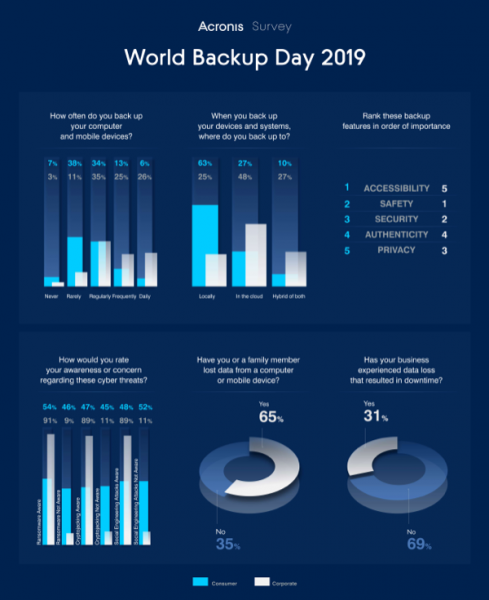
Acronis Infographic on Data Protection
Companies Actively Protect Cloud Data
The losses from just one hour of downtime are estimated at around $300,000, so business users certainly understand the value of their company's data. With increasing responsibility placed on CEOs and top executives for data protection, they are showing a growing interest in security issues, especially considering the rise in high-profile data breach cases.
This explains why business users who participated in the survey are already prepared to protect their own data, applications, and systems, stating that the most important aspects for them are security in terms of preventing unintentional incidents and security in preventing malicious actions against their data.
In the 2019 annual survey, business users were included for the first time, with responses coming from companies of all sizes, including 32.7% small businesses with up to 100 employees, 41% medium companies with 101 to 999 employees, and 26.3% large enterprises with over 1,000 employees.
For most companies, data protection is becoming one of the most important priorities: thus, companies back up data monthly (25.1%), weekly (24.8%), or daily (25.9%). As a result of these measures, 68.7% stated that they did not experience downtime due to data loss in the past year.
Such companies are well aware of the latest risks threatening their data, leading them to express concern or extreme concern regarding ransomware (60.6%), cryptojacking (60.1%), and social engineering (61%).
Today, companies of all sizes rely on cloud backup, with 48.3% using solely cloud backup and 26.8% employing a combination of cloud and local backup.
Given their requirements related to security and data protection, it is understandable that they are interested in cloud technologies. From a security perspective concerning unintentional data loss ("reliable backup to ensure data can always be restored"), external cloud backup guarantees data availability even in the event of office destruction due to fire, flooding, or other natural disasters. From the standpoint of security regarding malicious actions ("data protected from online threats and cybercriminals"), the cloud serves as a barrier against the deployment of malware.
4 Useful Tips for Everyone
To protect personal files or ensure business continuity, Acronis recommends following four simple steps that help safeguard data. However, these tips will certainly be valuable for private users as well.
- Always create backups of important data. Store backups both locally (for immediate access and the ability to restore as often as needed) and in the cloud (to ensure all data remains safe in case of office destruction due to theft, fire, flooding, or other disasters).
- Regularly update your operating system and software. Using outdated versions of the OS or applications means that vulnerabilities remain unpatched, and security fixes that help block cybercriminals' access to the system are not installed.
- Be cautious of suspicious emails, links, and attachments. Most cases of system infection by viruses or ransomware are a result of social engineering methods, through which users unwittingly open infected applications from emails or click on links that lead to websites with malware.
- Install antivirus software and run automatic system updates to protect it from the latest known threats. Windows users must confirm the activation and validity of Windows Defender.
How can Acronis assist you?Due to the incredibly rapid evolution of modern data threats, companies and users are eager to find data protection solutions that offer maximum security, including flexible local, hybrid, and cloud backup alongside powerful antivirus software.
Only backup solutions from Acronis ( for businesses and for individual users) provide active protection against ransomware and cryptojacking, based on artificial intelligence, capable of detecting and blocking malware in real-time and automatically restoring any damaged files. The technology is so effective that it prevented 400,000 such attacks last year.
The new version of this integrated protection, called recently received a new feature for recognizing and for cryptocurrency mining. The update released in the fall of 2018, Acronis Active Protection, blocked in its first months of operation.
→ Acronis and Habr Competition for International Backup Day — challenges for true IT specialists
 Today, March 31st — International Backup Day. This is at least a reason to back up in anticipation of April Fools' Day pranks, and at most — a chance to win prizes from Acronis. Especially since a Sunday evening is perfect for this.
This time, at stake is a one-year license for Acronis True Image 2019 Cyber Protection with 1 TB of cloud storage — it will be awarded to 5 winners.
To the top three, we will additionally gift:
- for 1st place — portable speakers
- for 2nd place — power bank
- for 3rd place — Acronis mug
To participate, you need to solve some challenging (as always) but interesting tasks. The first one is simple, the second and third are moderate, and the fourth is for true hardcore enthusiasts.
→ Task 1
Self-loving Pasha loves to encrypt texts, what has he encrypted this time? Cipher text:
tnuyyet sud qaurue → Task 2
What plugins for popular CMSs (WordPress, Drupal, and others) would you recommend for backup and migration? How are they worse/better than regular backups and Application Aware backups?
→ Task 3
How to properly work with your application's registry data starting from Windows 8. It is advisable to provide an example of correctly updating two values in a registry key. Why can't a backup solve the problem of logical consistency in the registry?
→ Task 4
Vasya wants to load a DLL into a child process (created with the SUSPENDED flag), the DLL name was copied using VirtualAllocEx/WriteProcessMemory
CreateRemoteThread(hChildProcess, nullptr, 0, LoadLibraryA, remoteDllName, 0, nullptr);
But due to in the child process, kernelbase.dll is located at a different address.
On 64-bit Windows at this moment, EnumModulesEx does not work. Suggest 3 methods to find the address of kernelbase.dll in a frozen child process.
It is preferable to implement one of the methods.
You have 2 weeks to solve it — until April 13. April 14 the jury from Acronis will select and announce the winners.
 You have 2 weeks to solve it — until April 13. April 14 the jury from Acronis will select and announce the winners.
For the remaining readers of Habr, one important and necessary wish: if you've made backups — sleep well!

Only registered users can participate in the survey. , please.
Do you make backups of personal information?
I back up information from my personal PC
I back up information from my smartphone
I back up information from my tablet
I back up from any devices
I do not make backups of personal information
45 users voted. 3 users abstained.
Does your company make backups?
Yes, how else!
We only back up the most important information
We do it when we remember
We don’t do it
I don't deal with this, I don't know
44 users voted. 4 users abstained.
Have you or your relatives ever faced data losses, leaks, or hacks?
Yes
No
I didn't track it
44 users voted. 2 users abstained.
Have there been data losses, leaks, or hacks in your company?
Yes, until 2018
Yes, in 2018
Yes, constantly
No, there hasn't been such — the information is not particularly valuable
I don't deal with this, I don't know
No, there hasn't been such — strong information protection
39 users voted. 3 users abstained.
Source: habr.com
